ON THIS PAGE
Get Personalized Help
Use Security Director Copilot to quickly find information and complete tasks.
Before You Get Started
Here are a few key things to know before you get started:
-
Security Director Copilot answers only from its indexed knowledge base. If information is not available, it may be unable to provide a complete answer or may return a partial response. Security Director Copilot is powered by AI. AI-generated content might be incorrect. Verify the information before following any AI guidance.
-
Security Director Copilot is a cloud-based service. It isn't available for on-premises deployments.
-
Security Director Copilot provides the best results for documentation-based questions such as "What is …,", "How do I …,", or "Explain ….".
-
Answers to open-ended operational questions might be partial because the workflows and prompts cover only a subset of system capabilities.
-
Security Director Copilot isn't a replacement for advanced operational tasks.
-
Treat Security Director Copilot responses as contextual assistance. Before making configuration changes, validate recommendations against official product documentation.
Get Started
Here’s how you can get started:
-
Ask questions in plain language—Type your questions in plain language. For example, you can ask:
How do I configure a security policy?
Show me how to create a report?
- Get step-by-step guidance—Receive clear, guided instructions tailored to your request. Responses are based on curated documentation and best practices. Follow along with step-by-step instructions to complete tasks efficiently.
-
Take actions faster—Ask task-oriented questions to quickly understand what to do next. Reduce time spent to navigate menus or search for features manually.
-
Use clickable links for navigation—Responses might include clickable links that take you directly to relevant pages in the UI. Click the link to navigate to the exact location needed to complete your task.
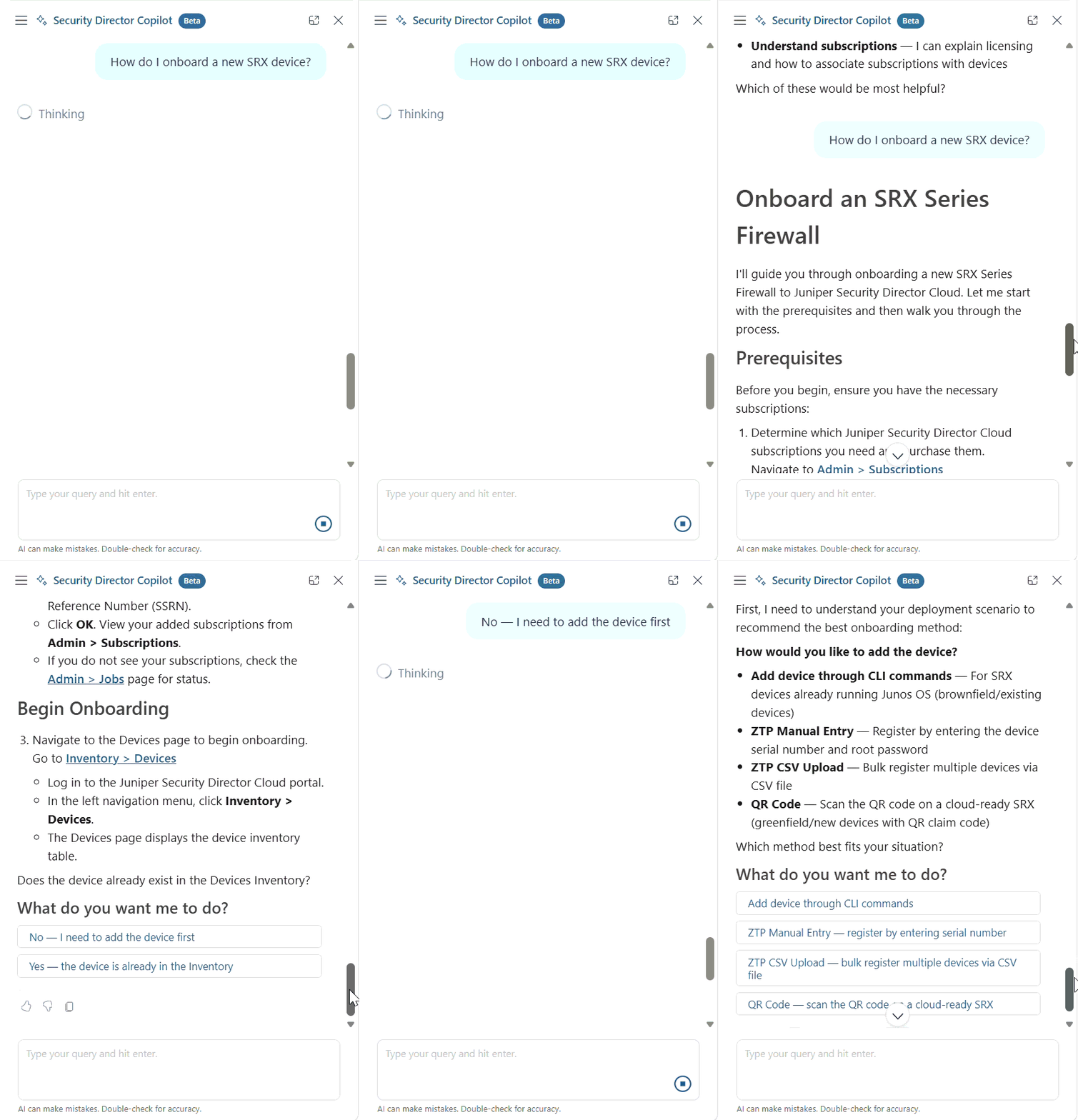
This example shows how Security Director Copilot provides personalized guidance for onboarding an SRX Series Firewall. In the example, Security Director Copilot displays step-by-step onboarding instructions when the user requests help, then prompts the user to confirm whether the device is already onboarded or needs to be added to the inventory.