
Create and Manage Adaptive Threat Profiling Feeds
You can create and manage adaptive threat profiling feeds to configure security or intrusion detection or prevention (IDP) policies that respond to real‑time threat information. This feature allows you to track and mitigate threats within your network.
Juniper Secure Edge, when enrolled with Juniper ATP Cloud, offers an integrated platform to implement adaptive threat profiling. The enrollment ensures that essential configurations, including cloud‑based threat intelligence integration and automated policy enforcement, are readily available. Organizations can efficiently track, assess, and mitigate threats using a centralized and scalable security framework.
Review the Adaptive Threat Profiling Overview topic.
To add a new adaptive threat profiling feed:
-
Click the plus sign (+).
The Add New Feed page is displayed as shown in Figure 1.
Figure 1: Add New Feed Settings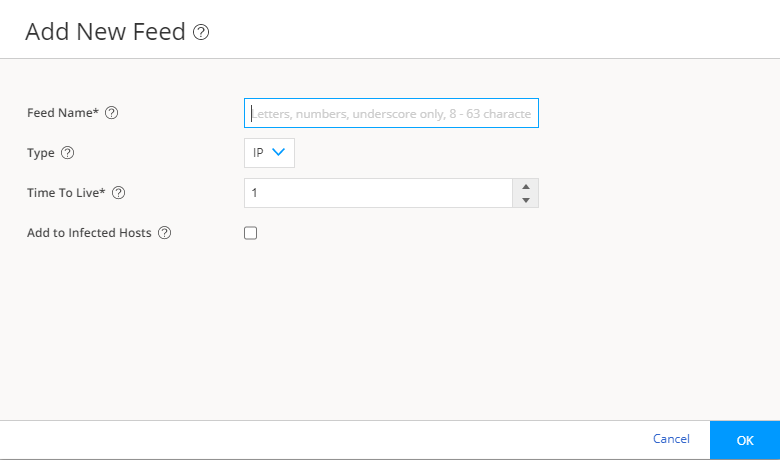
Manage Adaptive Threat Profiling Feeds
-
Edit—Select the feed, and then click the pencil icon (
 ).
). -
Delete—Select the feed, and then click the trash can icon (
 ).
). -
Filter—You can filter by feed type and Time to Live (days). Click the filter icon (
 ).
). -
View—To view detailed information about a feed, click a feed name to view the following information:
-
Feed Items—List of all the IP addresses or User IDs that are associated with the feed. To exclude an IP address or User ID from the feed, select the IP address or User ID and click Add to Excluded Items.
-
Excluded Items—List of all the IP addresses or User IDs that are excluded from the feed. To remove an IP address or User ID for the excluded items list, select the IP address or User ID and click the trash can icon (
). To manually exclude an IP address or User ID from the feed:
-
Click the plus icon (+) in the Excluded Items tab.
The Add to Excluded List page is displayed.
-
Enter the IP address or User ID that you want to exclude from the feed.
-
Click OK.
The IP address or User ID is listed in the Excluded items page.
-
-