
Troubleshooting
It is generally helpful to navigate to the Javascript console (“Developer tools” in Chrome) from the Speedtest page and check for error messages.
- For example, if
apiUrlis set incorrectly, you will see a “connection refused” message:

- If the URL contains
https://, you will get these messages:
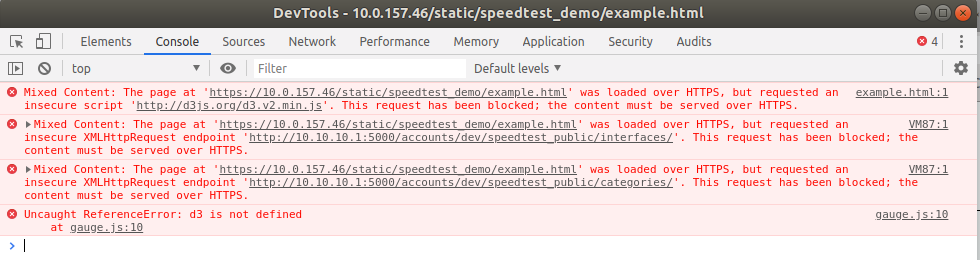
- If
ALLOWED_ORIGINis wrongly configured, messages like these will appear:
Access to XMLHttpRequest at
'http://<hostname>/rest/accounts/demo/speedtest_public/interfaces/' from origin
'http://<hostname>' has been blocked by CORS policy: No 'Access-Control-Allow-Origin'
header is present on the requested resource.
Access to XMLHttpRequest at
'http://<hostname>/rest/accounts/demo/speedtest_public/categories/' from origin
'http://<hostname>' has been blocked by CORS policy: No 'Access-Control-Allow-Origin'
header is present on the requested resource.
- Something else to keep in mind if you are hosting your Speedtest web page on the same
web server as Control Center is to avoid making inappropriate changes to the
Apache configuration files. For example, it is crucial that
ServerNamebe set identically in the files/etc/apache2/sites-available/netrounds.confand/etc/apache2/sites-available/netrounds-ssl.conf. If these settings differ, the Speedtest page will not work.