
ON THIS PAGE
EVPN/VXLAN in AI Data Center Use Case
Deploy the SRX4700 Firewall in integration with EVPN-VXLAN for secure overlay networking in campus, data center, branch, and cloud environments, providing tunnel inspection and Layer 4 and Layer 7 security services.
Overview
The SRX4700 Firewall deployment in AI data centers provides security, performance, and scalability that complement the demanding needs of AI and machine learning (ML) workloads.
For more information, see Delivering a Secure, End-to-End AI Data Center Solution.
Benefits
The key benefits of SRX4700 Firewall in AI data centers:
-
Enforces security for inter-VRF (E-W) and fabric edge (N-S) traffic.
-
Simplifies configurations and operations: no VRF-specific peering and only single peering per spine
-
Works with any EVPN fabric
-
Doesn't require additional licensing
-
Supports automation of operations with Apstra
-
Supports Multinode High Availability (MNHA)
Topology
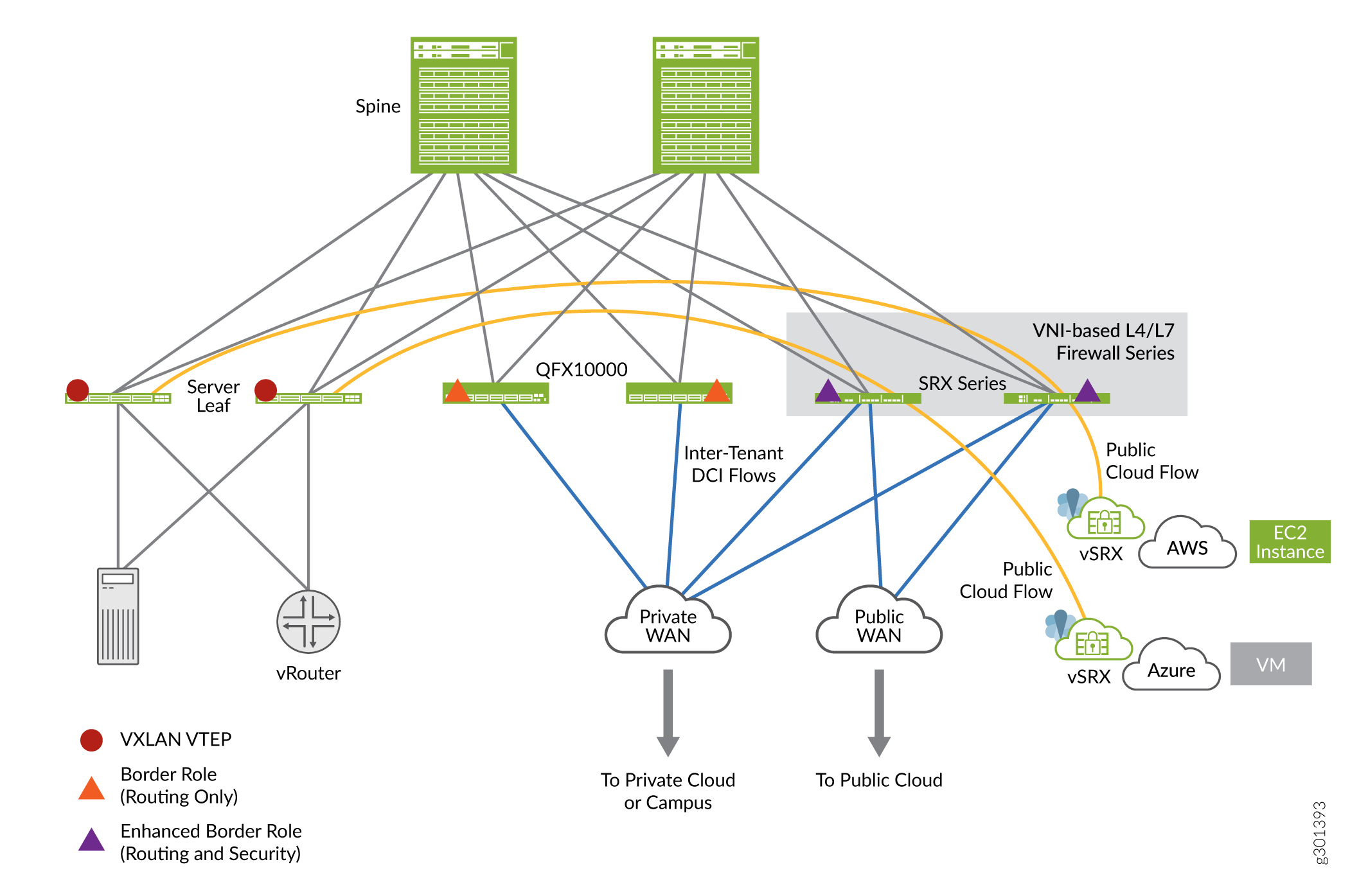
The topology of SRX4700 Firewall in an AI data center typically revolves around its integration into a spine-leaf architecture, which is widely used in modern hyperscale AI environments.
Here are the key aspects of the role and topology of the SRX4700 Firewall in an AI data center:
- Spine-leaf architecture:
- The SRX4700 Firewall can act as a secure, fabric-aware leaf node in the spine-leaf data center architecture. This deployment makes it suitable for scaling horizontally to accommodate high-bandwidth workloads that AI training and inference require.
- The use of EVPN Type 5 and VXLAN protocols ensures network virtualization support and east-west security across distributed workloads.
- Placement in AI workloads: In AI data centers, the SRX4700 Firewall typically
operates in layers:
- Core layer: Protecting critical data center core traffic flows at Layer 7 (application layer) with deep packet inspection.
- Edge layer: Securing workloads at the edge of the network with advanced firewall and intrusion prevention capabilities.
- Backend networks: Securing the backend network that handles storage and computing clusters where large AI datasets are processed.
- Multinode High Availability (MNHA) services: You can ensure high availability and resiliency in modern data centers using the MNHA feature on SRX4700 Firewalls. MNHA supports active/backup mode, session synchronization, and various network modes including default gateway or Layer 2 mode, hybrid mode, and routing mode or Layer 3 mode.
- Integration in hybrid or multicloud AI architectures: In hybrid or multicloud environments, the SRX4700 Firewall enables secure connectivity between on-premises infrastructure and public cloud AI services, using VXLAN overlays to extend Layer 2 networks across distributed systems.
The topology of the SRX4700 Firewall in an AI data center focuses on delivering wire-speed security while maintaining scalability and flexibility to adapt to high-performance distributed AI workloads and networks. The integration of the SRX4700 Firewall into a spine-leaf architecture and support for standard network virtualization protocols makes it well-suited for today's AI infrastructure.
Baseline Configurations
- Security Policies
- Zone-Level Inspection for Tunnel Inspection
- IDP, Content Security, and Advanced Anti-Malware for Tunnel Inspection
- Advanced Anti-Malware Policy
- SecIntel Profile
- IDP Policy
- Content Security Policy
- SSL Profiles
- EVPN/VXLAN Underlay and Overlay
Security Policies
set system host-name r4-dci-ebr
set security address-book global address vtep-untrust 10.255.2.0/24
set security address-book global address vtep-trust 10.255.1.0/24
set security address-book global address vlan100 192.168.100.0/24
set security policies from-zone trust to-zone untrust policy P1 match source-address vtep-trust
set security policies from-zone trust to-zone untrust policy P1 match destination-address vtep-untrust
set security policies from-zone trust to-zone untrust policy P1 match application junos-vxlan
set security policies from-zone trust to-zone untrust policy P1 then permit tunnel-inspection TP-1
set security policies from-zone untrust to-zone trust policy accept-all-dc2 match source-address any
set security policies from-zone untrust to-zone trust policy accept-all-dc2 match destination-address any
set security policies from-zone untrust to-zone trust policy accept-all-dc2 match application any
set security policies from-zone untrust to-zone trust policy accept-all-dc2 then permit
set security policies policy-set PSET-1 policy PSET-1-P1 match source-address vlan100
set security policies policy-set PSET-1 policy PSET-1-P1 match destination-address vlan100
set security policies policy-set PSET-1 policy PSET-1-P1 match application junos-icmp-all
set security policies policy-set PSET-1 policy PSET-1-P1 then permit
set security zones security-zone trust host-inbound-traffic system-services all
set security zones security-zone trust host-inbound-traffic protocols all
set security zones security-zone trust interfaces et-1/0/0.0
set security zones security-zone untrust host-inbound-traffic system-services all
set security zones security-zone untrust host-inbound-traffic protocols all
set security zones security-zone untrust interfaces et-1/0/1.0
set security tunnel-inspection inspection-profile TP-1 vxlan VNI-1100 policy-set PSET-1
set security tunnel-inspection inspection-profile TP-1 vxlan VNI-1100 vni VLAN-100
set security tunnel-inspection vni VLAN-100 vni-id 1100
set interfaces et-1/0/0 description "Link to DC1 Spine 1"
set interfaces et-1/0/0 mtu 9000
set interfaces et-1/0/0 unit 0 family inet address 172.16.1.2/30
set interfaces et-1/0/1 description "Link to DC2 Spine 1"
set interfaces et-1/0/1 mtu 9000
set interfaces et-1/0/1 unit 0 family inet address 172.16.2.2/30
Zone-Level Inspection for Tunnel Inspection
[edit]
set security policies policy-set PSET-1 policy PSET-1-P1 match source-address vlan100
set security policies policy-set PSET-1 policy PSET-1-P1 match destination-address vlan100
set security policies policy-set PSET-1 policy PSET-1-P1 match application any
set security policies policy-set PSET-1 policy PSET-1-P1 match dynamic-application any
set security policies policy-set PSET-1 policy PSET-1-P1 match url-category any
set security policies policy-set PSET-1 policy PSET-1-P1 match from-zone trust
set security policies policy-set PSET-1 policy PSET-1-P1 match to-zone untrust
set security policies policy-set PSET-1 policy PSET-1-P1 then permit
IDP, Content Security, and Advanced Anti-Malware for Tunnel Inspection
[edit]
set security address-book global address vlan100 192.168.100.0/24
set security policies policy-set PSET-1 policy PSET-1-P1 match source-address vlan100
set security policies policy-set PSET-1 policy PSET-1-P1 match destination-address vlan100
set security policies policy-set PSET-1 policy PSET-1-P1 match application any
set security policies policy-set PSET-1 policy PSET-1-P1 then permit application-services advanced-anti-malware-policy P3
set security policies policy-set PSET-1 policy PSET-1-P1 then permit application-services idp-policy idp123
set security policies policy-set PSET-1 policy PSET-1-P1 then permit application-services utm-policy P1
Advanced Anti-Malware Policy
[edit]
set services advanced-anti-malware policy P3 http inspection-profile scripts
set services advanced-anti-malware policy P3 http action block
set services advanced-anti-malware policy P3 http notification log
set services advanced-anti-malware policy P3 http client-notify message "AAMW Blocked!"
set services advanced-anti-malware policy P3 verdict-threshold recommended
set services advanced-anti-malware policy P3 fallback-options action permit
set services advanced-anti-malware policy P3 fallback-options notification log
SecIntel Profile
[edit]
set services security-intelligence url https://cloudfeeds.argonqa.junipersecurity.net/api/manifest.xml
set services security-intelligence profile cc_profile category CC
set services security-intelligence profile cc_profile rule cc_rule match threat-level 1
set services security-intelligence profile cc_profile rule cc_rule match threat-level 2
set services security-intelligence profile cc_profile rule cc_rule match threat-level 4
set services security-intelligence profile cc_profile rule cc_rule match threat-level 5
set services security-intelligence profile cc_profile rule cc_rule match threat-level 6
set services security-intelligence profile cc_profile rule cc_rule match threat-level 7
set services security-intelligence profile cc_profile rule cc_rule match threat-level 8
set services security-intelligence profile cc_profile rule cc_rule match threat-level 9
set services security-intelligence profile cc_profile rule cc_rule match threat-level 10
set services security-intelligence profile cc_profile rule cc_rule then action block close
set services security-intelligence profile cc_profile rule cc_rule then log
set services security-intelligence profile ih_profile category Infected-Hosts
set services security-intelligence profile ih_profile rule ih_rule match threat-level 7
set services security-intelligence profile ih_profile rule ih_rule match threat-level 8
set services security-intelligence profile ih_profile rule ih_rule match threat-level 9
set services security-intelligence profile ih_profile rule ih_rule match threat-level 10
set services security-intelligence profile ih_profile rule ih_rule then action block close http message "Blocked!"
set services security-intelligence profile ih_profile rule ih_rule then log
set services security-intelligence policy secintel1 CC cc_profile
set services security-intelligence policy secintel1 Infected-Hosts ih_profile
IDP Policy
set security idp idp-policy idp123 rulebase-ips rule rule1 match application junos-icmp-all
set security idp idp-policy idp123 rulebase-ips rule rule1 then action no-action
Content Security Policy
set security utm default-configuration anti-virus type sophos-engine
set security utm utm-policy P1 anti-virus http-profile junos-sophos-av-defaults
SSL Profiles
set services ssl initiation profile aamw-ssl
set services ssl proxy profile ssl-inspect-profile-1 root-ca VJSA
EVPN/VXLAN Underlay and Overlay
The SRX4700 supports integration into an EVPN-VXLAN fabric as a security inspection node, using eBGP for both underlay (IP fabric routing) and overlay (EVPN control plane with VXLAN data plane) in a 3-stage CLOS architecture. It peers with spine switches, learns or advertises EVPN Type 5 routes (enabled by default in some network designs), performs VXLAN encapsulation and de-encapsulation, and inspects VRF-to-VRF (east-west) and VRF-to-Internet (north-south) traffic.
Key Prerequisites and Features
- Fabric Role: SRX acts as part of the EVPN-VXLAN fabric (example in MNHA cluster), multi-homed through LACP (ae interfaces).
- Routing: eBGP for underlay (loopback peering) and overlay (EVPN Type 5 subnet routes).
- Validated Baseline: Includes EVPN Type 5 signaling, firewall policies, unified policy, and advanced features such as multihoming.
Interfaces and Zones (Underlay foundation):
set interfaces ae0 aggregated-ether-options lacp active
set interfaces ae0 unit 0 family inet address <IP>/<mask>
set interfaces lo0 unit 1 family inet address <loopback-IP>/32
set security zones security-zone <zone-name> interfaces ae0.0
Assign ae0 or lo0.1 to routing-instances for VRFs.
Routing Instances (VRF for Overlay):
set routing-instances <instance-name> instance-type vrf
set routing-instances < instance -name> interface ae0.0
set routing-instances < instance -name> route-distinguisher <rd_type>
set routing-instances < instance -name> vrf-target <community>
set routing-instances < instance -name> protocols evpn
SRX4700 creates new route distinguishers and pushes routes back to fabric.
eBGP Underlay Peering (IP reachability to spines):
set protocols bgp group <group_name> type external
set protocols bgp group <group_name> local-address <local-address>
set protocols bgp group <group_name> family inet unicast
set protocols bgp group <group_name> neighbor <address> peer-as <peer-as>
Peer through lo0.1.
eBGP Overlay Peering (EVPN-VXLAN control):
set protocols bgp group <group_name> type external
set protocols bgp group <group_name> local-address <local-address>
set protocols bgp group <group_name> family evpn signaling
set protocols bgp group <group_name> neighbor <address> peer-as <peer-as>
Enables Type 5 routes; spines share subnets.
EVPN and VXLAN:
set protocols evpn vni-options vni <id>
set switch-options vtep-source-interface lo0.1
SRX4700 encapsulates and decapsulates VXLAN; enable Type 5 in fabric blueprint if needed.
Security Policies (Inspection):
set security policies from-zone <src-zone> to-zone <dst-zone> policy <policy-name> match source-address any
set security policies from-zone <src-zone> to-zone <dst-zone> policy <policy-name> match destination-address any
set security policies from-zone <src-zone> to-zone <dst-zone> policy <policy-name> then permit
Applies to VRF traffic.
Verify the configurations using the commands:
show bgp summary: Confirm underlay/overlay sessions.
show evpn database: Check Type 5 routes.
For more information, see Secure Data Center Fabric with Juniper SRX Series Firewalls - Juniper Validated Design Extension (JVDE)