
ON THIS PAGE
Service Provider Data Center Use Case
Deploy the SRX4700 Firewall in service provider data centers for high-performance security at core and edge, supporting use cases such as Gi/N6 firewall, carrier-grade NAT (CGNAT), roaming firewall, and distributed or centralized security gateways.
Overview
In Service Provider Data Center deployments, the SRX4700 acts as a secure fabric-aware leaf in spine-leaf architectures, supporting EVPN/VXLAN, high-throughput IMIX traffic (1.4 Tbps), and Layer 7 security for core and edge workloads.
You can enhance your 4G and 5G service offerings with the SRX4700 Firewall, which secures Tier 1 service provider networks globally. The SRX4700 Firewall is ideal for environments with power and space constraints, as it operates at terabit (Tb) speeds while occupying only a single rack unit in data centers.
Deploy the SRX4700 Firewall in both distributed and centralized locations to safeguard your network infrastructure effectively.
Deploy in Connected Security Distributed Services (CSDS) or scale-out models with these configuration essentials.
In service provider data centers, the SRX4700 Firewall integrates into scale-out architectures with MX Series routers (for example, the MX304 or MX960) for load balancing and forwarding:
- Forwarding Layer: MX Series routers handle traffic distribution using ECMP (client hash or source hash for 0/0 routes), EBGP, or BFD for convergence.
- Services Layer: SRX4700 Firewall provides security services such as firewall, NAT (unique pools per firewall), and IPsec, scaling linearly by adding pairs (baseline 100 nGbps per pair).
- Supports high-scale setups up to router port limits (for example, MX304 with 32 100GbE ports).
Benefits
-
IPsec security gateway functionality—Enhances the security of communication between 4G and 5G base stations and the packet core by providing robust IPsec termination.
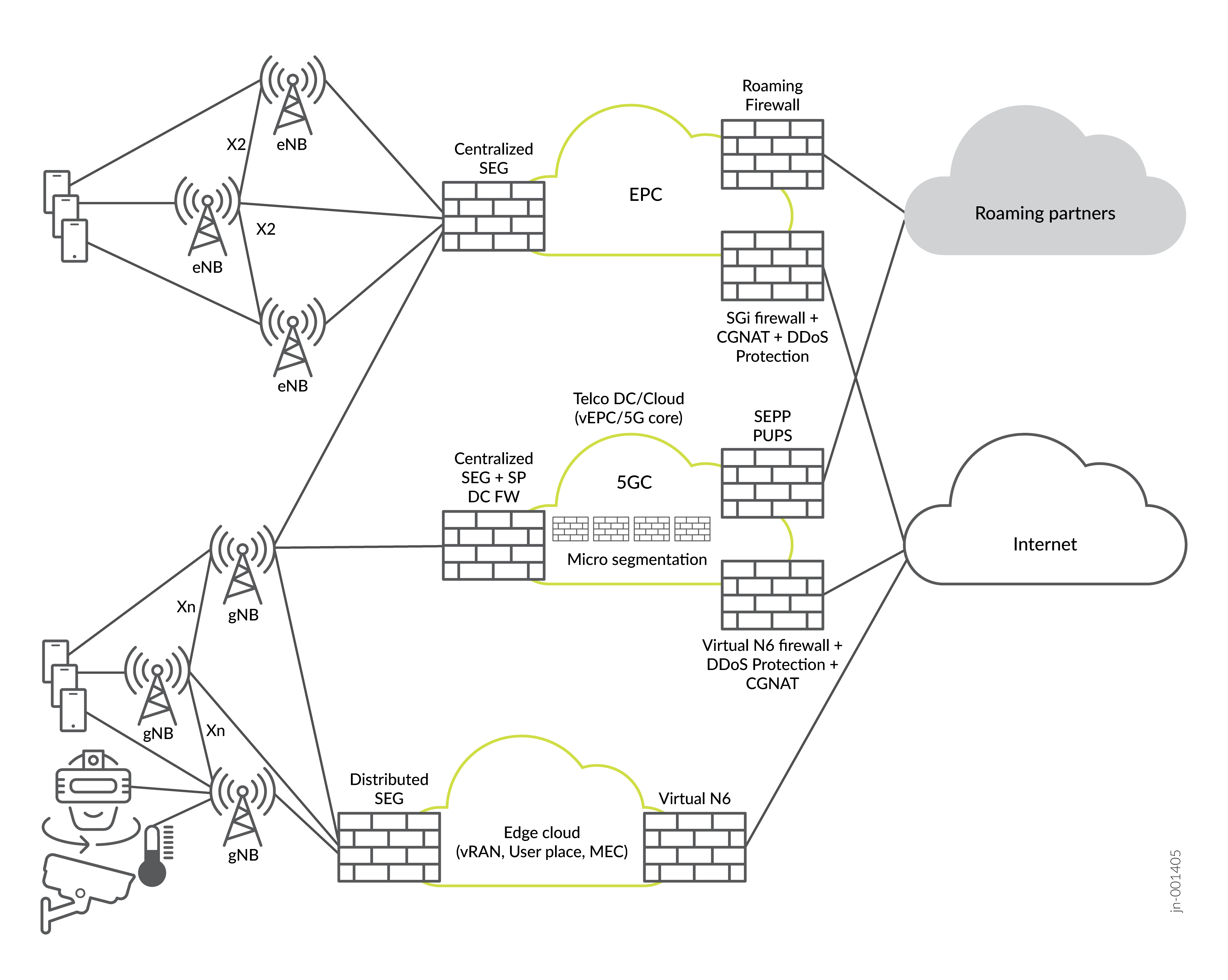
Tier 2 and tier 3 service providers can use the SRX4700 Firewall as a security gateway for centralized termination of IPsec tunnels from 4G and 5G base stations to the packet core. Service providers can also use the SRX4700 Firewall as an X2/Xn security gateway to terminate control plane IPsec traffic between base stations.
-
High-throughput—Optimizes data center operation by delivering high-throughput performance while occupying minimal rack space and consuming less power.
-
N6/Gi firewall and carrier-grade NAT—Improves traffic management efficiency and security through its integration of Gi/N6 firewall and carrier-grade NAT functionalities, ensuring secure and reliable handling of network traffic.
Use the SRX4700 Firewall as an N6 or Gi firewall for carrier-grade NAT in situations that require lower session counts, such as fixed broadband. The device limits total session scale in a Services Offloading (SOF) mode of operation.
-
MEC firewall functionality—Strengthens edge computing security by processing and reencrypting traffic in real time, safeguarding data integrity and confidentiality in multiaccess edge computing (MEC) environments.
Use the SRX4700 Firewall as a multiaccess edge computing (MEC) firewall to terminate and reoriginate IPsec tunnels from 4G and 5G base stations. You can apply security policies to the unencrypted traffic and then reencrypt it before sending it toward the packet core. The MEC server collocated with the SRX4700 Firewall can inspect the traffic from the base stations as cleartext.
Topology
Baseline Configurations
The baseline configurations in this topic provide a foundational template that helps standardize deployments, improve operational reliability, and accelerate secure onboarding of the SRX4700 Firewall in a service provider data center architecture.
- Interfaces and Zones
- Routing and Load Balancing (Integrate with MX Series Routers)
- Security Zones
- Security Policies
- NAT for Service Provider
- System Services
Interfaces and Zones
Assign interfaces to security zones (for example, trust and untrust).
set chassis fpc 1 pic 0 port-profile A  # Profile A: 1x400G + 5x100G
set chassis fpc 1 pic 0 port-profile A port-num 0 speed 100g
set interfaces et-1/1/1 unit 0 family inet address 10.1.1.1/30  # Underlay to spine
set interfaces et-1/1/2 unit 0 family inet address 10.1.2.1/30  # Data center fabric
set vlans tenant1 vlan-id 100
set interfaces et-1/1/3 unit 100 family inet address 192.168.1.1/24  # Tenant VLAN
Routing and Load Balancing (Integrate with MX Series Routers)
- Configure EBGP or BFD on interfaces.
- Load balance: Source hash for default route and destination hash for client prefixes.
Security Zones
All interfaces must belong to a security zone (by default null zone drops traffic). Group interfaces by trust level (untrust for external and trust or internal for DC fabric).
Factory-default zones (pre-shipped) are trust (outbound NAT) and untrust.
set security zones security-zone trust
set security zones security-zone untrust
set security zones security-zone untrust interfaces et-1/0/0.0 # External/SP peering
set security zones security-zone trust interfaces et-1/1/0.0
set security zones security-zone untrust host-inbound-traffic system-services all
set security zones security-zone trust host-inbound-traffic system-services all
set security address-book global address dc-subnet 192.168.1.0/24
set security address-book global attach zone trust

set security zones security-zone trust host-inbound-traffic system-services ssh
set security zones security-zone trust host-inbound-traffic protocols bgp ospf  # For underlay routing
Security Policies
Define zones and policies for traffic (for example, allow specific protocols).
Sample policy structure for permitting DC fabric traffic with inspection:
set security policies from-zone trust to-zone untrust policy allow-dc-traffic match source-address any
set security policies from-zone trust to-zone untrust policy allow-dc-traffic match destination-address any
set security policies from-zone trust to-zone untrust policy allow-dc-traffic match application any
set security policies from-zone trust to-zone untrust policy allow-dc-traffic then permit application-services idp  # IPS for threats
set security policies default-policy deny-all
NAT for Service Provider
Configure unique NAT pool per SRX4700 Firewall:
set security nat source pool sp-nat-pool address <range>
set security nat source rule-set rs1 from zone trust
set security nat source rule-set rs1 to zone untrust
set security nat source rule-set rs1 rule r1 match source-address 0.0.0.0/0
set security nat source rule-set rs1 rule r1 then source-nat pool sp-nat-pool
System Services
- Enable SSH and SNMP as needed per zone or interface.
- In a service provider data center context, the SRX4700 operates within the Connected Security Distributed Services (CSDS) Architecture, where it functions in the services layer providing security services such as carrier-grade NAT (CGNAT) and IPsec VPN. The SRX4700 integrates with MX Series routers in the forwarding layer, which serve as the single pane of glass for configuration distribution. For more information , see Connected Security Distributed Services Architecture.