
ON THIS PAGE
Data Center Core Firewall for Traffic Flow Control Use Case
Learn how to deploy the SRX1600, SRX4120, or SRX4300 Firewall at the data center core to segment traffic, enforce security policies, and control communication between server networks. High availability and scalable Layer 3 (L3) and Layer 4 (L4) services help ensure secure and reliable operations.
Overview
A mid-size enterprise data center with more than 1000 servers must control traffic flow between different parts of the data center network. A typical data center can host multiple departments or tenants. You must maintain clear separation and control over traffic flows to protect workloads from unauthorized access. Switch performance might degrade with large access control lists (ACLs), so use a specialized firewall for scalable, high-performance traffic filtering. This approach provides secure, predictable data center operations.
Deploy your firewall in enterprise, retail, Software as a Service (SaaS), and service provider segments. Use L3 and L4 capabilities and high availability features to secure traffic and maintain uptime.
For more details see, Data Center Next-Generation Firewall Use Case—Juniper Validated Design (JVD).
Benefits
-
Enhances security by providing granular control over network traffic, allowing detailed filtering at both L3 and L4 levels to prevent unauthorized access to specific network segments.
-
Ensures continuous operation and high uptime in data centers through high availability features, which include failover mechanisms and redundancies, to minimize the risk of downtime.
-
Improves data center performance by providing scalable, high-performance traffic filtering and reducing the impact of large firewall filters on switches.
-
Supports diverse operational environments, such as enterprise, retail, SaaS, and service provider networks, making it a versatile solution for various deployment scenarios.
-
Maintains predictable data center operations by securely managing traffic flows. Ensures data integrity and operational consistency by separating multiple departments or tenants.
Topology
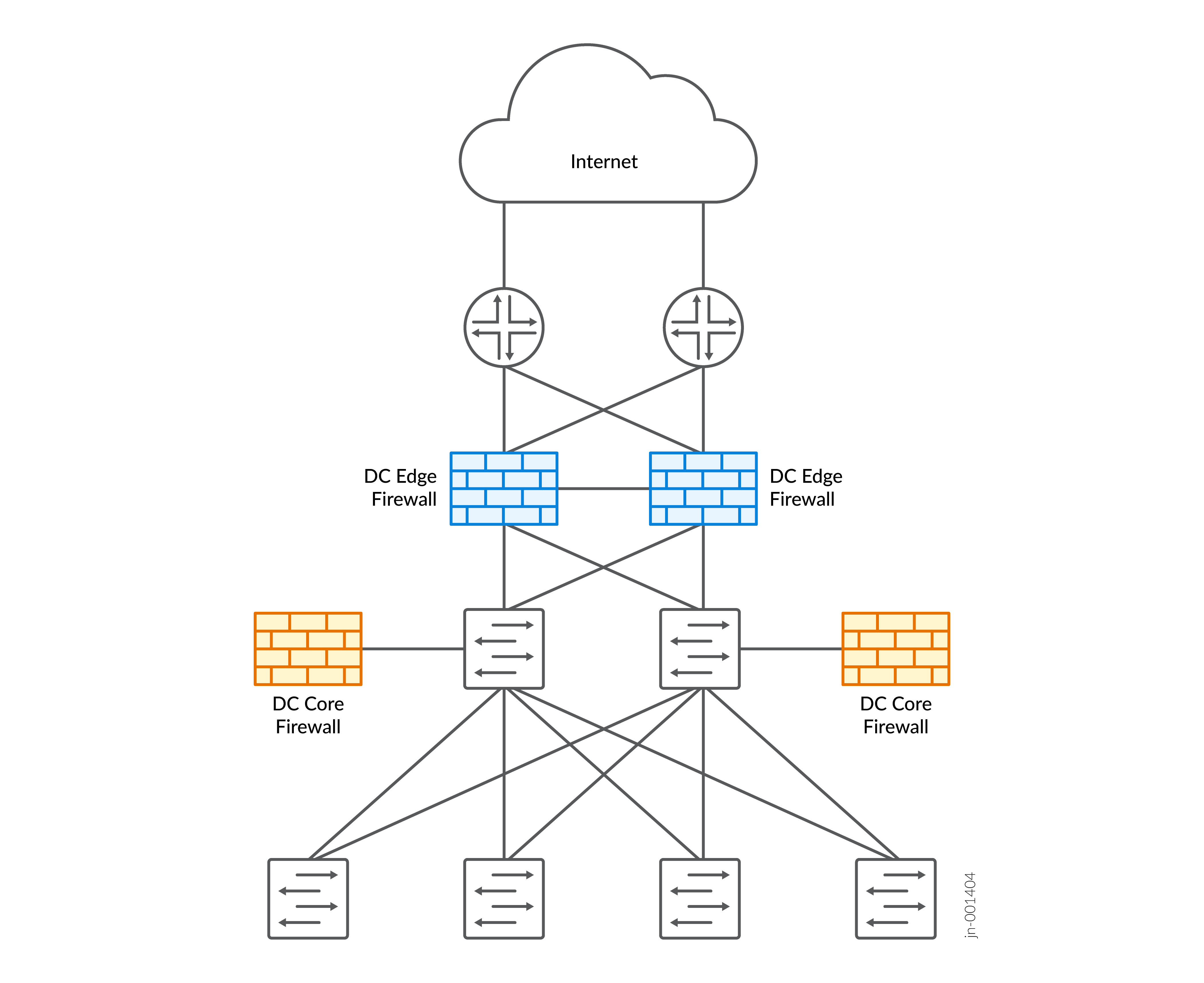
Baseline Configurations
The baseline configurations in this topic provide a foundational template that helps standardize deployments, improve operational reliability, and accelerate secure onboarding of the SRX1600, SRX4120, and SRX4300 Firewalls in a data center core architecture.
Security Zones
set security zones security-zone untrust interfaces ge-0/1/0
set security zones security-zone untrust host-inbound-traffic system-services ping
set security zones security-zone untrust host-inbound-traffic system-services ike
set security zones security-zone untrust host-inbound-traffic protocols ospf

set security zones security-zone trust interfaces ge-0/1/3
set security zones security-zone trust host-inbound-traffic system-services ping
set security zones security-zone trust host-inbound-traffic system-services ssh
set security zones security-zone trust host-inbound-traffic protocols ospf

set security zones security-zone services interfaces ge-0/1/2
set security zones security-zone services host-inbound-traffic system-services ping
set security zones security-zone services host-inbound-traffic system-services ssh
set security zones security-zone services host-inbound-traffic protocols ospf
Default Route
set routing-options static route 0.0.0.0/0 next-hop 192.0.2.1
set routing-options static route 10.90.0.0/16 next-hop 192.168.0.2
set routing-options static route 10.190.0.0/16 next-hop 192.168.30.2
NAT
Outgoing Internet Traffic for source NAT:
set security nat source pool abc address 192.168.16.18/32
set security nat source rule-set nat_to_internet from zone trust
set security nat source rule-set nat_to_internet to zone untrust
set security nat source rule-set nat_to_internet rule 1 match source-address 0.0.0.0/0
set security nat source rule-set nat_to_internet rule 1 match destination-address 0.0.0.0/0
set security nat source rule-set nat_to_internet rule 1 match application any
set security nat source rule-set nat_to_internet rule 1 then source-nat pool abc
Incoming destination traffic for webserver with destination NAT:
set security nat destination pool web-svr-pool address 192.168.2.10/32
set security nat destination pool web-svr-pool address port 443
set security nat destination rule-set WS-NAT rule 1 match destination-address 10.0.0.100/32
set security nat destination rule-set WS-NAT rule 1 match destination-port 443
set security nat destination rule-set WS-NAT rule 1 then destination-nat pool web-svr-pool
Global Addresses
set security address-book global address WebSvr-Local 192.168.2.10/32
set security address-book global address win-server 172.16.0.10/32
set security address-book global address web-server 172.16.0.11/32
set security address-book global address client1 192.168.10.10/32
set security address-book global address web-server-ext 10.0.0.100/32
Services
set security screen ids-option screen1
set security screen ids-option screen1 icmp flood threshold 200
set security screen ids-option screen1 udp flood threshold 500
set security screen ids-option screen1 ip bad-option
set security screen ids-option screen1 limit-session destination-ip-based 80
set security zones security-zone untrust screen screen1
set security zones security-zone untrust interfaces ge-0/1/0
set security zones security-zone untrust host-inbound-traffic system-services ping
set applications application-set Internet-services application junos-http
set applications application-set Internet-services application junos-https
set applications application-set Internet-services application junos-smtp
set applications application-set Internet-services application junos-smtps
set applications application-set Internet-services application junos-imap
set applications application-set Internet-services application junos-imaps
set applications application-set Internet-services application junos-dns-udp
set applications application-set Internet-services application junos-dns-tcp
set applications application-set Internet-services application junos-icmp-all
Security Policies
Security policies between trust to untrust:
-
Deny specific application:
set security policies from-zone trust to-zone untrust policy t2u_inet match source-address any
set security policies from-zone trust to-zone untrust policy t2u_inet match destination-address any
set security policies from-zone trust to-zone untrust policy t2u_inet match application Internet-services
set security policies from-zone trust to-zone untrust policy t2u_inet then deny
set security policies from-zone trust to-zone untrust policy t2u_inet then log session-close
-
Allow any application:
set security policies from-zone trust to-zone untrust policy t2u_inet match source-address any
set security policies from-zone trust to-zone untrust policy t2u_inet match destination-address any
set security policies from-zone trust to-zone untrust policy t2u_inet match application Internet-services
set security policies from-zone trust to-zone untrust policy t2u_inet then permit
set security policies from-zone trust to-zone untrust policy t2u_inet then log session-close
Security policies between services to untrust:
set security policies from-zone services to-zone untrust policy s2u_inet match source-address any
set security policies from-zone services to-zone untrust policy s2u_inet match destination-address any
set security policies from-zone services to-zone untrust policy s2u_inet match application Internet-services
set security policies from-zone services to-zone untrust policy s2u_inet then permit
set security policies from-zone services to-zone untrust policy s2u_inet then log session-close
Security policies between trust to services:
set security policies from-zone trust to-zone services policy t2s_web match source-address any
set security policies from-zone trust to-zone services policy t2s_web match destination-address any
set security policies from-zone trust to-zone services policy t2s_web match application junos-http
set security policies from-zone trust to-zone services policy t2s_web match application junos-https
set security policies from-zone trust to-zone services policy t2s_web then permit
set security policies from-zone trust to-zone services policy t2s_web then log session-close
Security policies between untrust to services:
set security policies from-zone untrust to-zone services policy u2s_web match source-address any
set security policies from-zone untrust to-zone services policy u2s_web match destination-address any
set security policies from-zone untrust to-zone services policy u2s_web match application junos-http
set security policies from-zone untrust to-zone services policy u2s_web match application junos-https
set security policies from-zone untrust to-zone services policy u2s_web then permit
set security policies from-zone untrust to-zone services policy u2s_web then log session-close