Help us improve your experience.

Let us know what you think.

Do you have time for a two-minute survey?


Inter-AS VPN

To construct an inter-AS VPN, you would follow the same steps as those used to construct a L3 VPN, with the additional step of specifying routers from more than one AS. The following figure shows three PEs (along with completed interface assignments) from a particular AS (65301) already added.
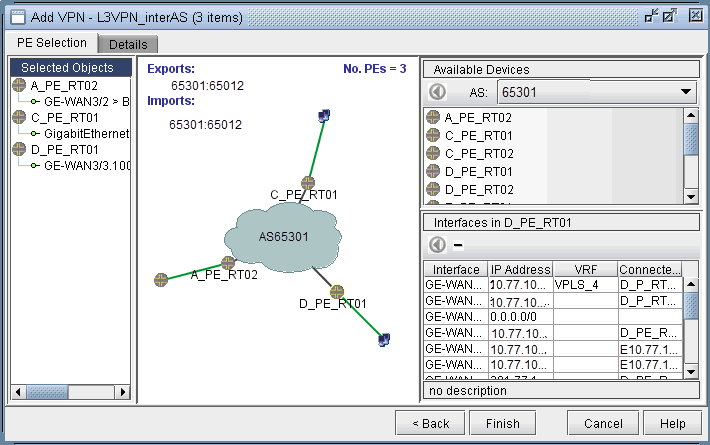
Figure 1: An inter-AS VPN being constructed, with three PEs from AS 65301 already addedNetwork configuration interface for setting up a Layer 3 VPN in an inter-AS environment. Central cloud AS65301 with connected routers A_PE_RT02, C_PE_RT01, D_PE_RT01. Green lines show connections. Selected devices and interfaces like GE-WAN3/2 and GE-WAN3/10 listed. Available devices on the right. Interfaces on D_PE_RT01 detailed with IPs and VRFs. Route targets 65301:65012 for exports and imports. Finish, Cancel, and Help buttons for configuration.

The next step would be to choose another AS (from the AS dropdown box under Available Devices), and then select routers from it. As the following figure shows, two routers from AS 65222 were added to the VPN to create an inter-AS VPN. Interfaces were then assigned to the two routers to complete the process.
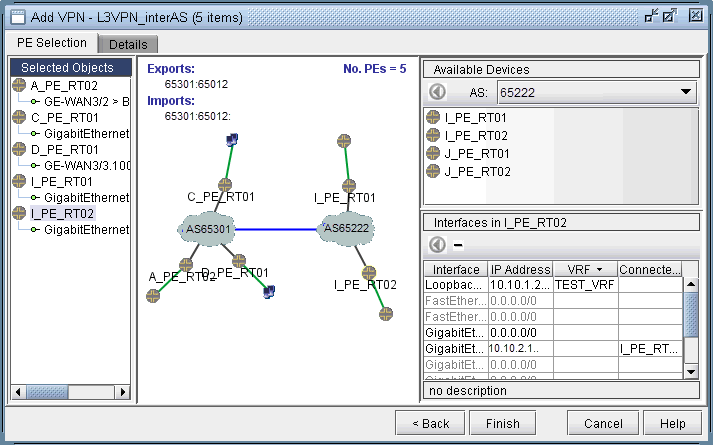
Figure 2: Adding two more PEs from another AS (65222)Network configuration interface for Layer 3 VPN in inter-AS environment, showing network topology, export/import route targets, selected devices, and interfaces.