
Use the Ingest Test Tool
The ingest connectivity tool can verify ingest methods such as OpenConfig, iAgent, and SNMP, where Paragon Insights initiates the connection with the device. The tool helps you identify a missing configuration on the network device. The tool also helps you choose appropriate playbooks and rules (that use sensors) that are compatible with the supported ingest methods.
To run the ingest connectivity test:
-
Click
Test
to
run the ingest connectivity test. The test results appear after a few
minutes.
The color coding for the test results is as follows:
-
Green status = pass
-
Yellow status = error (unable to test)
-
Red status = fail (test failed)
-
Yellow or red status includes a message with details about the issue.
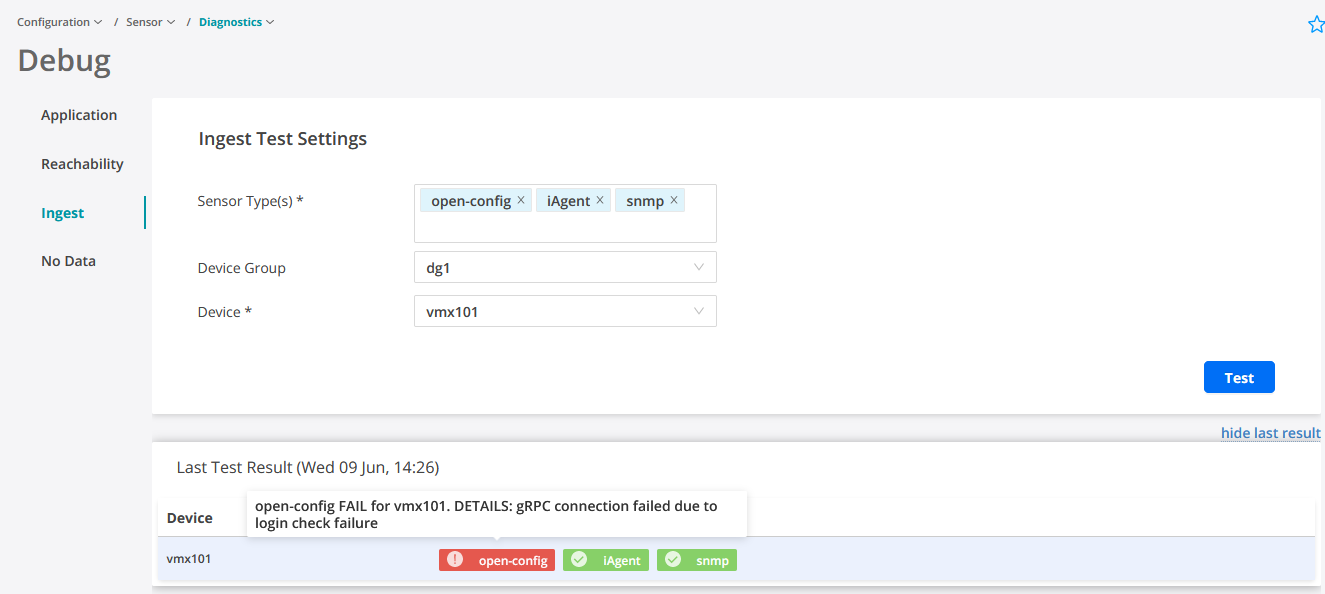
The example above shows that iAgent and SNMP ingests are working well but gRPC connection from OpenConfig ingest failed due to login check errors.
-