
Path Analysis
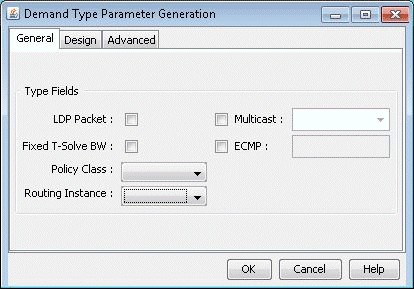
To see how Routing Instances affect the routing in a network, assign a Routing Instance to the Demand Type of demands (Network > Elements > Demands) or path traces (Network > Path & Capacity > Path) as shown in Figure 1 . This window is accessed by clicking on the Type button of the Modify Demand or Demand Path window. Demands with a Routing Instance assignment can only be routed over links with the same Routing Instance setting.
Reports
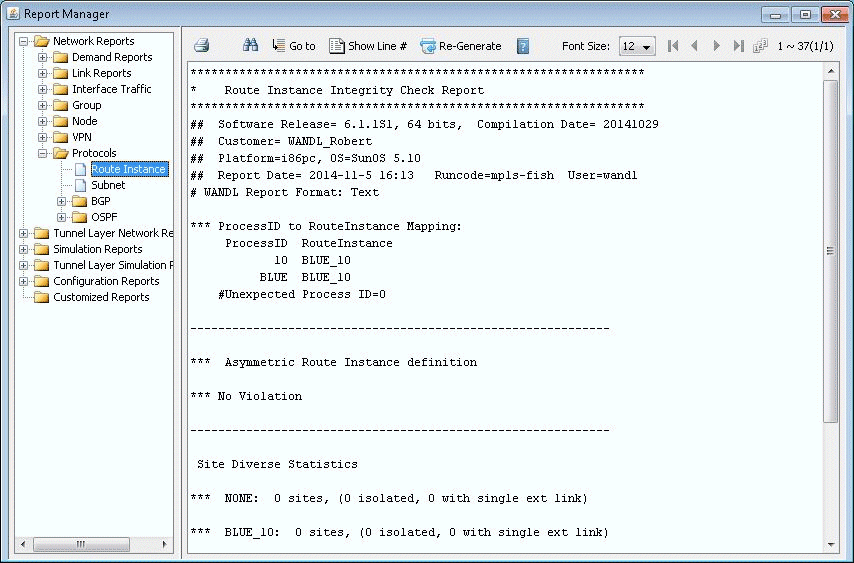
Navigate to Report > Report Manager from the main menu. Select the Route Instance report from Network Reports > Protocols. This report (RTINSTRPT) displays several integrity checks:
-
Asymmetric Route Instance Definition: Indicates links whose interfaces are associated with different Routing Instances
-
Unexpected OSPF process number: Indicates if an unexpected OSPF process number is defined
-
Site Diverse Statistics: An Isolated Site is defined as a site which has the given routing instance configured on at least one of its routers, but that site is not accessible via this routing instance from outside the site. A Single Link Site is defined as a site which only has one link of the given routing instance that can be used to reach the site from outside the site. If that link goes down, there is no other way to access that site for this routing instance.
-
BGP community definition errors: Indicates if the next-hop for any given community is in a different Routing Instance
-
Isolated colored PoP: Indicates if a Routing Instance has no outgoing link
-
Note that routing instance definitions via the routeinstance file or the Network > Protocols > OSPF/IS-IS Routing Instance are prerequisites to generating the report.
File Format
ROUTEINSTANCE File
#name assigned_color OSPF_PID route-instance-name community
blue_10 color=BLUE 10 BLUE community=1234:5678
red_20 color=RED 20 RED community=2345:6789|3456:7890
white_30 color=GREEN 30 NOID
This file should be referenced in the specification file as “routeinst= filename”.
Because OSPF process names do not need to be specified for Juniper routers, a special keyword “NOID” is used, as seen in the third entry. The keyword “NOID” indicates that the interface is OSPF-enabled but is not listed in the [edit routing-instances] section for a Juniper router