
Specifying the Overhead Calculation Frame Size
The following procedures give the steps needed to specify the frame size for a demand.
-
Navigate to Network > Elements > Demands. In the Demands window, double-click a demand, or select a demand from the table and press the Modify > Selected button. The Modify Demand window will appear.
-
In the Modify Demand window, press the Type button to open up the Demand Type Parameter Generation window.
Figure 1: Demand Type Parameters Window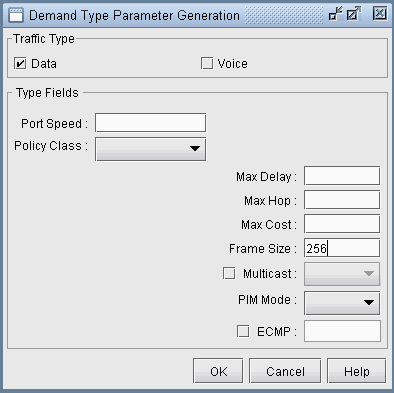
-
In the Demand Type window, specify a number for the Frame Size. The unit is in bytes. Then, click OK.
-
For instance, by typing 256 in the Frame Size box and open up the demand file, you would see BF256 added to the type field for a demand:
RLDN2600NWK_1 LDN2600 NWK 5000000 R,A2Z,PATH10(Dynamic),BF256
02,02 LDN2600_ETHERNET0/0
BF256 indicates that the
average frame size is 256 bytes.