
Setting up a Junos Space Appliance for Network Director
You can install Network Director in one of the following appliances:
JA2500 Junos Space Hardware Appliance
The JA2500 appliance is a dedicated hardware device that provides the computing power and specific requirements to run Network Director and the Network Director API as applications.
Figure 1 shows the front panel and Figure 2 shows the rear panel of the JA2500 appliance.
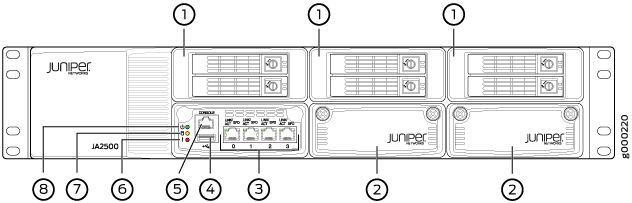
1—Hard drive |
5—Console port |
2—IOC expansion slot (currently not supported) |
6—Hardware Fault LED |
3—Network (Ethernet) ports |
7—Hard Disk Activity LED |
4—USB port |
8—Power LED |
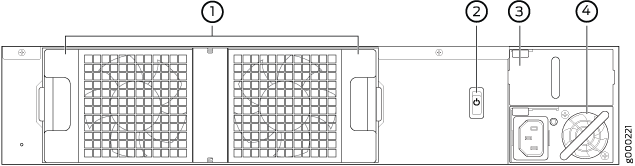
1—Cooling fans |
3—Redundant power supplymodule slot |
2—Power switch |
4—Power supplymodule |
Junos Space Virtual Appliance
The Junos Space Virtual Appliance consists of preconfigured Junos Space Network Management Platform software with a built-in operating system and application stack that is easy to deploy, manage, and maintain. A Junos Space Virtual Appliance includes the same software and provides all the functionality available in a Junos Space physical appliance. However, you must deploy the virtual appliance on the VMware ESX or ESXi server, or Kernel-based virtual machine (KVM) which provides a CPU, hard disk, RAM, and a network controller, but requires installation of an operating system and applications to become fully functional.
For information about installing Junos Space appliances in a fabric configuration and installing Junos Space Virtual Appliance on a VMware ESX or ESXi server, see Junos Space Virtual Appliance.