
Wi-Fi 7 Features in Detail
Wi-Fi 7 is the latest wireless networking standard, designed to significantly enhance Wi-Fi performance and capability. It builds upon the advancements made by previous standards like 802.11ax (Wi-Fi 6). Wi-Fi 7 introduces several key improvements designed to address the growing demand for faster, more reliable, and more efficient wireless connectivity.
The following sections provide more detail about each of Wi-Fi 7’s new or enhanced capabilities.
Extremely High Throughput
Wi-Fi 7 aims to achieve a theoretical maximum throughput of up to 48 Gbps, which is a substantial increase compared to the 9.6 Gbps offered by Wi-Fi 6. The higher throughput is achieved through various technical enhancements, including wider channel bandwidths and more efficient data encoding.
Wider Channel Bandwidths
Wi-Fi 7 supports channel bandwidths of up to 320 MHz, double the 160 MHz maximum of Wi-Fi 6. Wider channels can transmit more data at one time, increasing overall network capacity and speed.
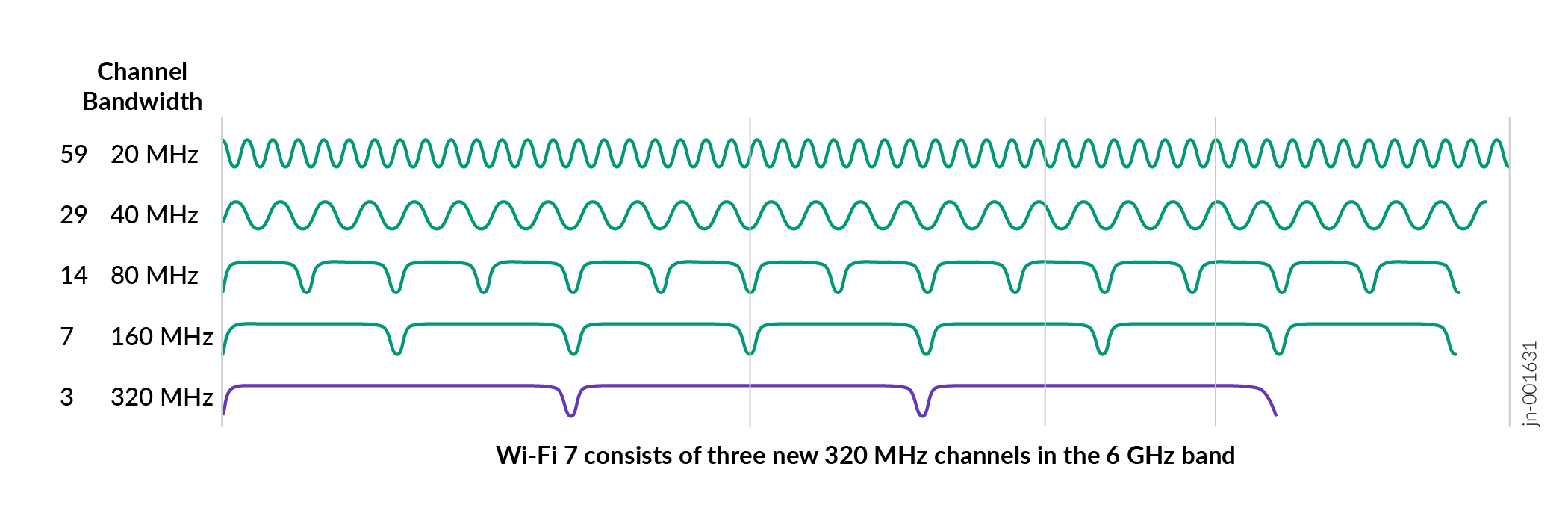
Client device support for 320 MHz channel width varies widely.
Multi-Link Operation (MLO)
-
MLO enables a single client device to use multiple radios, each operating on different frequency bands, as part of one logical connection. Instead of treating 2.4, 5, and 6 GHz bands as separate associations (as in Wi‑Fi 6 and Wi-Fi 6E), MLO aggregates the associations into a unified multi‑link connection. These connections improve throughput, reduce latency, and increase reliability, especially as 6 GHz introduces cleaner spectrum and wider channels.
The core properties of MLO are:
-
One Logical Connection: MLO presents multiple physical radios as a single unified link to upper layers.
-
Higher Throughput: Data transmissions can occur on multiple links concurrently, if supported, thus increasing the total available bandwidth.
-
Lower Latency: The AP and client choose the best link at any moment, avoiding congested channels.
-
Improved Reliability: If one band becomes noisy or busy, the session continues smoothly on the better-performing link.
-
Security: Each link still requires individual authentication, and MLO adds synchronized replay protection and multi‑link key management to protect traffic across linked radios.
-
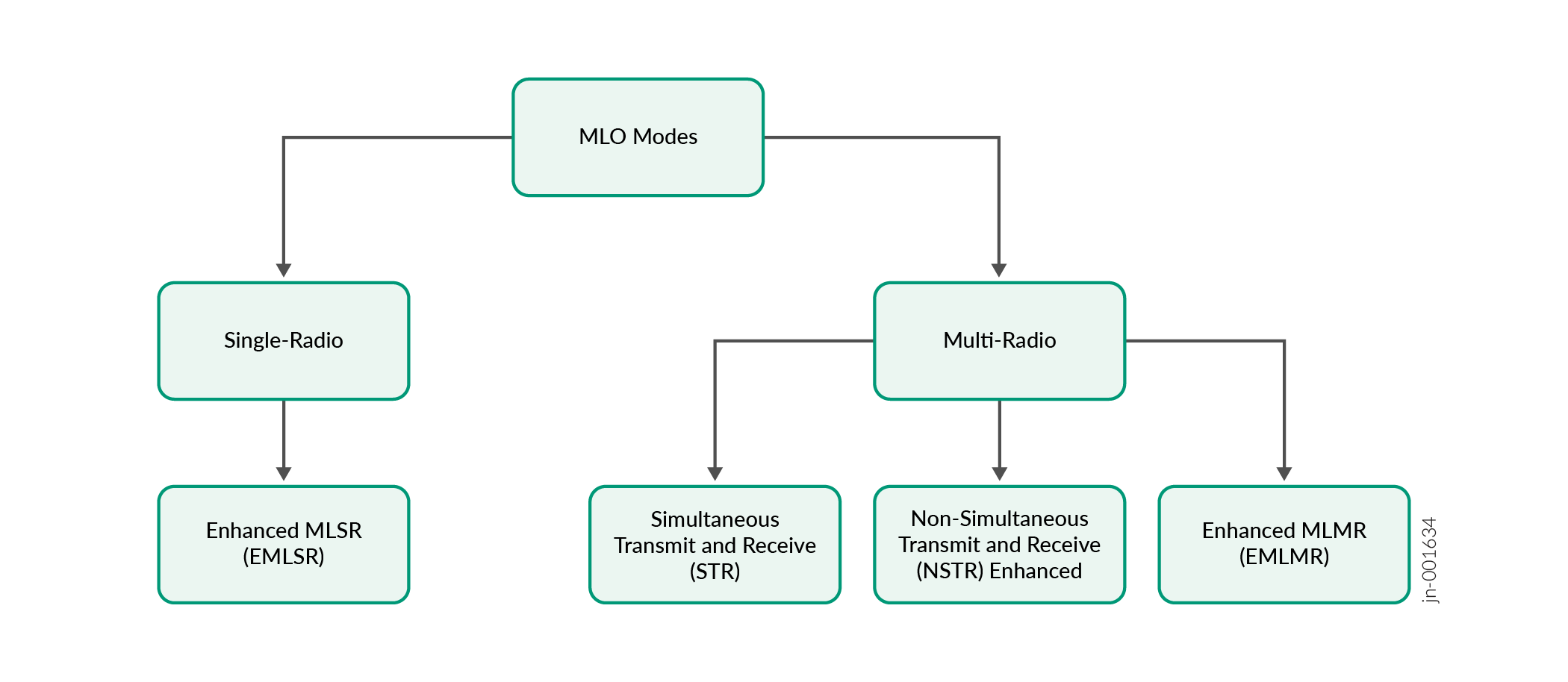
Click the links below to go directly to a specific MLO-related feature or definition.
- Link Behavior: Link Steering vs Link Switching
- MLO Client Types
- Enhanced ML‑SR (eMLSR)
- ML‑MR — Multi‑Link Multi‑Radio
- Simultaneous Multi‑Radio (STR-MLMR)
- Why Most Clients Only Support Two Links
Link Behavior: Link Steering vs Link Switching
Link Steering (Dynamic Link Selection)
MLO allows intelligent, real‑time selection of which link to use for each transmission. The AP and client evaluate:
-
SNR
-
Interference levels
-
Channel load
-
Bandwidth availability
Then the client and AP can choose the optimal link per packet or per traffic queue. Link steering is sometimes called multi‑link load balancing.
Link Switching (Fast Failover Between Links)
Link switching is a reliability enhancement:
-
If one link experiences interference, DFS events, or congestion, traffic instantly switches to another active link.
-
Unlike traditional roaming, link switching occurs internally without reassociation, reducing latency and preventing application disruption.
This makes real‑time apps like conferencing, AR/VR, and industrial automation far more resilient.
MLO Client Types
MLO implementation depends on how many radios the device has and how those radios operate. We describe MLO client types below.
Multi-Link Single Radio (ML-SR)
-
The device has one physical radio that can tune to different bands, but not simultaneously.
-
Multi‑link uses time-division to rapidly switch the radio between bands.
-
Only one active link at a time, which provides some MLO benefits (faster switching, better reliability) but no concurrent throughput gains.
-
Useful for low‑power or small-form-factor devices.
ML-SR is mandatory for all Wi‑Fi 7 clients.
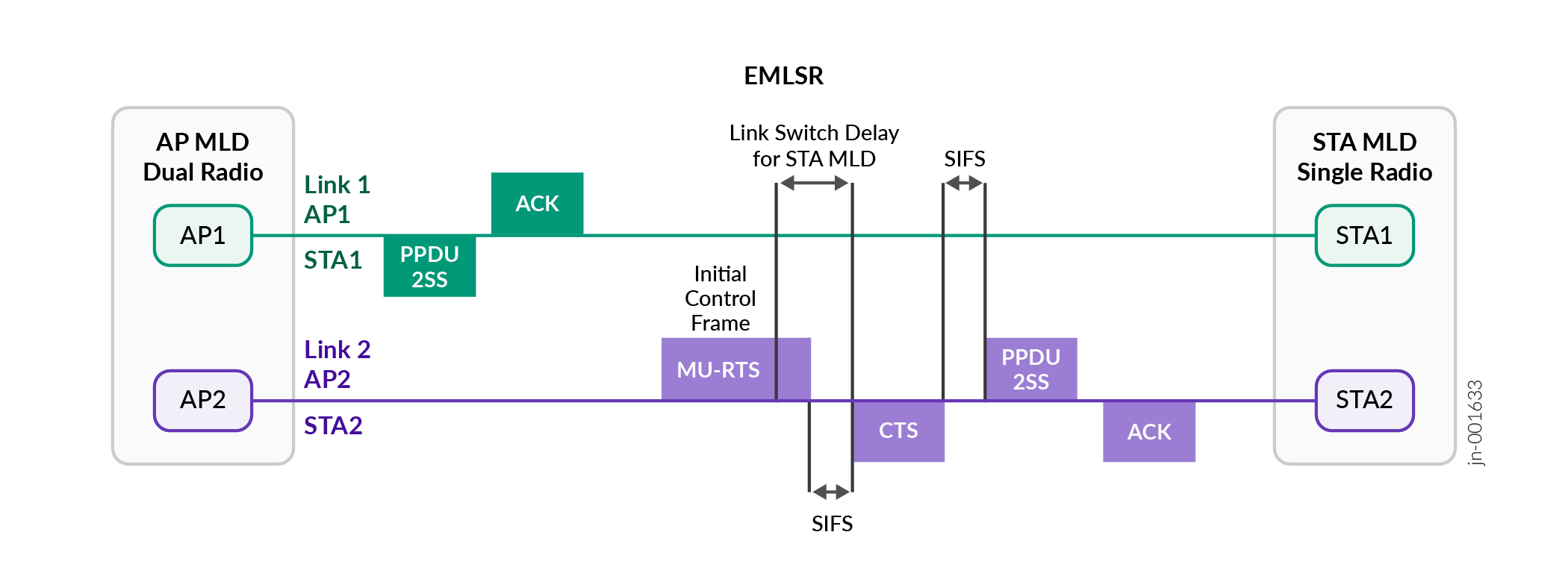
Enhanced ML‑SR (eMLSR)
-
Improved scheduling and faster retuning.
-
Still single‑radio, still non‑concurrent, but with lower switching overhead and better power efficiency.
ML‑MR — Multi‑Link Multi‑Radio
Devices have two or more radios, enabling simultaneous operation on multiple bands.
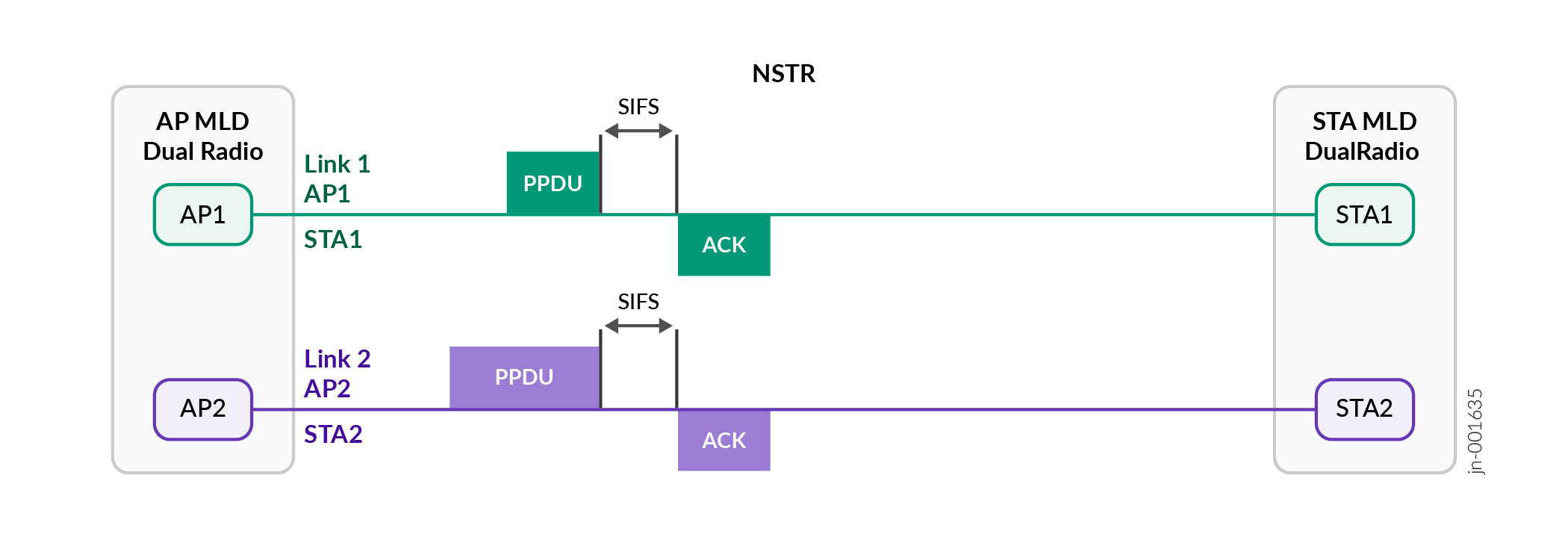
Two categories: Non‑Simultaneous Multi‑Radio (NSTR-MLMR) and Simultaneous Multi-Radio (STR-MLMR)
-
The device has multiple radios which cannot transmit concurrently due to internal constraints such as local oscillator coupling, coexistence issues, or power envelope limits.
-
Radios might be awake at the same time, but cannot fully transmit together.
-
Provides better responsiveness than ML‑SR, but still not full concurrency.
Simultaneous Multi‑Radio (STR-MLMR)
-
True concurrent MLO.
-
Radios on 5 GHz and 6 GHz (or 2.4 + 6 GHz) can transmit/receive simultaneously.
-
Provides the full MLO promise:
-
Higher throughput
-
Better latency
-
Robust load balancing
-
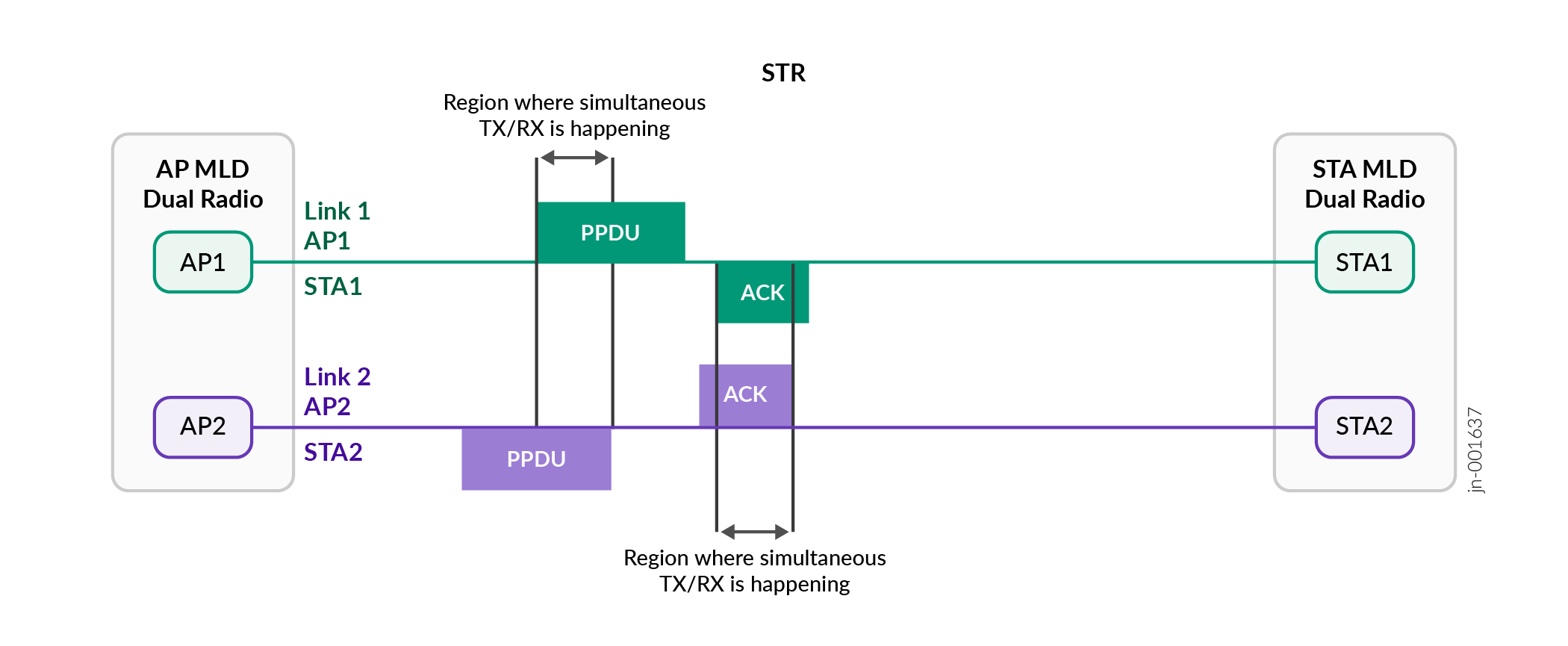
Important: STR‑MLMR is not mandatory for Wi‑Fi 7 clients and is currently limited to high‑end devices due to cost, size, and power-consumption considerations.
Why Most Clients Only Support Two Links
While the Wi‑Fi 7 standard allows triple‑band operation (2.4 + 5 + 6 GHz concurrently), practical realities limit adoption:
-
Devices rarely include three radios.
-
Thermal and battery constraints.
-
Vendor design tradeoffs (size, antenna count).
-
6 GHz is the primary performance band; vendors focus on 5 + 6 GHz dual‑radio designs.
Thus, MLO is most commonly implemented as dual‑band MLO, not triple‑band. Most Wi-Fi 7 clients deployed today operate as ML-SR or NSTR-MLMR devices. Full STR MLMR (simultaneous multi radio) operation is currently limited to a small subset of high-end clients for the reasons mentioned above. As a result, many real-world Wi-Fi 7 gains appear first as latency and reliability improvements rather than linear throughput scaling.
| Feature | ML‑SR | eMLSR | NSTR‑MLMR | STR‑MLMR |
|---|---|---|---|---|
| Radios | 1 | 1 | 2+ | 2+ |
| Simultaneous Multi‑Band Tx/Rx | ❌ | ❌ | ❌ (restricted) | ✅ |
| Latency Reduction | Moderate | Improved | Good | Best |
| Throughput Increase | None | None | Limited | Maximum |
| Power Efficiency | Highest | High | Medium | Lowest |
| Mandatory in Wi‑Fi 7 | Yes | No | No | No |
The following table describes the capabilities of some example client devices.
| Client Device | Max MLO Links Supported | Supported MLO Mode(s) | 3‑Band (2.4 + 5 + 6 GHz) Simultaneous MLO? | Notes |
|---|---|---|---|---|
| Intel BE200 | Advertises 3links, defaults to 2 | eMLSR (Enhanced Multi‑Link Single Radio) | No — single‑radio mode allows multiple link contexts but only one active Tx/Rx at a time | Supports 3‑link in registry‑tweaked test setups but effectively functions as a 2-link under normal operation. |
| iPhone 16 | 3 links | MLMR (NSTR / Non‑Simultaneous Multi‑Radio) | Partial / Conditional — can support 3 links, but actual simultaneous Tx/Rx across all three bands depends on mode | Apple devices reportedly support 3‑link MLO using NSTR (multi‑radio) behavior. |
| Google Pixel 9 / Pixel series (Wi‑Fi 7 models) | Reports multiple modes depending on the firmware | Claims NSTR MLMR in diagnostics, but not all modes are supported by APs | Uncertain / Vendor‑dependent — varies by implementation | AP logs show Pixel reporting NSTR MLMR, but actual connection mode depends on AP/client negotiation. |
| Windows 11 Wi‑Fi 7 laptops (general) | Depends on adapter (often Intel BE200) | Same as adapter: commonly eMLSR | No — many Win11 builds initially restrict MLO features in Enterprise security mode | Support for MLO in WPA3‑Enterprise requires OS + driver enablement ("Wi‑Fi 7 Enterprise"). |
| General Wi‑Fi 7 STA devices | 1–3 links depending on radio architecture | All STAs must support MLSR; others are optional | Not required by spec, optional only | 802.11be mandates MLSR only for clients. Multi-radio simultaneous operation is optional. |
Improved Modulation Through 4096-QAM
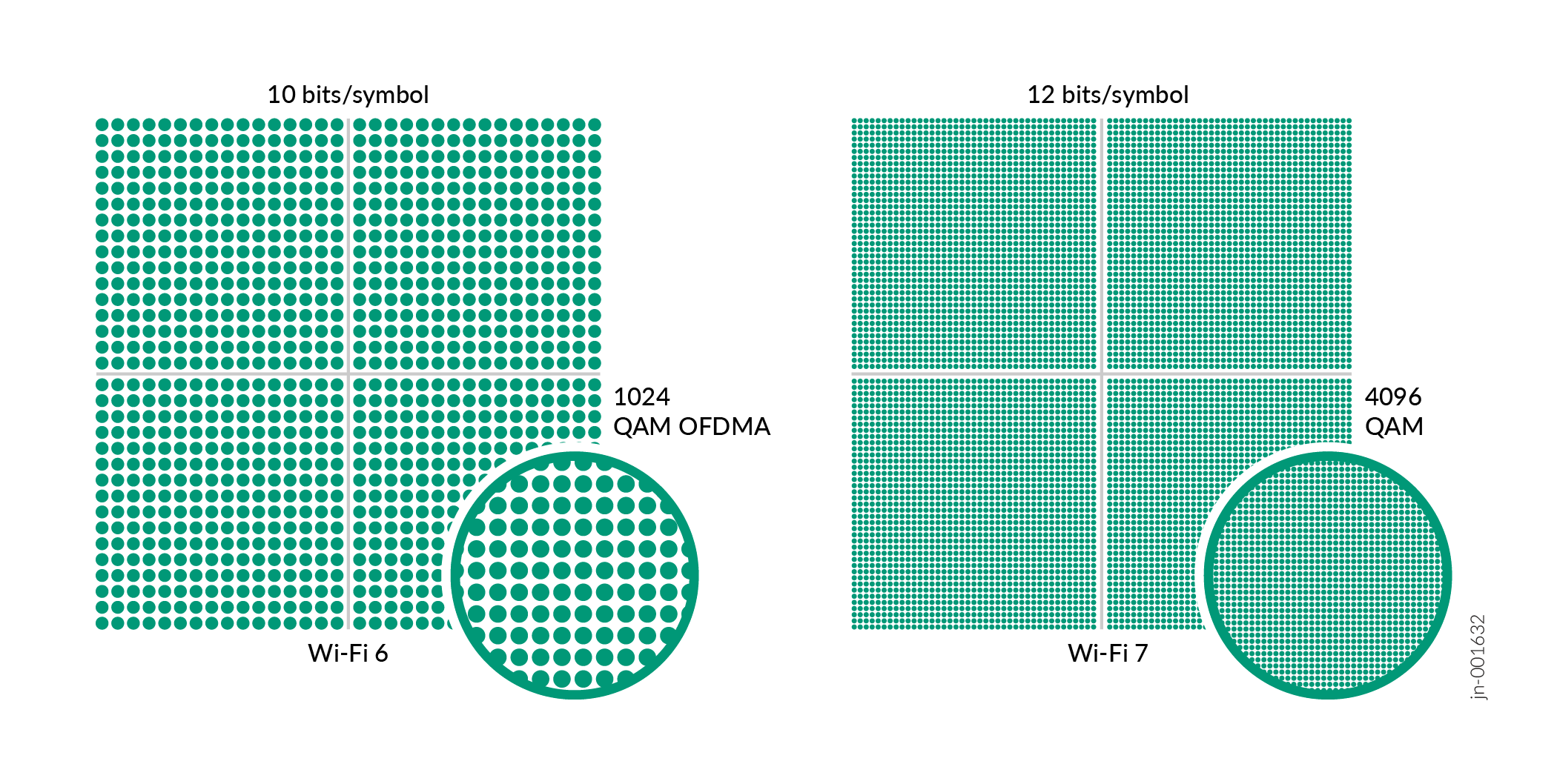
4096‑QAM significantly increases the amount of information encoded into each modulation symbol—12 bits per symbol compared to 10 bits with 1024‑QAM. While 2 bits might seem like a small theoretical change, in practice it offers several important advantages for dense enterprise deployments.
- Higher Throughput in High‑SNR Conditions
- Improved Spectrum Efficiency
- Shorter Transmission Durations
- Complementary to Other Wi‑Fi 7 Features
Higher Throughput in High‑SNR Conditions
4K‑QAM leverages clean RF conditions to push maximum physical layer rates, resulting in:
-
Higher per‑client throughput
-
Better performance for bandwidth‑intensive applications like 4K and 8K video, real‑time collaboration, and large image transfers
-
More efficient use of wide channels such as 160 and 320 MHz
Because Wi‑Fi 7 adds 320‑MHz channels and MLO, having higher‑order modulation becomes even more valuable—every spatial stream and every link can carry more bits when conditions are favorable.
Improved Spectrum Efficiency
Higher‑order QAM allows more data in the same spectral footprint, which is particularly useful in:
-
High‑density enterprise floors
-
Stadiums and arenas
-
Campuses with many 6 GHz‑capable devices
-
Environments where spectrum reuse is tightly engineered
4K‑QAM allows APs to take advantage of the cleaner 6 GHz band, where the noise floor is lower, and interference is reduced.
Shorter Transmission Durations
Because more bits are packed into each symbol, transmissions complete faster. Shorter PPDU durations deliver:
-
Lower airtime consumption
-
More available airtime for other clients
-
Reduced contention in dense deployments
Complementary to Other Wi‑Fi 7 Features
4K‑QAM is not a standalone improvement—it provides synergies with:
-
MLO
-
320‑MHz channels
-
Multi‑RU (MRU) allocations
-
Hybrid Automatic Repeat Request (HARQ)
-
16 spatial streams across the AP infrastructure
Together, these features allow Mist APs to sustain higher data rates more reliably, especially in clean 6 GHz deployments.
Multi-RU
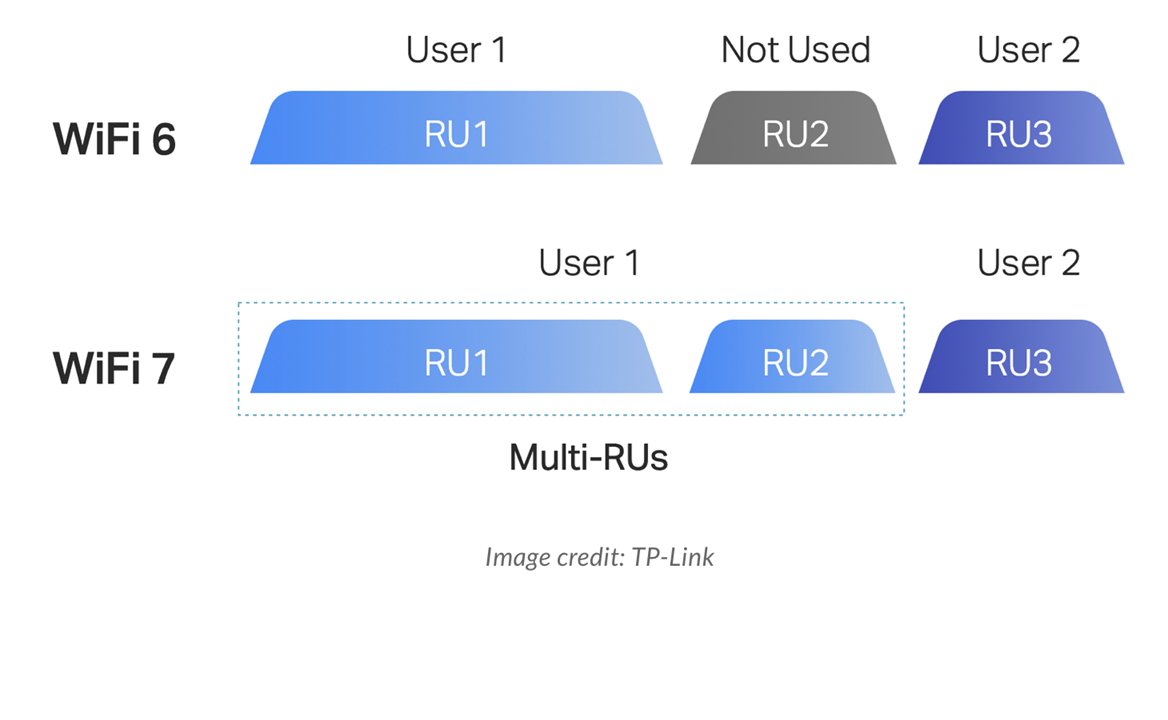
This feature was optional in Wi-Fi 6e, but is standard in Wi-Fi 7. Multi-RU provides a way to make more efficient use of RUs. RUs are small slices of wireless RF that provide a way to concurrently support multiple users in heavy traffic. Wider channels contain more RUs, and multi-RUs let a single user leverage more than one RU in order to support more clients by providing more granular scaling support within the channels.
Preamble Puncturing
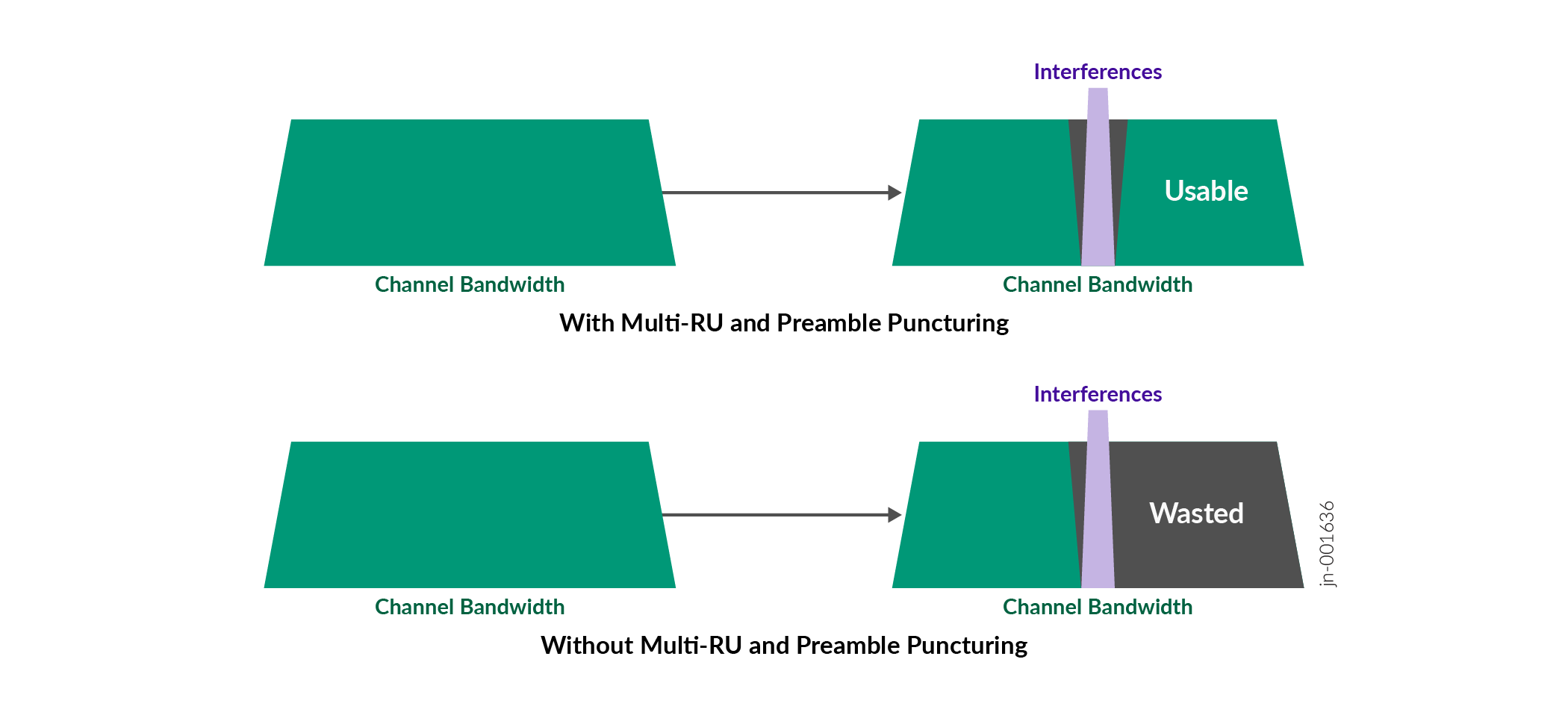
In environments where parts of the spectrum are unusable due to interference or regulatory restrictions, preamble puncturing allows the Wi-Fi device to skip certain subcarriers within the channel. If a part of the channel is affected by interference, the preamble and subsequent data packets can avoid these subcarriers, allowing the remaining usable subcarriers to be used effectively.
Enhanced MU-MIMO
Wi-Fi 7 improves MU-MIMO technology by supporting up to 16 spatial streams, compared to 8 spatial streams in Wi-Fi 6. This increase allows more devices to communicate with an AP simultaneously, improving network efficiency and user experience in environments with many connected devices.
Target Wake Time (TWT) Enhancements
Building on the TWT feature introduced in Wi-Fi 6, Wi-Fi 7 offers more advanced scheduling capabilities that helps reduce power consumption and optimize bandwidth usage. These scheduling improvements are particularly beneficial for battery-powered IoT devices.
Improved OFDMA
OFDMA is further refined in Wi-Fi 7, allowing more granular resource unit allocation to accommodate varying traffic patterns and improve network efficiency. Other Wi-Fi 7 enhancements also provide benefits for OFDMA, even though not specifically listed as OFDMA features:
| Category | Enhancement | Benefit |
|---|---|---|
| Spectrum Use | 320 MHz channels, enhanced puncturing | More RUs, more usable spectrum under interference |
| RU Allocation | Multi‑RU assignment (MRU) | Higher throughput, better spectral efficiency |
| Multi‑Link | OFDMA across multiple links | Lower latency, reliability, and traffic steering |
| Scheduling | Faster uplink and downlink OFDMA cycles | Reduced jitter and contention |
| Uplink Efficiency | Improved Trigger‑Based OFDMA | More clients per uplink burst, stronger reliability |
| PHY Efficiency | 4K‑QAM | More bits per tone/RU |
| Coordination | EHT‑specific RU structures | Efficient operation in complex RF environments |
Security
In Wi-Fi 7, security is a primary consideration. In fact, many of the feature enhancements available in Wi-Fi 7 will not function if the WLANs or clients lack the proper security features.
| Security Requirement | Description (per standard / WFA) | Benefits for Use | What if Clients Don’t Support It? |
|---|---|---|---|
| WPA3 or OWE (mandatory for any WLAN with Wi‑Fi 7 enabled) | Wi‑Fi 7 requires WPA3 or OWE on all bands where Wi‑Fi 7 is enabled. | Ensures modern encryption, eliminates legacy weaknesses; protects open networks through OWE. | Legacy clients (WPA2‑only) cannot connect unless you disable Wi‑Fi 7 or 6 GHz on the SSID or provide a fallback SSID. |
| Protected Management Frames (PMF) | Required for all Wi‑Fi 7 networks. PMF encrypts and authenticates management frames. | Prevents deauthentication spoofing, channel‑switch attacks, and other management‑frame exploits. | Older clients might not associate; mixed environments require careful SSID design (such as dual SSIDs or transition modes). |
| GCMP‑256 Cipher (mandatory on every Wi‑Fi 7 BSS) | Wi‑Fi 7 mandates GCMP‑256 for data encryption regardless of security mode. | Stronger confidentiality, integrity, and replay protection vs. CCMP‑128. Required for EHT data rates. | Non‑GCMP‑256 clients fall back to older ciphers, like CCMP‑128, and might lose access to Wi‑Fi 7 capabilities, including MLO and EHT throughput. |
| Beacon Protection | Mandatory safeguarding of beacon frames to prevent spoofing and impersonation. | Hardens the network against beacon‑spoof attacks that can mislead clients or disrupt service. | Older clients might ignore protected beacons or behave inconsistently when roaming. |
| SAE‑GDH and FT‑SAE‑GDH (AKM 24 & 25) | New authentication and key‑management suites for Wi‑Fi 7, enabling per‑MLD (multi‑link device) authentication. | Synchronizes keys across MLO links, enabling stable, secure multi‑link sessions. | Non‑Wi‑Fi 7 clients continue using legacy AKMs (8 or 9). These clients cannot benefit from secure multi‑link authentication and will lose MLO and Wi‑Fi 7 data‑rate capabilities. |
| OWE for Open Networks | Required option for Wi‑Fi 7 Open SSIDs; provides encrypted password-less connectivity. | Encrypts open traffic without passwords. Reduces passive eavesdropping. | Many guest and IoT clients still lack OWE support, requiring OWE transition mode or a parallel legacy guest SSID. |
| H2E (Hash‑to‑Element) for WPA3‑Personal | Mandatory for WPA3‑SAE on Wi‑Fi 7 6 GHz to eliminate dictionary‑attack vulnerabilities in legacy SAE. | Stronger password‑element generation, fixing earlier SAE weaknesses. | Older WPA3‑SAE clients using “Hunting and Pecking” cannot authenticate on 6 GHz or Wi‑Fi 7 SSIDs. |
| Mandatory PMK synchronization for MLO | Wi‑Fi 7 requires unified key hierarchy across all links for MLO to work securely. | Ensures secure, low‑latency MLO performance with a single PMK across all links. | Clients lacking MLO‑compatible key mgmt cannot use multi‑link and fall back to single‑band association. |
Wi‑Fi 7 is optimized for consistent capacity, lower latency, and reliability under load, not just higher peak physical layer rates. Features such as MLO, MRU, enhanced scheduling, and mandatory security are designed to maintain performance as client counts and traffic diversity increase.
Backward Compatibility in Wi-Fi 7
Backward compatibility is a core design principle of Wi‑Fi 7 (802.11be). A Wi‑Fi 7 AP can serve older clients (Wi‑Fi 6/6E/5, and so on) on the same network. This makes upgrades easier and protects existing device investments, but it also introduces performance and design tradeoffs. Below is a table depicting benefits and design considerations in regard to the various aspects of backward compatibility.
| Aspect | Benefits | Design Considerations |
|---|---|---|
| Device & Investment Protection | Backward compatibility lets existing Wi‑Fi 4/5/6/6E clients connect to new Wi‑Fi 7 APs, avoiding forced device refreshes and extending the life of legacy hardware. | Legacy clients might prevent you from fully realizing Wi‑Fi 7’s potential for years, delaying ROI on high‑end features. |
| Migration & Deployment | Enables gradual, phased migration to Wi‑Fi 7. You can upgrade APs or specific areas without wholesale changes or client replacement. | Network designs often end up optimized for legacy compatibility instead of being fully tuned to Wi‑Fi 7 capabilities (such as channel plans, client mix). |
| User Experience & Continuity | Minimizes disruption because users’ older devices continue working when APs are upgraded, thus reducing support tickets and business risk. | Mixed‑client environments can create inconsistent user experiences. Wi‑Fi 7 devices might perform very differently depending on how many legacy devices share airtime. |
| Ecosystem & Interoperability | Ensures interoperability across vendors and generations, simplifying procurement and operations in heterogeneous environments. | Maintaining multi‑generation interoperability increases protocol complexity and testing burden, which can mask bugs and edge cases in complex client mixes. |
| Capacity & Spectrum Use | Backward compatibility still allows you to consolidate onto fewer SSIDs and shared infrastructure, rather than running completely separate networks for old vs. new clients. | Legacy devices don’t support Wi‑Fi 7 efficiency features such as advanced OFDMA scheduling, MLO optimizations, and 4K QAM. Airtime is less efficiently used when legacy devices are present. |
| Operational Costs | Reduces immediate CapEx and can reduce OpEx by simplifying network segmentation vs. maintaining separate, old vs. new, infrastructures. | Operational tuning becomes more complex. You might need band steering, per‑SSID policies, and careful QoS to keep legacy devices from degrading overall performance. |
| Performance for Modern Clients | Allows high‑end Wi‑Fi 7 clients to benefit from new features where airtime is available, without abandoning older devices. | Legacy clients often dominate airtime at lower data rates, which can significantly cap throughput and latency improvements that Wi‑Fi 7 would otherwise deliver. |
| Security & Policy | Easier centralization of security policies on one infrastructure (such as single WPA2/WPA3 transition SSID supporting a range of devices). | Supporting older security modes or ciphers for backward compatibility can weaken the overall security posture compared to a pure Wi‑Fi 7 or WPA3‑only design. |
Overall, 802.11be addresses the increasing demands for bandwidth, efficiency, and low-latency communication in modern wireless networks, making it suitable for high-performance applications and environments with dense device connectivity. The increased security framework helps ensure that the data traversing Wi-Fi 7 WLANs is safe from malicious actors.