
Configure Wi-Fi 7 in Mist
This document provides some high-level guidance about configuring Wi-Fi 7 in the HPE Mist Networking portal.
You can enable Wi-Fi 7's required features easily in the HPE Mist Networking portal simply by enabling Wi-Fi 7 in the WLAN definition. In fact, the portal is designed to help you take advantage of 6 GHz and Wi-Fi 7 by default.
In the Mist portal, you can configure WLANs directly on a per-site basis or using templates for fast, consistent application of wireless network features and policies across your entire organization. Regardless of whether you define your WLANs directly or within templates, the configuration is straightforward.
Today, there are two things to configure:
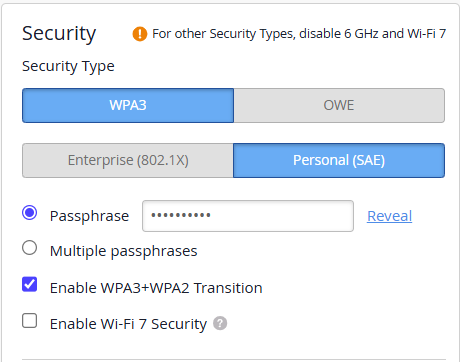
The Security block of the WLAN form must have WPA3 or OWE selected as the Security Type. With WPA3 selected, you can select either Enterprise (802.1x) or Personal (SAE) as the authentication method. With OWE selected, you can enable OWE Transition and further enhance the security of the OWE WLAN with Wi-Fi 7 security; specifically GCMP256 and Beacon Protection.
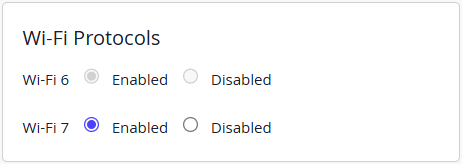
The Wi-Fi Protocols block of the WLAN form must have Wi-Fi 7 Enabled.
Similar to WLAN configuration templates, RF Templates allow consistent application of radio-specific settings across all the sites in your organization.
For details about configuring WLANs and WLAN templates, see: WLANs and WLAN Templates
For details about radio settings, see: Radio Management