
Enable Automatic Firmware Upgrade
In your site configuration, you can enable automatic firmware upgrades for access points (APs).
Auto upgrades will run on the schedule that you specify. On the specified date and time, Juniper Mist™ will check for firmware updates.If found, Juniper Mist will apply the new firmware to your access points.
Note that the auto upgrade process upgrades the firmware only if the specified firmware version is higher than the current version running on the AP.
You can configure auto upgrades as follows:
-
Apply the latest production or beta firmware to all APs
-
Apply a specific firmware to specific AP models
Apply the Latest Production or Beta Firmware to All APs
With this option, Juniper Mist will check weekly for available updates and apply them to all APs. You determine whether to install the latest production firmware or the latest beta release.
To configure an auto upgrade to apply the latest production or beta firmware:
-
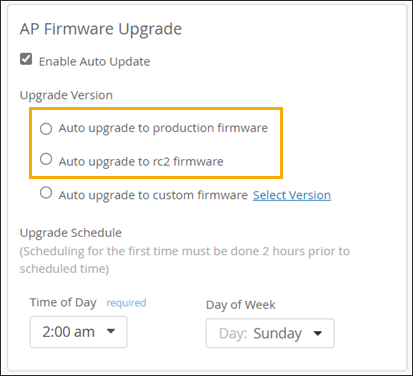
Under Upgrade Version, select one of these options:
-
Auto upgrade to production firmware—With this option, you'll get the latest official firmware release.
-
Auto upgrade to rc2 firmware—With this option, you'll get the latest beta release.
-
-
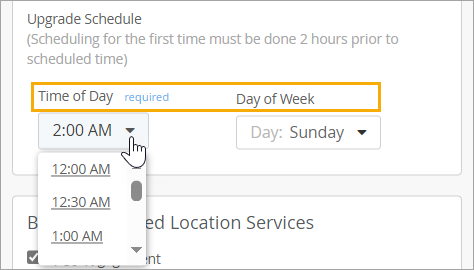
Under Upgrade Schedule,
select
the time and day when you want the upgrade to run, or select
Daily as the Day of Week
to run upgrades every
day.
 Note:
Note:If you want this upgrade to run today (the same day that you're enabling this feature), set the Time of Day to at least 2 hours from now. For example, let's say it's currently Tuesday at 5 PM. If you set Day of Week to Tuesday and Time of Day to 7 PM, the upgrades will run tonight at 7 PM. However, if you set an earlier time, the upgrades will not run until next Tuesday.
Apply Specific Firmware to Specific Models
With this option, Juniper Mist will check the specified models in your AP inventory to see if they need to be upgraded to the firmware version that you specify.
To configure an auto upgrade to apply specific firmware to specific models:
-
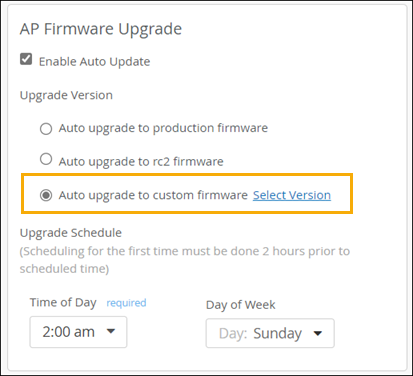
Click Auto upgrade to custom firmware, and then
click Select Version.
-
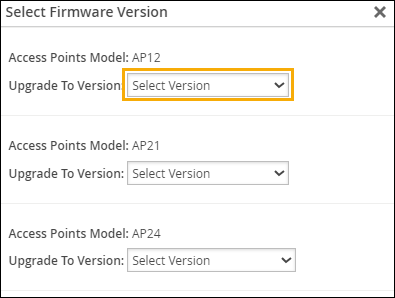
In the Select Firmware Version window, select the firmware version for each
model that you want to upgrade.
-
Under Upgrade Schedule, select the time and day when
you want the upgrade to run.
Note:
If you want this upgrade to run today (the same day that you're enabling this feature), set the Time of Day to at least 2 hours from now. For example, let's say it's currently Tuesday at 5 PM. If you set Day of Week to Tuesday and Time of Day to 7 PM, the upgrades will run tonight at 7 PM. However, if you set an earlier time, the upgrades will not run until next Tuesday.