Help us improve your experience.

Let us know what you think.

Do you have time for a two-minute survey?


Configure the System Log

Send system log messages to files, remote destinations, user terminals, or the system console.

Junos OS generates system log messages (also called syslog messages) to record events that occur on a switch, including the following events:

  • Routine operations, such as creation of an Open Shortest Path First (OSPF) protocol adjacency or a user login to the configuration database

  • Failure and error conditions, such as failure to access a configuration file or unexpected closure of a connection to a peer process

  • Emergency or critical conditions, such as shutdowns due to excessive temperature

For the switches that you manage in the Juniper Mist portal, you can configure syslog in the switch settings.

To configure the system log:

  1. Go to the switch template or the site-level configuration:
    • To configure an organization-level switch template—From the left menu, select Organization > Wired > Switch Templates.

    • To configure site-level switch settings—From the left menu, select Site > Wired > Switch Configuration. Click the site that you want to configure.

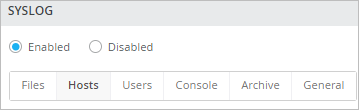
  2. Under All Switches Configuration, find the Syslog section.
  3. If you're on the site-level configuration page, select Override Configuration Template.
  4. Click Enabled.
    Syslog Options on the Configuration Page
    Note:

    After you enable logging, you must set up at least one type of logging.

  5. Use the tabs to configure the log settings.
    For help with these options, see Syslog Options.
  6. Click Save at the top-right corner of the configuration page.