
Remote Shell Access
Configure remote access from the Mist console to the Junos shell for connected devices.
By default, super users and network administrators can open a remote shell connection to any connected EX, SRX, and QFX device,managed or unmanaged, from the Mist console. This is especially useful for running Junos operational (show) commands for troubleshooting, viewing the configuration, or checking connection details and statistics. Note that you can also enter Junos configuration mode to edit the CLI directly, although this practice is discouraged for managed devices because those changes are not visible from Mist console, and any such changes will be eventually overwritten. Instead, we recommend using the CLI configuration for adding Junos commands that are not available in the Mist console.
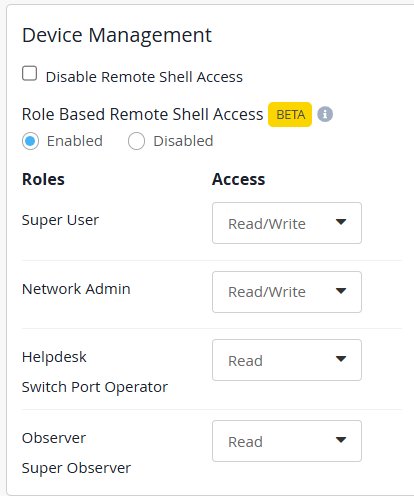
Super users and network administrators can globally disable remote shell access. In other words, for all devices in the organization, and all Mist account levels, new remote connections from the Mist console will be denied. Any existing remote shell connections will remain active, though.
Super users and network administrators can also allow read-only shell access (
monitor , show, test,
quit, help, request session, ssh
user@localhost), for the following Mist account types:
-
Helpdesk
-
Switch Port Operator
-
Observer
-
Super Observer
Configure remote shell access from the Device Management section of the Organization > Settings page.
When you open a remote shell to a device from the Mist console, the Junos privileges will reflect those of your Mist account, either mist-web-admin or mist-web-viewer. Configuration changes are shown on the Insight page as, commit user: mist-web-admin.
Mist will use the existing lo0 (loopback) interface for the connection, if it exists. Otherwise, Mist will provision the interface with an IP address of 127.127.127.1/32, and create a firewall rule, if needed, to allow the traffic.