Help us improve your experience.

Let us know what you think.

Do you have time for a two-minute survey?


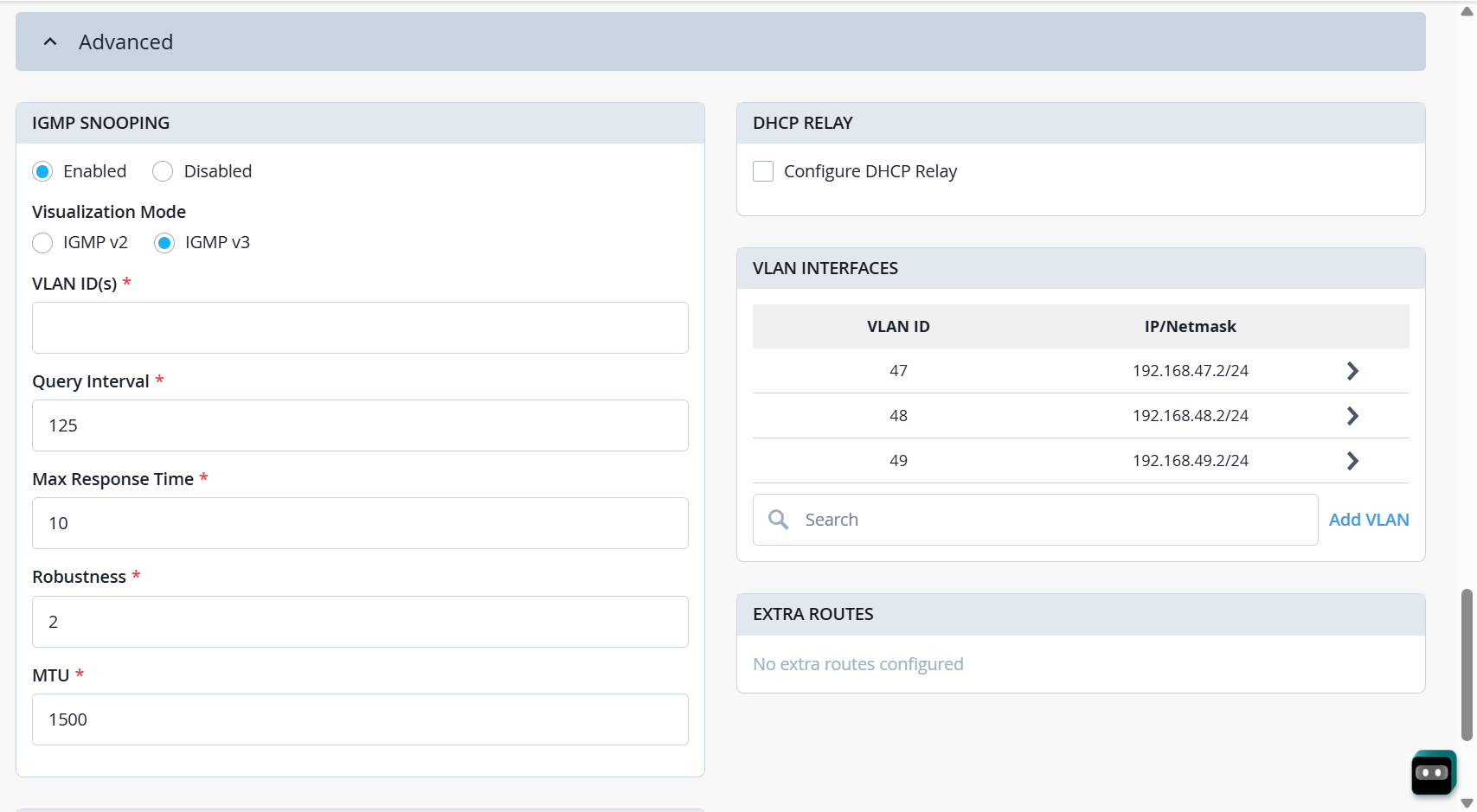
Configure IGMP Snooping

Enable IGMP snooping to ensure multicast traffic is forwarded only to tunnel sessions with active multicast subscribers.

IGMP (Internet Group Management Protocol) snooping is an L2 optimization mechanism that prevents multicast traffic from being flooded to all ports within a VLAN. Without IGMP snooping, every L2TP tunnel session connected to a Mist Edge receives all multicast streams, regardless of client interest, resulting in unnecessary bandwidth consumption and increased CPU utilization on the associated access points (APs). IGMP snooping ensures that multicast traffic is forwarded only to tunnel sessions serving clients that have expressed interest in the multicast group through IGMP Membership Reports.

  1. From the left menu of the Juniper Mist portal, select Mist Edges > Mist Edge Inventory.
  2. In the Mist Edge Inventory page, select the newly created Juniper Mist Edge.
    The page displays the configuration options available for the Juniper Mist Edge.
  3. Expand the Advanced section for IGMP snooping configuration.
  4. Select Enabled button.
    A new section appears with IGMP setting details.
  5. Select the visualization mode: IGMP v2 or IGMP v3.
  6. Specify the VLAN ID details.
  7. Enter the time period in Query Interval field.
    This field defines the time period between IGMP general queries sent by the IGMP querier. The max response time is the maximum time a multicast receiver (host) is allowed to wait before replying to an IGMP Query from the IGMP Querier.
  8. Enter the value in Robustness field to define how much loss of IGMP messages the network can tolerate.
  9. Fill in the MTU as needed.
    IGMP Snooping in Advanced Section - Inventory Page