
Configuration Changes That Impact AP Tunnels and Tunnel Termination Services
Know about the Mist Edge configuration changes that can impact AP tunnels and tunnel termination services.
Certain changes to the Mist Edge, cluster, or tunnel configuration can bounce L2TP tunnels between the access points (APs) and Mist Edges. In some cases, the tunnel termination services are impacted. Table 1 lists the impact of configuration changes on AP tunnels and tunnel termination services.
| Configuration Change | Bounces AP Tunnels | Impacts Tunnel Termination Services |
|---|---|---|
| Mist Edge Configuration | ||
| Name | No | No |
| Cluster/Site | Yes | Yes If you remove the cluster, then the tunnel services on the Mist Edge become inactive. Note that tunnel services become inactive even when you add a Mist Edge to a site or remove a Mist Edge from a site. |
|
IGMP snooping enabled or disabled |
No | No |
| Tunnel IPv4 or IPv6 address | Yes | No |
| Tunnel interfaces (upstream/downstream port mappings) | Yes | No |
| DHCP relay enabled or disabled | No | No |
| VLAN | No | No |
|
Upstream Resource Monitoring |
Yes | Yes If the configured resource is unreachable, the tunnel services become inactive. |
| Mist Edge Cluster Configuration | ||
| Mist Edge added or removed | Yes | Yes If you remove a Mist Edge, then the tunnel services on that Mist Edge become inactive. Note that tunnel services become inactive even when you add a Mist Edge to a site or remove a Mist Edge from a site. |
| Tunnel termination services host added or removed | Yes (bounces all the tunnels for all the Mist Edges that are part of the cluster) | No |
| AP subnets | Yes | No |
| FIPS enabled or disabled | Yes | Yes (restarts the service) |
| Mist Tunnel Configuration | ||
| Client VLAN list | Yes | No |
| Protocol change from UDP to IPsec or vice versa | Yes | No |
| MTU | Yes (causes longer delay in re-establishing AP tunnels) | No |
| Secondary cluster added or removed | Yes | No |
| Tunnel Timers | Yes | No |
| Auto-preemption enabled or disabled | No | No |
| Anchor tunnel enabled or disabled | Yes | Yes (restarts the services) |
| Site Configuration—Mist Tunnels | ||
| Client VLAN list | Yes | No |
| Protocol change from UDP to IPsec or vice versa | Yes | No |
| MTU | Yes (causes longer delay in re-establishing AP tunnels) | No |
| Secondary cluster added or removed | Yes | No |
| Tunnel Timers | Yes | No |
| Auto-preemption enabled or disabled | No | No |
| Anchor tunnel enabled or disabled | Yes | Yes (restarts the services) |
| Site Configuration—Mist Edge Management | ||
| FIPS enabled or disabled | Yes | Yes (restarts the services) |
Changes to switch proxy settings, site proxy settings, and Change of Authorization (CoA) do not impact the tunnels or tunnel termination services.
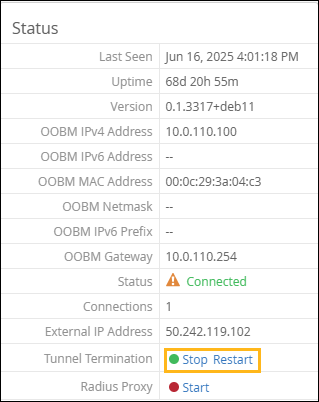
You can stop or restart the tunnel termination services by using the Stop or Restart option on the Mist Edge configuration page.
You can enable the L2TP Tunnel Down alert to be notified when an AP's L2TP tunnel to a Mist Edge goes down and fails to reconnect.
You can enable this alert from the Infrastructure section on the Monitor > Alerts > Alerts Configuration page. See Configure and Manage Alerts and Notifications.