
Marvis Minis Overview
Get familiar with Marvis Minis and learn how it proactively validates your network and application services.
What Is Marvis Minis?
Marvis Minis is a network digital twin, which uses your network infrastructure to assess the network connectivity, client connectivity, and service reachability of your network. By proactively simulating user connections, Marvis Minis can help detect and resolve issues on your wired and wireless networks before they impact users.
Marvis Minis runs validations on active VLANs within a site to assess network connectivity and application reachability for users. Marvis Minis is always on, running validations automatically at regular intervals, and can also be initiated on-demand. A key functionality of Marvis Minis is its ability to detect network or application issues even in the absence of actual users. This proactive approach enables the identification and resolution of potential issues before they affect users.
Marvis Minis validations cover both wired and wireless domains:
-
Marvis Minis for wireless networks runs directly on Mist APs, emulating a wireless client to verify services such as DHCP, DNS, ARP, RADIUS, and application reachability over the wireless network.
-
Marvis Minis for wired networks runs on Juniper EX Series switches, emulating a physically connected wired client on a specific VLAN. and validates DHCP, ARP, DNS, CURL, RADIUS (802.1X), and traceroute.
This video provides an introduction to Marvis Minis.
Marvis Minis, the first AI native networking digital experience twin, shifts network operations from reactive to proactive, elevating end-user experiences while enabling IT to spend less time and money chasing down problems. This is achieved by proactively simulating user connections to instantly validate network configurations and find problems, without users having to be present. Marvis Minis are always on, constantly monitoring your network in real-time.
Minis find misconfigured VLANs, bad firewall rules, application errors, and more, and converts issues into Marvis Actions for proactive resolution and validation. Packet captures can also be initiated to ensure all the right data is present for additional troubleshooting. Marvis Minis are self-configuring and auto-learning, minimizing any need for manual setup and hand-holding.
They are fully integrated with your network infrastructure and come standard with the Marvis Virtual Network Assistant. No extra hardware, software, or clients are required. And because they're AI native, data from Minis is continuously fed back into the MIST AI engine, providing an additional source of insight for the best ongoing AIOps responses.
Find and fix problems more quickly and cost-effectively. Optimize user experiences by solving issues before they even know they exist. And drive more value to your existing network and VNA investment.
That is the power of the industry's only AI native digital experience twin. That's the power of Marvis Minis.
Software Requirements
Marvis Minis does not require any additional software or external sensor hardware except for the following:
-
Marvis Minis for wireless networks—All Juniper Mist™ AP models support Marvis Minis. Marvis Minis is enabled by default on APs running firmware version 0.14.29313 and later.
Note:All APs in the site must run firmware version 0.14.29313 or a later version for Marvis Minis to run validations. If you add an AP running a firmware version earlier than 0.14.29313 to a site, Marvis Minis validations might be interrupted until the AP firmware is upgraded to the minimum required version.
-
Marvis Minis for wired networks—Marvis Minis is supported on EX4100, EX4400, EX4650, and QFX5120 switches running Junos OS version 25.4R2 or later.
Marvis Minis runs hourly validations for DHCP, ARP, DNS and CURL on APs running firmware version 0.14 and later. Critical validations that run continuously have AP model and firmware-specific requirements. This feature is currently available as part of the Beta program and is supported on Wi-Fi6E APs (AP64, AP45/AP45E, AP34, and AP24) running firmware 0.15.x and later. Contact your account team to participate in the Beta program.
Subscriptions for Marvis Minis
Marvis Minis does not require a separate subscription. If your organization already has an active Marvis for Wireless subscription, you automatically have access to Marvis Minis for wireless networks. Marvis Minis for wired networks requires a Marvis for Wired subscription.
Marvis Minis Validation Frequency
Marvis Minis runs the validation every hour even if no clients are connected to the network. If only a few clients experience network failures, Marvis Minis runs a validation to confirm whether the issue is specific to a client or whether it is a network issue.
Validations run as part of the downloadable Minis run continuously.
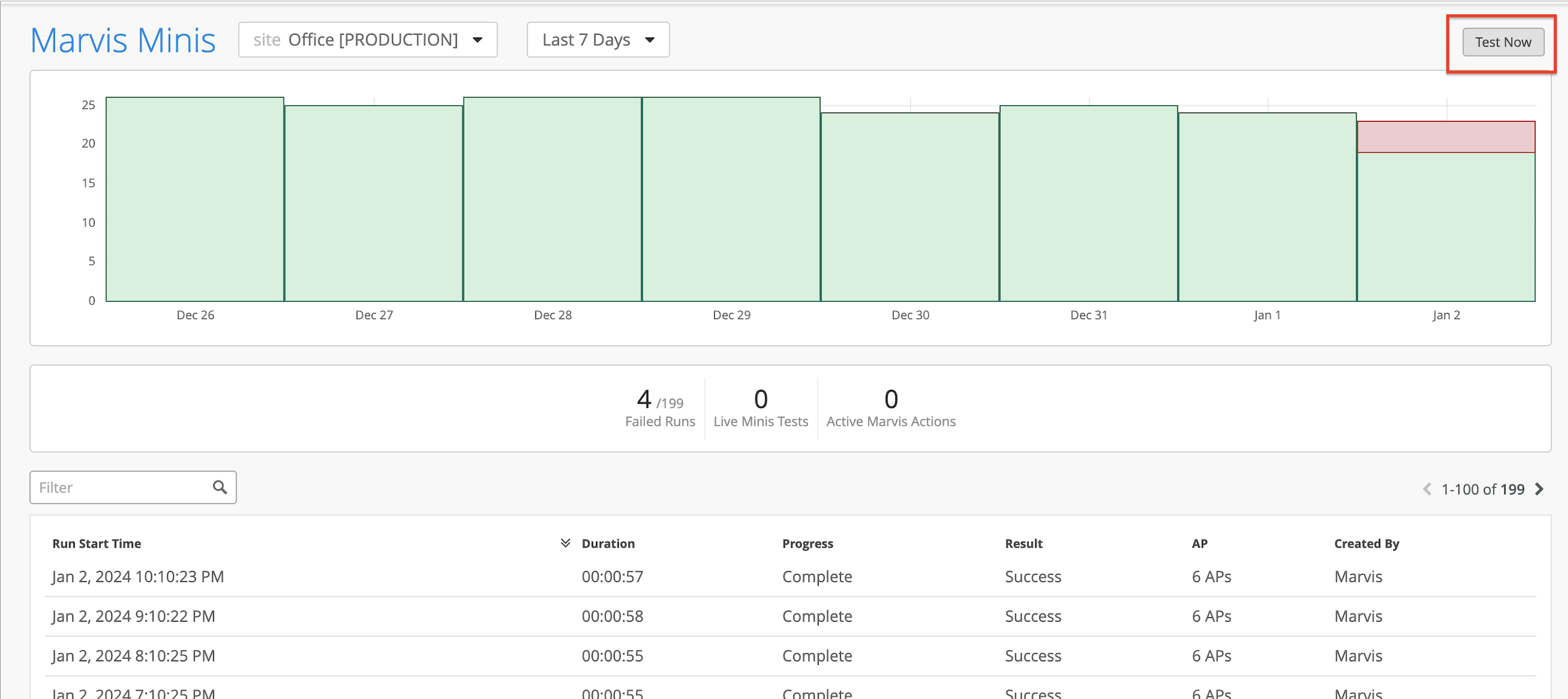
As an administrator, you can initiate an on-demand validation for the wireless network at any time. When a configuration change or hardware change occurs on the wireless network, administrators can click the Test Now button on the top-right corner of the Marvis Minis page (Marvis>Marvis Minis) to initiate the validation immediately. Ensure that you have selected the site you want to test from the site selector drop-down list.
Notice that the Live Minis Tests statistic shows a value of 1, which indicates that a validation is in progress. The table also shows the progress of the validation. Also, note that the Created By column lists User because the validation was triggered manually.
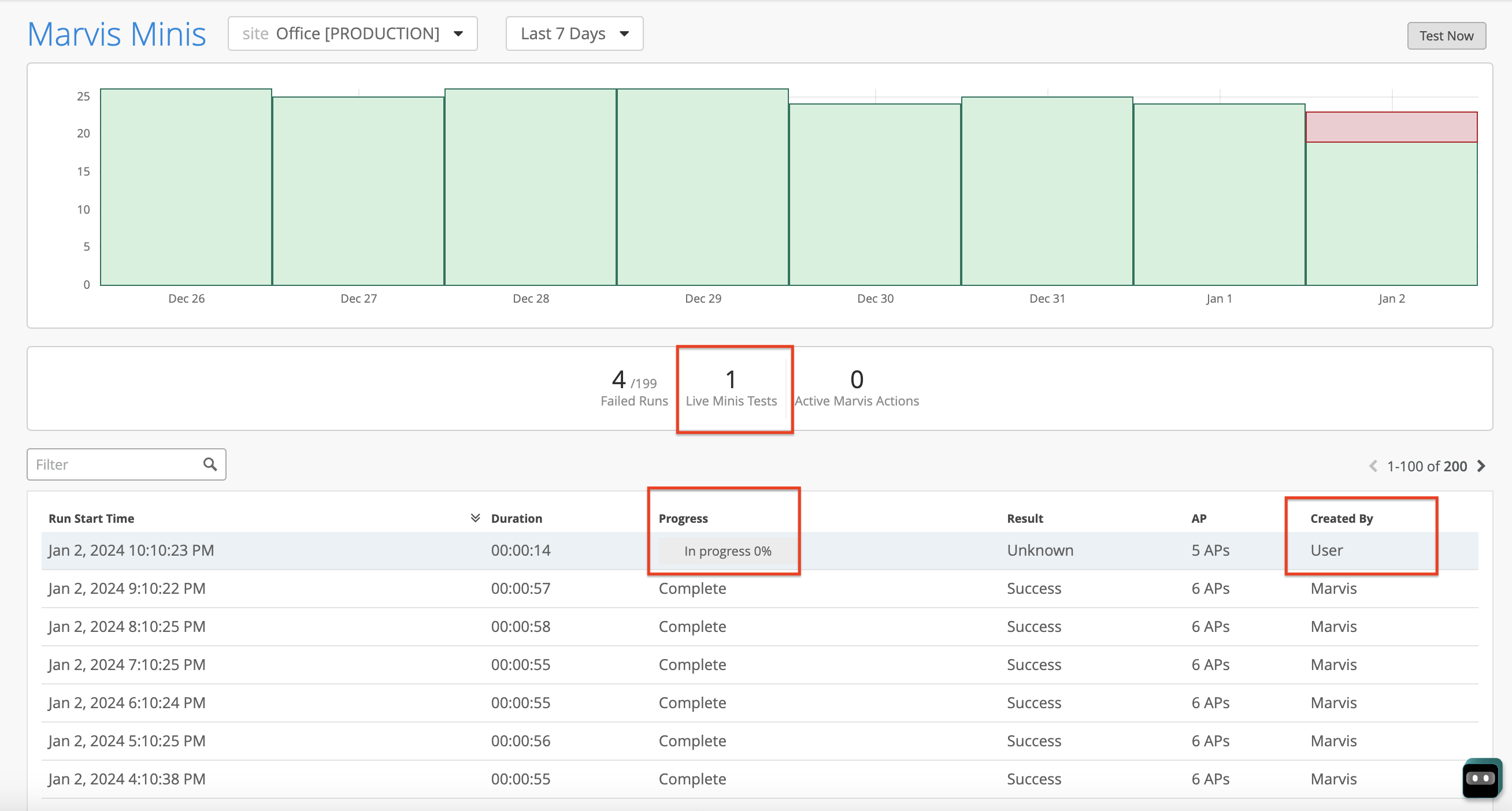
If an automated validation is in progress, you cannot trigger a manual validation.
Wireless and wired validations can run at the same time, but on different VLANs.
Marvis Actions for Marvis Minis
Marvis Actions provides visibility into all the ongoing issues that impact user experience in an organization. Marvis constantly receives data observed by Marvis Minis. Marvis ingests this additional data and lists Marvis Minis-detected failures under the Connectivity category on the Marvis Actions page.
When Marvis Minis detects a DHCP or ARP or DNS failure for a given VLAN ID on all APs (including APs in the expanded validation scope) or switches, the failure is listed under the Connectivity category immediately.
Here is an example that shows how a Marvis Minis-detected failure is listed as an action. Notice that Marvis attributes the failure reason to Marvis Minis validation.
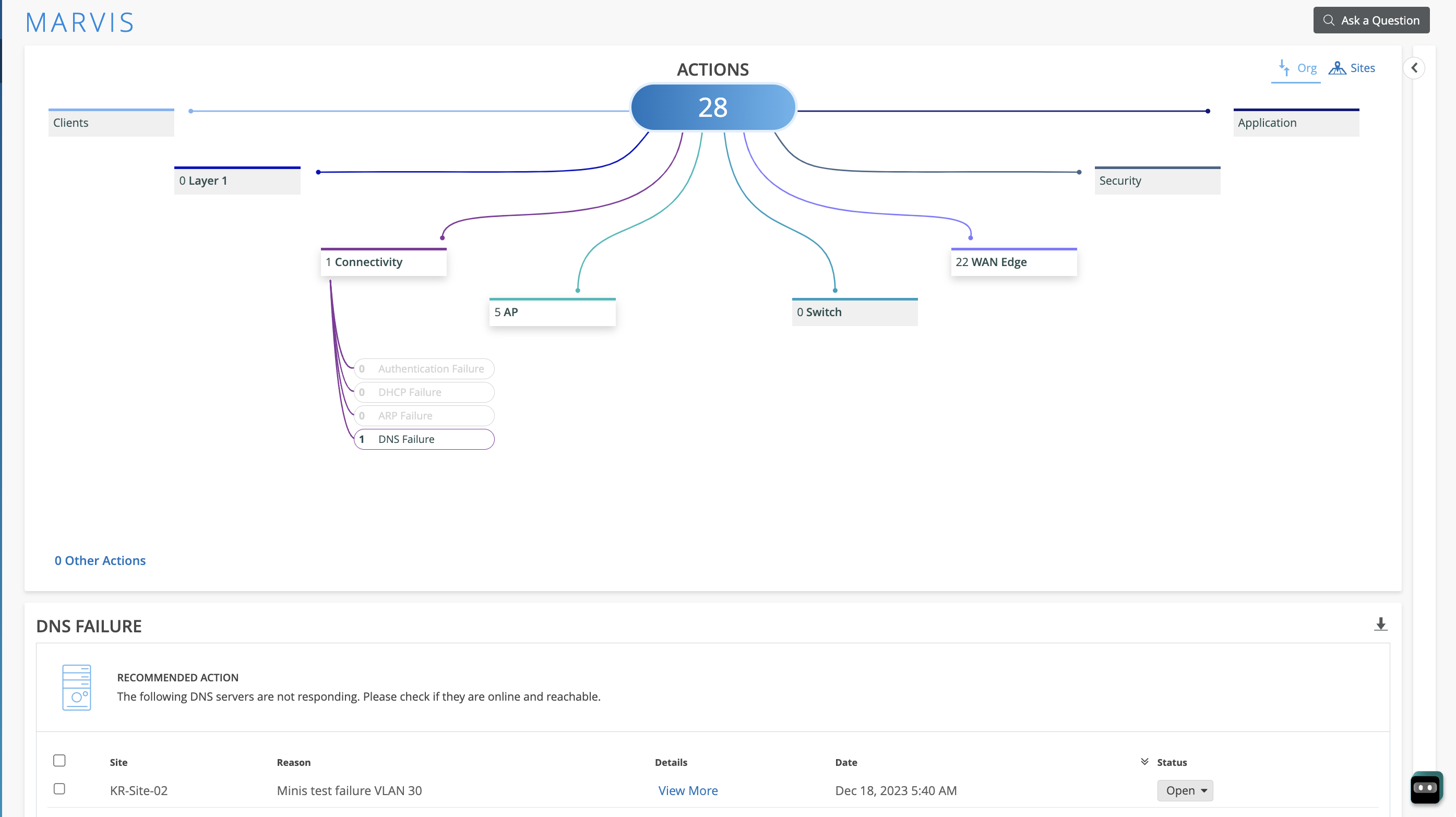
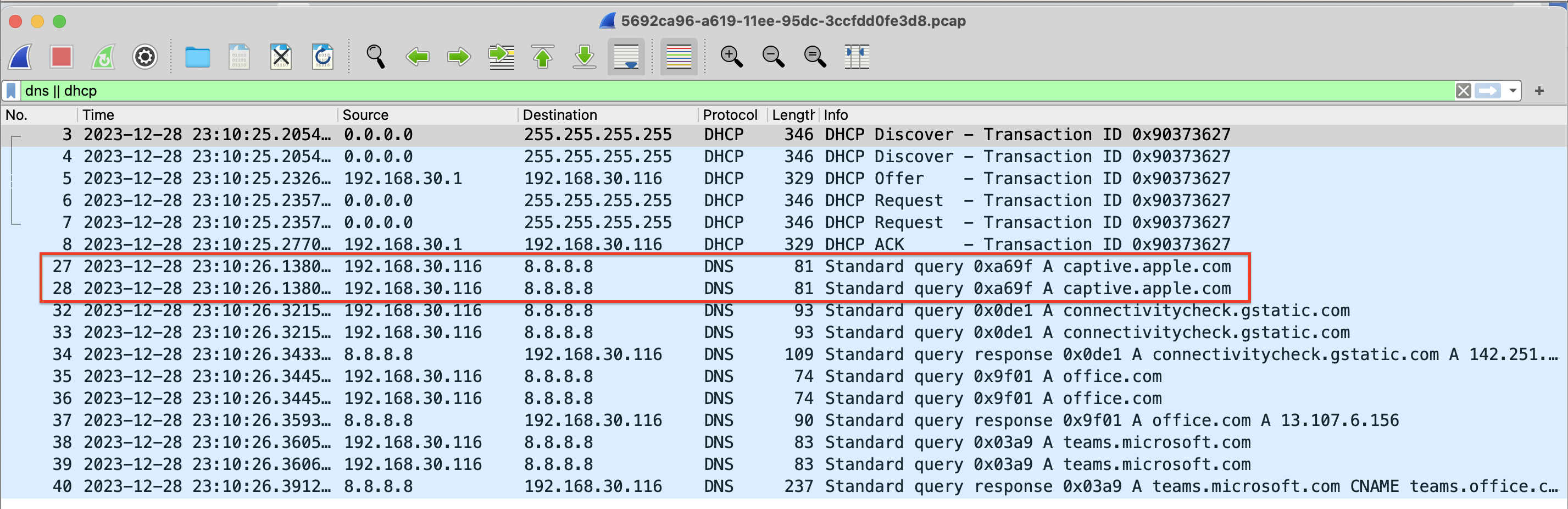
You can click the View More link to view the details and scope of the failure on the Marvis Minis page. You can download the dynamic packet capture (.pcap) file for any Marvis Minis-observed failure in the same way as you would for an end-user client. A paper clip icon adjacent to the AP name indicates that dynamic packet capture is available for the AP. The following screenshot shows the location of the paper clip icon. Click the Download (↓) button to access the packet capture.
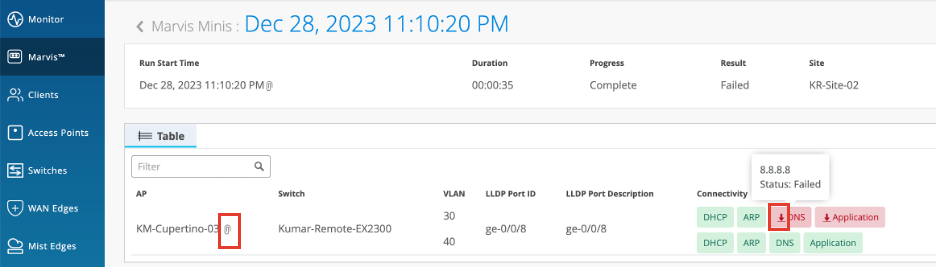
Here is a sample of a downloaded packet capture:
After you fix an issue, it might take up to 24 hours for the Marvis action to disappear from the Marvis Actions page. This resolution time ensures that Marvis does not generate the same action again and rules out reoccurrences of the same issue within 24 hours.