
Marvis Minis SLE Dashboard (Beta)
Get started using the Marvis Minis service-level experience (SLE) dashboard to get end-to-end visibility of the client to cloud user experience.
The Marvis Minis SLE measures the network and application performance based on the validations run by Marvis Minis. Marvis Minis SLEs delve deeper into factors affecting the client-to-cloud user experience helping you understand the impact and scope of issues. These factors are categorized under two types of SLEs—Network Services and Application Services.
-
The Network Services SLE provides insights into the failures that occurred when Marvis Minis initiated DHCP, DNS, ARP, or authentication tests.
-
The Application Services SLE provides insights into failures that occur after Marvis Minis initiated the application reachability and connectivity tests. This SLE provides detailed visibility across the application, LAN, and WAN domains, providing a comprehensive view of application performance across the entire organization. It also provides localized performance data specific to individual sites, enabling detailed analysis of how particular applications are functioning in different contexts.
The SLEs provide a time series view that helps you to quickly narrow down the type of failure and the failure start time. An interactive 24/7 checkerboard chart for each SLE provides an at-a-glance overview of the hourly validation test results. Hovering over a cell on the checkerboard chart displays a tooltip with the exact count of successful and failed tests for that hour, providing quick visibility into test outcomes. You can also delve into the specifics of each test run for more detailed insights.
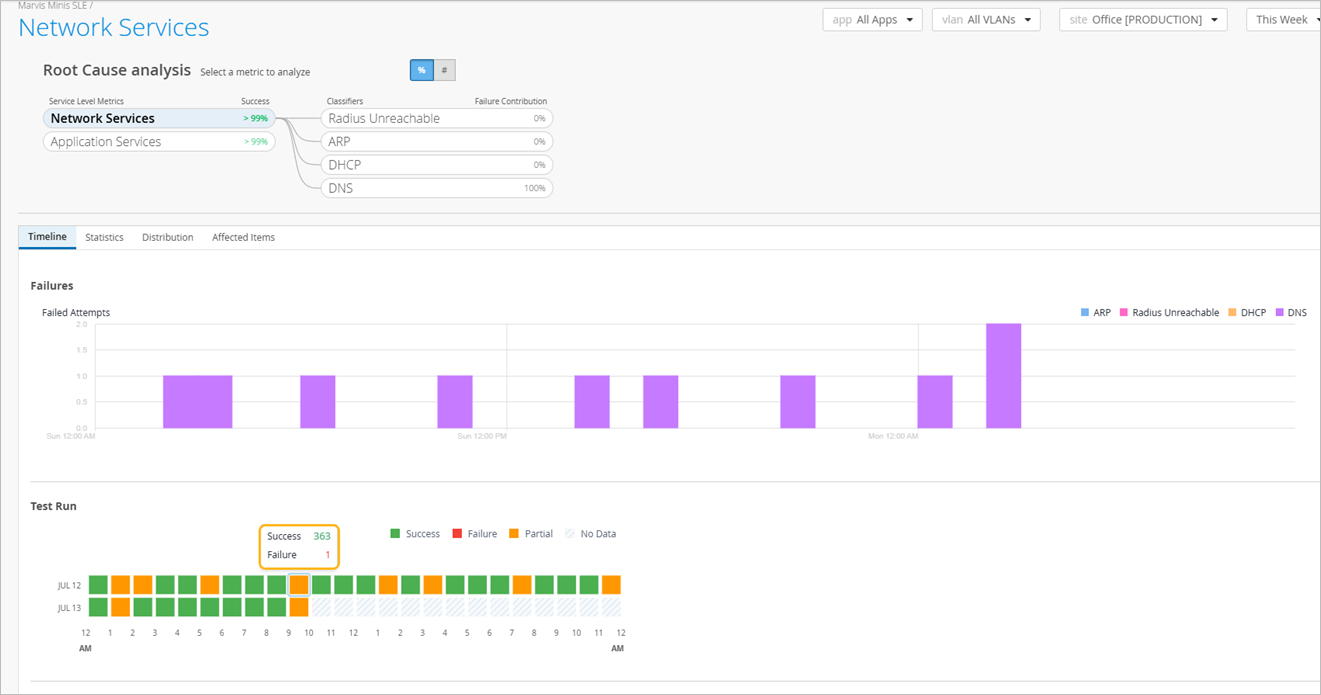
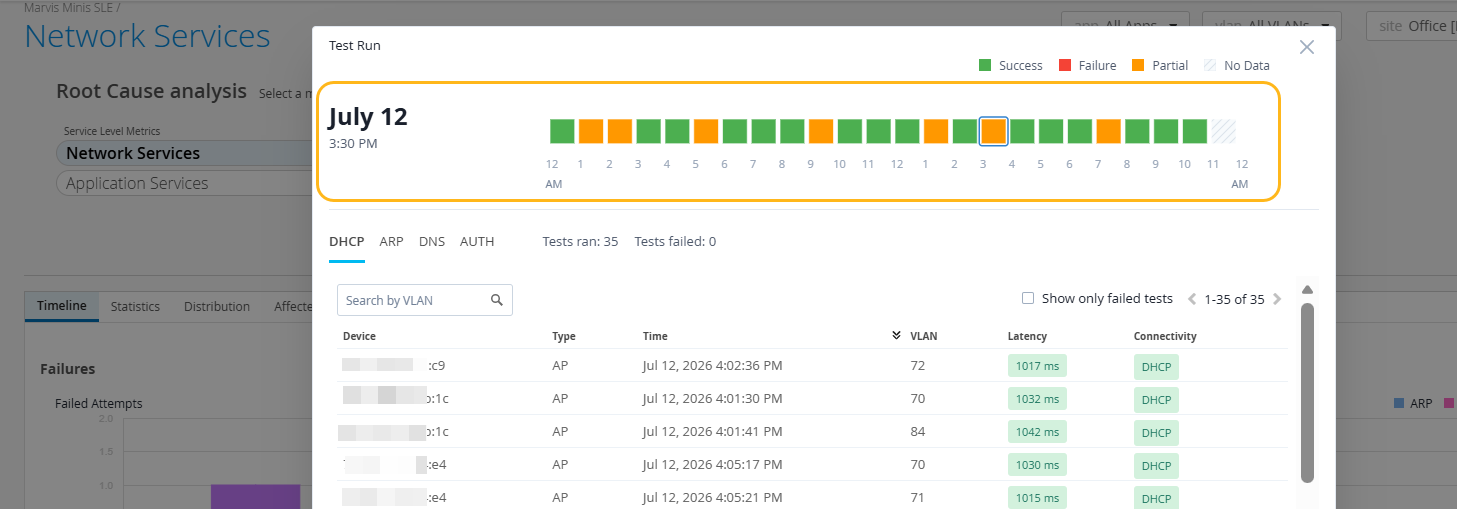
Clicking a cell displays the detailed view with the selected hour highlighted. You can seamlessly move to the previous or next hour directly from the detailed view to analyze trends over time without having to return to the checkerboard chart for each selection. With detailed visibility into site-level and organization-level performance, these SLEs enable early detection and resolution of issues.
Marvis Minis SLE—Intelligent Failure Scoping
Marvis Minis continuously evaluates SLEs across the entire site and automatically generates Marvis actions when failures are detected. If a failure remains unresolved for more than seven days without a meaningful impact, Marvis Minis classifies it as noise and automatically excludes it from SLE calculations. This approach ensures that SLE metrics reflect genuine, actionable issues—so engineering teams can focus their time and attention on problems that truly affect reliability and user experience.
Marvis Minis SLE—Intelligent Reachability Testing (Default Apps and DNS)
Marvis Minis determines Internet reachability by grouping four default applications into a single entity called Default Apps and evaluating the apps collectively. When Marvis Minis detects that Internet access is intentionally restricted at a site, it automatically adapts by excluding Default Apps from the SLE calculation. This approach prevents the scores from being penalized for an intentional network configuration. DNS reachability follows the same adaptive behavior. If DNS is unreachable by design, Marvis Minis auto‑learns this condition and excludes DNS from the SLE.
In these scenarios, only the remaining applicable tests—such as DHCP and ARP—continue to contribute to the SLE. This ensures that you see an accurate, noise‑free view of the services that are expected to function.
Finding the Marvis Minis SLE Dashboard
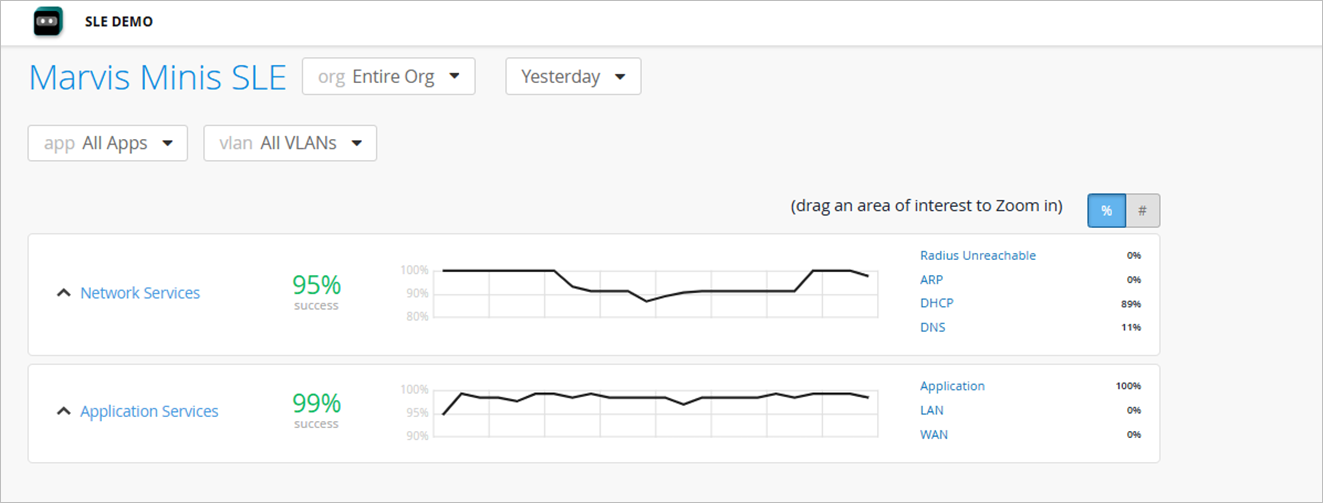
Select Monitor > Service Levels>Marvis Minis SLE from the left menu to view the Marvis Minis SLE dashboard. You can click each SLE to view the Root Cause Analysis page that provides details such as the timeline of failure occurrences, impacted applications and sites.
Filter Marvis Minis SLE Data by Applications or VLANs
You can filter SLE data by a specific application or VLAN using the drop-down lists, both at the organization level and site level.
Here are the different options to view data (applicable to both organization and site level):
-
-
All applications on all VLANs (default view)
-
All applications on a specific VLAN
-
A specific application on all VLANs
-
A specific application on a specific VLAN
-
Subscription Requirements for Marvis Minis SLEs
You do not require a separate subscription to view the Marvis Minis SLEs. Any organization with an active Marvis for Wireless subscription is automatically entitled for Marvis Minis SLEs. Note that Marvis Minis is supported only on APs and switches (authentication) currently.