
HPE Marvis Client Overview
Get familiar with the HPE Marvis Client. Understand how you can use HPE Marvis Client to get visibility into how your device interacts with the wireless network.
HPE Marvis client is a software agent in the form of an app or headless service that is installed on end-user devices to view the network from the client's perspective. You can view detailed data and telemetry about how the client experiences the wireless connection, including insight into client roaming behaviors. The HPE Marvis client recognizes the wireless connection and the corresponding signal strength.
The HPE Marvis client collects data on your device’s Wi-Fi interactions, including signal strength, connection quality, and other network metrics. HPE Mist uses this data to provide a comprehensive view of the device’s network experience. You can use this data to identify potential issues or areas for improvement.
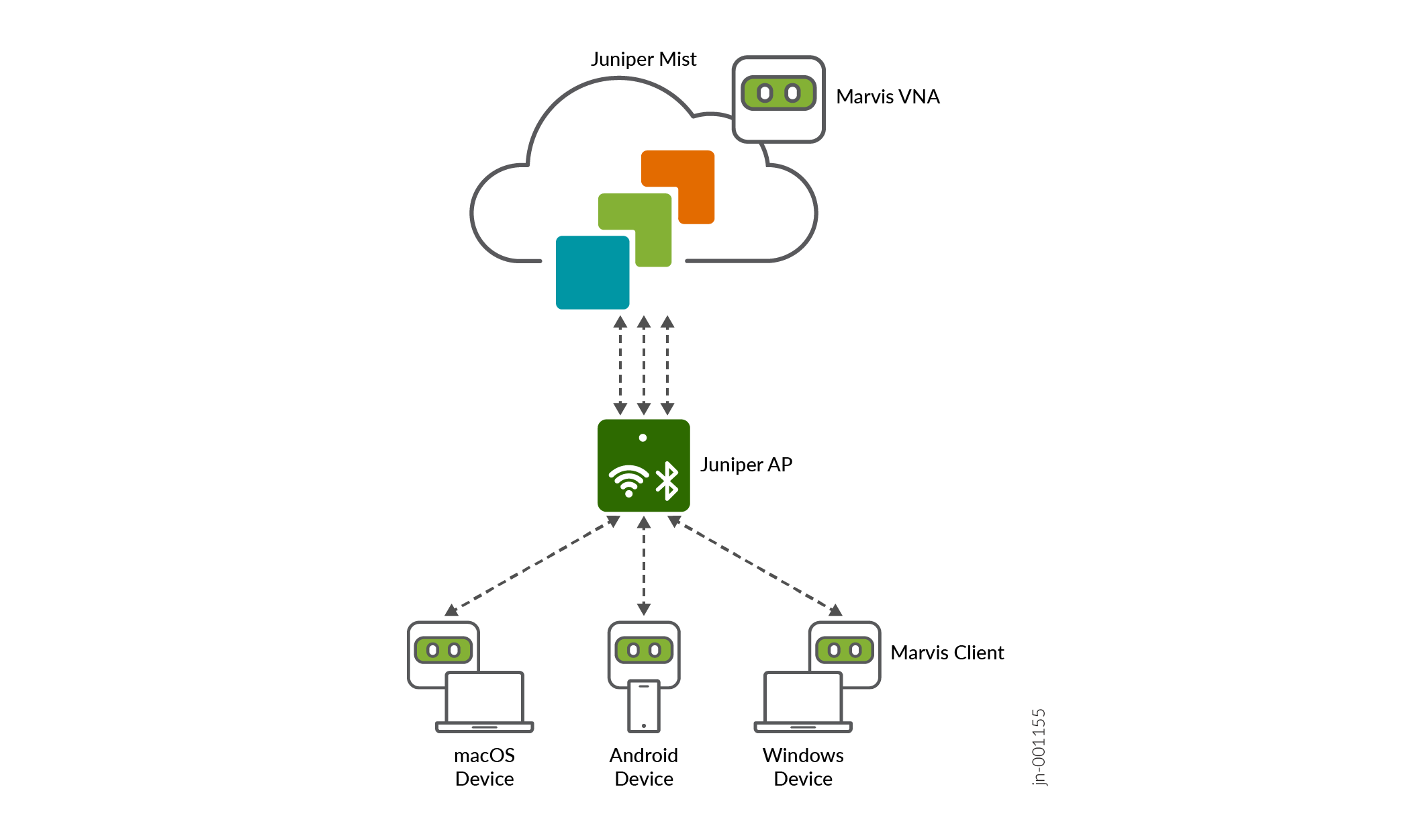
To use the HPE Marvis client, you must install it on a compatible device and connect your device to a HPE Mist AP. You also must have a HPE Marvis subscription. For more information, see Subscription Requirements.
The HPE Marvis client provides an additional layer of detail by displaying device type, manufacturer, and operating system, as follows:
-
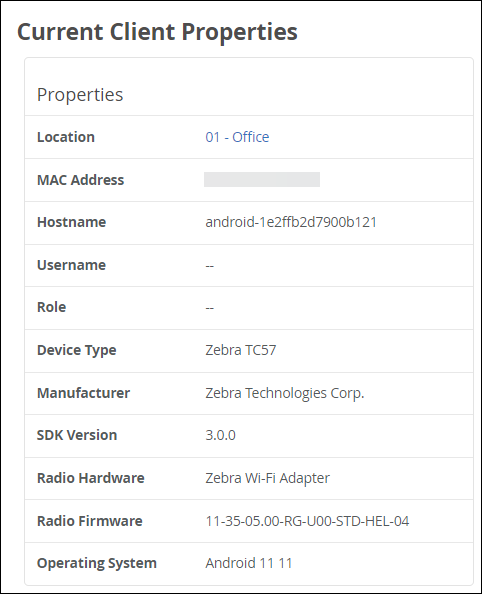
Detailed wireless properties: HPE Mist’s device fingerprinting provides the manufacturer, device type, and OS of the device. The HPE Marvis client enhances this visibility by providing the OS version along with the radio hardware (adapter) and firmware (driver) versions. The HPE Marvis client also enhances the HPE Mist device fingerprinting of the device type and OS version in cases where the other HPE Mist fingerprinting data sources—such as user agent and DHCP fingerprinting—lack accuracy. This level of visibility helps you identify:
-
Exceptions in terms of a device with different properties (such as the OS, radio hardware, and firmware) when compared to other devices of the same type.
-
Device-generic issues (for example, issues due to a firmware version).
-
-
Coverage issues due to asymmetry: An HPE Mist Networking access point (AP) indicates the received signal strength indicator (RSSI) at which it detects a client. The HPE Marvis client provides the RSSI at which the client detects the AP. This data helps you identify asymmetries in the power level between the client and AP. You can then resolve asymmetries that could result in a poor connection.
-
Connection type: You can see when the device switches between a wireless and a cellular connection type, along with the corresponding signal strength.
-
Roaming behavior: Roaming decisions and how a client decides to connect to an AP on a specific band is a client decision. The HPE Marvis client provides visibility into how the client detects the neighboring APs.
The following video provides a high-level overview of the HPE Marvis client.
As a network IT manager, understanding how mobile devices are operating on your wireless network is fundamental. Now, with HPE Marvis client, a powerful software agent that is compatible with Android, Windows, and macOS devices, you can open up the window into Wi-Fi experiences from the user's perspective. By collecting critical data including device profiles, Wi-Fi signal quality, and roaming behavior your team can pinpoint issues before they impact users. This real-time telemetry is transmitted to the HPE Mist Cloud where HPE Marvis and HPE Mist analyze the data and provide actionable insights. For example, it can monitor connection events, identify coverage gaps, and flag devices with out‑of‑spec configurations. HPE Marvis client empowers you to make informed decisions, reducing troubleshooting time and optimize Wi-Fi performance like never before. That's HPE Marvis client in 60 seconds.
HPE Marvis Clients View in the Management Portal
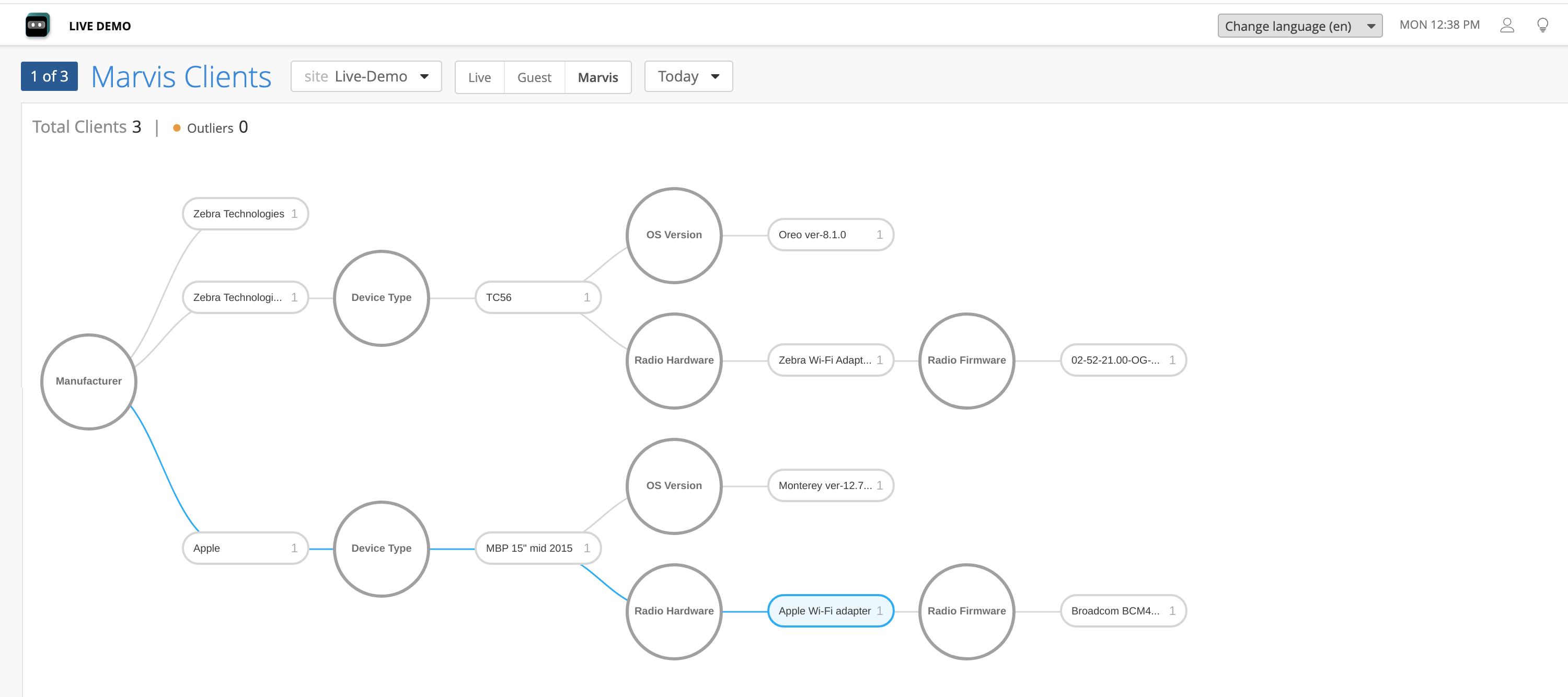
You can view all connected HPE Marvis clients directly on the HPE Mist management portal on the Wi-Fi Clients page (Clients > Wi-Fi Clients > HPE Marvis tab). You can view a graphical representation of your HPE Marvis clients and their detailed information including manufacturer, device type, OS version, and radio hardware and firmware. You can see the current and historical snapshots of the connected clients in a specific site.
The HPE Marvis clients page also highlights possible outliers that do not conform to the properties (for example, radio firmware version) seen for other clients with the same manufacturer or device type.
You can select either the Tree or List view to display your HPE Marvis clients, as follows:
-
Tree view: Groups clients based on their properties. HPE Marvis classifies the clients by manufacturer, device type, OS version, radio hardware, and radio firmware. The tree view displays the total number of HPE Marvis clients for the specified site and time range.
-
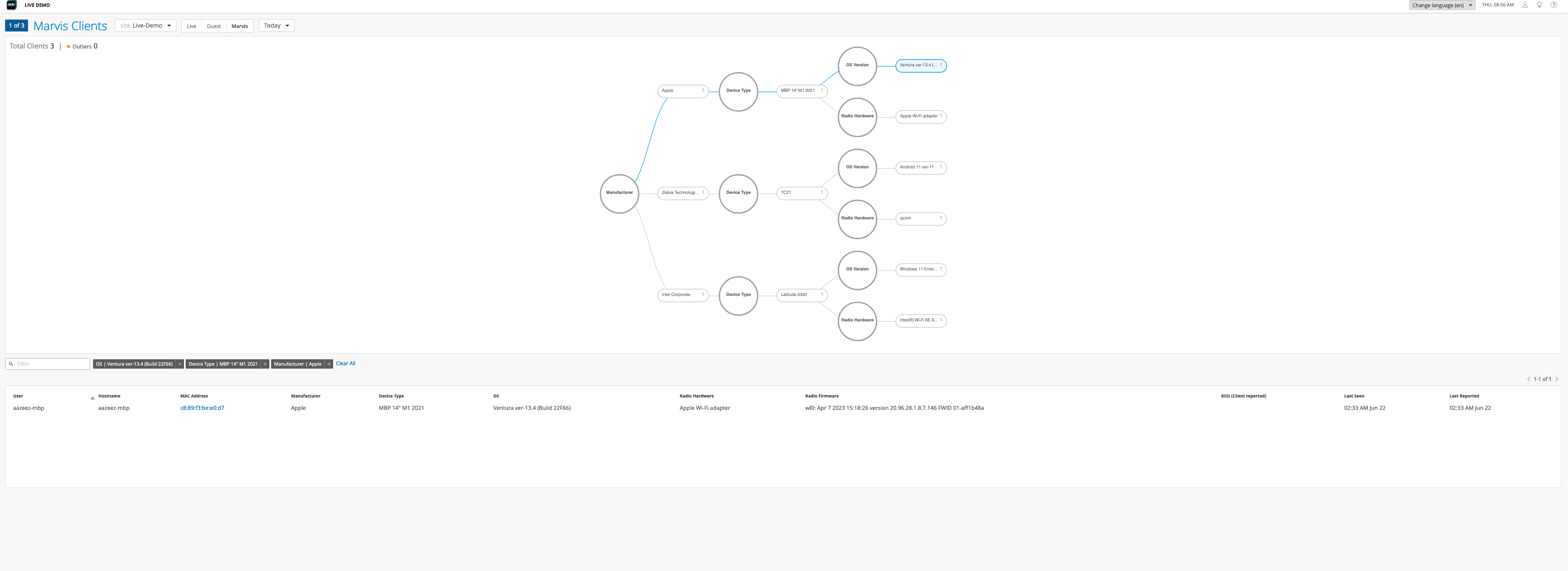
List view: Presents client information in a tabular format. The default columns include user, hostname, MAC address, manufacturer, device type, device OS, radio hardware, radio firmware, and client-reported RSSI value. The list view displays up to 50 clients on a single page. You can navigate between pages by using the arrow buttons located on the top-right corner of the list.

You can filter the list view by entering keywords in the search filter located at the top-left corner of the list. You can also filter the list view by clicking any client property in the tree view. When you click a property, the selected property and the path from the root property to the selected property are highlighted. You can then see the applied filters above the list view.
Subscription Requirements for HPE Marvis Client
You'll need a HPE Marvis Client (S-VNACLIENT) subscription per client.
Supported Devices
The HPE Marvis client is supported on the following devices:
-
Android—Oreo 8.0 and later releases
-
Windows—10 or later releases
-
macOS—macOS 12 or later releases