
Appendix: Test Case Information
This appendix provides a step-by-step guide for creating the base SD-WAN topology, which serves as the foundation for deriving the four additional tested topologies. The base topology addresses common challenges frequently encountered in SD-WAN deployments, such as the use of site variables for scaling and the management of multiple paths typical in modern SD-WAN VPNs.
After the five different topologies, we describe how to build and test all additional features you may or may not use in an SD-WAN design.
If you need help getting a full description of configuration items, please refer to the WAN-Edge for SSR description on the Juniper website which has all this detailed information.
General WAN Edge Workflow
This overview illustrates how to use the Juniper Mist portal to provision a simple hub-and-spoke network using Session Smart Routers. Conceptually, you can think of the network as an enterprise with branch offices connecting over a provider WAN to on-premises data centers. Examples include an auto parts store, a hospital, or a series of point-of-sale kiosks—anything that requires a remote extension of the corporate LAN for services such as authentication or access to applications.
We assume that before you begin configuring WAN Assurance in your sandbox, you have onboarded your hardware to the Juniper Mist cloud. We also assume and that the physical connections (cabling) needed to support the configuration are in place and that you know the interfaces, and VLANs are valid for your sandbox.
The figure below illustrates the workflow for configuring SD-WAN using the Juniper Mist portal.
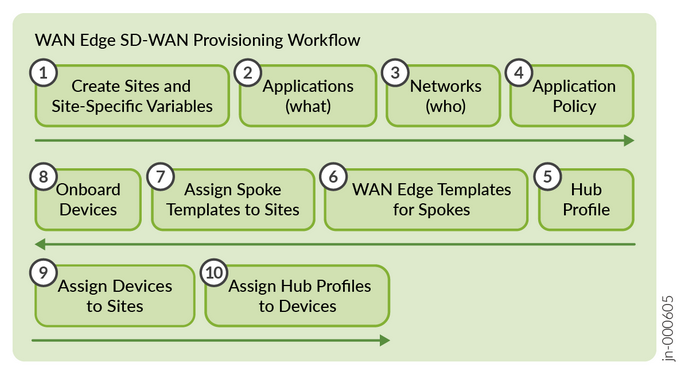
The sequence of configuration tasks in this example:
- Create Sites and Variables—Create a site for the hubs and spokes. Configure site variables for each site. You use these variables later in the templates for WAN edge devices and the hub profile.
- Configure Applications—Applications are destinations that you define using IP prefixes. Applications represent traffic destinations.
- Setup Networks—Define the networks. Networks are the source of traffic defined through IP prefixes.
- Create Application Policies—Application policies determine which networks or users can access which applications, and according to which traffic steering policy.
- Create hub profiles—You assign hub profile to standalone or clustered devices to automate overlay path creation.
- Create WAN edge templates—WAN edge templates automatically configure repetitive information such as an IP address, gateway, or VLAN when applied to sites. See Configure WAN Edge Templates.
- Assign Spoke Templates—Each spoke template needs to be assigned to a site where you intend to launch a spoke.
- Onboard devices—Onboard your devices so that they appear in the Juniper Mist cloud inventory.
- Assign devices to Sites—From the inventory, each device must be assigned to its site. For spokes, after this is performed, the template assigns, and the site variables enable the configuration of the spoke to be pushed to the device from Juniper Mist cloud.
- Complete the onboarding by attaching hub profiles. For each hub profile using the site variables.
Feel free to do additional tasks after this phase like configuring additional features, device updates or Day 2 monitoring of networks, devices and applications.