
Use Case and Reference Architecture
Before exploring the integration in more detail, it is important to review how the fabric normally operates and forwards packets. Understanding how a Layer 2 (L2) VLAN at an access switch, where wired and wireless clients connect, communicates with other VLANs that contain clients and how traffic is forwarded through the WAN router toward the internet is essential.
Basic Forwarding Operation of a Fabric
Except for special cases such as the rarely used bridged overlay option, it can generally be assumed that all VLANs in a fabric are connected to at least one global Virtual Routing Function (VRF). Most environments use several VRFs. By design:
- The fabric VRF contains the default gateway IP address for each VLAN client connected at the access switch. Wired clients use this IP address when they need to leave the fabric or communicate with clients in other VLANs within the fabric. This default gateway can be configured statically on the client or provided through a DHCP lease.
- VLANs connected to the same VRF can communicate directly and exchange traffic. This east-west traffic is handled entirely within the fabric. If traffic control is required within a VRF, it is typically implemented using ACLs or, if supported by the fabric, VXLAN group-based policies (GBP) deployed on the access switch.
- VRFs are isolated from one another by design as a security measure. As a result, all traffic between VRFs must be forwarded to the WAN router for security inspection. If the WAN router permits the traffic, it is then sent back to the fabric and forwarded to the destination VRF. This approach ensures that inter-VRF traffic is always enforced through north-south inspection on WAN router.
Virtual Gateway Fabric Versus Anycast Fabric
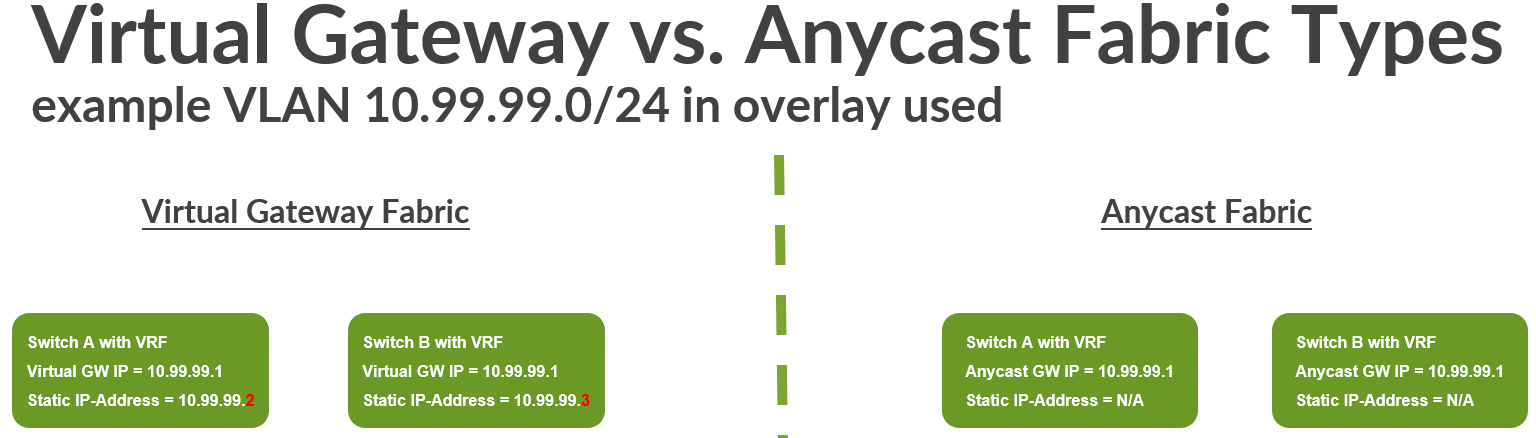
Depending on the fabric type, the overlay VLANs that carry client traffic may require additional IP addresses for internal functions, which is the case in Virtual Gateway fabrics. Juniper Mist campus fabrics support the following fabric types:
| Fabric Type | Virtual Gateway Fabric | Anycast Fabric |
|---|---|---|
| EVPN Multihoming Fabric | Yes | --- |
| Central Routed and Bridged Fabric (CRB) | Yes | --- |
| Edge Routed and Bridged Fabric (ERB) | --- | Yes |
| IP-Clos Fabric | --- | Yes |
In a Virtual Gateway fabric, the number of VRFs in the fabric is typically small and they are located on the core or collapsed-core switches. Since a Juniper Mist campus fabric supports a maximum of four core or collapsed-core switches, a given VRF may be duplicated on each of these switches, resulting in up to four instances of the same VRF within the fabric. In contrast, Anycast fabrics are designed for larger-scale deployments. In these designs, VRFs can be located on distribution switches in ERB architectures or even on access switches in IP Clos fabrics.
A key characteristic of Virtual Gateway fabrics is that the system assigns an additional static IP address for each VLAN within a VRF. This address is unique per VRF instance. As a result, in addition to the primary gateway IP address for the VLAN, each subnet requires up to four additional IP addresses, corresponding to the maximum of four core or collapsed-core switches supported in a Juniper Mist campus fabric.
This design provides benefits for certain fabric services, such as DHCP relay. When forwarding DHCP client requests from a VRF, the system uses the static IP address rather than the VLAN gateway IP address. Because this static IP is unique to the combination of VLAN and core switch within the VRF, the DHCP server can return the response directly to the correct VRF instance.
Another way to understand a Virtual Gateway fabric is to compare it with traditional Layer 2 gateway redundancy designs such as VRRP. In those designs, a virtual IP address floats between multiple gateways, and each gateway also requires its own unique IP address within the VLAN. In a Juniper Mist campus fabric, VRRP is not required because the EVPN control plane provides the necessary gateway redundancy.
The requirement to reserve additional static IP addresses in each VLAN is not present in Anycast fabrics. In those designs, VRFs are placed on distribution or access switches that may scale more broadly, which would otherwise require extensive IP address planning as the network grows. As a result, system services such as DHCP relay operate differently in Anycast fabrics and rely on more complex internal mechanisms.
When creating a new VLAN, the fabrics default gateway IP address is the lowest host IP address of a subnet. In case of a Virtual Gateway fabric, the maximum four additional static IP addresses needed are usually increments of that lowest host IP address of a subnet. As a best practice, performing manual changes to the gateway IP addresses and static IP addresses should be avoided. Changing those addresses can create confusion for others managing the fabric.
Service Block Function of a Fabric
When designing the connection of the fabric to the WAN router, you will leverage a so-called service block function. You may also find the terms service leaf or border leaf used in other literature. The service block function is meant for all kinds of integration scenarios such as:
- WAN router integration in a fabric.
- Server attachment for any kind of local services your fabric
needs to provide such as:
- DHCP server for fabric VLANs.
- File services
- Webservers
- Juniper Mist Edge for wireless network overlay
- Many more services
- All kinds of migration scenarios with legacy fabrics and network designs
A service block function in a Juniper Mist campus fabric can be either virtual or physical depending on the design of the fabric.
- A virtual service block function is a co-located function that is usually added to a fabric node that usually has a different function. In our case, which means that the service block function is added to the core switches of the fabric. This is the default design that enables you to deploy a fabric with minimal hardware footprint.
- A physical service block function always consists of a pair of dedicated switches north of the core switches in the fabric. You can think of these as a pair of dedicated distribution switches swapped to the top of the fabric. Hence, it is also recommended to use hardware similar to your distribution switches.
The image below shows both designs, with the physical service block function shown on the left side of the image and the virtual service block function on the right.
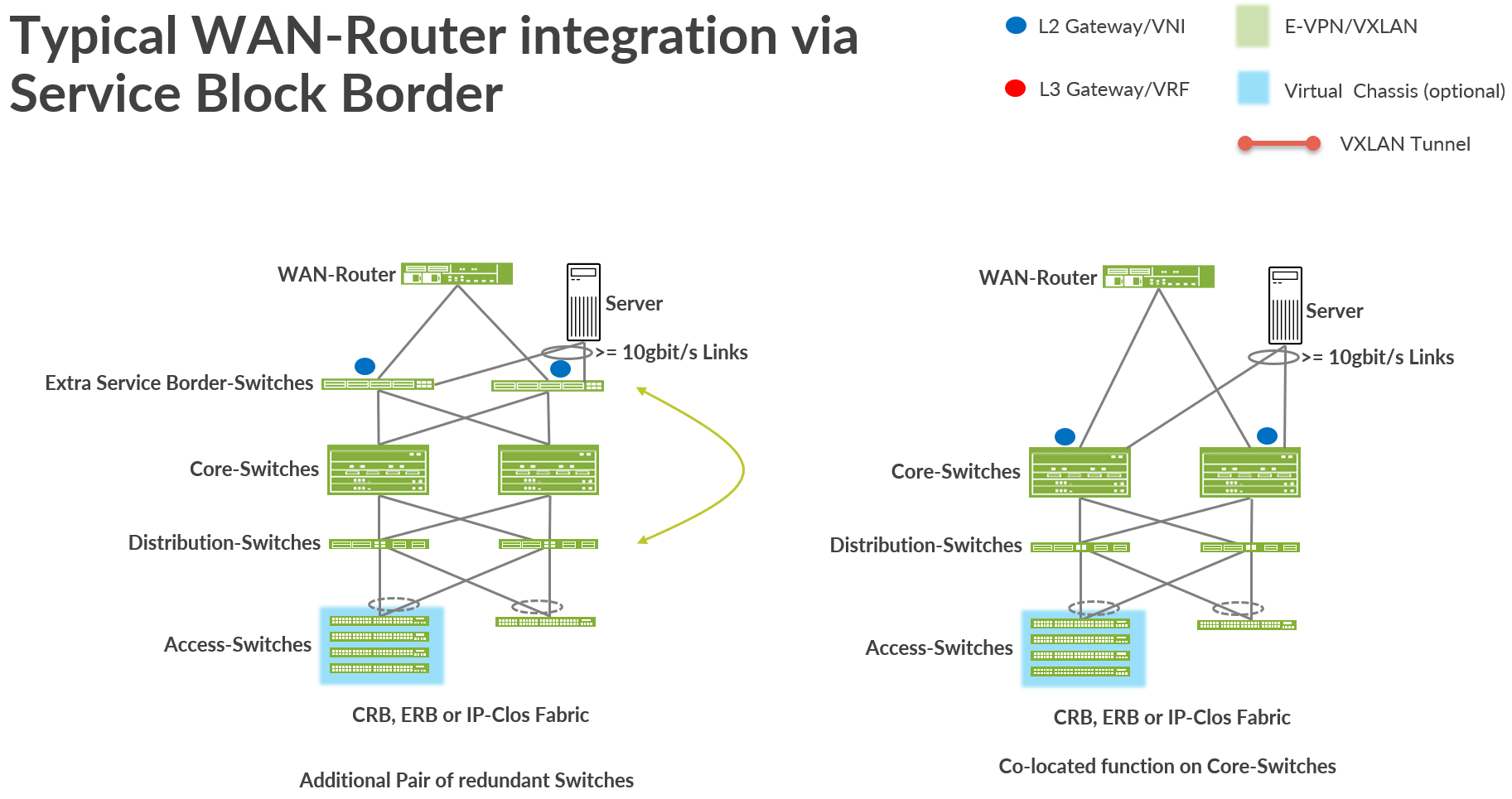
When deploying a service block, it’s typically the scale, local port or interface usage, and port speed and density of the core switches that influence the decision between using a virtual or a physical switch deployment. We recommend that you consider the following:
- Apart from the WAN routers do you have enough ports left for future server attachment?
- Do the supported port speeds match with what you want to attach?
- Can a physical service block function present a scale limit in the future?
- The speed of the connected WAN router. Remember that all VRF-to-VRF traffic must go through the WAN router by design.
When the fabric grows in the future to more than two core switches, then you must have a dedicated pair of physical service block switches for the service block function.
WAN Router Integration Using Service Block Function
There are several ways you can attach a WAN router to a fabric for traffic towards the internet. Usually, the way you attach the WAN router depends on the service block function of the fabric.
You can attach the WAN router:
- Using a Layer 2 Method:
- VLANs present at the access layer of a VRF, as well as any additional transport VLANs associated with the VRF, are shared through a trunk interface connected to the WAN router.
- The trunk links between the service block function of the fabric and the WAN router must use IEEE 802.3ad LAG with LACP to detect link failures or missing devices. Spanning Tree Protocol cannot be used in this scenario. On the fabric’s service block function, an ESI-LAG is configured to support this design. On the WAN router side, a standard IEEE 802.3ad LAG with LACP and active link management is sufficient. If the WAN router vendor does not support this functionality, a Layer 3 integration method should be considered.
- In the campus fabric configuration dialogue for each VRF, a manual route must be defined with a static IP address for default traffic destined for the internet or other VRFs. This static IP address must be reachable through the WAN router.
- The WAN router must have this static IP address configured on an interface connected to the service block function of the fabric so that it is reachable. Redundancy for this static IP address should be implemented using a Layer 2 gateway redundancy protocol. The use of VRRP is strongly recommended, with the static IP address configured as the virtual IP.
- On the WAN router, you may also need to define additional static routes for the VLANs associated with a VRF.
- Using a Layer 3 Method:
- The links between the service block function of the fabric and the WAN router are configured as Layer 3 (L3) point-to-point connections with IP addresses. These links must be individually configured on each service block function of the fabric and the corresponding WAN router interface.
- Each point-to-point link must be assigned a VLAN name that is also associated with the VRF in the fabric. Through this indirect association, the Juniper Mist cloud can reference and bind the appropriate VRF to the link. The VLAN ID assigned to the point-to-point link also provides isolation from other VRFs using the same connection.
- In the campus fabric configuration dialogue for each VRF, no additional static route toward the WAN router is required, as the fabric learns this information from the WAN router through a supported routing protocol.
- Policies must be created to control the import and export of routes between the fabric and the WAN router.
- A Layer 3 routing protocol must be used to exchange routes and
enable forwarding between the fabric and the WAN router. The
currently supported options include:
- Exterior BGP, which is recommended.
- OSPF, which should be used if eBGP is not supported on WAN router or it is a customer requirement.
- It is also possible to combine the usage of IEEE 803.2ad LAG with a layer 3 peering method such a BGP. Examples of such can be found in Appendix: WAN Edge SSR or SRX Juniper Mist Cloud-managed eBGP Peering via Active/Passive LAG .
We recommend using the Layer 3 exterior BGP-based method wherever this is technically possible from the first day on. Even if it is initially a higher effort to configure, it will be the only method in the future to achieve new features such as Data Center Interconnect (DCI).
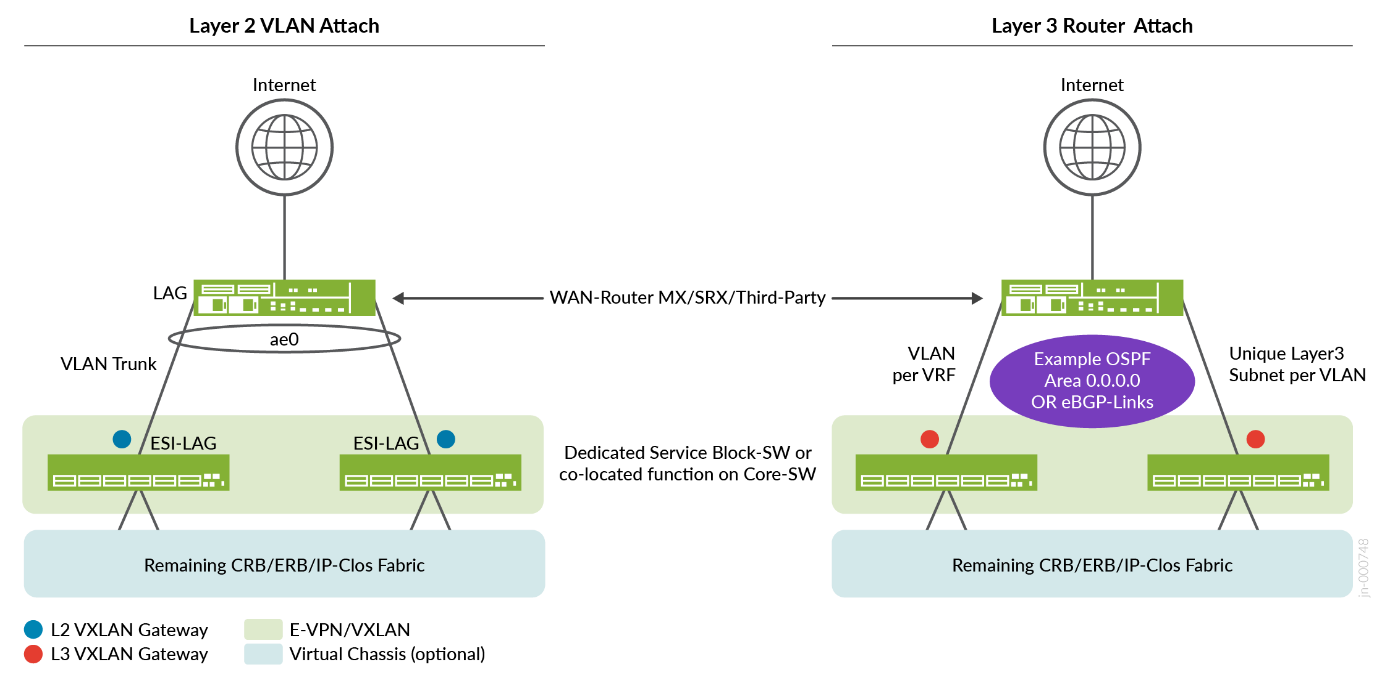
Layer 2 WAN Router Attach Details
Layer 2 WAN router attachment methods should generally be used only in lab environments or small fabric deployments. Even in these cases, if a redundant WAN router design is required, the WAN router must support IEEE 802.3ad LAG with LACP as well as a Layer 2 gateway redundancy mechanism such as VRRP. Without support for both features, it is not possible to build a reliable redundant WAN router design, and failures may occur at some point.
If you use a Layer 2 method, you have the following options:
- Treat the entire fabric as a large Layer 2 switch by using the bridged overlay model.
- Stretch at least one VLAN from the access layer to the WAN router, where the WAN router has an IP address in that VLAN that serves as the default gateway for the VRF. This approach is not recommended for production environments.
- Define a dedicated transport VLAN for each VRF. This is the recommended approach when using a Layer 2 exit design.
The bridged overlay model allows you to handle all the Layer 3 (L3) gateway functions of a VLAN directly on the WAN router itself. Many technical drawbacks might prevent you from using certain features of the fabric. If you want to migrate directly from a legacy design, you can use the bridged overlay model, so we describe the uses and benefits of that model here:
- There are no VRFs configured anywhere in the fabric. Therefore, the fabric acts like a large, distributed Layer 2 switch.
- All traffic is anchored outside of the fabric at the external WAN router.
- The WAN router must play the role of the default gateway in each VLAN.
- VLANs can communicate with each other only through the WAN router. As a result, all east-west traffic between VLANs is forwarded to the WAN router first for inspection and processing.
- Every VLAN used on access ports within the fabric must also be configured on the uplink ports connected to the WAN router.
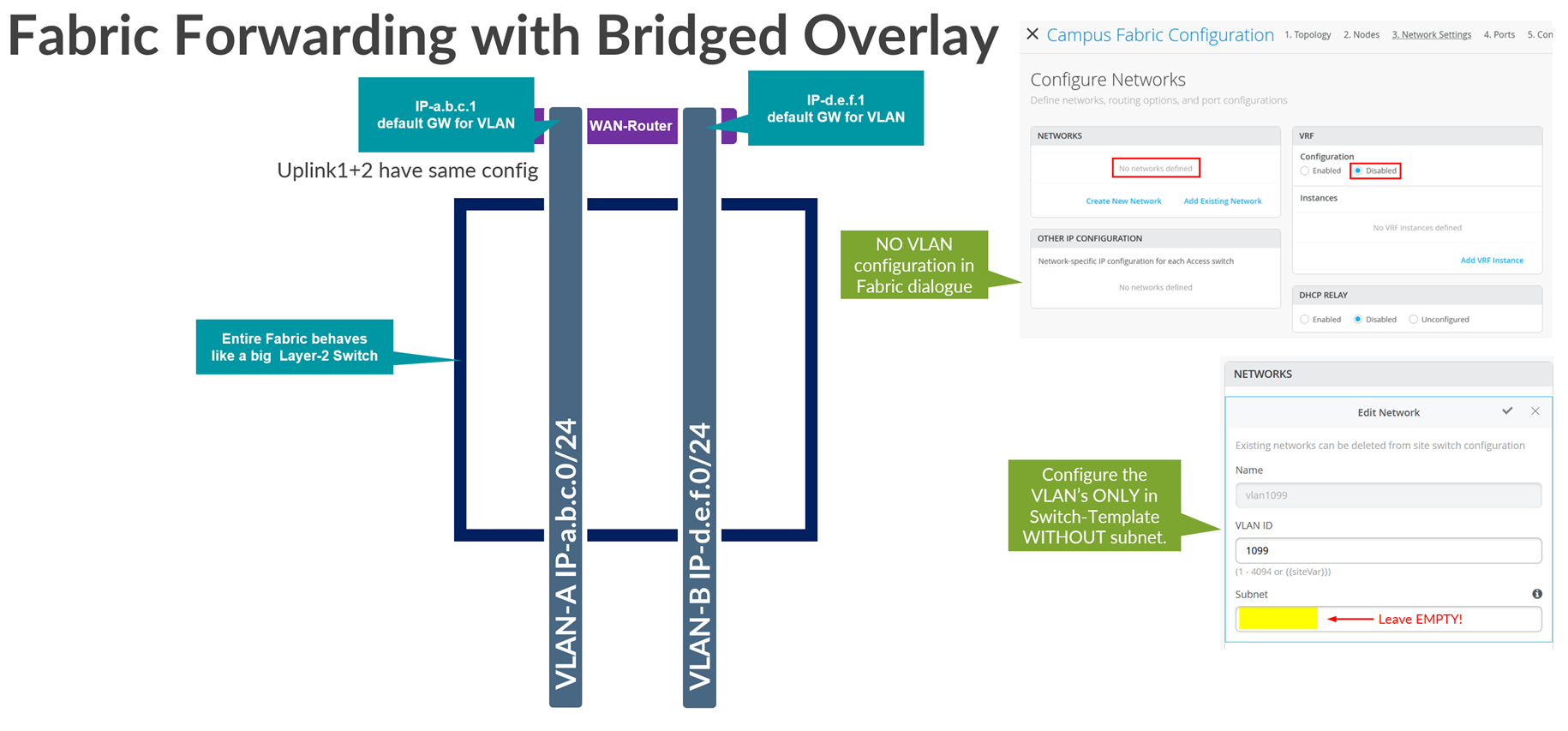
The following lists the known limitations of the bridged overlay approach:
- There is a limit of around 250 VLANs you can use with this approach. This is mainly because the WAN router cannot provide more than 250 VRRP groups for gateway failover. You can confirm this with the WAN router vendor.
- If DHCP relay is required, then it must be configured on the WAN router.
- This model allows the WAN router to be the DHCP server for your VLANs. However, it also means that you must configure DHCP lease redundancy between two WAN routers when those WAN routers are deployed as an HA pair.
- All east-west inter-VLAN traffic on the fabric must flow through the WAN router.
- The Juniper Mist cloud portal is unable to display IP address information about wired or wireless clients. This is because this information is gathered and reported to Juniper Mist cloud through the EVPN fabric VRF.
When implementing bridge overlay in an IP Clos fabric, some features may be lost. Since inter-VLAN traffic is always forced to exit the fabric—and VXLAN headers are stripped before reaching the WAN router—GBP become limited in functionality. As a result, GBP can only control or block traffic between clients within the same VLAN. It is not possible to manage traffic between clients in different VLANs, even if they belong to the same VRF.
A combination of the bridged overlay method and some other method to achieve a hybrid design is technically possible. Such a combination is often used when customers decide to provide a separate path (VLAN) for guest access that must not interfere with the fabric VLANs used for regular clients.
Now let’s review the other two most commonly used Layer 2 models:
Stretched VLAN: This is the method used in labs to make fast progress when attaching WAN routers; where the goal is not to provide a production-grade design but rather something simple and easy to debug. You see this method commonly used in Juniper JVDs and NCEs as an example.
- Using this method, a VLAN within a VRF instance that is used in access switches will also be used on the uplink to the WAN router, between the service block function and the WAN router.
- As a result of this stretched VLAN, the WAN router must be assigned a free IP address on that VLAN and the manual route for the default GW in the VRF configuration will point to that IP address.
- You can attach more VLANs to that VRF if needed. But you must delete or modify the VLAN used for the stretch to the WAN router.
- Do not use the stretched VLAN method in production environments. It has some downsides such as when a packet might need to be hair-pinned inside the fabric because of sub-optimal routing within the fabric.
Transport VLAN: This is the method recommended for use in a production-grade design when using a Layer 2 attachment method.
- Using this method, a dedicated VLAN per VRF on WAN router must be used on the uplink to the WAN router between the service block function and the WAN router. This dedicated VLAN is not used on any access switch within the fabric.
- The WAN router is assigned a free IP address on that dedicated VLAN and the manual route for the default GW in the VRF configuration points to that IP address.
- In this case, it is assumed that you have one or more other VLANs that you use on the access switches for that VRF.
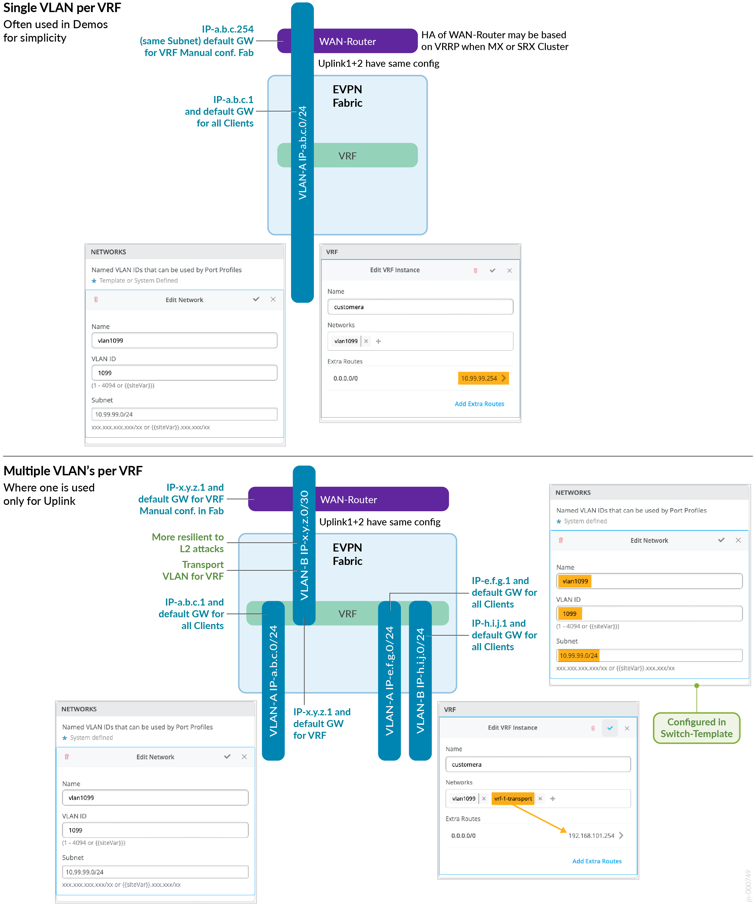
Going deeper into the forwarding and configuration of a stretched VLAN:
- On the service block border function, you create an ESI-LAG that contains all stretched VLANs that belong to the fabric (one per VRF).
- The WAN router only needs ordinary LAG support because with the stretched VLAN, you pool the links towards the attached service block border switches in a single LAG configuration.
- For example, on the VLAN 10.99.99.0/24, the fabric VRF might have the anycast or virtual GW IP address 10.99.99.1. All wired and wireless clients will use this address to send traffic to the fabric.
- In the VRF we configure a default route (0.0.0.0/0) with a gateway of 10.99.99.254.
- The IP address 10.99.99.254 is then configured at vlan 1099 on the WAN router providing the forwarding for the fabric.
- If you have redundant WAN routers, then configure a VRRP VIP with the address 10.99.99.254 on them.
Going deeper into the forwarding and configuration of a transport VLAN:
- Define additional transport VLANs in your switch template. Just define a VLAN ID with no network information.
- In your fabric definition, exclude the transport VLANs in the VRF they should use. Only add the access VLANs there.
- Do not define a default route in the fabric VRFs. The default route gets configured in the service block definition.
- On the service block border switch, add the local IP address of the network for the VLAN, such as 192.168.101.1/24, using the additional IP address configuration.
- On the service block border switch, create an ESI-LAG that contains only the chosen transport VLAN of each VRF.
- The WAN router only needs ordinary LAG support because you pool the links to the attached service block border switches in a single LAG configuration.
- You then need to manually create and edit the VRF service block
border switch:
- Add your transport VLAN to the access VLANs that automatically appear.
- Create a default a route (0.0.0.0/0) with a gateway of 192.168.101.1.254.
- For a VLAN such as 10.99.99.0/24, the access or fabric VRF will have the anycast/virtual GW IP address which is in this case the 10.99.99.1. This will be used by wired and wireless clients.
- The IP address 192.168.101.254 then is configured at vlan 101 on the WAN router providing the forwarding of the fabric.
- The WAN router must also configure a static route towards 10.99.99.0/24 via 192.168.101.1 as that is the link to the VRF of the fabric.
- Should you have redundant WAN routers then configure VRRP VIP for 192.168.101.254 on them.
- It is also recommended, using additional CLI configuration at
this time, to change the transport VLANs and VRFs on the service
block function to use virtual gateway addressing, regardless of the
fabric type. This helps ensure that traffic follows the most
optimal path. If this adjustment is not made, certain situations
may occur where traffic unnecessarily hairpins twice through the
service block function via the distribution switch below. This
situation can occur in the following example when:
- A packet leaves the fabric out on service block function 1 using uplink1 as the anchor-point for the ESI-LAG.
- A WAN router gets the packet on uplink1 but sends the answer packet down to uplink2 towards service block function 2.
- Service block function 2 sees that the anchor point was service block function 1 but has no direct link to it. So, it sends the answer packet down to a distribution switch.
- The distribution switch forwards the packet back up to the service block function 1.
- The service block function 1 then as anchor point forwards the answer to one of the distribution switches as it should be under normal conditions.
When we make the suggested change, this additional hair-pinning of traffic is avoided. Please see more about how this is achieved in the appendix section below where we share concrete examples.
A common error is that people forget to sync the AE Index field when defining the uplinks on the two service block functions of the fabric. The same values must be chosen on both service block function interfaces. The system does not check this and does not warn you if the fabric uses it elsewhere. Also, make sure to enable the ESI-LAG configuration knob.
Layer 3 WAN Router Attach Details
Finally, let’s review the more robust and scalable Layer 3 methods of attaching a WAN router to a fabric. When you use an L3 method, you have the following options:
- Use OSPF as the routing protocol between the fabric and the WAN router.
- Use exterior BGP as the routing protocol between the fabric and the WAN router. In this case, we just exchange routes, not EVPN information.
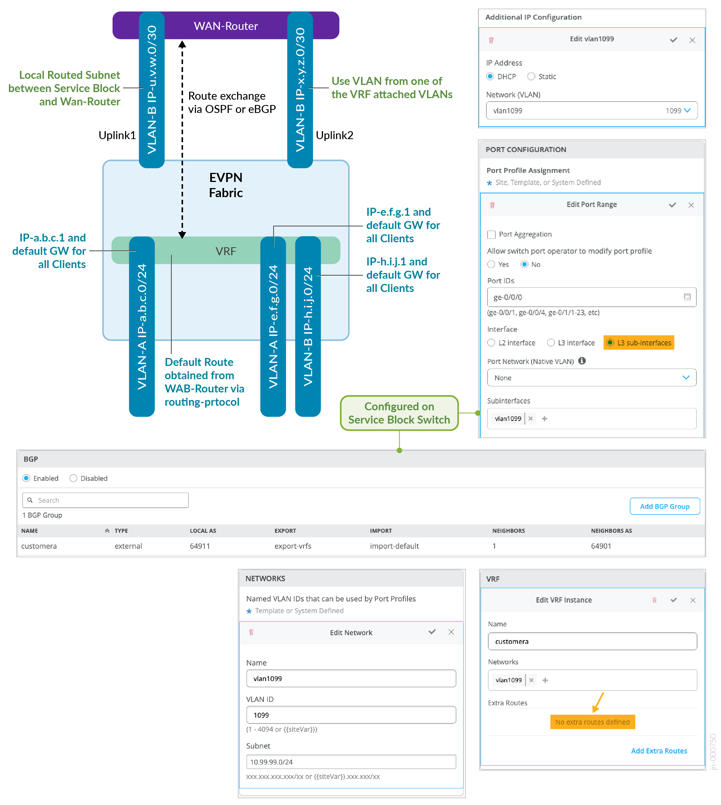
WAN Router Integration Using Layer 3 Router Attach:
- This method does not work if you have disabled VRFs. You need at least one VRF.
- Between the WAN router and the service block functions you need
a routing protocol to deal with failovers in case of a lost link.
You can choose between OSPF or eBGP:
- OSPF may be simpler to configure but needs some additional CLI for the added route filters.
- eBGP allows you to configure everything in the GUI but it is a bit more complex. This is the Juniper recommended method of attaching a WAN router to a fabric.
- In the fabric dialogue there is no need to manually define additional routes per VRF since those will be obtained via OSPF or eBGP.
- For each VRF, select one of the existing attached VLANs to act as the uplink towards the WAN router as indirect mapping towards the VRF. In a production-grade, highly available environment, you have two WAN routers. You must have at least two VLAN’s in each VRF before you can attach your WAN routers. This may be a bit strange but when referencing a VLAN that is bound to a VRF, the Mist UI knows how to reference the VRF. If you want, you can use device-transport VLANs per VRF, but you always need two as we expect a pair of redundant WAN routers for production.
- For each uplink VLAN (representing a VRF) you must have an IP subnet for L3 point-to-point (P2P) communication. Those subnets must be unique and non-overlapping with the pool the fabric uses (usually 10.255.240.0/20). You can choose them on your own since you need to manage that assignment manually. It may seem strange that you overwrite the IP addresses of the fabric VLAN in the sub-interface definition, but this is by design. For the P2P links, we recommend using /31 networks outside of the fabric range mentioned above.
- While most of the configuration can be done in the Juniper Mist
portal, you must provide a few lines of additional CLI for OSPF:
- This is to provide policy statements needed for the import and export filters for the OSPF area for each VRF. With eBGP you can manage those filters in the Juniper Mist portal.
- You also need to set a unique OSPF router ID for each VRF. This is to ensure that routes from the WAN router (such as the default route) are imported into each fabric VRF individually.
- When choosing eBGP you must manage your own private Autonomous System Numbers (ASN). The Mist fabric starts with the ASN 65000 so you must choose and ASN lower than that. We do not recommend the use of a unique AS per VRF because the maximum number of local ASN on a QFX switch is 16. We recommend that you use a shared ASN among your VRFs.
All L3 methods per VRF and WAN router on the uplink for the point-to-point links are multiplexed into each link. In a production-grade design you would expect to have two WAN routers. This means that each VRF needs a minimum of two VLANs to make the connection to the outside.
Figure 4 shows an example of an eBGP configuration for two service block functions and a single WAN router.
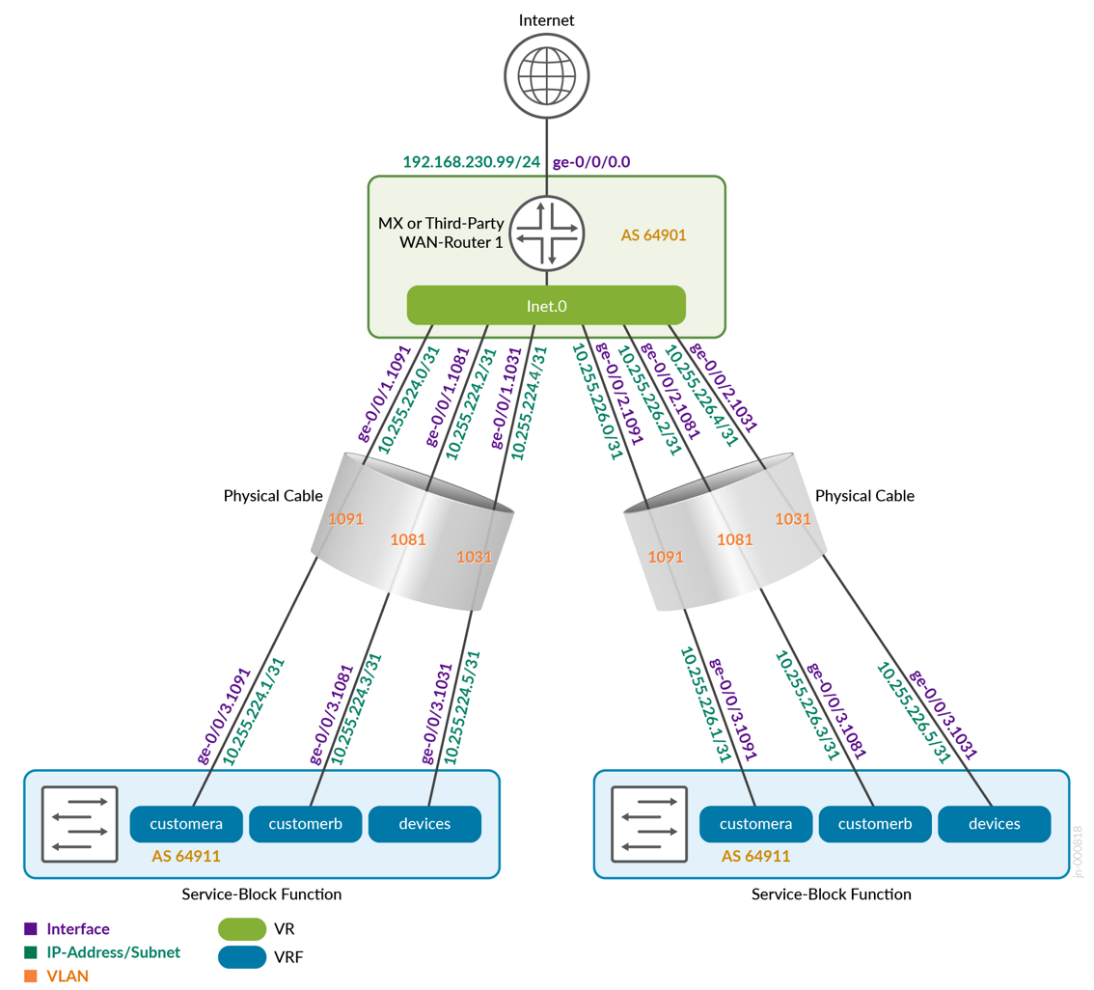
We have provided configuration examples for all the WAN router attach methods in the appendix. If something is unclear, check the appendix.