
Validation Framework
Test Bed
In the diagram below, you will see the suggested topology used for the phase 3 lab evaluating an IP Clos fabric design with multiple PoDs including 4 core switches as shown in Figure 1 .
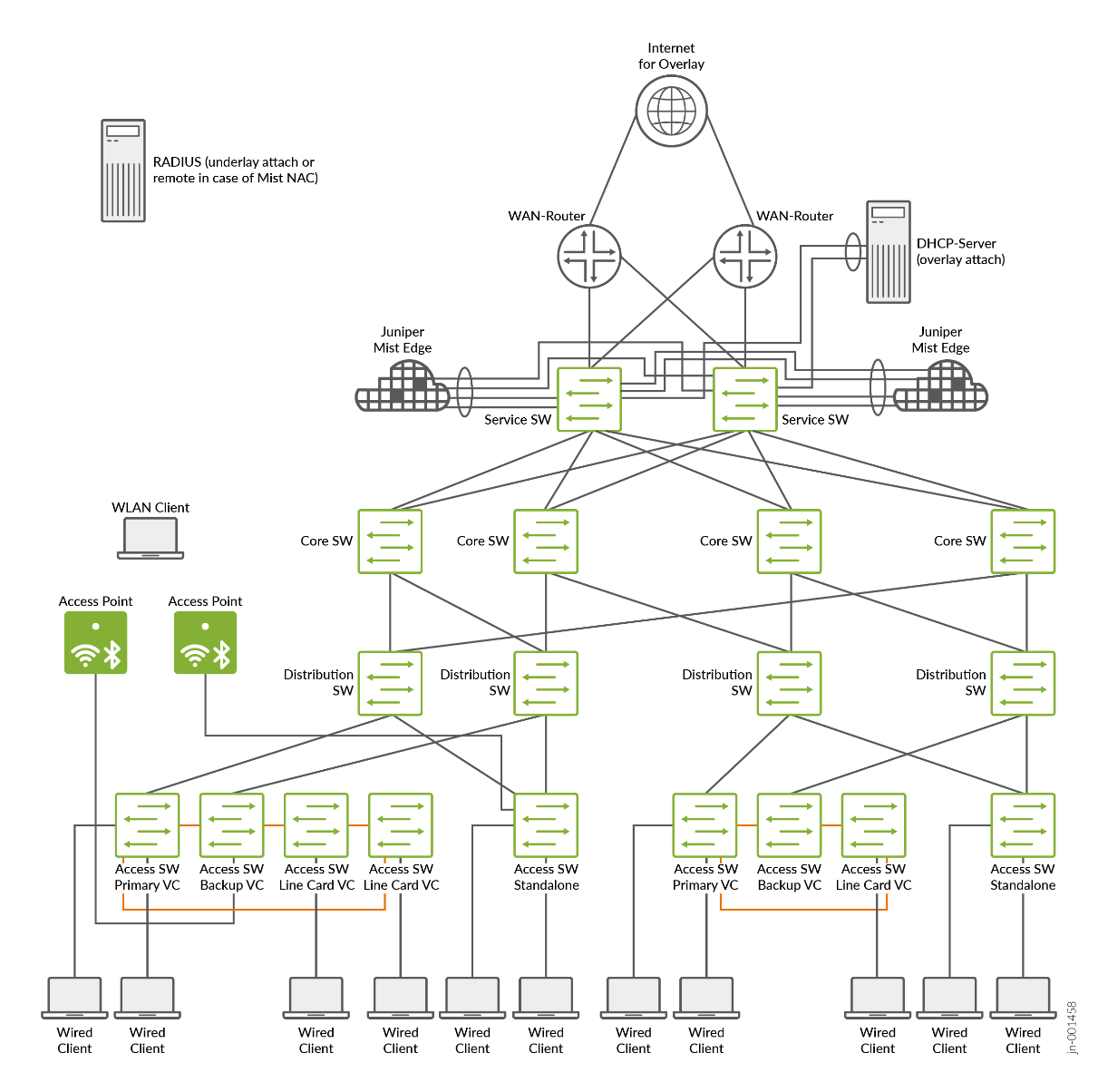
Using Topology 1, one can evaluate the following major campus fabric IP Clos features:
- Five-Stage IP Clos multi-site fabric with recommended link
redundancy:
- Four redundant core switches acting as a super spine (interleaved mesh to spine layer).
- Pod1/Building1:
- Two redundant distribution switches acting as spine.
- One 4-member Virtual Chassis access switch acting as leaf.
- One standalone access switch acting as Leaf.
- Pod2/Building2:
- Two redundant distribution switches acting as spine.
- One 3-member Virtual Chassis access switch acting as leaf.
- One standalone access switch acting as leaf.
- Service block function via:
- Integrated to existing core switches (default) acting as service leaf and core at the same time.
- As a separate and dedicated pair of service switches acting as service leaf.
- Attached WAN routers via L2 or L3 exit.
- Attached servers via ESI-LAG redundant links.
- Attached Juniper Mist Edges
- WAN router integration
- L2 fabric exit
- ESI-LAG based trunks.
- L3 fabric exit
- OSPF as routing protocol.
- eBGP as routing protocol (used for this JVD)
- Attached to
- Dedicated service block switches.
- Redundant WAN router design
- Two Juniper SRX firewalls in a cluster configuration (or MX routers).
- L2 fabric exit
- Wi-Fi access points
- Locally attached to the access switches with Power over Ethernet (PoE).
- Various Wi-Fi clients.
- Basic Wi-Fi roaming.
- Juniper Mist Edge
- Each Juniper Mist Edge is only attached (through a standard LAG) to one service block switch.
- Ability to tunnel traffic to Juniper Mist Edge to break out at the service block switch.
- Only one Juniper Mist Edge at a time shall terminate the tunnels to reduce MAC moves.
- Fast roaming when using Juniper Mist Edge.
- Overlay server attached to the service block functionality.
- DHCP server.
- Two Juniper Mist Edge devices.
- Other services.
- RADIUS server
- Server location
- Local server attached to the underlay network.
- Remote Juniper Mist Access Assurance via public cloud.
- Authentication for the following clients
- Wired clients attached to access switches.
- Wi-Fi clients using the access points.
- Authentication based on clients:
- MAC address.
- 802.1X EAP authentication.
- Dynamic authorization profiles
- Single VLAN assign.
- Multiple VLANs assigned.
- GBP tags assigned using Juniper-Switching-Filter.
- Server location
- Testing Fabric Features such as:
- DHCP relay
- Protect RE filter
- DHCP snooping
- Storm control
- MAC address limit with aging
- DNS
- NTP
- IPv6 overlay
- IPv6 underlay
- GBP tags assigned using static configuration
A second topology was created and used to evaluate a design with multiple PoDs with 2 core switches as shown in Figure 2, when the full redundancy of recommended links cannot be achieved. This design provides a reduced amount of links between floors and buildings for cost reasons.
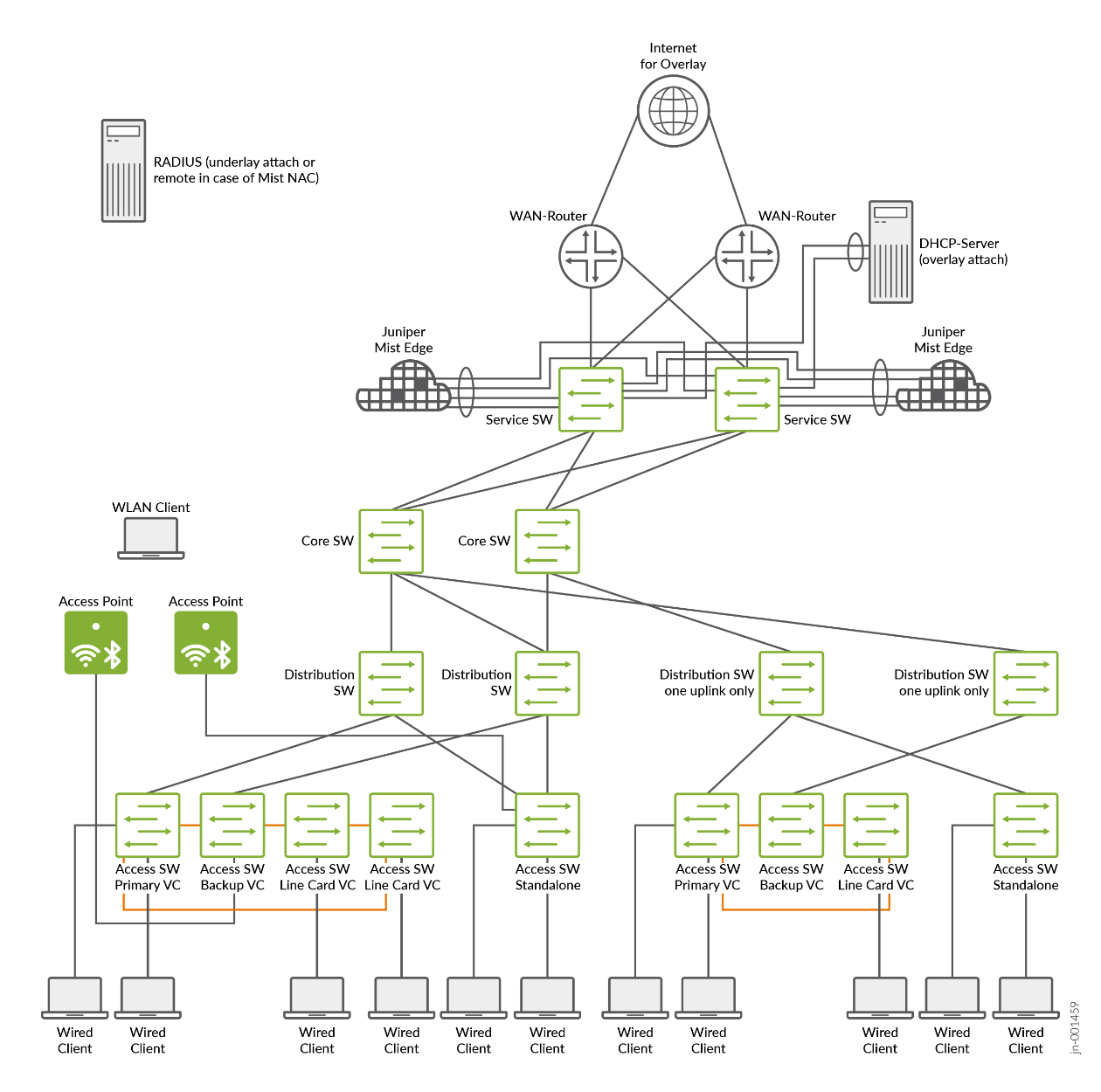
Using the second topology, you can evaluate the following campus fabric IP Clos features:
- Five-Stage IP Clos multisite fabric without recommended link
redundancy:
- Two redundant core switches acting as super spines.
- PoD1/Building1 (recommended link redundancy):
- Two redundant distribution switches acting as spines.
- One 4-member Virtual Chassis access switch acting as a leaf.
- One standalone access switch acting as a leaf.
- PoD2/Building2 (without link redundancy):
- Two distribution switches acting as spines (each with only one uplink).
- One 3-member Virtual Chassis access switch acting as a leaf.
- One standalone access switch acting as a leaf (with only one uplink).
Platforms / Devices Under Test (DUT)
To review the software versions and platforms on which this JVD was validated by Juniper Networks, see the Validated Platforms and Software section in this document.
Test Bed Configuration
In the appendix section of this JVD, we share information on exactly how some of the tests were performed. Contact your Juniper account representative to obtain the full details of the test bed configuration used for this JVD.