
Example: VPLS Configuration (BGP and LDP Interworking)
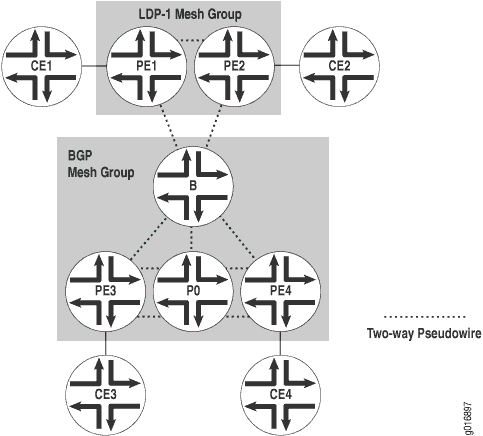
Figure 1, shows
two VPLS mesh groups: LDP-1 and the default BGP mesh group. The VPLS
instance is named v1 in the configuration. Table 1 shows the addresses for the
router interfaces in the example topology.
Router |
Interface |
Address |
|---|---|---|
CE1 |
fe-0/0/3 (link to Router PE1) |
10.12.31.1 |
loopback |
10.12.53.1 |
|
CE2 |
fe-0/0/1 (link to Router PE2) |
10.12.31.2 |
loopback |
10.12.53.2 |
|
PE1 |
t1-1/1/1 (link to Router PE2) |
10.12.100.17 |
t1-0/1/0 (link to Router B) |
10.12.100.2 |
|
loopback |
10.255.170.106 |
|
PE2 |
t1-0/1/1 (link to Router PE1) |
10.12.100.18 |
t1–0/1/3 (link to Router B) |
10.12.100.6 |
|
loopback |
10.255.170.104 |
|
B |
t1-0/1/2 (link to Router PE1) |
10.12.100.1 |
t1-0/1/3 (link to Router PE2) |
10.12.100.5 |
|
so-0/2/2 (link to Router PE3) |
10.12.100.9 |
|
fe-0/0/3 (link to Router PE4) |
10.12.100.13 |
|
loopback |
10.255.170.98 |
|
PE3 |
s0-0/2/1 (link to Router B) |
10.12.100.10 |
so-0/2/2 (link to Router P0) |
10.12.100.21 |
|
loopback |
10.255.170.96 |
|
P0 |
so-0/2/1 (link to Router PE3) |
10.12.100.22 |
t1-0/1/3 (link to Router PE4) |
10.12.100.25 |
|
loopback |
10.255.170.100 |
|
PE4 |
fe-0/0/3 (link to Router B) |
10.12.100.14 |
t1-0/1/3 (link to Router P0) |
10.12.100.26 |
|
loopback |
10.255.170.102 |
|
CE3 |
ge-1/2/1 (link to PE3) |
10.12.31.3 |
loopback |
10.12.53.3 |
|
CE4 |
fe-0/0/2 (link to PE4) |
10.12.31.4 |
loopback |
10.12.53.4 |
On Router CE3, the only item you need to configure is the Gigabit Ethernet interface that connects to PE3.
Router CE3
[edit]
interfaces {
    ge-1/2/1 {
        unit 0 {
            family inet {
                address 10.12.31.1/24;
            }
        }
    }
}
On Router PE3, prepare the router for VPLS by configuring BGP,
MPLS, OSPF, and LDP. (These protocols are the basis for most Layer 2
VPN-related applications, including VPLS.) Include the signaling statement at the [edit protocols bgp group group-name family l2vpn] hierarchy level, because VPLS uses the same
infrastructure for internal BGP as Layer 2 VPNs.
In Junos OS Release 7.3 and later, the signaling statement replaces the unicast statement
at the [edit protocols bgp group group-name family l2vpn] hierarchy level. You must use the signaling statement if you wish to configure VPLS domains and Layer 2
VPNs simultaneously.
Next, configure VLAN tagging on the Gigabit Ethernet interface connected to Router CE3. Finally, add the Gigabit Ethernet interface into a VPLS routing instance and specify the site range, site ID number, and site name.
Router PE3
[edit]
interfaces {
    so-0/2/1 {
        unit 0 {
            family inet {
                address 10.12.100.10/30;
            }
            family mpls;
        }
    }
    so-0/2/2 {
        unit 0 {
            family inet {
                address 10.12.100.21/30;
            }
            family mpls;
        }
    }
    ge-1/3/1 {
        encapsulation ethernet-vpls;
        unit 0 {
            family vpls;
        }
    }
}
routing-instances {
    v1 {
        instance-type vpls;
        protocols {
            vpls {
                site 1 {
                    site-identifier 3;
                }
                site-range 10;
            }
        }
        interface ge-1/3/1.0;
        route-distinguisher 10.255.170.96:1;
        vrf-target target:1:2;
    }
}
routing-options {
    autonomous-system 65000;
}
protocols {
    bgp {
        group int {
            type internal;
            local-address 10.255.170.96;
            family l2vpn {
                signaling;
            }
            neighbor 10.255.170.98;
            neighbor 10.255.170.102;
        }
        log-updown;
    }
    ldp {
        interface so-0/2/1.0;
        interface so-0/2/2.0;
    }
    mpls {
        interface all;
    }
    ospf {
        area 0.0.0.0 {
            interface so-0/2/1.0;
            interface so-0/2/2.0;
            interface lo0.0 {
                passive;
            }
        }
    }
}
On Router P0, configure MPLS, OSPF, and LDP to interconnect PE3 and PE4.
Router P0
[edit]
interfaces {
    t1-0/1/3 {
        unit 0 {
            family inet {
                address 10.12.100.25/30;
            }
            family mpls;
        }
    so-0/2/1 {
        unit 0 {
            family inet {
                address 10.12.100.22/30;
            }
            family mpls;
        }
    }
}
protocols {
    mpls {
        interface all;
    }
    ospf {
        area 0.0.0.0 {
            interface so-0/2/1.0;
            interface t1-0/1/3.0;
            interface lo0.0 {
                passive;
            }
        }
    }
    ldp {
        interface t1-0/1/3.0;
        interface so-0/2/1.0;
    }
}
On Router PE4, configure BGP, MPLS, OSPF, and LDP to complement the configuration on PE3. Next, configure VLAN tagging on the Fast Ethernet interface connected to Router CE4. Include VLAN VPLS encapsulation at both the physical and logical interface levels. Finally, add the Fast Ethernet interface into a VPLS routing instance and specify the site range, site ID number, and site name.
Router PE4
[edit]
interfaces {
    fe-0/0/2 {
    encapsulation ethernet-vpls;
        unit 0 {
            family vpls;
        }
    fe-0/0/3 {
        unit 0 {
            family inet {
                address 10.12.100.14/30;
            }
            family mpls;
        }
    }
    t1-0/1/3 {
        unit 0 {
            family inet {
                address 10.12.100.26/30;
            }
            family mpls;
			}
        }
    }
}
protocols {
    mpls {
        interface all;
    }
    bgp {
        log-updown;
        group int {
            type internal;
            local-address 10.255.170.102;
            family l2vpn {
                signaling;
            }
            neighbor 10.255.170.96;
            neighbor 10.255.170.98;
        }
    }
    ospf {
        area 0.0.0.0 {
            interface fe-0/0/3.0;
            interface t1-0/1/3.0;
            interface lo0.0 {
                passive;
            }
        }
    }
    ldp {
        interface fe-0/0/3.0;
        interface t1-0/1/3.0;
        interface lo0.0;
		}
    }
routing-instances {
    v1 {
        instance-type vpls;
        interface fe-0/0/2.0;
        route-distinguisher 10.255.170.102:1;
        vrf-target target:1:2;
        protocols {
            vpls {
                site-range 10;
                site 1 {
                    site-identifier 4;
                }
            }
        }
    }
routing-options {
    autonomous-system 65000;
	}
On Router CE4, configure the Fast Ethernet interface that connects to PE4.
Router CE4
[edit]
interfaces {
    fe-0/0/2 {
        unit 0 {
            family inet {
                address 10.12.31.4/24;
            }
        }
    }
}
On Router B, the area border router, configure the interfaces.
Next, configure BGP, MPLS, OSPF, and LDP. Be sure to include the loopback
interface in the LDP configuration by including the interface
lo0.0 statement at the [edit protocols ldp] hierarchy
level. For BGP, include the signaling statement at the
[edit bgp group group-name family l2vpn] hierarchy level. Last, configure the VPLS instance with both BGP
and LDP signaling. Configure the LDP-1 mesh group by including the mesh-group ldp1 statement at the [edit routing-instances
v1 protocols vpls] hierarchy level.
Router B
[edit]
interfaces {
fe-0/0/3 {
unit 0 {
family inet {
address 10.12.100.13/30;
}
family mpls;
}
}
t1-0/1/2 {
unit 0 {
family inet {
address 10.12.100.1/30;
}
family mpls;
}
}
t1-0/1/3 {
unit 0 {
family inet {
address 10.12.100.5/30;
}
family mpls;
}
}
so-0/2/2 {
unit 0 {
family inet {
address 10.12.100.9/30;
}
family mpls;
}
}
}
protocols {
mpls {
interface all;
}
bgp {
log-updown;
group int {
type internal;
local-address 10.255.170.98;
family l2vpn {
signaling;
}
neighbor 10.255.170.96;
neighbor 10.255.170.102;
}
}
ospf {
area 0.0.0.0 {
interface t1-0/1/2.0;
interface t1-0/1/3.0;
interface so-0/2/2.0;
interface fe-0/0/3.0;
interface lo0.0 {
passive;
}
}
}
ldp {
interface fe-0/0/3.0;
interface t1-0/1/2.0;
interface t1-0/1/3.0;
interface so-0/2/2.0;
interface lo0.0;
}
}
routing-instances {
v1 {
instance-type vpls;
route-distinguisher 10.255.170.98:1;
vrf-target target:1:2;
protocols {
vpls {
site-range 10;
site 1 {
site-identifier 1;
}
vpls-id 101;
mesh-group ldp-1 {
neighbor 10.255.170.106;
neighbor 10.255.170.104;
}
}
}
}
}
routing-options {
autonomous-system 65000;
}
Finally, configure the LDP PE routers. On Router PE1, prepare the router for VPLS by configuring LDP, MPLS, and OSPF. Next, configure VPLS encapsulation on the Fast Ethernet interface connected to CE1. Finally, add the Fast Ethernet interface to the routing instance, specifying the VPLS ID and the neighboring routers’ loopback addresses.
Router PE1
[edit]
interfaces {
    fe-0/0/3 {
        encapsulation ethernet-vpls;
        unit 0 {
            family vpls;
        }
    }
    t1-0/1/0 {
        unit 0 {
            family inet {
                address 10.12.100.2/30;
            }
            family mpls;
        }
    }
    t1-1/1/1 {
        unit 0 {
            family inet {
                address 10.12.100.17/30;
            }
            family mpls;
        }
    }
}
protocols {
    mpls {
        interface all;
    }
    ospf {
        area 0.0.0.0 {
            interface t1-0/1/0.0;
            interface t1-1/1/1.0;
            interface lo0.0 {
                passive;
            }
        }
    }
    ldp {
        interface t1-0/1/0.0;
        interface t1-1/1/1.0;
        interface lo0.0;
    }
}
routing-instances {
    v1 {
        instance-type vpls;
        interface fe-0/0/3.0;
        protocols {
            vpls {
                vpls-id 101;
                neighbor 10.255.170.98;
                neighbor 10.255.170.104;
            }
        }
    }
}
Next, configure the Fast Ethernet interface on Router CE1 that connects to Router PE1.
Router CE1
[edit]
interfaces {
    fe-0/0/3 {
        unit 0 {
            family inet {
                address 10.12.31.1/24;
            }
        }
    }
}
On Router PE2, prepare the router for VPLS by configuring LDP, MPLS, and OSPF. Next, configure VPLS encapsulation on the Fast Ethernet interface connected to Router CE1. Finally, add the Fast Ethernet interface to the routing instance, specifying the VPLS ID and the neighboring routers’ loopback addresses.
Router PE2
[edit]
interfaces {
    t1-0/1/1 {
        unit 0 {
            family inet {
                address 10.12.100.18/30;
            }
            family mpls;
        }
    t1-0/1/3 {
        unit 0 {
            family inet {
                address 10.12.100.6/30;
            }
            family mpls;
        }
    }
    fe-1/0/2 {
        encapsulation ethernet-vpls;
        unit 0 {
            family vpls;
        }
    }
}
protocols {
    mpls {
        interface all;
    }
    ospf {
        area 0.0.0.0 {
            interface t1-0/1/3.0;
            interface t1-0/1/1.0;
            interface lo0.0 {
                passive;
            }
        }
    }
    ldp {
        interface t1-0/1/1.0;
        interface t1-0/1/3.0;
        interface lo0.0;
    }
}
routing-instances {
    v1 {
        instance-type vpls;
        interface fe-1/0/2.0;
        protocols {
            vpls {
                vpls-id 101;
                neighbor 10.255.170.98;
                neighbor 10.255.170.106;
            }
        }
    }
}
Finally, on Router CE2 configure the Fast Ethernet interface connected to PE2:
Router CE2
[edit]
interfaces {
    fe-0/0/1 {
        unit 0 {
            family inet {
                address 10.12.31.2/24;
            }
        }
    }
}
Verifying Your Work
To verify proper operation of VPLS, use the following commands:
show bgp summaryshow ldp neighborshow vpls connectionsshow route forwarding-table family vpls (destination | extensive | matching | table)show interfaces vt* terseshow vpls flood extensiveshow vpls statistics
The following section shows the output of some of these commands on Router B as a result of the configuration example.
Use the show bgp summary command to verify BGP signaling
for VPLS is up.
user@B> show bgp summary
Groups: 1 Peers: 2 Down peers: 0
Table          Tot Paths  Act Paths Suppressed    History Damp State    Pending
bgp.l2vpn.0            2          2          0          0          0          0
Peer               AS      InPkt     OutPkt    OutQ   Flaps Last Up/Dwn
State|#Active/Received/Damped...
10.255.170.96   65000        124        125       0       0       54:26 Establ
  bgp.l2vpn.0: 1/1/0
  v1.l2vpn.0: 1/1/0
10.255.170.102  65000        122        124       0       0       54:18 Establ
  bgp.l2vpn.0: 1/1/0
  v1.l2vpn.0: 1/1/0
Use the show ldp neighbors command to verify that
LDP signaling for VPLS is up.
user@B>  show ldp neighbors
Address            Interface          Label space ID         Hold time
10.255.170.104     lo0.0              10.255.170.104:0         41
10.255.170.106     lo0.0              10.255.170.106:0         38
10.12.100.14       fe-0/0/3.0         10.255.170.102:0         12
10.12.100.10       so-0/2/2.0         10.255.170.96:0          14
10.12.100.2        t1-0/1/2.0         10.255.170.106:0         14
10.12.100.6        t1-0/1/3.0         10.255.170.104:0         13
To verify that the VPLS connections are up, use the show
vpls connections command.
user@B>show vpls connections
Layer-2 VPN connections:

Legend for connection status (St)
EI -- encapsulation invalid      NC -- interface encapsulation not CCC/TCC/VPLS
EM -- encapsulation mismatch     WE -- interface and instance encaps not same
VC-Dn -- Virtual circuit down    NP -- interface hardware not present
CM -- control-word mismatch      -> -- only outbound connection is up
CN -- circuit not provisioned    <- -- only inbound connection is up
OR -- out of range               Up -- operational
OL -- no outgoing label          Dn -- down
LD -- local site signaled down   CF -- call admission control failure
RD -- remote site signaled down  SC -- local and remote site ID collision LN -- local site not designated  LM -- local site ID not minimum designated RN -- remote site not designated RM -- remote site ID not minimum designated XX -- unknown connection status  IL -- no incoming label
MM -- MTU mismatch               MI -- Mesh-Group ID not availble

Legend for interface status
Up -- operational
Dn -- down

Instance: v1
BGP-VPLS State
  Local site: 1 (1)
    connection-site           Type  St     Time last up          # Up trans
    3                         rmt   Up     Jan 22 16:38:47 2008           1
      Local interface: vt-0/3/0.1048834, Status: Up, Encapsulation: VPLS
        Description: Intf - vpls v1 local site 1 remote site 3
      Remote PE: 10.255.170.96, Negotiated control-word: No
      Incoming label: 800258, Outgoing label: 800000
    4                         rmt   Up     Jan 22 16:38:54 2008           1
      Local interface: vt-0/3/0.1048835, Status: Up, Encapsulation: VPLS
        Description: Intf - vpls v1 local site 1 remote site 4
      Remote PE: 10.255.170.102, Negotiated control-word: No
      Incoming label: 800259, Outgoing label: 800000 LDP-VPLS State
VPLS-id: 101
  Mesh-group connections: m1
    Neighbor                  Type  St     Time last up          # Up trans
    10.255.170.104(vpls-id 101) rmt Up     Jan 22 16:38:40 2008           1
      Local interface: vt-0/3/0.1048833, Status: Up, Encapsulation: ETHERNET
        Description: Intf - vpls v1 neighbor 10.255.170.104 vpls-id 101
      Remote PE: 10.255.170.104, Negotiated control-word: No
      Incoming label: 800001, Outgoing label: 800000
    10.255.170.106(vpls-id 101) rmt Up     Jan 22 16:38:39 2008           1
      Local interface: vt-0/3/0.1048832, Status: Up, Encapsulation: ETHERNET
        Description: Intf - vpls v1 neighbor 10.255.170.106 vpls-id 101
      Remote PE: 10.255.170.106, Negotiated control-word: No
      Incoming label: 800000, Outgoing label: 800000
To display VPLS routes (MAC addresses) in the vpls forwarding
table, use the show route forwarding-table family vpls command.
user@B> show route forwarding-table family vpls
Routing table: v1.vpls
VPLS:
Destination        Type RtRef Next hop           Type Index NhRef Netif
default            perm     0                    rjct   540     1
vt-0/3/0.1048832   user     0                    comp   587     3
vt-0/3/0.1048833   user     0                    comp   587     3
vt-0/3/0.1048834   user     0                    comp   589     3
vt-0/3/0.1048835   user     0                    comp   589     3
00:17:cb:c2:10:01/48
                   dynm     0                    indr 262143     4
                                                Push 800000   580     2
t1-0/1/3.0
00:17:cb:c2:10:02/48
                   dynm     0                    indr 262145     4
                              10.12.100.14      Push 800000   594     2
fe-0/0/3.0
00:17:cb:c2:10:03/48
                   dynm     0                    indr 262142     4
                                                Push 800000   576     2
t1-0/1/2.0
00:17:cb:c2:10:bd/48
                   dynm     0                    indr 262144     4
                                                Push 800000   585     2
so-0/2/2.0
To display VPLS source and destination MAC address
accounting information, use the destination, extensive, matching, or table option with the show
route forwarding-table family vpls command. When you analyze
the display output, keep in mind the following:
VPLS MAC address accounting is handled on a per-MAC address basis for each VPLS instance. All information is retrieved from MAC address entries in the MAC address table. VPLS MAC address accounting is performed only on local CE routers.
The VPLS counters for source and destination MAC addresses increment continuously until the oldest MAC address entries are removed from the memory buffer, either when the entries time out or if the VPLS instance is restarted.
To display status information about Virtual Loopback Tunnel
interfaces in the VPLS instance, use the show interfaces vt*
terse command.
user@B> show interfaces vt* terse
Interface               Admin Link Proto    Local                 Remote
vt-0/3/0                up    up
vt-0/3/0.1048832        up    up   vpls
vt-0/3/0.1048833        up    up   vpls
vt-0/3/0.1048834        up    up   vpls
vt-0/3/0.1048835        up    up   vpls
To display VPLS route information related to the flood process,
use the show vpls flood extensive command.
user@B> show vpls flood extensive
Name: v1
CEs: 0
VEs: 4
  Flood route prefix: 0x4a/32
  Flood route type: IFF_FLOOD
  Flood route owner: vt-0/3/0.1048834
  Flood group name: __ves__
  Flood group index: 0
  Nexthop type: comp
  Nexthop index: 589
    Flooding to:
    Name             Type          NhType          Index
    m1               Group          comp            588
        Composition: flood-to-all
        Flooding to:
        Name             Type          NhType          Index
        vt-0/3/0.1048832 VE             indr            262142
        vt-0/3/0.1048833 VE             indr            262143

  Flood route prefix: 0x4b/32
  Flood route type: IFF_FLOOD
  Flood route owner: vt-0/3/0.1048835
  Flood group name: __ves__
  Flood group index: 0
  Nexthop type: comp
  Nexthop index: 589
    Flooding to:
    Name             Type          NhType          Index
    m1               Group          comp            588
        Composition: flood-to-all
        Flooding to:
        Name             Type          NhType          Index
        vt-0/3/0.1048832 VE             indr            262142
        vt-0/3/0.1048833 VE             indr            262143

  Flood route prefix: 0x48/32
  Flood route type: IFF_FLOOD
  Flood route owner: vt-0/3/0.1048832
  Flood group name: m1
  Flood group index: 2
  Nexthop type: comp
  Nexthop index: 587
    Flooding to:
    Name             Type          NhType          Index
    __ves__          Group          comp            586
        Composition: flood-to-all
        Flooding to:
        Name             Type          NhType          Index
        vt-0/3/0.1048834 VE             indr            262144
        vt-0/3/0.1048835 VE             indr            262145

  Flood route prefix: 0x49/32
  Flood route type: IFF_FLOOD
  Flood route owner: vt-0/3/0.1048833
  Flood group name: m1
  Flood group index: 2
  Nexthop type: comp
  Nexthop index: 587
    Flooding to:
    Name             Type          NhType          Index
    __ves__          Group          comp            586
        Composition: flood-to-all
        Flooding to:
        Name             Type          NhType          Index
        vt-0/3/0.1048834 VE             indr            262144
        vt-0/3/0.1048835 VE             indr            262145
To view packet flow statistics for the VPLS instance, use the show vpls statistics command:
user@B> show vpls statistics
Instance: v1
   Local interface: vt-0/3/0.1048832, Index: 72
   Remote PE: 10.255.170.106
     Multicast packets:                     6
     Multicast bytes  :                   360
     Flooded packets  :                    16
     Flooded bytes    :                  1188
     Current MAC count:                     1
   Local interface: vt-0/3/0.1048833, Index: 73
   Remote PE: 10.255.170.104
     Multicast packets:                     4
     Multicast bytes  :                   240
     Flooded packets  :                     6
     Flooded bytes    :                   398
     Current MAC count:                     1
   Local interface: vt-0/3/0.1048834, Index: 74
   Remote PE: 10.255.170.96
     Multicast packets:                     2
     Multicast bytes  :                   120
     Flooded packets  :                     4
     Flooded bytes    :                   278
     Current MAC count:                     1
   Local interface: vt-0/3/0.1048835, Index: 75
   Remote PE: 10.255.170.102
     Multicast packets:                     1
     Multicast bytes  :                    60
     Flooded packets  :                     2
     Flooded bytes    :                   158
     Current MAC count:                     1