
Fixed Wireless Access Solution with Dynamic Soft-GRE Tunnels
Read this topic to understand how service providers can offer fixed wireless access (FWA) services for Multi-Dwelling Units (MDUs) by leveraging their existing the Juniper MX Series broadband network gateway (BNG) and 4G/5G packet core.
Fixed Wireless Access for MDUs
Fixed wireless access (FWA) uses wireless technology, typically 4G or 5G, instead of fiber or cables to provide last mile connectivity to Broad Band Edge (BBE) subscribers serving both business and residential consumers. FWA enables rapid and cost-effective deployment, especially in prohibitive or low-density subscriber areas. The advent of 5G has significantly improved the performance of FWA, making it a competitive alternative to wired broadband.
Service Providers are increasingly looking into Fixed Wireless for home users to take advantage of the 4G and 5G proliferation. While the local loop is wireless, these fixed wireless subscribers are managed by the wireline Broadband Network Gateway (BNG), thereby reducing the backend subscriber management requirements such as provisioning, billing, and more. Broadband edge subscriber services over soft-GRE tunnel are developed to support such Wifi Offload Gateway deployments, allowing L2 traffic between the customer premises equipment (CPE) and the BNG.
Service providers can offer FWA services for Multi-Dwelling Units (MDUs) by leveraging their existing the Juniper MX Series broadband network gateway (BNG) and 4G/5G packet core. Consider the topology provided in Figure 1.
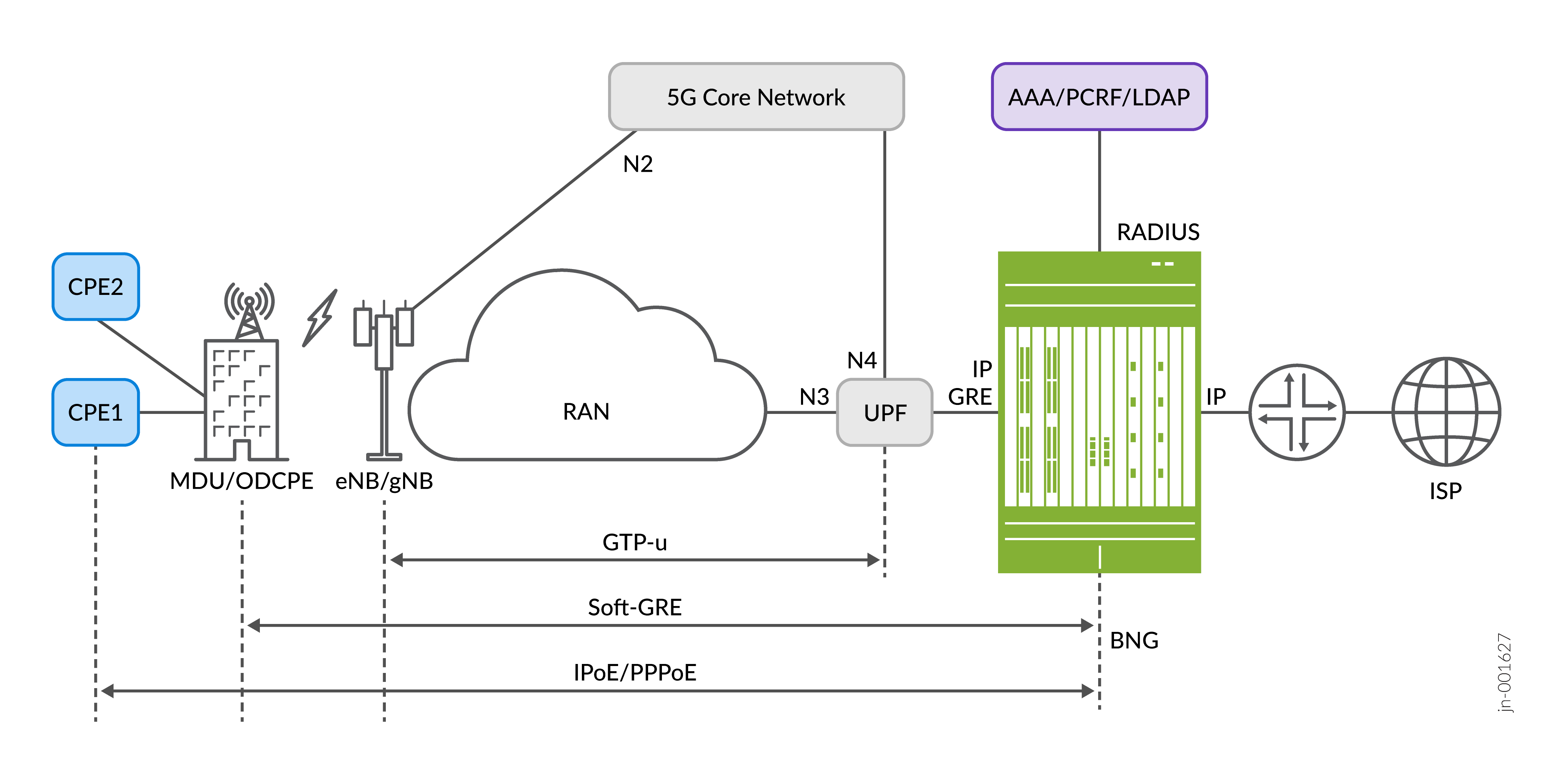
The customer premises equipment (CPE) access to internet is over a 4G or 5G wireless connection that connects the MDU's outdoor CPE (ODCPE) device to the radio tower (eNB/gNB), replacing the wireline local loop. The ODCPE creates a soft-GRE tunnel with the BNG device to enable encapsulated traffic between the CPE and BNG over the 5G core network. Soft-GRE does not require signaling to establish the GRE tunnel. The CPE can either be a DHCP or PPPoE client. The BNG provides IP address to the CPE along with subscriber services, including Authentication, Authorization and Accounting (AAA) and Quality of Service (QoS). One of the benefits of this approach is the ability to have multiple subscriber sessions on a single wireless connection.
Soft-GRE is a stateless GRE tunneling, whereby the BNG initiates tunnel creation while
processing incoming GRE packets. The tunnel contexts are created
upon receiving PPPoE or
DHCP control messages, such as PADI or DISCOVER and the BNG subscriber sessions are created on
top of the GRE tunnel. The BNG does not maintain states for unused tunnels,
and deletes the GRE
tunnels when the subscriber session logs out, improving the solution's
scalability. The set services
soft-gre gre-group CLI hierarchy must be defined to enable dynamic GRE
service. You must define the parameters described in the Table 1 table:
| Parameter | Description |
|---|---|
| source-address | IP address on which incoming GRE traffic must be received by the BNG. |
| destination-networks | Specified IP subnets from which the soft-GRE connect requests from the customer will be processed. Soft-GRE sessions from the access networks are accepted only if the prefixes are within the subnet range defined under destination-networks. |
| service-interface | Specified pseudowire subscriber interface device (IFD) on which the tunnels are built. |
| dynamic-profile | Name of the dynamic profile that creates the tunnel. |
An example configuration snippet is provided below:
[edit]
services {
    soft-gre {
        gre-1 {
            source-address 172.16.0.1;
            destination-networks {
                10.40.0.0/16;
            }
            service-interface ps1;
            dynamic-profile tunnel-profile-novlan;
        }
    }
}
The following key features are supported:
- Dynamic creation and deletion of GRE tunnels
-
GRE tunnels on VLAN tagged and untagged interfaces
-
IPv4 and IPv6 GRE tunnels
-
VLAN tagged and untagged GRE playloads
-
IPv4 and IPv6 DHCP or PPPoE subscriber termination over GRE
Configuring Dynamic Soft-GRE Tunnels
-
BNG Gateway IP:
172.16.0.1 - Destination Networks:
10.30.0.0/16,10.40.0.0/16 -
Subscriber IP addresses:
172.31.0.11through172.31.0.15
Verifying Dynamic Soft-GRE Tunnels
Purpose
Verify the subscriber provisioning over dynamic soft-GRE tunnels.
Action
- Verify the device configuration.
Loopback and pseudowire interface configuration.
user@host> show configuration interfaces
lo0 {
    unit 0 {
        family inet {
            address 172.16.0.1/32;
        }
        family inet6 {
            address 2001:db8:172:16:0::1/128;
        }
    }
}
ps0 {
    anchor-point {
        rlt1;
    }
    flexible-vlan-tagging;
    unit 0 {
        encapsulation ethernet-ccc;
    }
}
ps1 {
    anchor-point {
        lt-0/0/0;
    }
    flexible-vlan-tagging;
    unit 0 {
        encapsulation ethernet-ccc;
    }
}
rlt1 {
    redundancy-group {
        member-interface lt-0/1/0;
        member-interface lt-5/1/0;
    }
}
Dynamic profiles configuration.
user@host> show configuration dynamic-profiles
PROF_AUTOSENS_VLAN {
    routing-instances {
        "$junos-routing-instance" {
            interface "$junos-interface-name";
        }
    }
    interfaces {
        "$junos-interface-ifd-name" {
            unit "$junos-interface-unit" {
                demux-source [ inet inet6 ];
                proxy-arp;
                vlan-tags outer "$junos-stacked-vlan-id" inner "$junos-vlan-id";
                family inet {
                    unnumbered-address "$junos-loopback-interface";
                }
                family inet6 {
                    unnumbered-address "$junos-loopback-interface";
                }
                family pppoe {
                    duplicate-protection;
                    dynamic-profile pppoe-client-profile;
                }
            }
        }
    }
}
pppoe-client-profile {
    routing-instances {
        "$junos-routing-instance" {
            interface "$junos-interface-name";
        }
    }
    interfaces {
        pp0 {
            unit "$junos-interface-unit" {
                actual-transit-statistics;
                ppp-options {
                    chap;
                    pap;
                }
                pppoe-options {
                    underlying-interface "$junos-underlying-interface";
                    server;
                }
                no-keepalives;
                family inet {
                    unnumbered-address "$junos-loopback-interface";
                }
                family inet6 {
                    unnumbered-address "$junos-loopback-interface";
                }
            }
        }
    }
}
tunnel-profile {
    interfaces {
        "$junos-interface-ifd-name" {
            unit "$junos-interface-unit" {
                auto-configure {
                    stacked-vlan-ranges {
                        dynamic-profile PROF_AUTOSENS_VLAN {
                            accept any;
                            ranges {
                                any,any;
                            }
                        }
                    }
                    vlan-ranges {
                        dynamic-profile PROF_AUTOSENS_VLAN {
                            accept any;
                            ranges {
                                any;
                            }
                        }
                    }
                    remove-when-no-subscribers;
                }
                family inet {
                    unnumbered-address lo0.0;
                }
                family inet6 {
                    unnumbered-address lo0.0;
                }
                family pppoe {
                    duplicate-protection;
                    dynamic-profile pppoe-client-profile;
                }
            }
        }
    }
}
tunnel-profile-novlan {
    interfaces {
        "$junos-interface-ifd-name" {
            unit "$junos-interface-unit" {
                family inet {
                    unnumbered-address lo0.0;
                }
                family inet6 {
                    unnumbered-address lo0.0;
                }
                family pppoe {
                    duplicate-protection;
                    dynamic-profile pppoe-client-profile;
                    }
                }
            }
        }
    }
}
Soft-GRE services configuration.
user@host> show configuration services soft-gre
gre-2 {
    source-address 172.16.0.1;
    destination-networks {
        10.40.0.0/16;
    }
    service-interface ps1;
    dynamic-profile tunnel-profile-novlan;
}
gre-1 {
    source-address 172.16.0.1;
    destination-networks {
        10.30.0.0/16;
    }
    service-interface ps0;
    dynamic-profile tunnel-profile;
}
Verify the subscriber summary using the
show subscriber summarycommand.user@host> show subscribers summary Subscribers by State Active: 14 Total: 14 Subscribers by Client Type DHCP: 4 VLAN: 2 PPPoE: 4 GRE: 4 Total: 14
Verify the subscribers using the
show subscriberscommand.user@host> show subscribers Interface IP Address/VLAN ID User Name LS:RI ps1.3221231480 10.40.0.3 :default pp0.3221231481 172.31.0.11 user default:default * 2001:db8:172:30:0:2::/64 pp0.3221231481 2001:db8:172:30:0:2::/64 default:default ps0.3221231483 10.30.0.2 :default ps0.3221231484 1 default:default pp0.3221231485 172.31.0.12 user default:default * 2001:db8:172:31::8 pp0.3221231485 2001:db8:172:31::8 default:default ps1.3221231487 10.40.0.4 :default demux0.3221231488 172.31.0.13 default:default ps1.3221231487 2001:db8:172:31::9 default:default * 2001:db8:172:30:0:4::/64 ps1.3221231490 10.40.0.2 :default pp0.3221231491 172.31.0.14 user default:default xe-5/0/4.3221231492 0x8100.1 0x8100.1 default:default pp0.3221231493 172.31.0.15 user default:default
-
Verify the tunnel summary using the
show services soft-gre tunnel summarycommand.user@host> show services soft-gre tunnel summary Count Static 0 Dynamic 4 Total 4 Verify tunnel details.
user@host> show services soft-gre tunnel detail
  Interface Name: ps0.3221231483, Group Name: gre-1
    Local IP: 172.16.0.1
    Remote IP: 10.30.0.2
    Subscribers: 2
    Routing Instance: default
    Create time: 2026-02-03 07:10:45 PST

  Interface Name: ps1.3221231490, Group Name: gre-2
    Local IP: 172.16.0.1
    Remote IP: 10.40.0.2
    Subscribers: 1
    Routing Instance: default
    Create time: 2026-02-03 07:11:13 PST

  Interface Name: ps1.3221231480, Group Name: gre-2
    Local IP: 172.16.0.1
    Remote IP: 10.40.0.3
    Subscribers: 1
    Routing Instance: default
    Create time: 2026-02-03 07:10:32 PST

  Interface Name: ps1.3221231487, Group Name: gre-2
    Local IP: 172.16.0.1
    Remote IP: 10.40.0.4
    Subscribers: 1
    Routing Instance: default
    Create time: 2026-02-03 07:11:00 PST
Verify tunnel statistics.
user@host> show services soft-gre tunnel statistics
  Interface Name: ps0.3221231483, Group Name: gre-1
    Local IP: 172.16.0.1
    Remote IP: 10.30.0.2
    Subscribers: 2
    Routing Instance: default
    Create time: 2026-02-03 07:10:45 PST
    Statistics since: Tue Feb  3 07:10:45 2026
      Statistic         Packets        Bytes
       Data Rx              457         5000
       Data Tx              453         4292

  Interface Name: ps1.3221231490, Group Name: gre-2
    Local IP: 172.16.0.1
    Remote IP: 10.40.0.2
    Subscribers: 1
    Routing Instance: default
    Create time: 2026-02-03 07:11:13 PST
    Statistics since: Tue Feb  3 07:11:13 2026
      Statistic         Packets        Bytes
       Data Rx              446         4522
       Data Tx              445         3854

  Interface Name: ps1.3221231480, Group Name: gre-2
    Local IP: 172.16.0.1
    Remote IP: 10.40.0.3
    Subscribers: 1
    Routing Instance: default
    Create time: 2026-02-03 07:10:32 PST
    Statistics since: Tue Feb  3 07:10:32 2026
      Statistic         Packets        Bytes
       Data Rx              456         4987
       Data Tx              452         4326

  Interface Name: ps1.3221231487, Group Name: gre-2
    Local IP: 172.16.0.1
    Remote IP: 10.40.0.4
    Subscribers: 1
    Routing Instance: default
    Create time: 2026-02-03 07:11:00 PST
    Statistics since: Tue Feb  3 07:11:00 2026
      Statistic         Packets        Bytes
       Data Rx               11         1071
       Data Tx                3          208