
Understanding the Ephemeral Configuration Database
The ephemeral database is an alternate configuration database that provides a fast programmatic interface for performing configuration updates on devices running Junos OS and Junos OS Evolved. The ephemeral database enables Juniper Extension Toolkit (JET) applications and NETCONF and Junos XML management protocol client applications to concurrently load and commit configuration changes to a device and with significantly greater throughput than when committing data to the candidate configuration database.
Use Feature Explorer to confirm platform and release support for specific features.
The following sections discuss the different aspects of the ephemeral configuration database.
Benefits of the Ephemeral Configuration Database
- Enables multiple client applications to concurrently configure a device by loading and committing data to separate instances of the ephemeral database
- Enables fast provisioning and rapid configuration changes in dynamic environments that require fast commit times
Ephemeral Configuration Database Overview
When managing Junos devices, the recommended and most common method to configure the device is to modify and commit the candidate configuration, which corresponds to a persistent (static) configuration database. The standard commit operation handles configuration groups, macros, and commit scripts; performs commit checks to validate the configuration’s syntax and semantics; and stores copies of the committed configurations. The standard commit model is robust because it prevents configuration errors and it enables you to roll back to a previously committed configuration. However, in some cases, the commit operation can consume a significant amount of time and device resources.
JET applications and NETCONF and Junos XML protocol client applications can also configure the ephemeral database. The ephemeral database is an alternate configuration database that provides a configuration layer separate from both the candidate configuration database and the configuration layers of other client applications. The ephemeral commit model enables Junos devices to commit and merge changes from multiple clients and execute the commits with significantly greater throughput than when committing data to the candidate configuration database. Thus, the ephemeral database is advantageous in dynamic environments where fast provisioning and rapid configuration changes are required, such as in large data centers.
A commit operation on the ephemeral database requires less time than the same operation on the static database because the ephemeral database is not subject to the same validation required in the static database. As a result, the ephemeral commit model provides better performance than the standard commit model but at the expense of some of the more robust features present in the standard model. The ephemeral commit model has the following restrictions:
-
Configuration data syntax is validated, but configuration data semantics are not validated.
-
Certain configuration statements are not supported as described in Unsupported Configuration Statements in the Ephemeral Configuration Database.
-
Configuration groups and interface ranges are not processed.
-
Macros, commit scripts, and translation scripts are not processed.
-
Previous versions of the ephemeral configuration are not archived.
-
Standard show commands do not display ephemeral configuration data in the output.
-
Ephemeral configuration data does not persist when you:
-
Install a package that requires rebuilding the Junos schema, for example, an OpenConfig or YANG package.
-
Perform a software upgrade or a unified in-service software upgrade (ISSU).
-
Reboot or power cycle the device.
-
We strongly recommend that you exercise caution when using the ephemeral configuration database. Committing invalid configuration data can corrupt the ephemeral database, which can cause Junos processes to restart or stop responding and result in disruption to the system or network.
Junos devices validate the syntax but not the semantics, or constraints, of the configuration data committed to the ephemeral database. For example, if the configuration references an undefined routing policy, the configuration might be syntactically correct, but it would be semantically incorrect. The standard commit model generates a commit error in this case, but the ephemeral commit model does not. Therefore, it is imperative to validate all configuration data before committing it to the ephemeral database. If you commit configuration data that is invalid or results in undesirable network disruption, you must remove the problematic data from the database. You can delete the data, or if necessary, you can reboot the device, which deletes the configuration data in all instances of the ephemeral configuration database.
The ephemeral configuration database stores internal version information in addition to configuration data. As a result, the size of the ephemeral configuration database is always larger than the static configuration database for the same configuration data, and most operations on the ephemeral database, whether additions, modifications, or deletions, increase the size of the database.
When you use the ephemeral configuration database, commit operations on the static configuration database might take longer, because the device must perform additional operations to merge the static and ephemeral configuration data.
Ephemeral Database Instances
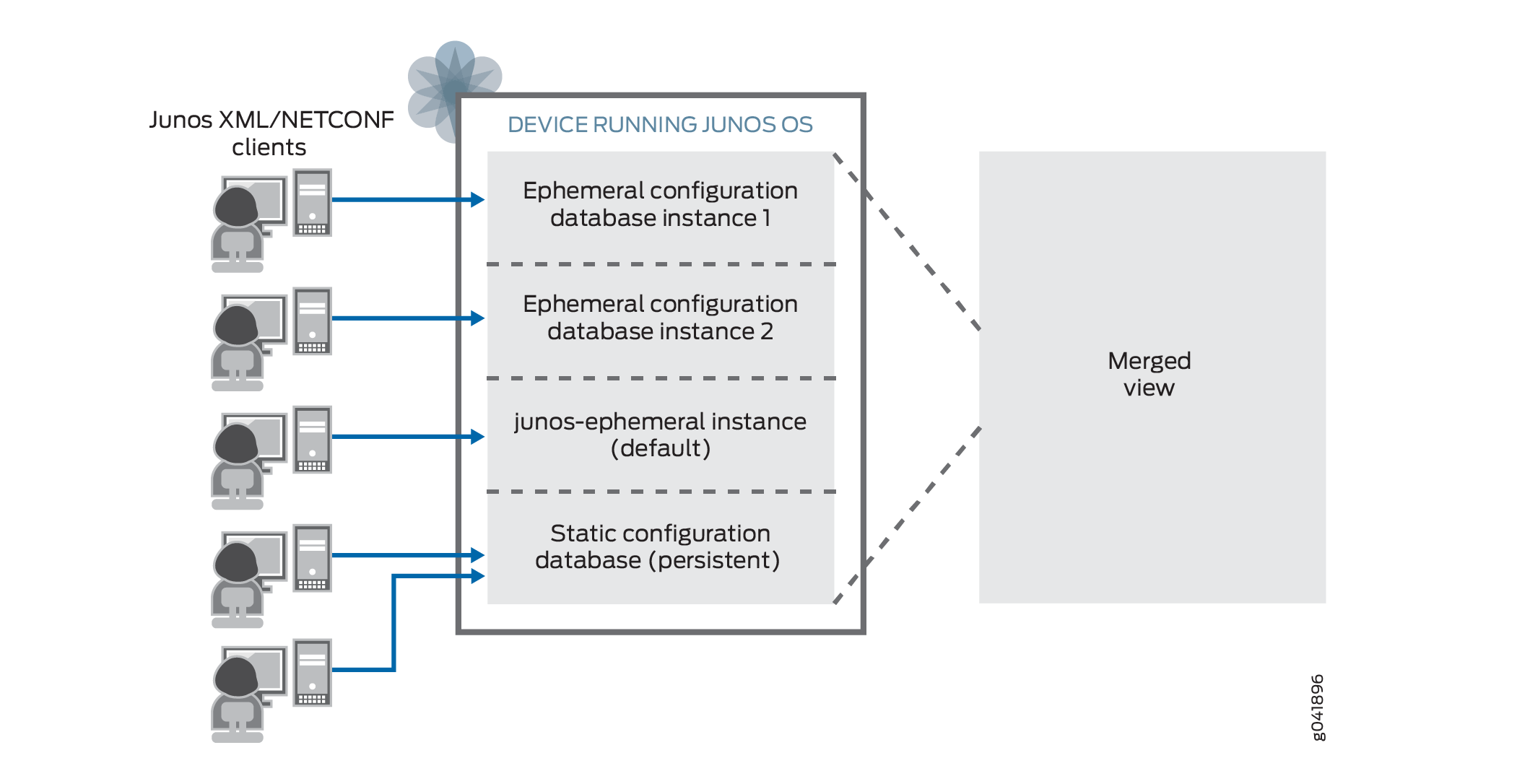
Junos devices provide a default ephemeral database instance, which is automatically enabled. You can also enable multiple user-defined instances of the ephemeral configuration database. JET applications and NETCONF and Junos XML protocol client applications can concurrently load and commit data to separate instances of the ephemeral database. The active device configuration is a merged view of the static and ephemeral configuration databases.
Ephemeral database instances are useful when multiple client applications need to simultaneously update a device configuration. For example, two or more SDN controllers might need to simultaneously push configuration data to the same device. In the standard commit model, one controller might have an exclusive lock on the candidate configuration, thereby preventing the other controller from modifying it. By using separate ephemeral instances, the controllers can deploy the changes at the same time.
Applications can simultaneously load and commit data to different ephemeral database instances in addition to the static configuration database. However, the device processes the commits sequentially. As a result, the commit to a specific database might be delayed, depending on the processing order.
The Junos processes read the configuration data from both the static configuration database and the ephemeral configuration database. When one or more ephemeral database instances are in use and there is conflicting data, statements in a database with a higher priority override the statements in a database with a lower priority. The database priority, from highest to lowest, is as follows:
-
Statements in a user-defined instance of the ephemeral configuration database.
If the device uses multiple user-defined ephemeral instances, it determines the priority by the order in which the instances are configured at the
[edit system
              configuration-database ephemeral]
hierarchy level, running from highest to lowest priority. -
Statements in the default ephemeral database instance.
-
Statements in the static configuration database.
Consider the following configuration:
system {
    configuration-database {
        ephemeral {
            instance 1;
            instance 2;
        }
    }
}
Figure 1 illustrates the priority of the ephemeral database instances and the static (committed) configuration database. In this example, ephemeral database instance 1 has the highest priority, followed by ephemeral database instance 2, then the default ephemeral database instance, and finally the static configuration database.
Ephemeral Database General Commit Model
JET applications and NETCONF and Junos XML protocol client applications can modify the ephemeral configuration database. JET applications must send configuration requests as pairs of load and commit operations. NETCONF and Junos XML protocol client applications can perform multiple load operations before executing a commit operation.
You must validate all configuration data before loading it into the ephemeral database and committing it on the device. Committing invalid configuration data can cause Junos processes to restart or stop responding and result in disruption to the system or network.
Client applications can simultaneously load and commit data to different ephemeral database instances. Commits issued at the same time for different ephemeral instances are queued and processed serially by the device. If a client disconnects from a session, the device discards any uncommitted configuration changes in the ephemeral instance. However, configuration data that has already been committed to the ephemeral instance by that client is unaffected.
When you commit an ephemeral instance, the system validates the syntax, but not the semantics, of the ephemeral configuration data. When the commit is complete, the device notifies the affected system processes. The processes read the updated configuration and merge the ephemeral data into the active configuration according to the rules of prioritization described in Ephemeral Database Instances. The active device configuration is a merged view of the static and ephemeral configuration databases.
The ephemeral database's commit time will be slightly longer on devices running Junos OS Evolved than on devices running Junos OS because of the architectural differences between the two operating systems.
For detailed information about committing and synchronizing instances of the ephemeral configuration database, see Commit and Synchronize Ephemeral Configuration Data Using the NETCONF or Junos XML Protocol.
Using the Ephemeral Database with High Availability Features
High availability refers to the hardware and software components that provide redundancy and reliability for network communications. You should consider certain behaviors and caveats before using the ephemeral database on systems that use high availability features. High availability features include redundant Routing Engines, graceful Routing Engine switchover (GRES), nonstop active routing (NSR), and interchassis redundancy for MX Series routers or EX Series switches using Virtual Chassis. The following sections describe these behaviors and outline how the different ephemeral database commit synchronize models can affect these behaviors.
- Understanding Ephemeral Database Commit Synchronize Models
- Redundant Routing Engines
- Graceful Routing Engine Switchover (GRES)
- Nonstop Active Routing (NSR)
- MX Series Virtual Chassis
- EX Series Virtual Chassis
Understanding Ephemeral Database Commit Synchronize Models
The ephemeral configuration database has two models for synchronizing ephemeral configuration data across Routing Engines or Virtual Chassis members during a commit synchronize operation:
-
Asynchronous
-
Synchronous
Starting with Junos OS Release 25.4R1 and Junos OS Evolved Release 25.4R1, the ephemeral database uses the synchronous model by default and devices that enable GRES or NSR must use the synchronous model. However, you can still use either model to synchronize ephemeral data on devices that do not enable GRES or NSR. In earlier releases, the asynchronous model is the default.
Asynchronous Model
When the ephemeral database uses the asynchronous commit model, the primary Routing Engine or Virtual Chassis primary device commits the configuration and then notifies the backup device. The requesting Routing Engine does not wait for the other Routing Engine to first synchronize and commit the configuration. Devices that use high availability features require that the primary and backup Routing Engines are synchronized in case of a failover. However, there can be situations in which an asynchronous commit synchronize operation can be interrupted and fail to synchronize the ephemeral configuration to the other Routing Engine.
Synchronous Model
The synchronous commit model is similar to the model used by the static configuration database. Synchronous commit operations are slower than asynchronous commit operations, but they provide better assurance that the ephemeral configuration is synchronized across Routing Engines or Virtual Chassis members. Thus, the synchronous commit model enables you to use the ephemeral database with greater reliability on devices that use high availability features.
In a dual Routing-Engine or MX Series Virtual Chassis environment, the synchronous commit model works as follows:
- The primary Routing Engine or Virtual Chassis primary device starts its commit operation for the ephemeral instance.
- At a given point during the commit operation, the device initiates a commit on the backup Routing Engine or Virtual Chassis backup device.
- If the other Routing Engine successfully commits the configuration, then the primary Routing Engine continues its commit operation. If the commit fails on the other Routing Engine, then the primary Routing Engine also fails the commit.
When an EX Series Virtual Chassis uses the synchronous commit model, the member switch in the primary Routing Engine role first initiates the commit operation on the other members simultaneously. Because an EX Series Virtual Chassis can have many members, the primary switch then proceeds with its commit operation, even if the commit fails on another member.
As is the case for the static configuration database, even with the synchronous commit synchronize model, there can be rare circumstances in which the device commits an updated ephemeral configuration on the backup Routing Engine but fails to complete the commit on the primary Routing Engine resulting in the configurations being out of synchronization.
Failover Synchronization
Devices running Junos OS Release 20.2R1 or later and devices running Junos OS Evolved
also support failover configuration synchronization for the ephemeral database. If you
configure failover synchronization, then when the backup Routing Engine synchronizes with
the primary Routing Engine, for example, when it is newly inserted, brought back online,
or during a change in role, it synchronizes both its static and ephemeral configuration
databases. To enable failover synchronization, configure the commit
synchronize statement at the [edit system] hierarchy level in
the static configuration database.
For failover synchronization, the backup Routing Engine or the MX Virtual Chassis backup device only synchronizes the ephemeral configuration database with the primary device if both the backup device and the primary device are running the same software version.
Both commit synchronize operations and failover synchronize operations synchronize the ephemeral configuration data to the other Routing Engine using a load update operation instead of a load override operation. By using a load update operation, the device only needs to notify the Junos processes that correspond to changed statements during the update, which minimizes possible disruptions to the network.
Redundant Routing Engines
Dual Routing Engine systems support configuring the ephemeral database. However, the ephemeral commit model does not automatically synchronize ephemeral configuration data to the backup Routing Engine during a commit operation. You can synchronize the data in an ephemeral instance on a per-commit or per-session basis. You can also configure an ephemeral instance to automatically synchronize its data every time you commit the instance. For more information, see Commit and Synchronize Ephemeral Configuration Data Using the NETCONF or Junos XML Protocol.
Multichassis environments do not support synchronizing the ephemeral configuration database to the other Routing Engines.
When a client application commits data in an ephemeral instance and synchronizes it to the backup Routing Engine, the device synchronizes the ephemeral data using the configured commit synchronize model. Dual Routing Engine devices also support failover configuration synchronization for the ephemeral database. For more information, see Understanding Ephemeral Database Commit Synchronize Models.
Graceful Routing Engine Switchover (GRES)
GRES enables a device with redundant Routing Engines to continue forwarding packets, even if the primary Routing Engine fails. GRES requires that the primary and backup Routing Engines synchronize the configuration and certain state information before a switchover occurs.
We recommend that you use the synchronous commit synchronize model on devices that enable GRES. Moreover, starting in Junos OS Release 25.4R1 and Junos OS Evolved Release 25.4R1, devices that enable GRES must use the synchronous model. Synchronous commit operations are slower than asynchronous commit operations, but they provide better assurance that the ephemeral configuration is synchronized between Routing Engines.
Dual Routing Engine devices running Junos OS Evolved enable GRES by default.
Although supported in certain releases, we do not recommend using the asynchronous
commit synchronize model on devices that enable GRES. If you use the asynchronous model,
in certain circumstances, the ephemeral database might not be synchronized between the
primary and backup Routing Engines when a switchover occurs. For example, the backup and
primary Routing Engines might not synchronize the ephemeral database if the commit
synchronize operation is interrupted by a sudden power outage. If you use the asynchronous
commit model on a GRES-enabled device, you must explicitly configure the device to
synchronize ephemeral configuration data to the backup Routing Engine. To enable
synchronization, configure the allow-commit-synchronize-with-gres
statement at the [edit system configuration-database ephemeral] hierarchy
level in the static configuration database.
Nonstop Active Routing (NSR)
Nonstop active routing (NSR) enables the transparent switchover of the Routing Engines in the event that one of the Routing Engines goes down. We recommend that you use the synchronous commit synchronize model on devices that enable NSR. Moreover, starting in Junos OS Release 25.4R1 and Junos OS Evolved Release 25.4R1, devices that enable NSR must use the synchronous model. Synchronous commit operations are slower than asynchronous commit operations, but they provide better assurance that the ephemeral configuration is synchronized between Routing Engines.
Although supported in certain releases, we do not recommend using the asynchronous commit synchronize model on devices that enable NSR, because it comes with certain caveats. In a deployment with dual Routing Engines, a commit synchronize operation on an ephemeral instance on the primary Routing Engine results in an asynchronous commit on the backup Routing Engine. If the device notifies the routing protocol process (rpd) in the process of updating the configuration, it could result in an undesirable behavior of the system due to the asynchronous nature of the commit on the backup Routing Engine. In Junos OS Release 21.1R1 and later, the device synchronizes the ephemeral instance to the backup Routing Engine using a load update operation, so it only notifies processes corresponding to statements that are changed.
Applications utilizing the ephemeral database are only impacted in this NSR situation if they interact with the routing protocol process. For example, the SmartWall Threat Defense Director (SmartWall TDD) would not be impacted in this case, because it only interacts with the firewall process (dfwd) through the ephemeral database.
MX Series Virtual Chassis
MX Series Virtual Chassis support configuring the ephemeral database. You can configure and commit an ephemeral instance only on the primary Routing Engine of the Virtual Chassis primary device.
An MX Series Virtual Chassis does not automatically synchronize any ephemeral configuration data during a commit operation. As with dual Routing Engine systems, you can synchronize the data in an ephemeral instance on a per-commit or per-session basis. You can also configure an ephemeral instance to automatically synchronize its data every time you commit the instance. The device synchronizes the ephemeral data only from the primary Routing Engine on the primary device to the primary Routing Engine on the backup device.
MX Series Virtual Chassis do not, under any circumstance, synchronize ephemeral configuration data from the primary Routing Engine to the backup Routing Engine on the respective Virtual Chassis member.
MX Series Virtual Chassis must have GRES configured. If you configure the ephemeral
database to use the synchronous commit synchronize model (recommended), the device
synchronizes the ephemeral instance to the other Routing Engine when you request a commit
synchronize operation. However, if the ephemeral database uses the asynchronous commit
synchronize model, you must explicitly configure the
allow-commit-synchronize-with-gres statement in the static
configuration database to enable synchronization. See Understanding Ephemeral Database Commit Synchronize Models for more information about the ephemeral database commit models.
Starting with Junos OS Release 25.4R1 and Junos OS Evolved Release 25.4R1, devices that enable GRES must use the synchronous commit synchronize model.
When you commit and synchronize an ephemeral instance on an MX Series Virtual Chassis that uses the asynchronous commit synchronize model:
-
The Virtual Chassis primary device validates the configuration syntax and commits the ephemeral instance on its primary Routing Engine.
-
If the commit is successful, the primary device notifies the backup device to synchronize the ephemeral instance.
-
The backup device commits the ephemeral instance on its primary Routing Engine only. If the commit operation fails, the backup device logs a message in the system log file but does not notify the primary device.
When you commit and synchronize an ephemeral instance on an MX Series Virtual Chassis that is configured to use the synchronous commit synchronize model, which is the recommended method:
-
The Virtual Chassis primary device starts its commit of the ephemeral instance on its primary Routing Engine.
-
At a given point in its commit operation, the primary device initiates a commit on the backup device's primary Routing Engine.
-
If the backup device successfully commits the configuration, then the primary device proceeds with its commit operation. If the backup device fails to commit the configuration, then the primary device also fails the commit.
As outlined, when you use the asynchronous commit synchronize model for the ephemeral database, the commit can succeed on the primary device but fail on the backup device. When you use the synchronous commit synchronize model, the commit either succeeds or fails for both primary Routing Engines, except in rare circumstances.
MX Series Virtual Chassis support failover configuration synchronization for the
ephemeral database. To configure failover configuration synchronization, include the
commit
            synchronize
statement at the [edit system]
hierarchy level in the static configuration database. After you configure the statement,
the primary Routing Engine on the Virtual Chassis backup device synchronizes both its
static and ephemeral configuration databases when it synchronizes with the primary Routing
Engine on the Virtual Chassis primary device, for example, after it restarts.
For failover synchronization, the MX Virtual Chassis backup device only synchronizes the ephemeral configuration database with the primary device if both devices are running the same software version.
EX Series Virtual Chassis
EX Series Virtual Chassis support the ephemeral configuration database. You can only configure and commit an ephemeral instance on the member switch in the primary Routing Engine role. Starting in Junos OS Release 23.4R1, you can synchronize the ephemeral database across EX Series Virtual Chassis members.
An EX Series Virtual Chassis does not automatically synchronize any ephemeral configuration data during a commit operation. You can synchronize the data in an ephemeral instance on a per-commit or per-session basis. You can also configure an ephemeral instance to automatically synchronize its data every time you commit the instance.
You can configure GRES on an EX Series Virtual Chassis to enable the Virtual Chassis to
continue forwarding packets if the primary Routing Engine fails. If you configure the
ephemeral database to use the synchronous commit synchronize model (recommended), the
device synchronizes the ephemeral instance to the other members when you request a commit
synchronize operation. However, if the ephemeral database uses the asynchronous commit
synchronize model and GRES is configured, you must explicitly configure the
allow-commit-synchronize-with-gres statement in the static
configuration database to enable synchronization.
Starting with Junos OS Release 25.4R1 and Junos OS Evolved Release 25.4R1, devices that enable GRES must use the synchronous commit synchronize model.
When you commit and synchronize an ephemeral instance on an EX Series Virtual Chassis that uses the asynchronous commit synchronize model:
-
The member switch in the primary Routing Engine role validates the configuration syntax and commits the ephemeral instance.
-
If the commit is successful, the primary device notifies the
commit-syncdprocess, which initiates the commit on each member switch in turn. -
Each member switch commits the ephemeral instance. If the commit operation fails on any member, it does not affect the commit operation on the other members.
When you commit and synchronize an ephemeral instance on an EX Series Virtual Chassis that is configured to use the synchronous commit synchronize model, which is the recommended method:
-
The member switch in the primary Routing Engine role initiates the commit on all member switches simultaneously.
-
Each member switch commits the ephemeral instance and notifies the primary switch. If the commit operation fails on any member, it does not affect the commit operation on the other members.
-
After receiving responses from all member switches, the primary switch commits the ephemeral instance.
As outlined, in the asynchronous model, the primary switch relies on the
commit-syncd process to initiate the commits on each member switch
sequentially. If the commit-syncd process fails for any reason, then some
commits might not be initiated. In the synchronous commit model, the primary switch
initiates the commit on all member switches directly and in parallel. Thus, the
synchronous commit model is generally more reliable than the asynchronous commit model. In
either case, if the commit fails on one member, it does not impact or prevent the commit
on the other members.
Additionally, in the synchronous commit model, the primary switch displays the commit progress for each member as the commit occurs. In the asynchronous model, the commits occur in the background, so in this case, only the primary device logs the commit results.
Ephemeral Database Best Practices
The ephemeral configuration database enables multiple applications to make rapid configuration changes simultaneously. Because the ephemeral configuration database does not use the same safeguards as the static configuration database, you should carefully consider how you use the ephemeral database. We recommend following these best practices to optimize performance and avoid potential issues when you use the ephemeral configuration database.
Regulate Commit Frequency
The ephemeral database is designed for faster commits. However, committing too frequently can cause problems if the applications that consume the configuration can't keep pace with the rate of commit operations. Therefore, we recommend that you commit the next set of changes only after the device's operational state reflects the changes from the previous commit.
For example, if you execute frequent, rapid commits, the device could overwrite certain configuration data that it stores in external files before a Junos process reads the previous update. If a Junos process misses an important update, the device or network could exhibit unpredictable behavior.
Ensure Data Integrity
Junos devices do not validate configuration data semantics when you commit data to an ephemeral database. Therefore, you must take additional steps before loading and committing the configuration to ensure data integrity. We recommend that you always:
-
Validate configuration data before loading it in the database
-
Consolidate related configuration statements into a single database
You should validate all configuration data before loading it into an ephemeral database. We recommend that you pre-validate your configuration data using a static database, which validates both syntax and semantics.
Additionally, you should always load related configuration data into a single database. Adding related or dependent configuration data in the same database helps ensure that the device can detect and process related statements during a commit operation. For example, if you define a firewall filter in the static configuration database or in an ephemeral configuration database, then you should configure the application of the filter to an interface in the same configuration database.
By contrast, suppose you configure some statements in the static database but you configure related or dependent statements in an ephemeral database. When you commit the static database, the system validates the data only within that database. The system might not identify the dependent configuration in the ephemeral database, which can cause the validation, and thus the commit, to fail.
Consolidate Scaled Configurations
We recommend that you load scaled configurations into a single ephemeral database instance, rather than distributing them across multiple databases. A scaled configuration might include, for example, large lists of:
-
Policy options
-
Prefix lists
-
VLANs
-
Firewall filters
When you restrict a top-level configuration hierarchy to a single database, internal optimizations enable Junos processes to consume the configuration more efficiently. Alternatively, if you spread the configuration across multiple databases, Junos processes must parse a merged view of the configuration, which generally requires more resources and processing time.
Change History Table
Feature support is determined by the platform and release you are using. Use Feature Explorer to determine if a feature is supported on your platform.
synchronous. In earlier releases, the
default is asynchronous.commit
synchronize statement at the [edit system] hierarchy level in
the static configuration database and the backup Routing Engine synchronizes with the
primary Routing Engine, for example, when it is newly inserted, brought back online, or
during a change in role, it synchronizes both its static and ephemeral configuration
databases. In earlier releases, the device synchronizes only the static configuration
database.