
Source NAT
Learn how source NAT translates the source IP addresses of outbound traffic, enabling multiple internal hosts to access external networks by using one or more public IP addresses. Understand source NAT rules and source pools, including PAT, address allocation, overflow pools, and persistent address mappings.
Source Network Address Translation (NAT) is most commonly used for translating private IP address to a public routable address to communicate with the host. Source NAT changes the source address of the packets that pass through the router. A NAT pool is a set of addresses that are designed as a replacement for client IP addresses. For more information, see the following topics:
What Is Source NAT?
Source NAT is the translation of the source IP address of a packet leaving a Juniper Networks device.Source NAT is commonly used when devices in a private/trust network need to communicate with hosts on a public or untrust network, such as the Internet.
| NAT Type | Address Mapping | Address Pool | Port Translation | Mapping Behavior |
|---|---|---|---|---|
| Interface NAT | Internal addresses to egress interface IP | Not required | Performed | Dynamic |
| Pool NAT without port translation | Internal addresses to NAT pool addresses | Required | Not performed | Dynamic; translated address can be reused for subsequent matching traffic |
| Pool NAT with port translation | Multiple internal addresses or connections to a smaller NAT pool | Required | Performed | Dynamic; multiple connections can share translated addresses using different ports |
| Static pool NAT (address shift) | Internal address block to a corresponding NAT pool address block | Required | Not performed | Static; fixed one-to-one mapping |
On the MX Series device, if you use the Source NAT on an aggregated multiservices
(AMS) interface. The service set command creates a separate entry
for each AMS interface. Hence, the memory utilization exhausts and if you configure
an additional AMS interface result in configuration commit
error.
How Source NAT Works
Source NAT is used to allow hosts with private IP addresses to access a public network.
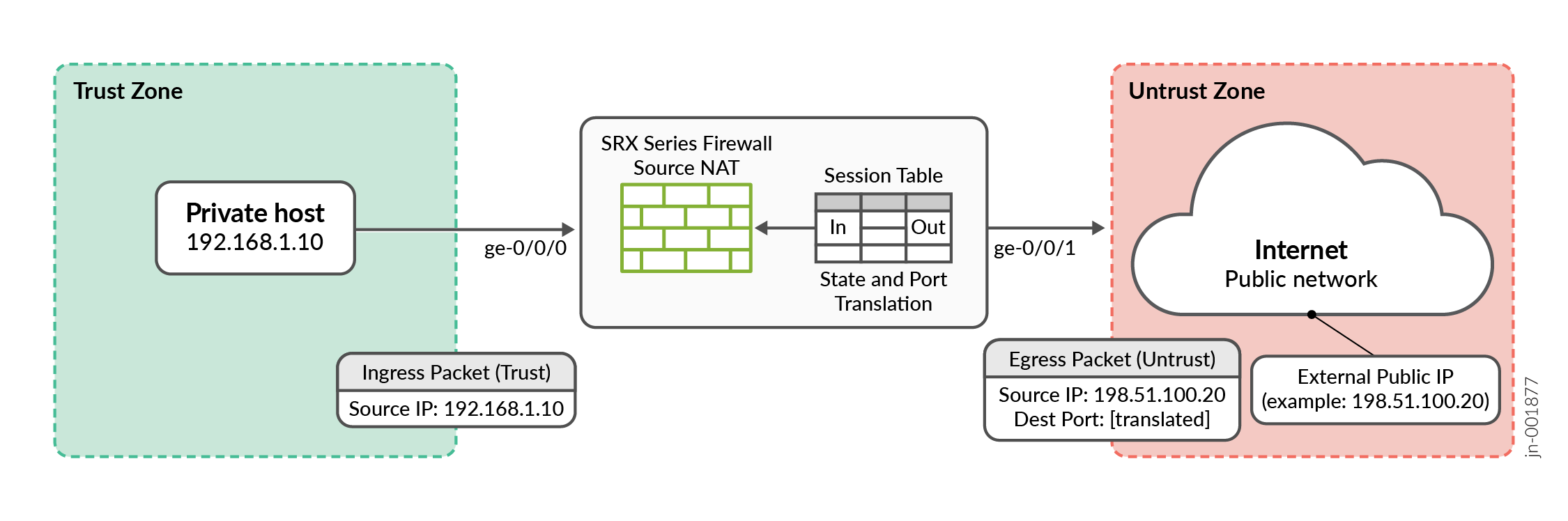
The private host sends traffic.
The host 192.168.1.10 wants to reach an Internet destination.The packet reaches the SRX Series Firewall.
The SRX Series Firewall receives the packet from the Trust zone.
The SRX Series Firewall determines whether the traffic matches a configured source NAT rule.
The SRX Series Firewall translates the source IP address.
If the packet matches the Source NAT rule, the SRX Series Firewall replaces the original source address with a translated address.
IP address from 192.168.1.10 to 198.51.100.20
The SRX Series Firewall also maintains translation state so that return traffic can be associated with the original internal host.
The translated packet goes to the Internet.
The Internet receives a packet with the translated source address: 198.51.100.20
The private address 192.168.1.10 is therefore hidden from the external network.
Source NAT Architecture
System session capacity and session ramp-up rate are limited by the memory and CPU capacity of the central point. The following NAT enhancements improve performance:
- NAT resource tracking: The central point architecture no longer supports central point sessions. NAT therefore uses a NAT tracker to track NAT IP address and port allocations and their usage. The NAT tracker is a global array that maps Services Processing Unit (SPU) session IDs to NAT IP addresses or ports and helps manage NAT resources.
- Reduced statistics updates: By default, the SPU sends NAT rule alarm, trap, and statistics updates to the central point once every second. Previously, statistics were updated in the central point for each session trigger. This approach reduces the processing overhead on the central point.
- Optimized NAT port selection: NAT can select a translated port so that the 5-tuple hash after NAT matches the hash before NAT. This allows the forward and reverse traffic to be handled by the same SPU, reducing the need to install an additional forwarding session. As a result, NAT performance and throughput improve.
- Local IP-shifting pool management: For IP-shifting (non-PAT) NAT pools, resource management is moved from the central point to the SPU. Each SPU can therefore manage its local NAT resources without sending every NAT request to the central point. This improves the connections-per-second rate and throughput of IP-shifting NAT.
Source NAT Configuration
The main configuration tasks for source NAT are as follows:
Source NAT Rules
Source NAT rules specify two layers of match conditions:
-
Traffic direction—Allows you to specify combinations of
from interface,from zone, orfrom routing-instanceandto interface,to zone, orto routing-instance. You cannot configure the samefromandtocontexts for different rule sets. -
Packet information—Can be source and destination IP addresses or subnets, source port numbers or port ranges, destination port numbers or port ranges, protocols, or applications.
For all ALG traffic, except FTP, we recommend that you not use the
source-port rule option. Data session creation can fail if this
option is used because the IP address and the source port value, which is a random
value, might not match the rule.
In addition, we recommend that you not use the destination-port
option or the application option as matching conditions for ALG
traffic. If these options are used, translation may fail because the port value in
the application payload might not match the port value in the IP address.
If multiple source NAT rules overlap in the match conditions, the most specific rule is chosen. For example, if rules A and B specify the same source and destination IP addresses, but rule A specifies traffic from zone 1 to zone 2 and rule B specifies traffic from zone 1 to interface ge-0/0/0, rule B is used to perform source NAT. An interface match is considered to be more specific than a zone match, which is more specific than a routing instance match.
The actions you can specify for a source NAT rule are:
-
off—Do not perform source NAT.
-
pool—Use the specified user-defined address pool to perform source NAT.
-
interface—Use the egress interface’s IP address to perform source NAT.
Source NAT rules are applied to traffic in the first packet that is processed for the flow or in the fast path for the ALG. Source NAT rules are processed after static NAT rules, destination NAT rules, and reverse mapping of static NAT rules and after route and security policy lookup.
When zones are not configured under rule-set and when active source NAT is configured with missing mandatory statement “from” then, the following message is displayed when performing commit “Missing mandatory statement: 'from' error: configuration check-out failed” and the configuration check-out fails.
Optimize Source NAT Performance
Source NAT can be optimized based on functionality and performance needs.
Port Randomization Mode (Default)
For pool-based source NAT and interface NAT, port randomization mode is enabled and used by default.
In this mode, the device selects IP addresses on a round-robin basis, and the port selection is random. That is, when the device performs NAT translation it first chooses the IP address by round robin, then chooses the port used for that IP address by randomization.
Although randomized port number allocation can provide protection from security threats such as DNS poison attacks, it can also affect performance and memory usage due to the computations and NAT table resources involved.
Round-Robin Mode
A less resource-intensive NAT translation method involves using only the round-robin allocation method. Whereas randomization requires computational work for each assigned port, the round robin method simply selects ports sequentially.
In this mode, the device selects both IP addresses and ports on a round-robin basis. That is, when the device performs NAT translation it first chooses the IP address by round robin, then chooses the port used for that IP address by round robin.
For example, if the source pool contains only one IP address:
When the first packet of a flow arrives (creating a session), it is translated to IP1, port N. Subsequent packets in that flow are allocated to the same IP/port.
When the first packet of a new flow arrives, it is translated to IP1, port N+1, and so on.
If the source pool contains two IP addresses:
When the first packet of a flow arrives (creating a session), it is translated to IP1, port X. Subsequent packets in that flow are allocated to the same IP/port.
When the first packet of a second flow arrives, it is translated to IP2, port X.
When the first packet of a third flow arrives, it is translated to IP1, port X+1.
With the first packets of a fourth flow arrives, it is translated to IP2, port X+1, and so on.
Configuration
Round-robin mode is enabled by default, however port randomization mode (also enabled) has higher priority. To use round-robin mode, disable the higher-priority port randomization mode, as follows:
user@host# set security nat source port-randomization disable
To disable round-robin mode (and re-enable port randomization), delete the configuration statement, as follows:
user@host# delete security nat source port-randomization disable
Session Affinity Mode
With the modes noted above, a given session is processed by the inbound SPU based on a 5-tuple (source IP, dest IP, source port, dest port, protocol) hash. When NAT is involved, the 5-tuple hash will be different for the outbound part of the session vs. the return part of the session. Therefore, the outbound NAT session information may be located in one SPU, while the return (reverse) NAT session information may be located in another SPU. The goal of session affinity mode is to maintain the forwarding session information for both the outbound and return traffic on the same SPU.
In this mode, the device uses a “reverse NAT enhancement” translation algorithm for IP and port selection, to improve performance for NAT sessions and throughput. The NAT module attempts to select an IP address and port that can be used with the hash algorithm to ensure the selected SPU for the outbound and return flow elements can be identical.
Configuration
Session affinity mode is enabled by default, however both port randomization and round-robin modes (also enabled) have higher priority. To use session affinity mode, disable both port randomization and round-robin modes, as follows:
user@host# set security nat source port-randomization disable user@host# set security nat source port-round-robin disable
To disable session affinity mode, and re-enable either round-robin or port randomization mode, delete one or both of the configuration statements, as follows:
user@host# delete security nat source port-round-robin disable user@host# delete security nat source port-randomization disable
Usage Notes
Notes and guidelines for session affinity mode include:
Use large NAT port pools whenever possible (see Security Considerations below)
The algorithm chooses a port from within the configured port range. If no port is available, the NAT port will be allocated based on random selection.
Static NAT and destination NAT cannot use affinity mode.
Security Considerations
Although session affinity improves performance by consolidating forwarding sessions, it decreases security to some degree since the algorithm selects the IP address and port based on a pre-defined algorithm with specific parameters, instead of pure randomization. That said, the fact there are typically multiple eligible ports for the algorithm to choose from and so there is still some degree of randomization.
The best way to mitigate the security risk is to ensure the source port number used is less predictable. That is, the larger the NAT pool resource range from which ephemeral ports are selected, the smaller the chances of an attacker guessing the selected port number. Given this, it is recommended to configure large NAT port pools whenever possible.
Port Overflow Burst Mode
The port overflow burst mode allows you to use the ports beyond the allocated port blocks. You can configure a burst pool with a range of ports in an IP address to be reserved for bursting.
There are primary and burst pool types, the device uses the burst pool once the subscribers reach the limit configured in the primary pool.
Brust mode is supported on:
Deterministic NAT source NAT pool with PBA type burst pool.
Deterministic NAT source NAT pool with dynamic Network Address Port Translation (NAPT) type burst pool.
Regular PBA source NAT pool with PBA type burst pool.
Regular PBA source NAT pool with dynamic NAPT type burst pool.
|
NAT Type |
Before the Configured Port Block Limit not Exceed |
After the Configured Port Block Limit not Exceed |
|---|---|---|
|
Deterministic NAT source NAT pool with PBA type burst pool |
Port blocks from the primary DetNAT pool are used. |
Port block from the burst pool configured in PBA. |
|
Deterministic NAT source NAT pool with dynamic Network Address Port Translation (NAPT) type burst pool |
Port blocks from the primary DetNAT pool are used. |
Port block from the burst pool configured in dynamic NAPT. |
|
Regular PBA source NAT pool with PBA type burst pool |
Port blocks from the primary PBA pool are used. |
Port block from the burst pool configured in PBA. |
|
Regular PBA source NAT pool with dynamic NAPT type burst pool |
Port blocks from the primary PBA pool are used. |
Port block from the burst pool configured in dynamic NAPT. |
PBA Burst Type Method—PBA supports APP and non-APP mode of operations.
-
APP Mode—Ports are allocated from the primary pool. When then subscriber limit exceeds from primary pool, if there are any available ports for the same IP address from the burst pool, then new sessions are created.
-
non-APP Mode—Ports are allocated from the primary pool. When subscriber limit exceeds from primary pool, new sessions are created from the burst pool with any available IP address and port.
DetNAT Burst Type Method—Ports are allocated from the primary pool. If the same IP address from the burst pool or all the available ports are not available from same IP address, then new session are created with another IP address. If the burst pool is configured with a different IP from primary pool, uses another IP from the burst pool.
Configure Port Block Allocation Size
Before you begin:
Understand the guidelines for configuring port block allocation. Read Guidelines for Configuring Secured Port Block Allocation.
You can configure secured port block allocation, which allocates blocks of ports to a NAT subscriber. With port block allocation, we generate one syslog log per set of ports allocated for a subscriber. Use this procedure to configure the port block allocation size.
Monitoring Source NAT Information
Purpose
Display configured information about source Network Address Translation (NAT) rules, pools, persistent NAT, and paired addresses.
Action
Select Monitor>NAT>Source NAT in the J-Web user interface, or enter the following CLI commands:
show security nat source summary
show security nat source pool pool-name
show security nat source persistent-nat-table
show security nat source paired-address
Table 3 describes the available options for monitoring source NAT.
Field |
Description |
Action |
|---|---|---|
| Rules | ||
Rule-set Name |
Name of the rule set. |
Select all rule sets or a specific rule set to display from the list. |
Total rules |
Number of rules configured. |
– |
ID |
Rule ID number. |
– |
Name |
Name of the rule . |
– |
From |
Name of the routing instance/zone/interface from which the packet flows. |
– |
To |
Name of the routing instance/zone/interface to which the packet flows. |
– |
Source address range |
Source IP address range in the source pool. |
– |
Destination address range |
Destination IP address range in the source pool. |
– |
Source ports |
Source port numbers. |
– |
Ip protocol |
IP protocol. |
– |
Action |
Action taken for a packet that matches a rule. |
– |
Persistent NAT type |
Persistent NAT type. |
– |
Inactivity timeout |
Inactivity timeout interval for the persistent NAT binding. |
– |
Alarm threshold |
Utilization alarm threshold. |
|
Max session number |
The maximum number of sessions. |
– |
Sessions (Succ/Failed/Current) |
Successful, failed, and current sessions.
|
– |
Translation Hits |
Number of times a translation in the translation table is used for a source NAT rule. |
– |
| Pools | ||
Pool Name |
The names of the pools. |
Select all pools or a specific pool to display from the list. |
Total Pools |
Total pools added. |
– |
ID |
ID of the pool. |
– |
Name |
Name of the source pool. |
– |
Address range |
IP address range in the source pool. |
– |
Single/Twin ports |
Number of allocated single and twin ports. |
– |
Port |
Source port number in the pool. |
– |
Address assignment |
Displays the type of address assignment. |
– |
Alarm threshold |
Utilization alarm threshold. |
– |
Port overloading factor |
Port overloading capacity. |
– |
Routing instance |
Name of the routing instance. |
– |
Total addresses |
Total IP address, IP address set, or address book entry. |
– |
Host address base |
Host base address of the original source IP address range. |
– |
Translation hits |
Number of times a translation in the translation table is used for source NAT. |
– |
| Top 10 Translation Hits | ||
Graph |
Displays the graph of top 10 translation hits. |
– |
| Persistent NAT | ||
| Persistent NAT table statistics | ||
binding total |
Displays the total number of persistent NAT bindings for the FPC. |
– |
binding in use |
Number of persistent NAT bindings that are in use for the FPC. |
– |
enode total |
Total number of persistent NAT enodes for the FPC. |
– |
enode in use |
Number of persistent NAT enodes that are in use for the FPC. |
– |
| Persistent NAT table | ||
Source NAT pool |
Name of the pool. |
Select all pools or a specific pool to display from the list. |
Internal IP |
Internal IP address. |
Select all IP addresses or a specific IP address to display from the list. |
Internal port |
Displays the internal ports configured in the system. |
Select the port to display from the list. |
Internal protocol |
Internal protocols . |
Select all protocols or a specific protocol to display from the list. |
Internal IP |
Internal transport IP address of the outgoing session from internal to external. |
– |
Internal port |
Internal transport port number of the outgoing session from internal to external. |
– |
Internal protocol |
Internal protocol of the outgoing session from internal to external. |
– |
Reflective IP |
Translated IP address of the source IP address. |
– |
Reflective port |
Displays the translated number of the port. |
– |
Reflective protocol |
Translated protocol. |
– |
Source NAT pool |
Name of the source NAT pool where persistent NAT is used. |
– |
Type |
Persistent NAT type. |
– |
Left time/Conf time |
Inactivity timeout period that remains and the configured timeout value. |
– |
Current session num/Max session num |
Number of current sessions associated with the persistent NAT binding and the maximum number of sessions. |
– |
Source NAT rule |
Name of the source NAT rule to which this persistent NAT binding applies. |
– |
| External node table | ||
Internal IP |
Internal transport IP address of the outgoing session from internal to external. |
– |
Internal port |
Internal port number of the outgoing session from internal to external. |
– |
External IP |
External IP address of the outgoing session from internal to external. |
– |
External port |
External port of the outgoing session from internal to external. |
– |
Zone |
External zone of the outgoing session from internal to external. |
– |
| Paired Address | ||
Pool name |
Name of the pool. |
Select all pools or a specific pool to display from the list. |
Specified Address |
IP address. |
Select all addresses, or select the internal or external IP address to display, and enter the IP address. |
Pool name |
Displays the selected pool or pools. |
– |
Internal address |
Displays the internal IP address. |
– |
External address |
Displays the external IP address. |
– |
| Resource Usage | ||
| Utilization for all source pools | ||
Pool name |
Name of the pool. |
To view additional usage information for Port Address Translation (PAT) pools, select a pool name. The information displays under Detail Port Utilization for Specified Pool. |
Pool type |
Pool type: PAT or Non-PAT. |
– |
Port overloading factor |
Port overloading capacity for PAT pools. |
– |
Address |
Addresses in the pool. |
– |
Used |
Number of used resources in the pool. For Non-PAT pools, the number of used IP addresses is displayed. For PAT pools, the number of used ports is displayed. |
– |
Available |
Number of available resources in the pool. For Non-PAT pools, the number of available IP addresses is displayed. For PAT pools, the number of available ports is displayed. |
– |
Total |
Number of used and available resources in the pool. For Non-PAT pools, the total number of used and available IP addresses is displayed. For PAT pools, the total number of used and available ports is displayed. |
– |
Usage |
Percent of resources used. For Non-PAT pools, the percent of IP addresses used is displayed. For PAT pools, the percent of ports, including single and twin ports, is displayed. |
– |
Peak usage |
Percent of resources used during the peak date and time. |
– |
| Detail Port Utilization for Specified Pool | ||
Address Name |
IP addresses in the PAT pool. |
Select the IP address for which you want to display detailed usage information. |
Factor-Index |
Index number. |
– |
Port-range |
Displays the number of ports allocated at a time. |
– |
Used |
Displays the number of used ports. |
– |
Available |
Displays the number of available ports. |
– |
Total |
Displays the number of used and available ports. |
– |
Usage |
Displays the percentage of ports used during the peak date and time. |
– |
Example: Configure Source NAT for Egress Interface Translation
This example describes how to configure a source NAT mapping of private addresses to the public address of an egress interface.
Requirements
Before you begin:
Configure network interfaces on the device. See Interfaces User Guide for Security Devices.
Create security zones and assign interfaces to them. See Understanding Security Zones.
Overview
This example uses the trust security zone for the private address space and the untrust security zone for the public address space. In Figure 2, devices with private addresses in the trust zone access a public network through the egress interface ge-0/0/0. For packets that enter the Juniper Networks security device from the trust zone with a destination address in the untrust zone, the source IP address is translated to the IP address of the egress interface.
No source NAT pool is required for source NAT using an egress interface. Proxy ARP does not need to be configured for the egress interface.
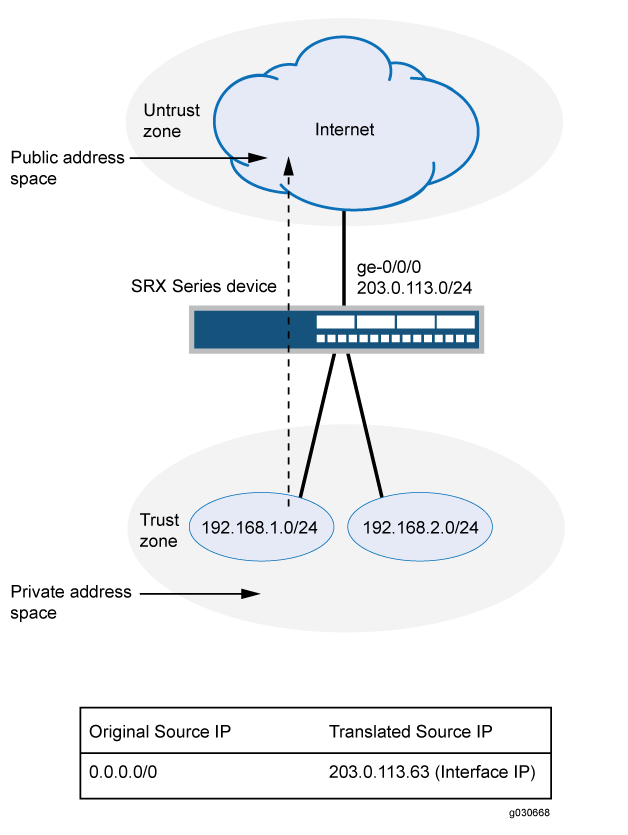
This example describes the following configurations:
Source NAT rule set
rs1with a ruler1to match any packet from the trust zone to the untrust zone. For matching packets, the source address is translated to the IP address of the egress interface.Security policies to permit traffic from the trust zone to the untrust zone.
Configuration
Procedure
CLI Quick Configuration
To quickly configure this example, copy the
following commands, paste them into a text file, remove any line breaks,
change any details necessary to match your network configuration,
copy and paste the commands into the CLI at the [edit] hierarchy
level, and then enter commit from configuration mode.
set security nat source rule-set rs1 from zone trust set security nat source rule-set rs1 to zone untrust set security nat source rule-set rs1 rule r1 match source-address 0.0.0.0/0 set security nat source rule-set rs1 rule r1 match destination-address 0.0.0.0/0 set security nat source rule-set rs1 rule r1 then source-nat interface set security policies from-zone trust to-zone untrust policy internet-access match source-address any set security policies from-zone trust to-zone untrust policy internet-access match destination-address any set security policies from-zone trust to-zone untrust policy internet-access match application any set security policies from-zone trust to-zone untrust policy internet-access then permit
Step-by-Step Procedure
The following example requires you to navigate throughout various levels in the configuration hierarchy. For instructions on how to do that, see Using the CLI Editor in Configuration Mode.
To configure a source NAT translation to an egress interface:
Create a source NAT rule set.
[edit security nat source] user@host# set rule-set rs1 from zone trust user@host# set rule-set rs1 to zone untrust
Configure a rule that matches packets and translates the source address to the address of the egress interface.
[edit security nat source] user@host# set rule-set rs1 rule r1 match source-address 0.0.0.0/0 user@host# set rule-set rs1 rule r1 match destination-address 0.0.0.0/0 user@host# set rule-set rs1 rule r1 then source-nat interface
Configure a security policy that allows traffic from the trust zone to the untrust zone.
[edit security policies from-zone trust to-zone untrust] user@host# set policy internet-access match source-address any destination-address any application any user@host# set policy internet-access then permit
Results
From configuration mode, confirm your configuration
by entering the show security nat and show security
policies commands. If the output does not display the intended
configuration, repeat the configuration instructions in this example
to correct it.
[edit]
user@host# show security nat
source {
rule-set rs1 {
from zone trust;
to zone untrust;
rule r1 {
match {
source-address 0.0.0.0/0;
destination-address 0.0.0.0/0;
}
then {
source-nat {
interface;
}
}
}
}
}
user@host# show security policies
from-zone trust to-zone untrust {
policy internet-access {
match {
source-address any;
destination-address any;
application any;
}
then {
permit;
}
}
}
If you are done configuring the device, enter commit from configuration mode.
Verification
To confirm that the configuration is working properly, perform these tasks:
Verifying Source NAT Rule Usage
Purpose
Verify that there is traffic matching the source NAT rule.
Action
From operational mode, enter the show security nat source
rule all command. View the Translation hits field to check for
traffic that matches the rule.
Example: Configure Source NAT for Single Address Translation
This example describes how to configure a source NAT mapping of a single private address to a public address.
Requirements
Before you begin:
Configure network interfaces on the device. See Interfaces User Guide for Security Devices.
Create security zones and assign interfaces to them. See Understanding Security Zones.
Overview
This example uses the trust security zone for the private address space and the untrust security zone for the public address space. In Figure 3, a device with the private address 192.168.1.200 in the trust zone accesses a public network. For packets sent by the device to a destination address in the untrust zone, the Juniper Networks security device translates the source IP address to the public IP address 203.0.113.200/32.
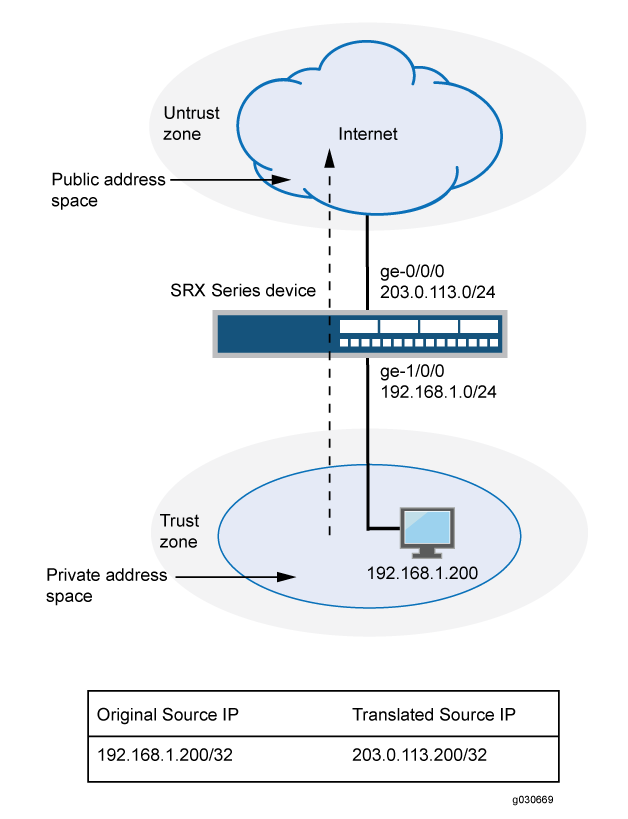
This example describes the following configurations:
Source NAT pool
src-nat-pool-1that contains the IP address 203.0.113.200/32.Source NAT rule set
rs1with ruler1to match packets from the trust zone to the untrust zone with the source IP address 192.168.1.200/32. For matching packets, the source address is translated to the IP address insrc-nat-pool-1pool.Proxy ARP for the address 203.0.113.200 on interface ge-0/0/0.0. This allows the Juniper Networks security device to respond to ARP requests received on the interface for that address.
Security policies to permit traffic from the trust zone to the untrust zone.
Configuration
Procedure
CLI Quick Configuration
To quickly configure this example, copy the
following commands, paste them into a text file, remove any line breaks,
change any details necessary to match your network configuration,
copy and paste the commands into the CLI at the [edit] hierarchy
level, and then enter commit from configuration mode.
set security nat source pool src-nat-pool-1 address 203.0.113.200/32 set security nat source rule-set rs1 from zone trust set security nat source rule-set rs1 to zone untrust set security nat source rule-set rs1 rule r1 match source-address 192.168.1.200/32 set security nat source rule-set rs1 rule r1 then source-nat pool src-nat-pool-1 set security nat proxy-arp interface ge-0/0/0.0 address 203.0.113.200/32 set security policies from-zone trust to-zone untrust policy internet-access match source-address any set security policies from-zone trust to-zone untrust policy internet-access match destination-address any set security policies from-zone trust to-zone untrust policy internet-access match application any set security policies from-zone trust to-zone untrust policy internet-access then permit
Step-by-Step Procedure
The following example requires you to navigate throughout various levels in the configuration hierarchy. For instructions on how to do that, see Using the CLI Editor in Configuration Mode.
To configure a source NAT translation for a single IP address:
Create a source NAT pool.
[edit security nat source] user@host# set pool src-nat-pool-1 address 203.0.113.200/32
Create a source NAT rule set.
[edit security nat source]
user@host# set rule-set rs1 from zone trust
user@host# set rule-set rs1 to zone untrust
Configure a rule that matches packets and translates the source address to the address in the pool.
[edit security nat source] user@host# set rule-set rs1 rule r1 match source-address 192.168.1.200/32 user@host# set rule-set rs1 rule r1 then source-nat pool src-nat-pool-1
Configure proxy ARP.
[edit security nat] user@host# set proxy-arp interface ge-0/0/0.0 address 203.0.113.200
Configure a security policy that allows traffic from the trust zone to the untrust zone.
[edit security policies from-zone trust to-zone untrust]
user@host# set policy internet-access match source-address any destination-address any application any
user@host# set policy internet-access then permit
Results
From configuration mode, confirm your configuration
by entering the show security nat and show security
policies commands. If the output does not display the intended
configuration, repeat the configuration instructions in this example
to correct it.
[edit]
user@host# show security nat
source {
pool src-nat-pool-1 {
address {
203.0.113.200/32;
}
}
rule-set rs1 {
from zone trust;
to zone untrust;
rule r1 {
match {
source-address 192.168.1.200/32;
}
then {
source-nat {
pool {
src-nat-pool-1;
}
}
}
}
}
}
proxy-arp {
interface ge-0/0/0.0 {
address {
203.0.113.200/32;
}
}
}
user@host# show security policies
from-zone trust to-zone untrust {
policy internet-access {
match {
source-address any;
destination-address any;
application any;
}
then {
permit;
}
}
}
If you are done configuring the device, enter commit from configuration mode.
Verification
To confirm that the configuration is working properly, perform these tasks:
- Verifying Source NAT Pool Usage
- Verifying Source NAT Rule Usage
- Verifying NAT Application to Traffic
Verifying Source NAT Pool Usage
Purpose
Verify that there is traffic using IP addresses from the source NAT pool.
Action
From operational mode, enter the show security nat source
pool all command. View the Translation hits field to check for
traffic using IP addresses from the pool.
Verifying Source NAT Rule Usage
Purpose
Verify that there is traffic matching the source NAT rule.
Action
From operational mode, enter the show security nat source
rule all command. View the Translation hits field to check for
traffic that matches the rule.
Example: Configure Source NAT with Multiple Rules
This example describes how to configure source NAT mappings with multiple rules.
Requirements
Before you begin:
Configure network interfaces on the device. See Interfaces User Guide for Security Devices.
Create security zones and assign interfaces to them. See Understanding Security Zones.
Overview
This example uses the trust security zone for the private address space and the untrust security zone for the public address space. In Figure 4, the following translations are performed on the Juniper Networks security device for the source NAT mapping for traffic from the trust zone to the untrust zones:
The source IP address in packets sent by the 10.1.1.0/24 and 10.1.2.0/24 subnets to any address in the untrust zone is translated to a public address in the range from 192.0.2.1 to 192.0.2.24 with port translation.
The source IP address in packets sent by the 192.168.1.0/24 subnet to any address in the untrust zone is translated to a public address in the range from 192.0.2.100 to 192.0.2.249 with no port translation.
The source IP address in packets sent by the 192.168.1.250/32 host device is not translated.
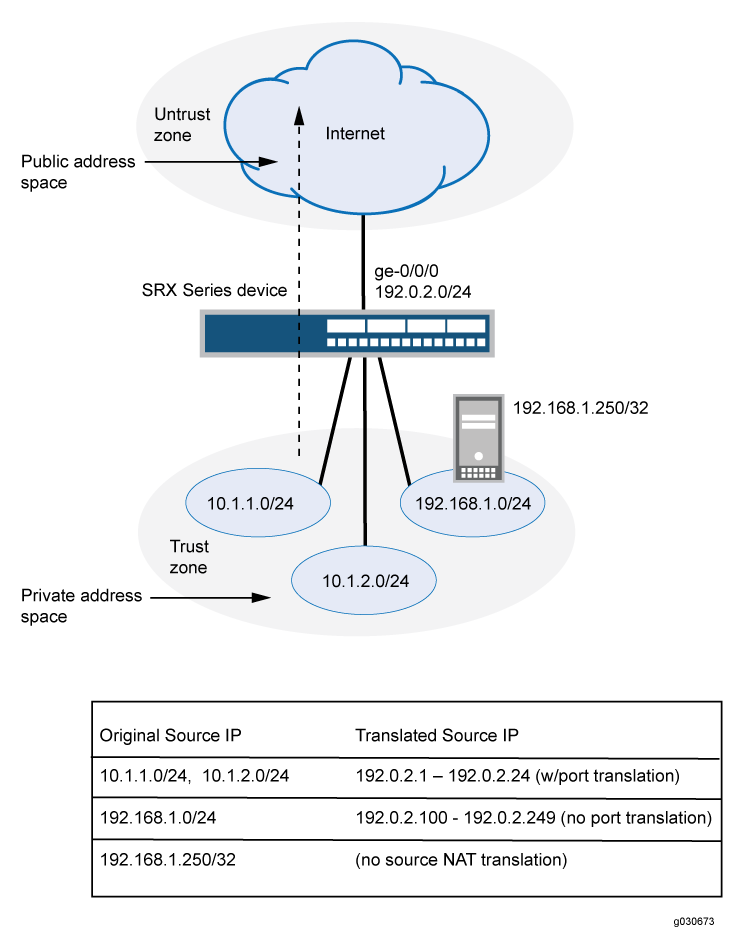
This example describes the following configurations:
Source NAT pool
src-nat-pool-1that contains the IP address range 192.0.2.1 through 192.0.2.24.Source NAT pool
src-nat-pool-2that contains the IP address range 192.0.2.100 through 192.0.2.249, with port address translation disabled.When port address translation is disabled, the number of translations that the source NAT pool can support concurrently is limited to the number of addresses in the pool, unless the
address-sharedoption is enabled. Packets are dropped if there are no addresses available in the source NAT pool. You can optionally specify an overflow pool from which IP addresses and port numbers are allocated when there are no addresses available in the original source NAT pool.Source NAT rule set
rs1to match packets from the trust zone to the untrust zone. Rule setrs1contains multiple rules:Rule
r1to match packets with a source IP address in either the 10.1.1.0/24 or 10.1.2.0/24 subnets. For matching packets, the source address is translated to an IP address in thesrc-nat-pool-1pool.Rule
r2to match packets with a source IP address of 192.168.1.250/32. For matching packets, there is no NAT translation performed.Rule
r3to match packets with a source IP address in the 192.168.1.0/24 subnet. For matching packets, the source address is translated to an IP address in thesrc-nat-pool-2pool.The order of rules in a rule set is important, as the first rule in the rule set that matches the traffic is used. Therefore, rule
r2to match a specific IP address must be placed before ruler3that matches the subnet on which the device is located.
Proxy ARP for the addresses 192.0.2.1 through 192.0.2.24 and 192.0.2.100 through 192.0.2.249 on interface ge-0/0/0.0. This allows the Juniper Networks security device to respond to ARP requests received on the interface for those addresses.
Security policies to permit traffic from the trust zone to the untrust zone.
When you configure source NAT rule or pool with rule name or pool name as interface or service-set you will receive the following error message: syntax error, expecting <data>.
If there is a source NAT rule named
interface, the rule cannot be viewed using theshow security nat source rule interfacecommand.If there is a source NAT rule named
service-set, the rule cannot be viewed using theshow security nat source rule service-setcommand.If there is a source NAT pool named
interface, the pool cannot be viewed using theshow security nat source pool interfacecommand.If there is a source NAT pool named
service-set, the pool cannot be viewed using theshow security nat source pool service-setcommand.If there is a source NAT pool named
interface, the paired-address cannot be viewed using theshow security nat source paired-address pool-name interfacecommand.If there is a source NAT pool named
service-set, the paired-address cannot be viewed using theshow security nat source paired-address pool-name service-setcommand.
Configuration
Procedure
CLI Quick Configuration
To quickly configure this example, copy the
following commands, paste them into a text file, remove any line breaks,
change any details necessary to match your network configuration,
copy and paste the commands into the CLI at the [edit] hierarchy
level, and then enter commit from configuration mode.
set security nat source pool src-nat-pool-1 address 192.0.2.1/32 to 192.0.2.24/32 set security nat source pool src-nat-pool-2 address 192.0.2.100/32 to 192.0.2.249/32 set security nat source pool src-nat-pool-2 port no-translation set security nat source rule-set rs1 from zone trust set security nat source rule-set rs1 to zone untrust set security nat source rule-set rs1 rule r1 match source-address 10.1.1.0/24 set security nat source rule-set rs1 rule r1 match source-address 10.1.2.0/24 set security nat source rule-set rs1 rule r1 match destination-address 0.0.0.0/0 set security nat source rule-set rs1 rule r1 then source-nat pool src-nat-pool-1 set security nat source rule-set rs1 rule r2 match source-address 192.168.1.250/32 set security nat source rule-set rs1 rule r2 match destination-address 0.0.0.0/0 set security nat source rule-set rs1 rule r2 then source-nat off set security nat source rule-set rs1 rule r3 match source-address 192.168.1.0/24 set security nat source rule-set rs1 rule r3 match destination-address 0.0.0.0/0 set security nat source rule-set rs1 rule r3 then source-nat pool src-nat-pool-2 set security nat proxy-arp interface ge-0/0/0.0 address 192.0.2.1/32 to 192.0.2.24/32 set security nat proxy-arp interface ge-0/0/0.0 address 192.0.2.100/32 to 192.0.2.249/32 set security policies from-zone trust to-zone untrust policy internet-access match source-address any set security policies from-zone trust to-zone untrust policy internet-access match destination-address any set security policies from-zone trust to-zone untrust policy internet-access match application any set security policies from-zone trust to-zone untrust policy internet-access then permit
Step-by-Step Procedure
The following example requires you to navigate throughout various levels in the configuration hierarchy. For instructions on how to do that, see Using the CLI Editor in Configuration Mode.
To configure multiple source NAT rules in a rule set:
Create a source NAT pool.
[edit security nat source] user@host# set pool src-nat-pool-1 address 192.0.2.1 to 192.0.2.24
Create a source NAT pool with no port translation.
[edit security nat source] user@host# set pool src-nat-pool-2 address 192.0.2.100 to 192.0.2.249 user@host# set pool src-nat-pool-2 port no-translation
To configure an overflow pool for
src-nat-pool-2using the egress interface:[edit security nat source] user@host# set pool src-nat-pool-2 overflow-pool interface
Create a source NAT rule set.
[edit security nat source]
user@host# set rule-set rs1 from zone trust
user@host# set rule-set rs1 to zone untrust
Configure a rule that matches packets and translates the source address to an address in the pool.
[edit security nat source] user@host# set rule-set rs1 rule r1 match source-address [10.1.1.0/24 10.1.2.0/24] user@host# set rule-set rs1 rule r1 match destination-address 0.0.0.0/0 user@host# set rule-set rs1 rule r1 then source-nat pool src-nat-pool-1
Configure a rule to match packets for which the source address is not translated.
[edit security nat source] user@host# set rule-set rs1 rule r2 match source-address 192.168.1.250/32 user@host# set rule-set rs1 rule r2 match destination-address 0.0.0.0/0 user@host# set rule-set rs1 rule r2 then source-nat off
Configure a rule to match packets and translate the source address to an address in the pool with no port translation.
[edit security nat source] user@host# set rule-set rs1 rule r3 match source-address 192.168.1.0/24 user@host# set rule-set rs1 rule r3 match destination-address 0.0.0.0/0 user@host# set rule-set rs1 rule r3 then source-nat pool src-nat-pool-2
Configure proxy ARP.
[edit security nat] user@host# set proxy-arp interface ge-0/0/0.0 address 192.0.2.1 to 192.0.2.24 user@host# set proxy-arp interface ge-0/0/0.0 address 192.0.2.100 to 192.0.2.249
Configure a security policy that allows traffic from the trust zone to the untrust zone.
[edit security policies from-zone trust to-zone untrust]
user@host# set policy internet-access match source-address any destination-address any application any
user@host# set policy internet-access then permit
Results
From configuration mode, confirm your configuration
by entering the show security nat and show security
policies commands. If the output does not display the intended
configuration, repeat the configuration instructions in this example
to correct it.
[edit]
user@host# show security nat
source {
    pool src-nat-pool-1 {
        address {
            192.0.2.1/32 to 192.0.2.24/32;
        }
    }
    pool src-nat-pool-2 {
        address {
            192.0.2.100/32 to 192.0.2.249/32;
        }
        port no-translation;
    }
    rule-set rs1 {
        from zone trust;
        to zone untrust;
        rule r1 {
            match {
                source-address [ 10.1.1.0/24 10.1.2.0/24 ];
                destination-address 0.0.0.0/0;
            }
            then {
                source-nat {
                    pool {
                        src-nat-pool-1;
                    }
                }
            }
        }
        rule r2 {
            match {
                source-address 192.168.1.250/32;
                destination-address 0.0.0.0/0;
            }
            then {
                source-nat {
                    off;
                }
            }
        }
        rule r3 {
            match {
                source-address 192.168.1.0/24;
                destination-address 0.0.0.0/0;
            }
            then {
                source-nat {
                    pool {
                        src-nat-pool-2;
                    }
                }
            }
        }
    }
}
    proxy-arp {
        interface ge-0/0/0.0 {
            address {
                192.0.2.1/32 to 192.0.2.24/32;
                192.0.2.100/32 to 192.0.2.249/32;
            }
        }
    }
user@host# show security policies
from-zone trust to-zone untrust {
    policy internet-access {
        match {
            source-address any;
            destination-address any;
            application any;
        }
        then {
            permit;
        }
    }
}
If you are done configuring the device, enter commit from configuration mode.
Verification
To confirm that the configuration is working properly, perform these tasks:
- Verifying Source NAT Pool Usage
- Verifying Source NAT Rule Usage
- Verifying NAT Application to Traffic
Verifying Source NAT Pool Usage
Purpose
Verify that there is traffic using IP addresses from the source NAT pool.
Action
From operational mode, enter the show security nat source
pool all command. View the Translation hits field to check for
traffic using IP addresses from the pool.
Verifying Source NAT Rule Usage
Purpose
Verify that there is traffic matching the source NAT rule.
Action
From operational mode, enter the show security nat source
rule all command. View the Translation hits field to check for
traffic that matches the rule.
Change History Table
Feature support is determined by the platform and release you are using. Use Feature Explorer to determine if a feature is supported on your platform.
warning: To
                                                  save system memory, the block size is recommended
                                                  to be no less than 64
.