
Pop-and-Forward LSP Configuration
Pop-and-Forward LSP Overview
Pop-and-forward LSPs introduces the notion of pre-installed per traffic engineering link pop labels that are shared by RSVP-TE LSPs that traverse these links and significantly reducing the required forwarding plane state . A transit label-switching router (LSR) allocates a unique pop label per traffic engineering link with a forwarding action to pop the label and forward the packet over that traffic engineering link should the label appear at the top of the packet. These pop labels are sent back in the RESV message of the LSP at each LSR and further recorded in the record route object (RRO). The label stack is constructed from the recorded labels in the RRO and pushed by the ingress label edge router (LER), as each transit hop performs a pop-and-forward action on its label. The pop-and-forward tunnels enhances the RSVP-TE control plane feature benefits with the simplicity of the shared MPLS forwarding plane.
- Benefits of RSVP-TE Pop-and-Forward LSP Tunnels
- Pop-and-Forward LSP Tunnel Terminology
- Pop-and-Forward LSP Tunnel Label and Signaling
- Pop-and-Forward LSP Tunnel Label Stacking
- Pop-and-Forward LSP Tunnel Link Protection
- RSVP-TE Pop-and-Forward LSP Tunnel Supported and Unsupported Features
Benefits of RSVP-TE Pop-and-Forward LSP Tunnels
-
Scaling advantage of RSVP-TE—Any platform-specific label space limit on an LSR is prevented from being a constraint to the control plane scaling on that interface.
-
Reduced forwarding plane state—The transit labels on a traffic engineering link are shared across RSVP-TE tunnels traversing the link, and are used independent of the ingress and egress devices of the LSPs, thereby significantly reducing the required forwarding plane state.
-
Reduced transit data plane state—Because the pop labels are allocated per traffic engineering link and shared across LSPs, the total label state in the forwarding plane is reduced to a function of the number of RSVP neighbors on that interface.
-
Faster LSP setup time—The forwarding plane state is not programmed during the LSP setup and teardown. As a result, the control plane need not wait sequentially at each hop for the forwarding plane to be programmed prior to sending the label upstream in the RESV message, resulting in reduced LSP setup time.
-
Backward compatibility—This allows backward compatibility with transit LSRs that provide regular labels in RESV messages. Labels can be mixed across transit hops in a single MPLS RSVP-TE LSP. Certain LSRs can use traffic engineering link labels and others can use regular labels. The ingress can construct a label stack appropriately based on what type of label is recorded from every transit LSR.
Pop-and-Forward LSP Tunnel Terminology
The following terminology is used in the implementation of RSVP-TE pop-and-forward LSP tunnels:
-
Pop label—An incoming label at an LSR that is popped and forwarded over a specific traffic-engineering link to a neighbor.
-
Swap label—An incoming label at an LSR that is swapped to an outgoing label and forwarded over a specific downstream traffic engineering link.
-
Delegation label—An incoming label at an LSR that is popped. A new set of labels is pushed before the packet is forwarded.
-
Delegation hop— A transit hop that allocates a delegation label.
-
Application label depth (AppLD)—Maximum number of application or service labels (for example, VPN, LDP, or IPv6 explicit-null labels) that can be beneath the RSVP transport labels. It is configured on a per-node basis, and is equally applicable for all LSPs, and is neither signaled nor advertised.
-
Outbound label depth (OutLD)—Maximum number of labels that can be pushed before a packet is forwarded. This is local to the node, and is neither signaled nor advertised.
-
Additional transport label depth (AddTLD)—Maximum number of other transport labels that can be added (for example, bypass label). This is a per-LSP parameter that is neither signaled or advertised. The value is discerned by checking if the LSP has been signaled with link protection (AddTLD=1) or without link protection (AddTLD=0).
-
Effective transport label depth (ETLD)— Number of transport labels that the LSP hop can potentially send to its downstream hop. This value is signaled per LSP in the hop attributes subobject. The hop attributes subobject is added to the record route object (RRO) in the path message.
Pop-and-Forward LSP Tunnel Label and Signaling
Every traffic engineering link is allocated a pop label that is installed in the mpls.0 routing table with a forwarding action to pop the label and forward the packet over the traffic engineering link to the downstream neighbor of the RSVP-TE tunnel.
For pop-and-forward LSP tunnels, the pop label for the traffic engineering link is allocated when the first RESV message for a pop-and-forward transit LSP arrives over that traffic engineering link. This is done to avoid preallocating pop labels and installing them in networks where pop-and-forward LSPs are not configured.
For the pop-and-forward LSP tunnels to function effectively,
we recommend that you configure the maximum-labels statement
on all the interfaces in the RSVP-TE network.
Figure 1 displays pop labels at all interfaces for neighboring devices.
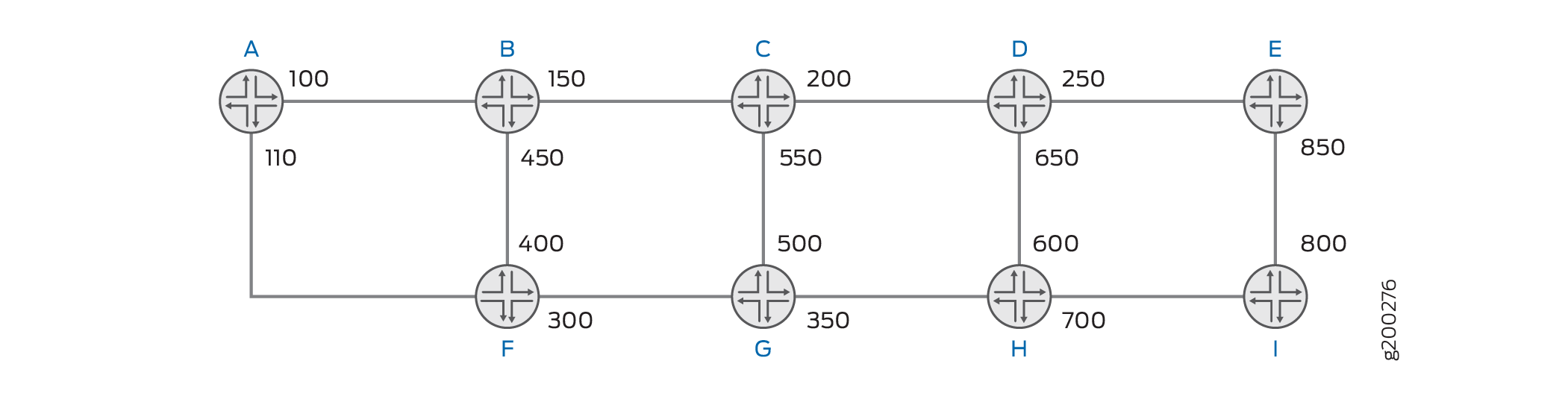
There are two pop-and-forward LSP tunnels—T1 and T2. Tunnel T1 is from Device A to Device E on path A-B-C-D-E. Tunnel T2 is from Device F to Device E on path F-B-C-D-E. Both the tunnels, T1 and T2, share the same traffic engineering links B-C, C-D, and D-E.
As RSVP-TE signals the setup of the pop-and-forward tunnel T1, the LSR D receives the RESV message from the egress E. Device D checks the next-hop traffic engineering link (D-E) and provides the pop label (250) in the RESV message for the tunnel. The label is sent in the label object and is also recorded in the label subobject (with the pop label bit set) carried in the RRO. Similarly, Device C provides the pop label (200) for the next- hop traffic engineering link C-D and Device B provides the pop label (150) for the next-hop traffic engineering link B-C. For the tunnel T2, the transit LSRs provide the same pop labels as described for tunnel T1.
Both the label edge routers (LERs), Device A and Device F, push the same stack of labels [150(top), 200, 250] for tunnels T1 and T2, respectively. The recorded labels in the RRO are used by the ingress LER to construct a stack of labels.
The pop-and-forward LSP tunnel labels are compatible with transit interfaces that use swap labels. Labels can be mixed across transit hops in a single MPLS RSVP-TE LSP, where certain LSRs can use pop labels and others can use swap labels. The ingress device constructs the appropriate label stack based on the label type recorded from every transit LSR.
Pop-and-Forward LSP Tunnel Label Stacking
Construction of Label Stack at the Ingress
The ingress LER checks the type of label received from each transit hop as recorded in the RRO in the RESV message and generates the appropriate label stack to use for the pop-and-forward tunnel.
The following logic is used by the ingress LER while constructing the label stack:
-
Each RRO label subobject is processed starting with the label subobject from the first downstream hop.
-
Any label provided by the first downstream hop is always pushed on the label stack. If the label type is a pop label, then any label from the succeeding downstream hop is also pushed on the constructed label stack.
-
If the label type is a swap label, then any label from the succeeding downstream hop is not pushed on the constructed label stack.
Auto-Delegation of Label Stack
The ingress device runs the Constrained Shortest Path First (CSPF) to compute the path, and if the hop length is greater than the OutLD-AppLD-AddTLD, the ingress device cannot impose the entire label stack to reach the egress device.
When requesting RSVP-TE to signal the path, the ingress device always requests autodelegation for the LSP, where one or more transit hops automatically select themselves as delegation hops to push the label stack to reach the next delegation hop. Junos OS uses an algorithm based on the received Effective Transport Label-Stack Depth (ETLD), that each transit executes to decide whether it should autoselect itself as a delegation hop. This algorithm is based on the section on ETLD in the Internet draft draft-ietf-mpls-rsvp-shared-labels-00.txt (expires September 11 2017), Signaling RSVP-TE Tunnels on a Shared MPLS Forwarding Plane.
The label stack imposed by the ingress device delivers the packet up to the first delegation hop. Each delegation hop's label stack also includes the delegation label of the next delegation hop at the bottom of the stack.
Figure 2 displays labels at every device interface, where Device D and Device I are delegation hops, [Label] P is the pop label, and [Label] D is the delegation label. The RSVP-TE pop-and-forward LSP tunnel is A-B-C-D-E-F-G-H-I-J-K-L. Delegation label 1250 represents (300, 350, 400, 450, 1500); Delegation label 1500 represents (550, 600).
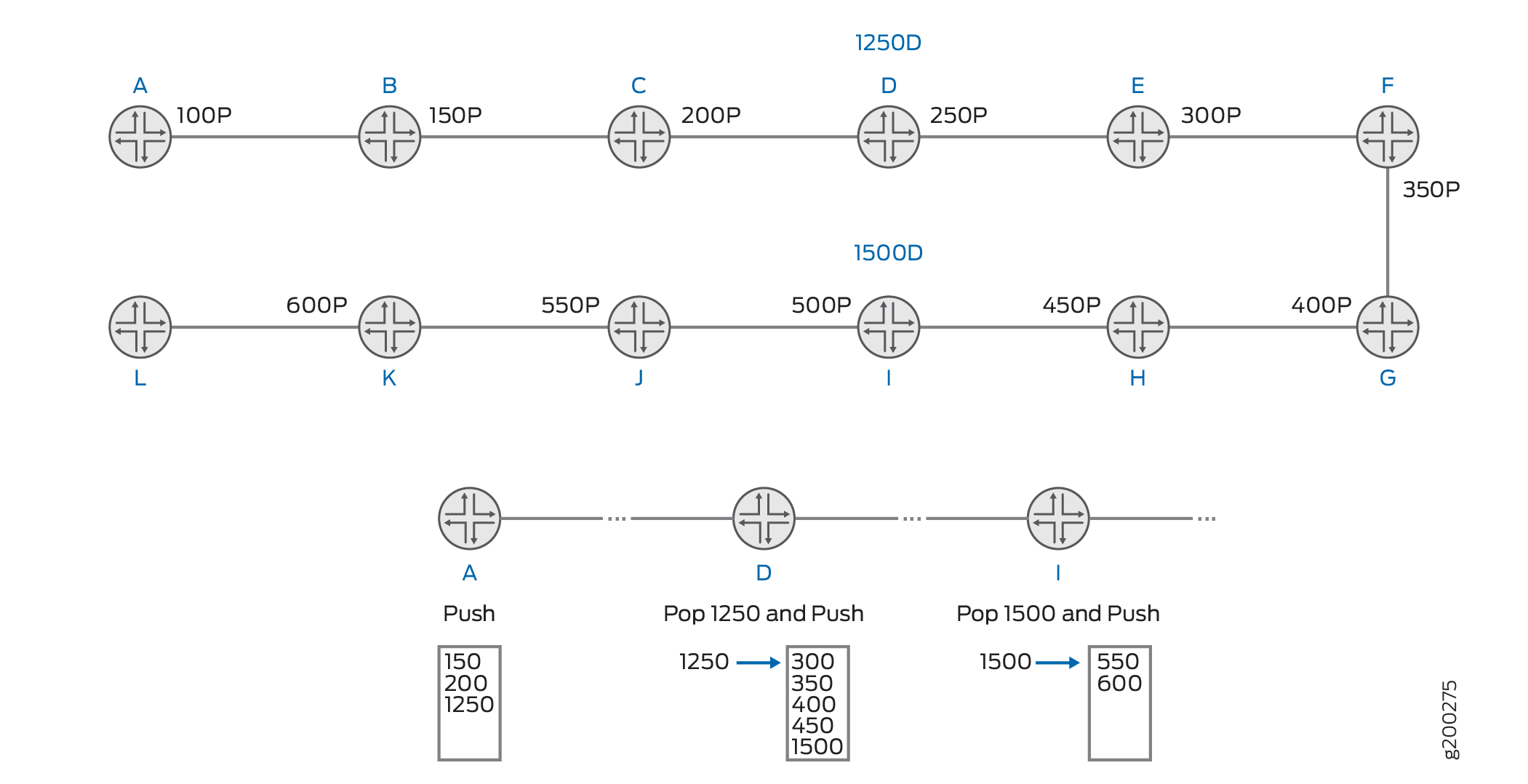
In this approach, for the tunnel, the ingress LER Device A pushes (150, 200, 1250). At LSR Device D, the delegation label 1250 gets popped and labels 300, 350, 400, 450, and 1500 get pushed. At LSR Device I, the delegation label 1500 gets popped and the remaining set of labels (550, 600) get pushed. In Junos OS, the pop and push action occurs as a swap to the bottom label of the outgoing stack and push the remaining labels.
A delegation label and the LSP segment that it covers can be shared by multiple pop-and-forward LSPs. A LSP delegation segment consist of an ordered set of hops (IP addresses and labels) as seen in the RESV RRO. The delegation label (and the segment that it covers) is not owned by a particular LSP, but can be shared. When all LSPs using a delegation label are deleted, the delegation label (and route) is deleted.
Pop-and-Forward LSP Tunnel Link Protection
To provide link protection at a point of local repair (PLR) with a pop-and-forward data plane, the LSR allocates a separate pop label for the traffic engineering link that is used for the RSVP-TE tunnels that request link protection from the ingress device. No signaling extensions are required to support link protection for the RSVP-TE tunnels over the pop-and-forward data plane.
Figure 3 displays pop labels at every device interface; labels marked with P are pop labels that offer link protection for the traffic-engineering link.
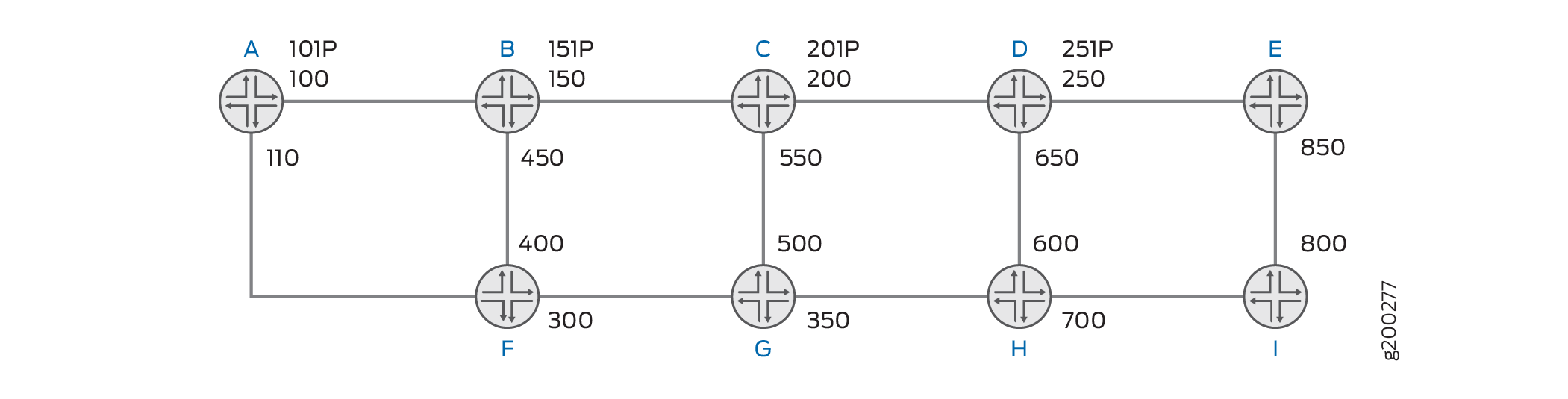
At each LSR, link-protected pop labels can be allocated for each traffic engineering link, and a link-protecting facility bypass LSP (which is not a pop-and-forward LSP, but rather a normal bypass LSP) can be created to protect the traffic engineering link. These labels can be sent in the RESV message by the LSR for LSPs requesting link protection over the specific traffic engineering link. Because the facility bypass terminates at the next hop (merge point), the incoming pop label on the packet at the PLR is what the merge point expects.
For example, LSR Device B can install a facility bypass LSP for the link-protected pop label 151. When the traffic engineering link B-C is up, LSR Device B pops 151 and sends the packet to C. If the traffic engineering link B-C is down, the LSR can pop 151 and send the packet through the facility backup to Device C.
RSVP-TE Pop-and-Forward LSP Tunnel Supported and Unsupported Features
Junos OS supports the following features with RSVP-TE pop-and-forward LSP tunnels:
-
Pop labels per RSVP neighbor for unprotected LSP.
-
Pop labels per RSVP neighbor for LSPs requesting link protection using facility bypass
-
Autodelegation of LSP segment.
-
Mixed label mode, where certain transit LSRs do not support pop-and-forward LSP tunnels
-
LSP ping and traceroute
-
All existing CSPF constraint.
-
Load balancing of traffic between pop-and-forward LSPs and regular point-to-point RSVP-TE LSP.
-
Autobandwidth, LDP tunneling, and TE++ container LSP.
-
Aggregated Ethernet interface.
-
Virtual platforms support, such as Juniper Networks vMX Virtual Router.
-
64-bit support
-
Logical systems
Junos OS does not support the following functionality for RSVP-TE pop-and-forward LSP tunnels:
-
Node link protection
-
Detour protection for MPLS fast reroute
-
Point-to-multipoint LSPs.
-
Switch-away LSP.
-
Generalized MPLS (GMPLS) LSPs (including bidirectional LSPs, associated LSPs, VLAN user-to-network interface [UNI] and so on)
-
IP Flow Information Export (protocol) (IPFIX) inline flow sampling for MPLS template
-
RFC 3813, Multiprotocol Label Switching (MPLS) Label Switching Router (LSR) Management Information Base (MIB)
-
IPv4 Explicit-null (Inserting label 0 at the bottom of the label stack is not supported. If there are service labels beneath the RSVP-TE pop-and-forward label stack, because the penultimate hop for the LSP copies the EXP value to the service label, this can allow continuity of class of service (CoS) across the MPLS forwarding plane).
-
Ultimate-hop popping (UHP)
-
Graceful Routing Engine switchover (GRES)
-
Nonstop active routing (NSR)
Example: Configure RSVP-TE Pop-and-Forward Tunnels
Use this example to configure RSVP-TE pop-and-forward tunnels that share per–TE-link pop labels.
- Example Prerequisites
- Topology
- Configure Pop-and-Forward on the Ingress Router
- Quick Configuration
- Verification
- Configure Pop-and-Forward with Delegation Labels
- Quick Configuration
- Verification
Example Prerequisites
|
Hardware requirements |
For supported hardware, please check Feature Explorer. |
|
Software requirements |
Junos OS 18.1 and onwards is supported. |
|
Licensing requirements |
None specific to this feature. |
|
Configuration requirements |
Basic IGP, MPLS and RSVP-TE should be enabled. |
Topology
Lets consider a simple linear RSVP-TE topology:

R1: Ingress LER
R2, R3, R5: Transit LSRs
R5: Egress LER
Configure Pop-and-Forward on the Ingress Router
Quick Configuration
Edit the following commands as needed for your specific environment and paste them
into ingress router A's terminal window when in configuration mode at the
[edit] hierarchy.
This device configuration omits all commands not directly related to MPLS or RSVP functionality.
set interfaces ge-0/0/0 unit 0 family mpls maximum-labels 4
set protocols mpls label-switched-path R1_TO_R2 to 192.168.1.2
set protocols mpls label-switched-path R1_TO_R2 primary R1_TO_R2_EXPLICIT
set protocols mpls label-switched-path R1_TO_R3 to 192.168.1.3
set protocols mpls label-switched-path R1_TO_R3 primary R1_TO_R3_EXPLICIT
set protocols mpls label-switched-path R1_TO_R4 to 192.168.1.4
set protocols mpls label-switched-path R1_TO_R4 primary R1_TO_R4_EXPLICIT
set protocols mpls label-switched-path R1_TO_R5 pop-and-forward
set protocols mpls label-switched-path R1_TO_R5 to 192.168.1.5
set protocols mpls label-switched-path R1_TO_R5 primary R1_TO_R5_EXPLICIT
set protocols mpls path R1_TO_R2_EXPLICIT 10.1.2.2 strict
set protocols mpls path R1_TO_R3_EXPLICIT 10.1.2.2 strict
set protocols mpls path R1_TO_R3_EXPLICIT 10.2.3.3 strict
set protocols mpls path R1_TO_R4_EXPLICIT 10.1.2.2 strict
set protocols mpls path R1_TO_R4_EXPLICIT 10.2.3.3 strict
set protocols mpls path R1_TO_R4_EXPLICIT 10.3.4.4 strict
set protocols mpls path R1_TO_R5_EXPLICIT 192.168.1.5 loose
set protocols mpls interface ge-0/0/0.0
set protocols rsvp interface ge-0/0/0.0
Verification
| Command | Verification Task |
|---|---|
show mpls lsp ingress detail |
Confirm if the LSP is operational, and pop-and-forward is active. |
show route table inet.3 detail |
List the label details. |
show route table mpls.0 label |
Verify pop label operation on a transit router. |
show rsvp pop-and-forward extensive |
Verify shared labels on transit routers. |
- Verify if pop-and-forward on the LSP is operational
- Verify the labels in R1’s inet.3 table
- Verify pop operation on a transit router
- Verify shared labels on transit routers
Verify if pop-and-forward on the LSP is operational
Purpose
Confirm if the LSP is operational, and pop-and-forward is active.
Action
user@R1> show mpls lsp ingress detail
192.168.1.5
  From: 192.168.1.1, State: Up, ActiveRoute: 0, LSPname: R1_TO_R5, LSPid: 6
  ActivePath: R1_TO_R5_EXPLICIT (primary)
  LSPtype: Static Pop-and-forward Configured, Penultimate hop popping
  LoadBalance: Random
  Follow destination IGP metric
  Encoding type: Packet, Switching type: Packet, GPID: IPv4
  LSP Self-ping Status : Enabled
 *Primary   R1_TO_R5_EXPLICIT State: Up
    Priorities: 7 0
    SmartOptimizeTimer: 180
    Flap Count: 3
    MBB Count: 0
    Computed ERO (S [L] denotes strict [loose] hops): (CSPF metric: 40)
 10.1.2.2 S 10.2.3.3 S 10.3.4.4 S 10.4.5.5 S
    Received RRO (ProtectionFlag 1=Available 2=InUse 4=B/W 8=Node 10=SoftPreempt 20=Node-ID):
                 (Labels: P=Pop D=Delegation)
          10.1.2.2(Label=299968 P) 10.2.3.3(Label=299936 P) 10.3.4.4(Label=299904 P) 10.4.5.5(Label=3)
Total 4 displayed, Up 4, Down 0
Meaning
The LSP R1_TO_R5 is Up and it is of the type pop-and-forward. Labels with a P assigned to them indicate that they will be popped.
Verify the labels in R1’s inet.3 table
Purpose
Issue the show route table inet.3 detail command on the ingress router to verify that the LSP is active for BGP prefix resolution, and to verify the label operations that the ingress router will perform on packets that travel down this LSP.
Action
user@R1> show route table inet.3 192.168.1.5 detail
…………excerpt
inet.3: 4 destinations, 4 routes (4 active, 0 holddown, 0 hidden)
192.168.1.5/32 (1 entry, 1 announced)
        State: <FlashAll>
        *RSVP   Preference: 7/1
                Next hop type: Router, Next hop index: 0
                Address: 0x8a5b814
                Next-hop reference count: 1, Next-hop session id: 0
                Kernel Table Id: 0
                Next hop: 10.1.2.2 via ge-0/0/0.0, selected
                Label-switched-path R1_TO_R5
                Label operation: Push 299904, Push 299936, Push 299968(top)
                Label TTL action: prop-ttl, prop-ttl, prop-ttl(top)
                Load balance label: Label 299904: None; Label 299936: None; Label 299968: None;
----snipped
Meaning
Labels 299904, 299936, and 299968 are pushed
downstream by router R1.
In RSVP-TE, the downstream node allocates the label that it’s upstream neighbor must use when sending traffic to it for this LSP.
- R5 tells R4 in the RESV messageto use label 3 (implicit-null) when sending packets for this LSP. This special-purpose reserved label instructs R4 not to include any transport label in the packets that R4 sends to R5. This is also known as penultimate-hop popping.
- R4 allocates a local pop-and-forward label 299904 for its connection to R5. This is the label that R4 includes in its RESV message to R3. Whenever R4 receives a packet with a top label of 299904, R4 will pop this label and then send the remaining packet directly to R5.
- R3 allocates a local pop-and-forward label 299936 for its connection to R4. This is the label that R3 includes in its RESV message to R2. Whenever R3 receives a packet with a top label of 299936, R3 will pop this label and then send the remaining packet directly to R4.
- Finally, R2 allocates a local pop-and-forward label 299968 for its connection to R3. This is the label that R2 includes in its RESV message to R1. Whenever R2 receives a packet with a top label of 299968, R2 will pop this label and then send the remaining packet directly to R3. While R2 requested to receive label 299968, this label is not exclusive to LSP R1_TO_R5. R2 will request to receive this same label for any other pop-and-forward LSPs that use the link from R2 to R3.
- R1 receives an RSVP message from R2 that includes all of the labels mentioned above at each hop. The labels generated by R2, R3, and R4 are all tagged as being pop-and-forward labels. Using this information, R1 identifies that traffic down this LSP must be sent to R2 with a label stack of [299904, 299936, 299968], where 299968 is the top label.
Here’s the RRO:
- 10.1.2.2: 299968
- 10.2.3.3: 299936
- 10.3.4.4: 299904
- 10.4.5.5: 3 (implicit-null)
These labels correspond to what each hop allocated (or advertised) for the upstream.
Verify pop operation on a transit router
Purpose
Check RSVP-TE pop-and-forward LSP tunnel information for a specific label.
Action
user@R2> show route table mpls.0 label 299968
mpls.0: 17 destinations, 17 routes (17 active, 0 holddown, 0 hidden)
+ = Active Route, - = Last Active, * = Both

299968             *[RSVP/7/1] 01:36:30, metric 1
                    >  to 10.2.3.3 via ge-0/0/1.0, Pop
299968(S=0)        *[RSVP/7/1] 01:36:30, metric 1
                    >  to 10.2.3.3 via ge-0/0/1.0, Pop
Meaning
From an earlier verification topic Verify the labels in R1’s inet.3 table, we have determined that router R2 requested to receive label 299968 (this label is not exclusive to LSP R1_TO_R5). R2 pops this label and then forwards the packet to router R3 via 10.2.3.3.
Verify shared labels on transit routers
Purpose
Verify shared labels on transit routers.
Action
user@R2> show rsvp pop-and-forward extensive
RSVP pop-and-forward: 1 shared labels
299968 (shared-label)
  Hop count: 1
  Protection type: unprotected, Session count: 1
  Segment-id:
    Hop 1: 10.2.3.3
  Segment route:
    Primary: 10.2.3.3, OutIf: ge-0/0/1.0
  Lsp-session list (name, dest-ip, sender-ip, lsp-id):
    R1_TO_R5, 192.168.1.5, 192.168.1.1, 4
Meaning
Transit router R2 has allocated shared label 299968 and is currently used by LSP R1_TO_R5. R2 will request to receive this same label for any other pop-and-forward LSPs that use the link from R2 to R3. The next-hop information for the segment is also displayed.
Configure Pop-and-Forward with Delegation Labels
Using the exact same topology and router setup from the earlier example, let's try to trigger the creation of a delegation label that can push a new stack of outgoing labels.
Quick Configuration
Edit the following commands as needed for your specific environment and paste them
into ingress router A's terminal window when in configuration mode at the
[edit] hierarchy.
This device configuration omits all commands not directly related to MPLS or RSVP functionality.
set interfaces ge-0/0/0 unit 0 family mpls maximum-labels 3 set protocols mpls label-switched-path R1_TO_R2 to 192.168.1.2 set protocols mpls label-switched-path R1_TO_R2 primary R1_TO_R2_EXPLICIT set protocols mpls label-switched-path R1_TO_R3 to 192.168.1.3 set protocols mpls label-switched-path R1_TO_R3 primary R1_TO_R3_EXPLICIT set protocols mpls label-switched-path R1_TO_R4 to 192.168.1.4 set protocols mpls label-switched-path R1_TO_R4 primary R1_TO_R4_EXPLICIT set protocols mpls label-switched-path R1_TO_R5 pop-and-forward set protocols mpls label-switched-path R1_TO_R5 to 192.168.1.5 set protocols mpls label-switched-path R1_TO_R5 primary R1_TO_R5_EXPLICIT set protocols mpls path R1_TO_R2_EXPLICIT 10.1.2.2 strict set protocols mpls path R1_TO_R3_EXPLICIT 10.1.2.2 strict set protocols mpls path R1_TO_R3_EXPLICIT 10.2.3.3 strict set protocols mpls path R1_TO_R4_EXPLICIT 10.1.2.2 strict set protocols mpls path R1_TO_R4_EXPLICIT 10.2.3.3 strict set protocols mpls path R1_TO_R4_EXPLICIT 10.3.4.4 strict set protocols mpls path R1_TO_R5_EXPLICIT 192.168.1.5 loose set protocols mpls interface ge-0/0/0.0 set protocols rsvp interface ge-0/0/0.0
Verification
- Verify the labels in R1’s inet.3 table
- Verify if delegation labels are created
- Verify delegation label swap operation on a transit router
- Verify shared labels on transit routers
Verify the labels in R1’s inet.3 table
Purpose
Issue the show route table inet.3 detail command on the ingress router to verify that the LSP is active for BGP prefix resolution, and to verify the label operations that the ingress router will perform on packets that travel down this LSP.
Action
user@R1> show route table inet.3 192.168.1.5 detail
inet.3: 4 destinations, 4 routes (4 active, 0 holddown, 0 hidden)
192.168.1.5/32 (1 entry, 1 announced)
        State: <FlashAll>
        *RSVP   Preference: 7/1
                Next hop type: Router, Next hop index: 0
                Address: 0x8a60514
                Next-hop reference count: 1, Next-hop session id: 0
                Kernel Table Id: 0
                Next hop: 10.1.2.2 via ge-0/0/0.0, selected
                Label-switched-path R1_TO_R5
                Label operation: Push 299952, Push 299984(top)
                Label TTL action: prop-ttl, prop-ttl(top)
                Load balance label: Label 299952: None; Label 299984: None;
                Label element ptr: 0xf010c80
                Label parent element ptr: 0x0
                Label element references: 2
                Label element child references: 0
                Label element lsp id: 6
                Session Id: 0
                State: <Active Int>
                Age: 15:35      Metric: 40
                Validation State: unverified
                Task: RSVP
                Announcement bits (1): 2-Resolve tree 1
                AS path: I
                Thread: junos-main
Meaning
With maximum-labels set to 3, only 2 labels are pushed. On
all ingress routers, the third label is reserved for a service label, for
example VPN labels. Transit routers don’t have this restriction.
Verify if delegation labels are created
Purpose
Issue the show mpls lsp detail name command to inspect the Route Request Object (RRO) for 192.168.1.5
Action
user@R1> show mpls lsp detail name R1_TO_R5
Ingress LSP: 4 sessions
…………excerpt
192.168.1.5
  From: 192.168.1.1, State: Up, ActiveRoute: 0, LSPname: R1_TO_R5, LSPid: 6
  ActivePath: R1_TO_R5_EXPLICIT (primary)
  LSPtype: Static Pop-and-forward Configured, Penultimate hop popping
  LoadBalance: Random
  Follow destination IGP metric
  Encoding type: Packet, Switching type: Packet, GPID: IPv4
  LSP Self-ping Status : Enabled
 *Primary   R1_TO_R5_EXPLICIT State: Up
    Priorities: 7 0
    SmartOptimizeTimer: 180
    Flap Count: 4
    MBB Count: 0
    Computed ERO (S [L] denotes strict [loose] hops): (CSPF metric: 40)
 10.1.2.2 S 10.2.3.3 S 10.3.4.4 S 10.4.5.5 S
    Received RRO (ProtectionFlag 1=Available 2=InUse 4=B/W 8=Node 10=SoftPreempt 20=Node-ID):
                 (Labels: P=Pop D=Delegation)
          10.1.2.2(Label=299984 P) 10.2.3.3(Label=299952 D) 10.3.4.4(Label=299920 P) 10.4.5.5(Label=3)
Total 1 displayed, Up 1, Down 0
Meaning
Observe the labels allocated by the routers. Transit router R3 has allocated delegation label 299952 instead of a pop label. Incoming delegation label 299952 is swapped for a new stack of outgoing transport labels. These can be verified by issuing the show route table mpls.0 label command on R3 as demonstrated in the next section. Note that label 299952 on R3 is not unique to LSP R1_TO_R5. Designation labels can be shared with other LSPs that use this path, just like pop labels.
Verify delegation label swap operation on a transit router
Purpose
Issue the show route table mpls.0 label command to confirm the swapping of labels and view the outgoing transport labels.
Action
user@R3> show route table mpls.0 label 299952

mpls.0: 15 destinations, 15 routes (15 active, 0 holddown, 0 hidden)
+ = Active Route, - = Last Active, * = Both

299952             *[RSVP/7/1] 2d 14:05:34, metric 1
                    >  to 10.3.4.4 via ge-0/0/1.0, Swap 299920
Meaning
Incoming delegation label 29952 is swapped for a new outgoing transport label 299920 which is exactly what R4 is expecting. Rather than using a pop label, R3 automatically created a delegation label, based on information inside the received RSVP Path message.
First, when R1 sends the initial Path message, R1 sets the Label Stack Imposition-Delegation (LSI-D) bit in the LSP Attributes object. This bit instructs downstream routers to automatically create a delegation label wherever necessary.
Second, when R1 writes its hop information to the Record Route object, R1 includes a numerical value called the effective transport label stack depth (ETLD), which by default is one less than the maximum labels on the interface. R1 uses this to signal how many transport labels R1 can push onto traffic that travels down this LSP. Ingress routers reserve one label for service applications such as MPLS VPNs. In this example, R1's max interface labels is 3. Therefore, R1 sets the ETLD to 2.
Transit routers decrement this value by 1 at each hop. As such, when R3 tries to change this from 1 to 0, R3 uses this as a trigger to create a delegation label that can push a new stack of outgoing labels. R3 then resets the ETLD to its own maximum labels (3) for the Path message to R4. In this example, R3 only needs to write one outgoing label to the pack that it sends to R4, effectively resulting in a swap operation. However, on a longer LSP, R3 could push additional labels as required by further hops.
On the ingress device, you can calculate the expected ETLD on R1 using the formula OutLD – AppLD - AddTLD, where OutLD is the outbound label-stack depth (3), AppLD is the label depth reserves for application labels (1), and AddTLD is any additional required transport labels, such as for facility backup paths (0 in this case).
Verify shared labels on transit routers
Purpose
Issue the show rsvp pop-and-forward extensive command to view details of the shared label.
Action
user@R3> show rsvp pop-and-forward extensive
RSVP pop-and-forward: 1 shared labels
299952 (shared-label)
  Hop count: 2
  Protection type: unprotected, Session count: 1
  Segment-id:
    Hop 1: 10.3.4.4(label=299920)
    Hop 2: 10.4.5.5
  Segment route:
    Primary: 10.3.4.4, OutIf: ge-0/0/1.0
  Lsp-session list (name, dest-ip, sender-ip, lsp-id):
    R1_TO_R5, 192.168.1.5, 192.168.1.1, 5
Meaning
Transit router R2 has allocated shared label 299952. R2 will expect to receive this same label from any other pop-and-forward LSPs that use the link from R2 to R3. You can also view the LSPs that use this shared label. Currently only LSP R1_TO_R5 uses this label. The next-hop information for the segment is also displayed.