
ON THIS PAGE
Example: Configuring LDP-Signaled LSPs
This example shows how to create and configure LDP instances within an MPLS network.
Requirements
Before you begin:
-
Configure network interfaces. See Interfaces User Guide for Security Devices.
-
Configure an IGP across your network. (The LDP configuration is added to the existing IGP configuration and included in the MPLS configuration.)
-
Configure a network to use LDP for LSP establishment by enabling MPLS on all transit interfaces in the MPLS network.
Note:Because LDP runs on top of an IGP such as IS-IS or OSPF, you must configure LDP and the IGP on the same set of interfaces.
Overview
To configure LDP-signaled LSPs, you must enable the MPLS family
on all transit interfaces in the MPLS network and include all the
transit interfaces under the [protocols mpls] and [protocols ldp] hierarchy levels.
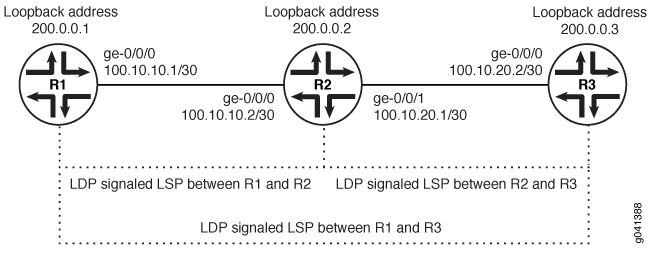
In this example, you enable the MPLS family and create an LDP instance on all the transit interfaces. Additionally, you enable the MPLS process on all the transit interfaces in the MPLS network. In this example, you configure a sample network as shown in Figure 1.
Configuration
Procedure
CLI Quick Configuration
To quickly configure this example, copy the
following commands, paste them into a text file, remove any line breaks,
change any details necessary to match your network configuration,
copy and paste the commands into the CLI at the [edit] hierarchy
level and then enter commit from configuration mode.
R1
                  set interfaces ge-0/0/0 unit 0 family mpls

                  set protocols mpls ge-0/0/0 unit 0

                  set protocols ldp interface ge-0/0/0 unit 0
R2
                  set interfaces ge-0/0/0 unit 0 family mpls

                  set protocols mpls ge-0/0/0 unit 0

                  set protocols ldp interface ge-0/0/0 unit 0

                  set interfaces ge-0/0/1 unit 0 family mpls

                  set protocols mpls ge-0/0/1 unit 0

                  set protocols ldp interface ge-0/0/1 unit 0
R3
                  set interfaces ge-0/0/0 unit 0 family mpls

                  set protocols mpls ge-0/0/0 unit 0

                  set protocols ldp interface ge-0/0/0 unit 0
Step-by-Step Procedure
To enable LDP instances within an MPLS network:
-
Enable the MPLS family on the transit interface on Router R1.
[edit] user@R1# set interfaces ge-0/0/0 unit 0 family mpls -
Enable the MPLS process on the transit interface.
[edit] user@R1# set protocols mpls interface ge-0/0/0 unit 0 -
Create the LDP instance on the transit interface.
[edit]
user@R1# set protocols ldp interface ge-0/0/0 unit 0
Results
Confirm your configuration by entering the show command from configuration mode. If the output does not display
the intended configuration, repeat the configuration instructions
in this example to correct it.
For brevity, this show output includes only the configuration
that is relevant to this example. Any other configuration on the system
has been replaced with ellipses (...).
user@R1# show
...
    interfaces {
        ge-0/0/0 {
            unit 0 {
                family inet {
                    address 10.100.37.20/24;
                }
                family mpls;
            }
        }
        }
    ...
        protocols {
            mpls {
                interface all;
            }
            ldp {
                interface ge-0/0/0.0;
            }
        }
If you are done configuring the device, enter the commit command from the configuration mode to activate the configuration.