
Map Junos OS Commands and Command Output to Junos XML Tag Elements
The Junos XML API is an XML representation of Junos OS configuration statements and operational mode commands. It defines an XML equivalent for all statements in the Junos OS configuration hierarchy and many of the commands that you issue in CLI operational mode. Each operational mode command with a Junos XML counterpart maps to a request tag element and, if necessary, a response tag element.
Request tag elements are used in remote procedure calls (RPCs) within NETCONF and Junos XML
protocol sessions to request information from a device running Junos OS or a device
running Junos OS Evolved. The server returns the response using Junos XML tag elements
enclosed within the response tag element. For example, the
show interfaces command maps to the
<get-interface-information> request tag, and the server
returns the <interface-information> response tag.
The following sections outline how to map commands, command options, and command output to Junos XML tag elements.
Mapping Command Output to Junos XML Elements
On the Junos OS CLI, to display command output as Junos XML elements instead of as the default
formatted ASCII text, include the | display xml option after
the command. The XML elements that describe the Junos OS configuration or
operational data belong to the Junos XML API. The Junos XML API defines the
Junos OS content that can be retrieved and manipulated by NETCONF and Junos XML
management protocol operations.
The following example shows the output from the show chassis hardware command.
The output is identical to the server’s response for the
<get-chassis-inventory> RPC request.
user@host> show chassis hardware | display xml
<rpc-reply xmlns:junos="http://xml.juniper.net/junos/25.2R1.9/junos">
    <chassis-inventory xmlns="http://xml.juniper.net/junos/25.2R0/junos-chassis">
        <chassis junos:style="inventory">
            <name>Chassis</name>
            <serial-number>JN1085AA1AFA</serial-number>
            <description>MX960</description>
            <chassis-module>
                <name>Midplane</name>
                <version>REV 02</version>
                <part-number>710-013698</part-number>
                <serial-number>AA0001</serial-number>
                <description>MX960 Backplane</description>
                <model-number>CHAS-BP-MX960-S</model-number>
            </chassis-module>
            <chassis-module>
                <name>FPM Board</name>
                <version>REV 02</version>
                <part-number>710-014974</part-number>
                <serial-number>AA0002</serial-number>
                <description>Front Panel Display</description>
                <model-number>CRAFT-MX960-S</model-number>
            </chassis-module>
            <chassis-module>
                <name>PDM</name>
                <version>Rev 02</version>
                <part-number>740-013110</part-number>
                <serial-number>AAA0000001A</serial-number>
                <description>Power Distribution Module</description>
            </chassis-module>
            <!-- other child tags of <chassis> -->
        </chassis>
    </chassis-inventory>
    <cli>
        <banner></banner>
    </cli>
</rpc-reply>
Mapping Commands to Junos XML Request Tag Elements
You can find information about the available Junos OS or Junos OS Evolved operational mode commands and their equivalent Junos XML RPC request tags using the following methods:
-
Appending
| display xml rpcto an operational command in the CLI. -
Using the Junos XML API Explorer - Operational Tags application to search for a command or request tag in a given release.
You can use the Junos XML API Explorer tool to: verify a command, map the command to its equivalent Junos XML RPC request tag and child tags, and view the expected response tag for various Junos OS or Junos OS Evolved releases.
In the Junos OS CLI, you can display the Junos XML request tag elements for any operational mode
command that has a Junos XML counterpart. To display the request tags for a
given command, enter the command and pipe it to the display xml
rpc command.
The following example displays the RPC tags for the show route command:
user@host> show route | display xml rpc
<rpc-reply xmlns:junos="http://xml.juniper.net/junos/25.2R1.9/junos">
    <rpc>
        <get-route-information>
        </get-route-information>
    </rpc>
    <cli>
        <banner></banner>
    </cli>
</rpc-reply>Starting in Junos OS Release 20.3R1, the names of some Junos XML RPC request tags have been updated to ensure consistency across the Junos XML API. Junos devices still accept the old request tag names for backwards compatibility, but we recommend using the new names going forward. To verify the Junos XML RPC request tag for an operational mode command in a given Junos OS release, see the Junos XML API Explorer - Operational Tags tool.
Mapping for Command Options with Variable Values
Many CLI commands have options that identify the object that the command affects
or reports on, distinguishing the object from other objects of the same type. In
some cases, the CLI does not precede the identifier with a fixed-form keyword,
but XML convention requires that the Junos XML API define a tag element for
every option. To find the names for each identifier (and any other child tag
elements) for an operational request tag element, consult the tag element’s
entry in the appropriate DTD. Alternatively, issue the command and command
option in the CLI and append the | display xml rpc option.
Table 1 shows the Junos XML tag elements for two operational commands that have
variable-form options. In the show interfaces command, ge-0/0/1
is the name of the interface. In the show bgp neighbor command,
10.168.1.222 is the IP address for the BGP peer of interest.
| Command | Junos XML Tags |
|---|---|
|
|
<rpc>
  <get-interface-information>
    <interface-name>ge-0/0/1</interface-name>
  </get-interface-information>
</rpc>
|
|
|
<rpc>
  <get-bgp-neighbor-information>
    <neighbor-address>10.168.1.122</neighbor-address>
  </get-bgp-neighbor-information>
</rpc>
|
You can display the Junos XML RPC tags for a command and its options in the CLI
by executing the command and command option and appending | display xml
rpc.
user@host> show interfaces ge-0/0/1 | display xml rpc
<rpc-reply xmlns:junos="http://xml.juniper.net/junos/25.2R1.9/junos">
    <rpc>
        <get-interface-information>
            <interface-name>ge-0/0/1</interface-name>
        </get-interface-information>
    </rpc>
    <cli>
        <banner></banner>
    </cli>
</rpc-reply>
Mapping for Fixed-Form Command Options
Some CLI commands include options that have a fixed form, such as the
brief and detail options, which specify
the amount of detail to include in the output. The Junos XML API usually maps
such an option to an empty tag whose name matches the option name.
The
following example shows the Junos XML tag elements for the show isis
adjacency command, which has a fixed-form option called
detail:
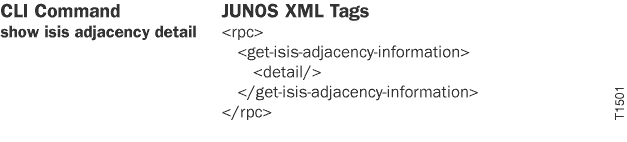
To view the tags in the CLI:
user@host> show isis adjacency detail | display xml rpc
<rpc-reply xmlns:junos="http://xml.juniper.net/junos/25.2R1.9/junos">
    <rpc>
        <get-isis-adjacency-information>
            <detail/>
        </get-isis-adjacency-information>
    </rpc>
    <cli>
        <banner></banner>
    </cli>
</rpc-reply>
Change History Table
Feature support is determined by the platform and release you are using. Use Feature Explorer to determine if a feature is supported on your platform.