
ON THIS PAGE
Understanding Dial-in Telemetry
Dial-in telemetry is a network monitoring method where the collector initiates the connection to the device to retrieve telemetry data. The collector "dials in" to the network device and typically using protocols like gRPC to request and receive data.
In dial-in mode, the data collector initiates the connection to the network device and subscribes to telemetry data. The collector and the device establish a session. The device streams data to the collector at configured intervals. This mode is commonly used when operators require a unified channel for both configuration and operational data.
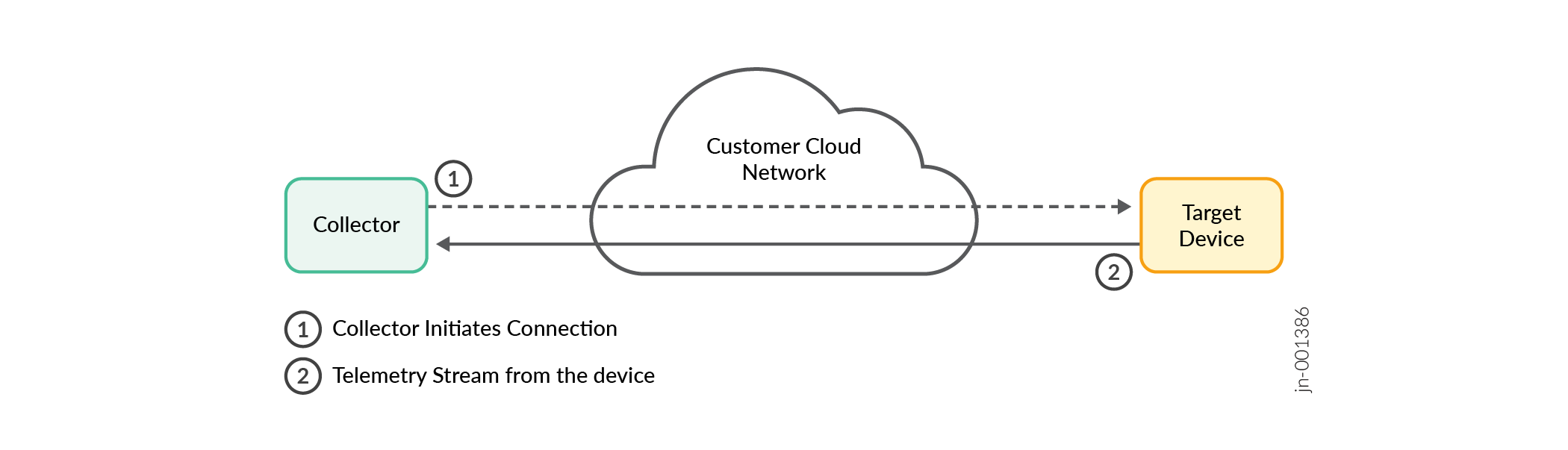
The Junos Telemetry supports both gNMI and Juniper Extension Toolkit (JET) dial-in connections over gRPC transport.
You can use gNMI in a dial-in fashion for on-demand requests (for example, a one-time “get” operation to fetch data). For gNMI dial-in connections, you must enable the gNMI service. The POLL (the collector polls snapshots), and ONCE (a single snapshot) subscription modes are supported. The device usually initiates gRPC for streaming telemetry in Junos Telemetry.
gRPC Service
gRPC is an open-source framework that provides secure and reliable data transport. You can use a set of Remote Procedure Call (RPC) interfaces to configure the Junos Telemetry and stream telemetry data using the gRPC framework. gRPC remote procedure calls are used to provision sensors and to subscribe to and receive telemetry data. OpenConfig supports the YANG data models. The OpenConfig data model generates data as Google Protocol Buffer (.gpb) messages in a universal key/value format.
Use gRPC to Stream Data
According to the OpenConfig specification, only gRPC-based transport is supported for streaming data. The gRPC server terminates the gRPC sessions from the management system that is running the client. RPC calls trigger the creation of Junos OS sensors, which either stream data at regular intervals or report specific events. These sensors then forward updates through the appropriate gRPC channel.
Starting from Junos OS Release 18.2R1, when an external streaming server, or collector, provisions sensors to export data through gRPC on devices running Junos OS, the sensor configuration is committed to the junos-analytics instance of the ephemeral configuration database. The configuration can be viewed by using the show ephemeral-configuration instance junos-analytics operational command. In earlier releases, the sensor's configuration is committed to the default instance of the ephemeral configuration database.
The Juniper Telemetry header, previously exported as part of telemetry updates, is now exported as an extension header.
- Use
GnmiJuniperTelemetryHeader.prototo decode updates from devices running Junos OS Release 19.3 or earlier. - Use
GnmiJuniperTelemetryHeaderExtension.protofor devices running Junos OS Release 19.4 or later.
See Table 1 for a list and descriptions of the RPCs implemented to support the Junos Telemetry solution.
RPC Name |
Description |
|---|---|
|
Specify telemetry parameters and stream data for the specified list of OpenConfig paths. |
|
Retrieve the list of subscriptions that are created through |
|
Unsubscribe a subscription created through |
Data streamed through gRPC is formatted in OpenConfig key-value pairs in protocol buffers (.gpb) messages. In this universal format, keys are strings that correspond to the path of the system resources in the OpenConfig schema for monitored devices. Values correspond to integers or strings that identify the operational state of the system resource, such as interface counters.
Starting in Junos OS Release 18.2R1, data streamed through gRPC can be formatted as protobuf in addition to key-value pairs for OpenConfig-based Routing Engine (RE) sensors. These sensors are in addition to the Packet Forwarding Engine (PFE) sensors.
The following shows the universal key/value format:
message KeyValue {
    string key        = 1 [(telemetry_options).is_key = true];
    uint64 int_value  = 2;
    string str_value  = 3;
    string prefix_str = 4;
}

message TelemetryStream {
    // router name or export IP address
    required string system_id     = 1 [(telemetry_options).is_key = true];

    // line card / RE (slot number)
    optional uint32 component_id  = 2 [(telemetry_options).is_key = true];

   // PFE (if applicable)
    optional uint32 sub_component_id = 3 [(telemetry_options).is_key = true];

   // timestamp (common to all entries in the kv array)
    optional uint64 timestamp     = 4 [(telemetry_options).is_timestamp = true];

    // key / value pairs
    repeated KeyValue kv;
}
The following example shows how a set of counters for an interface can be represented:
key = “/interfaces/counters/rx-bytes”,     int_value = 1000
key = “/interfaces/counters/tx-bytes”,     int_value = 2000
key = “/interfaces/counters/rx-packets”, int_value = 10
key = “/interfaces/counters/rx-bytes” ,    int_value = 20
key = “/interfaces/counters/oper-state”, str_value = “up”
A mapping table maps field names to the OpenConfig key strings.
Enable Junos Telemetry Using OpenConfig
OpenConfig for Junos OS specifies an RPC model to enable Junos Telemetry . This package also includes the required YANG models.
You can locate all YANG data models in a GitHub repository for a given OS and release in a single download package. The package and repository include the native configuration, state, and RPC data models and the OpenConfig and IETF data models supported by that OS. You can also access the YANG data models from the Juniper Networks download site.
To download OpenConfig and YANG model files, open a web browser and navigate to https://www.hpe.com/us/en/networking/hpe-juniper-networking.html, then click Support to open the Juniper Support portal at https://support.juniper.net/support/. Select the Downloads tab, enter a product name in the Type a product name field, click Find a product, search for and select the required product, then choose the appropriate Junos OS and software VERSION from the drop-down list. Scroll down on the same page, expand the + Tools section, and download the required files: JUNOS Telemetry Interface Data Model Files for OpenConfig models and YANG Module for YANG files.
To download OpenConfig and YANG model files, open a web browser and navigate to https://www.hpe.com/us/en/networking/hpe-juniper-networking.html, then click Support to open the Juniper Support portal at https://support.juniper.net/support/. Select the Downloads tab, enter a product name in the Type a product name field, click Find a product, search for and select the required product, then choose the appropriate Junos OSand software VERSION from the drop-down list. Scroll down on the same page, expand the + Tools section, and download the required files: JUNOS Telemetry Interface Data Model Files for OpenConfig models and YANG Module for YANG files.
The programmatic interface OpenConfigTelemetry
defines the telemetry gRPC
service. The telemetrySubscribe RPC specifies the following
subscription parameters:
-
OpenConfig path that identifies the system resource to stream telemetry data, for example:
/interfaces/interface/state/counters/ -
Interval at which data is reported and streamed to the collector server, in milliseconds, for example:
sample_frequency = 4000
A streaming server or collector uses the telemetrySubscribe RPC
to request an inline subscription for data at the specified path. The device
then sends telemetry data back on the same connection as the subscription
request.
gRPC Server Overview
Junos Telemetry allows multi-port service configuration, letting you configure multiple sets of telemetry services to listen on different ports.
The Junos Telemetry offers flexible gRPC service configuration capabilities, allowing you to set up multiple gRPC servers, each with distinct services, listening addresses, and ports. These capabilities provide granular control over service management and telemetry data collection. You can configure TLS certificates for each server to ensure secure communication. To configure gRPC server, see Configure gRPC Services.
gNMI Service
The gNMI (gRPC Network Management Interface) is a protocol based on gRPC that configures and monitors network devices. Developed by OpenConfig specifically for network management, gNMI allows network operators to retrieve and modify device configuration data and subscribe to real-time telemetry data from network devices. Data collection is a key task in telemetry solutions. gNMI supports subscription modes such as ONCE, POLL, and STREAM for telemetry updates. gNMI uses the gRPC framework, supports efficient data encoding formats such as Protocol Buffers (protobuf), and ensures secure communication through TLS. YANG models define structure of configuration and telemetry data.
The main components of gNMI are:
gNMI Client: Runs on an external system. It sends gNMI requests to configure the device, retrieve configuration data, and subscribe to telemetry streams.
gNMI Server: Runs on the network device and provides access to telemetry and configuration data. The gNMI server processes the request based on its type. If it is a configuration-management change, the gNMI server updates the device configuration and sends a response to the client. It streams data to the gNMI client if it is a telemetry-data-collection request.
gNMI supports the following Remote Procedure Calls (RPCs) for controlling and monitoring network devices:
Get: This RPC retrieves the current state of the network device, including configuration and operational data.
Note:Use the
typeoption in the gNMI GET RPC to specify the data type to retrieve. The available options areCONFIG,STATE, andALL. The valid type option isCONFIG. Use Encoding to define the value encoding formats that the gNMI protocol supports. Available options includeJSON,BYTES,PROTO,ASCII, andJSON_IETF. The valid encoding options areJSON_IETFandASCII. Choosing any other configuration apart from the valid options results in an error message.Set: The set RPC modifies the configuration of the network device.
Subscribe: Use this RPC to subscribe to telemetry data from a network device. The following subscription modes are supported:
- ONCE: Retrieves the current values only once.
- POLL: Sends current values whenever a poll message is received.
- STREAM: Continuously sends updates at specified intervals or when changes occur.
For more information, see gNMI Subscription
Capabilities: Use this RPC to discover the device's capabilities, such as supported models and encodings.
gNMI Origin
The Path message’s origin field identifies the schema for the path. The origin field is encoded as a string. The <origin, path> tuple uniquely identifies the path within the message.
The origin field is valid in any context of a Path message. Typically it is used in the following ways:
- Use a
SetRequestto indicate that a particular schema modifies the target configuration. - Use a
GetRequestto retrieve the contents of a particular schema, or use aGetResponseto indicate that the payload contains data from a particular<origin, path>schema. - Use a
SubscribeRequestto subscribe to paths within a particular schema, or use aSubscribeResponseto indicate that an update corresponds to a particular<origin, path>tuple.
When a message uses more than one origin, do not specify a path in the prefix, because the prefix applies to all paths in the message. When a prefix is specified, include any required origin. Do not specify origin in both the prefix and the path fields in a single request for any RPC payload message.
- Special Values of Origin
- Definition of
originfor YANG-modelled Data - Partial Specifications of Origin in Set
- Transactionality of Sets with Multiple Origins
Special Values of Origin
Origin values are agreed out-of-band to the gNMI protocol. Where the origin field is unspecified, its value must default to openconfig. It is recommended that the origin is explictly set.
Definition of origin for YANG-modelled Data
The openconfig-extensions:origin field may be utilised to determine the origin within which a particular module is instantiated.
origin is distinct from namespace. While a YANG namespace is defined at any depth within the schema tree, an origin is only used to disambiguate entire schema trees. That is to say, any element that is not at the root inherits its origin from its root entity, regardless of the YANG schema modules that make up that root.
Partial Specifications of Origin in Set
If a Set RPC specifies delete, update, or replace fields which include an origin within their Path messages, the corresponding change must be constrained to the specified origin in the following ways:
-
replaceoperations must only replace the contents of the specifiedoriginat the specified path. Origins that are not specified within theSetRequestmust not have their contents replaced. In order for areplaceoperation to replace any contents of anoriginit must be explicitly specified in theSetRequest. -
deleteoperations must delete only the contents at the specified path within the specifiedorigin. To delete contents from multiple origins, a client must specify multiple paths within thedeleteof theSetRequest.
These rules apply where origins represent data that does not overlap. In some cases (for example, CLI and OpenConfig) origins may reflect different 'views' on the same data, and thus their interaction is more complex.
Transactionality of Sets with Multiple Origins
When a SetRequest specifies more than one origin (in other words, when it includes two or more operations whose paths reference different origins), all affected data trees must be treated as a single transaction. The SetResponse should indicate success only if all operations succeed. If any operation fails, changes across all origins must be rolled back, and an error status must be returned in response to the Set RPC.