
ON THIS PAGE
Intrusion Detection And Prevention Overview
The Juniper Networks IDP system enhances network security by detecting and preventing threats. It monitors traffic for malicious activity, uses a signature database to identify attacks, and applies security policies for real-time mitigation. This system provides proactive threat detection and response.
Intrusion detection is the process of monitoring the events occurring in your network and analyzing the events for signs of possible incidents, violations, or imminent threats to your security policies. Intrusion prevention is the process of performing intrusion detection and then stopping the detected incidents. The security measures are IDS and IPS, which become part of your network to detect and stop potential incidents.
Benefits
By leveraging Intrusion Detection and Prevention (IDP), you can significantly enhance your network's security posture, protecting against a wide range of known and emerging threats. The following are some of the benefits:
-
Proactive Threat Prevention—Prevents attacks from causing damage.
-
Network Visibility—Provides insights into potential security issues.
-
Customizable Protection—Allows tailoring of security policies to specific network needs.
-
Compliance Support—Helps meet regulatory requirements for network security.
-
Automated Response and Remediation—The IDP system can automatically respond to detected threats by:
-
Blocking malicious traffic
-
Quarantining affected firewalls
-
Alerting administrators
This action helps minimize the impact of security incidents.
-
IDP Workflow
The IDP system inspects traffic to detect and mitigate threats. The traffic inspection engine analyzes packets using signature-based detection, protocol anomaly detection, and behavioral analysis. If a threat is found, a decision is taken at the policy enforcement and actions stage whether to block, alert, or log the activity. The events are logged and reported back to the administrators for further analysis. Threat intelligence and updates continuously improves detection by adding new threat data and ensures real-time protection against evolving cyberthreats.
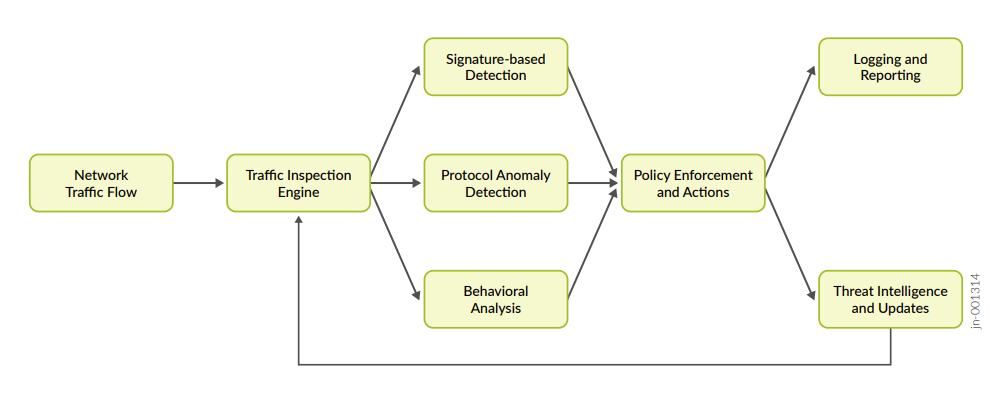
Table 1: IDP Workflow lists the details of the IDP workflow.
| Component | Description |
|---|---|
| Traffic Inspection Engine (Or IDP Inspection Process) | Examines packets for potential security risks (matches known attack patterns). |
| Detection Mechanisms | Signature-based detection, Protocol anomaly detection (identifies deviations from expected network behavior), and Behavioral analysis (detects unusual patterns based on historical data). |
| Policy Enforcement and Actions | Once a threat is identified, the system enforces policies and decides whether to block, alert, or log the activity. |
| Logging and Reporting | Detected events are logged or reported. Administrators analyze and respond |
| Threat Intelligence and Updates | Continuously feed new threat data into the system. See Adaptive Threat Profiling. |
How IDP Works?
An IDP policy lets you selectively enforce various attack detection and prevention techniques on the network traffic passing through your security devices. These security devices offer the same set of IDP signatures that are available on Juniper Networks IDP Series IDP Appliances to secure networks against attacks.
To download and configure initial IDP functionality on the security devices, see IDP Basic Configuration.