
Configuring Ethernet Ring Protection Switching
Follow the steps below to configure Ethernet ring protection switching (ERPS) on your device.
Configuring Ethernet Ring Protection Switching
The inheritance model follows:
[edit protocols]
protection-group {
    ethernet-ring ring-name (
        node-id mac-address;
        ring-protection-link-owner;
        east-interface {
            control-channel channel-name {
            ring-protection-link-end;
        }
        west-interface {
            node-id mac-address;
            control-channel channel-name {
            ring-protection-link-end;
        }
        data-channel {
            vlan number;
        }
        guard-interval number;
        restore-interval number;
    }
}
For each ring, a protection group must be configured. There may be several rings in each node, so there should be multiple protection groups corresponding to the related Ethernet rings.
Three interval parameters (restore-interval, guard-interval, and hold-interval) can be configured
at the protection group level. These configurations are global configurations
and apply to all Ethernet rings if the Ethernet ring doesn't have
a more specific configuration for these values. If no parameter is
configured at the protection group level, the global configuration
of this parameter uses the default value.
Example: Ethernet Ring Protection Switching Configuration on MX Routers
This example describes how to configure Ethernet ring protection switching on an MX Series router:
Requirements
This example uses the following hardware and software components:
-
Router node 1 running Junos OS with two Gigabit Ethernet interfaces.
-
Router node 2 running Junos OS with two Gigabit Ethernet interfaces.
-
Router node 3 running Junos OS with two Gigabit Ethernet interfaces.
Ethernet Ring Overview and Topology
This section describes a configuration example for a three-node ring. The ring topology is shown in Figure 1.
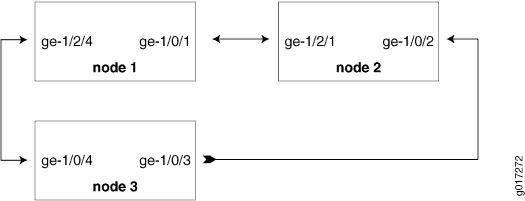
Topology
The configuration in this section is only for the RAPS channel. The bridge domain for user traffic is the same as the normal bridge domain. The only exception is if a bridge domain includes a ring port, then it must also include the other ring port of the same ring.
Configuring a Three-Node Ring
To configure Ethernet Ring Protection Switching on a three-node ring, perform these tasks:
Configuring Ethernet Ring Protection Switching on a Three-Node Ring
Step-by-Step Procedure
-
Configuring Node 1
interfaces { ge-1/0/1 { vlan-tagging; encapsulation flexible-ethernet-services; unit 1 { encapsulation vlan-bridge; vlan-id 100; } } ge-1/2/4 { vlan-tagging; encapsulation flexible-ethernet-services; unit 1 { encapsulation vlan-bridge; vlan-id 100; } } } bridge-domains { bd1 { domain-type bridge; interface ge-1/2/4.1; interface ge-1/0/1.1; } } protocols { protection-group { ethernet-ring pg101 { node-id 00:01:01:00:00:01; ring-protection-link-owner; east-interface { control-channel ge-1/0/1.1; ring-protection-link-end; } west-interface { control-channel ge-1/2/4.1; } } } } protocols { oam { ethernet { connectivity-fault-management { action-profile rmep-defaults { default-action { interface-down; } } maintenance-domain d1 { level 0; maintenance-association 100 { mep 1 { interface ge-1/0/1; remote-mep 2 { action-profile rmep-defaults; } } } } maintenance-domain d2 { level 0; maintenance-association 100 { mep 1 { interface ge-1/2/4; remote-mep 2 { action-profile rmep-defaults; } } } } } } } } -
Configuring Node 2
interfaces { ge-1/0/2 { vlan-tagging; encapsulation flexible-ethernet-services; unit 1 { encapsulation vlan-bridge; vlan-id 100; } } ge-1/2/1 { vlan-tagging; encapsulation flexible-ethernet-services; unit 1 { encapsulation vlan-bridge; vlan-id 100; } } } bridge-domains { bd1 { domain-type bridge; interface ge-1/2/1.1; interface ge-1/0/2.1; } } protocols { protection-group { ethernet-ring pg102 { east-interface { control-channel ge-1/0/2.1; } west-interface { control-channel ge-1/2/1.1; } } } } protocols { oam { ethernet { connectivity-fault-management { action-profile rmep-defaults { default-action { interface-down; } } maintenance-domain d1 { level 0; maintenance-association 100 { mep 2 { interface ge-1/2/1; remote-mep 1 { action-profile rmep-defaults; } } } } maintenance-domain d3 { level 0; maintenance-association 100 { mep 1 { interface ge-1/0/2; remote-mep 2 { action-profile rmep-defaults; } } } } } } } } -
Configuring Node 3
interfaces {
    ge-1/0/4 {
        vlan-tagging;
        encapsulation flexible-ethernet-services;
        unit 1 {
             encapsulation vlan-bridge;
             vlan-id 100;
        }
    }

    ge-1/0/3 {
        vlan-tagging;
        encapsulation flexible-ethernet-services;
        unit 1 {
            encapsulation vlan-bridge;
            vlan-id 100;
        }
    }
}

bridge-domains {
    bd1 {
        domain-type bridge;
        interface ge-1/0/4.1;
        interface ge-1/0/3.1;
    }
}


protocols {
    protection-group {
        ethernet-ring pg103 {
            east-interface {
                control-channel ge-1/0/3.1;
            }
            west-interface {
                control-channel ge-1/0/4.1;
            }
        }
    }
}


protocols {
    oam {
        ethernet {
            connectivity-fault-management {
                action-profile rmep-defaults {
                    default-action {
                        interface-down;
                    }
                }
                maintenance-domain d2 {
                    level 0;
                    maintenance-association 100 {
                        mep 2 {
                            interface ge-1/0/4;
                            remote-mep 1 {
                                action-profile rmep-defaults;
                            }
                        }
                    }
                }
                maintenance-domain d3 {
                    level 0;
                    maintenance-association 100 {
                        mep 2 {
                            interface ge-1/0/3;
                            remote-mep 1 {
                                action-profile rmep-defaults;
                            }
                        }
                    }
                }
            }
        }
    }
}
Examples: Ethernet RPS Output
This section provides output examples based on the configuration shown in Example: Ethernet Ring Protection Switching Configuration on MX Routers. The show commands used in these examples can help verify configuration and correct operation.
Normal Situation—RPL Owner Node
If the ring has no failure, the show command will
have the following output for Node 1:
user@node1> show protection-group ethernet-ring aps

Ethernet Ring Name  Request/state  No Flush  Ring Protection Link Blocked
pg101               NR             No        Yes

Originator  Remote Node ID
Yes

user@node1> show protection-group ethernet-ring interface
Ethernet ring port parameters for protection group pg101

Interface    Control Channel  Forward State  Ring Protection Link End
ge-1/0/1     ge-1/0/1.1       discarding     Yes
ge-1/2/4     ge-1/2/4.1       forwarding     No

Signal Failure  Admin State
Clear          IFF ready
Clear          IFF ready

user@node1> show protection-group ethernet-ring node-state
Ethernet ring    APS State    Event         Ring Protection Link Owner
pg101            idle         NR-RB         Yes

Restore Timer  Quard Timer  Operation state
disabled       disabled    operational
user@node1> show protection-group ethernet-ring statistics group-name pg101
Ethernet Ring statistics for PG pg101
RAPS sent                        : 1
RAPS received                    : 0
Local SF happened:               : 0
Remote SF happened:              : 0
NR event happened:               : 0
NR-RB event happened:            : 1
Normal Situation—Other Nodes
For Node 2 and Node 3, the outputs should be the same:
user@node2> show protection-group ethernet-ring aps
Ethernet Ring Name  Request/state  No Flush  Ring Protection Link Blocked
pg102               NR             No        Yes

Originator  Remote Node ID
No          00:01:01:00:00:01

user@node2> show protection-group ethernet-ring interface
Ethernet ring port parameters for protection group pg102

Interface    Control Channel  Forward State  Ring Protection Link End
ge-1/2/1     ge-1/2/1.1       forwarding     No
ge-1/0/2     ge-1/0/2.1       forwarding     No

Signal Failure  Admin State
Clear          IFF ready
Clear          IFF ready

user@node2> show protection-group ethernet-ring node-state
Ethernet ring    APS State    Event         Ring Protection Link Owner
pg102            idle         NR-RB         No

Restore Timer  Quard Timer  Operation state
disabled       disabled    operational

user@node2> show protection-group ethernet-ring statistics group-name pg102
Ethernet Ring statistics for PG pg101
RAPS sent                        : 0
RAPS received                    : 1
Local SF happened:               : 0
Remote SF happened:              : 0
NR event happened:               : 0
NR-RB event happened:            : 1
Failure Situation—RPL Owner Node
If the ring has a link failure between Node 2 and Node 3, the show command will have the following outputs for Node 1:
user@node1> show protection-group ethernet-ring aps
Ethernet Ring Name  Request/state  No Flush  Ring Protection Link Blocked
pg101               SF             NO        No

Originator  Remote Node ID
No          00:01:02:00:00:01

user@node1> show protection-group ethernet-ring interface
Ethernet ring port parameters for protection group pg101

Interface    Control Channel  Forward State  Ring Protection Link End
ge-1/0/1     ge-1/0/1.1       forwarding     Yes
ge-1/2/4     ge-1/2/4.1       forwarding     No

Signal Failure  Admin State
Clear           IFF ready
Clear           IFF ready

user@node1> show protection-group ethernet-ring node-state
Ethernet ring    APS State    Event         Ring Protection Link Owner
pg101            protected    SF            Yes

Restore Timer  Quard Timer  Operation state
disabled       disabled     operational

user@node1> show protection-group ethernet-ring statistics group-name pg101
Ethernet Ring statistics for PG pg101
RAPS sent                        : 1
RAPS received                    : 1
Local SF happened:               : 0
Remote SF happened:              : 1
NR event happened:               : 0
NR-RB event happened:            : 1
Failure Situation—Other Nodes
For Node 2 and Node 3, the outputs should be the same:
user@node2> show protection-group ethernet-ring aps
Ethernet Ring Name  Request/state  No Flush  Ring Protection Link Blocked
pg102               SF             No        No

Originator  Remote Node ID
Yes         00:00:00:00:00:00

user@node2> show protection-group ethernet-ring interface
Ethernet ring port parameters for protection group pg102

Interface    Control Channel  Forward State  Ring Protection Link End
ge-1/2/1     ge-1/2/1.1       forwarding     No
ge-1/0/2     ge-1/0/2.1       discarding     No

Signal Failure  Admin State
Clear           IFF ready
set             IFF ready

user@node2> show protection-group ethernet-ring node-state
Ethernet ring    APS State    Event         Ring Protection Link Owner
pg102            idle         NR-RB         No

Restore Timer  Quard Timer  Operation state
disabled       disabled     operational

user@node2> show protection-group ethernet-ring statistics group-name pg102
Ethernet Ring statistics for PG pg101
RAPS sent                        : 1
RAPS received                    : 1
Local SF happened:               : 1
Remote SF happened:              : 0
NR event happened:               : 0
NR-RB event happened:            : 1