
Introduction to GPRS
Learn how GPRS works and how to secure its GTP interfaces using Junos OS.
GPRS Overview
General Packet Radio Service (GPRS) networks connect to roaming partners, corporate customers, GPRS Roaming Exchange (GRX) providers, and the public Internet. Operators must protect their networks while still allowing controlled access to and from these external connections. Juniper Networks provides security capabilities that help address these challenges.
A major security concern in the GPRS architecture is the limited protection in the GPRS Tunneling Protocol (GTP). GTP operates between GPRS Support Nodes (GSNs), establishing tunnels for individual user endpoints (UEs) and for S-GW to P-GW communication in 4G networks. A GTP tunnel is a channel between GSNs through which hosts exchange data. The SGSN (S-GW) encapsulates packets from UEs with a GTP header and forwards them to the GGSN (P-GW), which decapsulates the packets and sends them to external hosts.
Because GTP does not provide authentication, data integrity, or confidentiality, communication between GPRS networks is inherently vulnerable. Operators typically use IP Security (IPsec) for roaming links, apply traffic rate limits, and leverage stateful inspection to mitigate most risks. The GTP firewall capabilities in Junos OS further strengthen mobile operator security.
Juniper Networks security devices mitigate a wide variety of attacks on the following types of GPRS interfaces:
Gn—Connection between SGSN (S-GW) and GGSN within the same Public Land Mobile Network (PLMN).
S5—Connection between S-GW and P-GW within the same PLMN in 4G.
Gp—Connection between two different PLMNs.
S8—Bearer-plane connection between home and visited PLMNs in 4G.
Gi—Connection between a GGSN and the Internet or other destination networks.
SGi—Connection between a P-GW and external networks in 4G.
The term interface differs between Junos OS and GPRS terminology. In Junos OS, an interface acts as a doorway into a security zone. In GPRS, an interface is a connection point between two GPRS components, such as between an SGSN (S-GW) and a GGSN (P-GW).
Junos OS supports GTP traffic inspection over IPv6 in addition to IPv4. Devices can form GTP tunnels using IPv4, IPv6, or both for UEs across SGSN, S-GW, GGSN, and P-GW nodes. The GTP Application Layer Gateway (ALG) can inspect or ignore IPv6-based GTP sessions according to policy configurations, and all IPv4 ALG capabilities also apply to IPv6. You can inspect GTP-C and GTP-U messages transmitted over IPv6 based on your security policies.
This topic contains the following sections:
Gp and Gn Interfaces
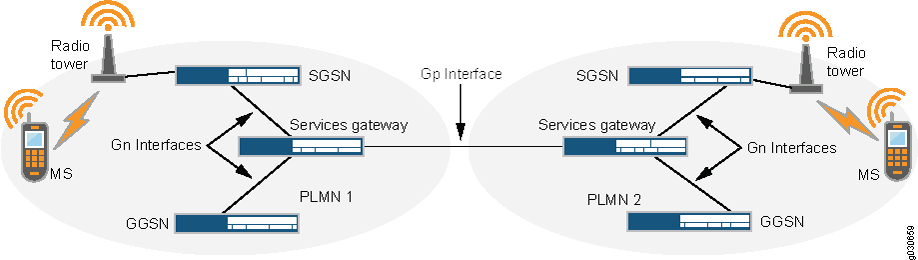
You deploy a security device on the Gn interface to protect core network assets such as the SGSN (S-GW) and GGSN (P-GW). To secure GTP tunnels on the Gn interface, place the security device between the SGSNs (S-GW) and GGSNs (P-GW) within the same PLMN.
On the Gp interface, the security device protects one PLMN from another. To secure GTP tunnels on the Gp interface, position the SGSNs (S-GW) and GGSNs (P-GW) of the PLMN behind the security device so that all inbound and outbound traffic passes through the firewall.
Figure 1 shows how Juniper Networks SRX Series Firewalls are positioned to protect PLMNs on the Gp and Gn interfaces.
Gi Interface
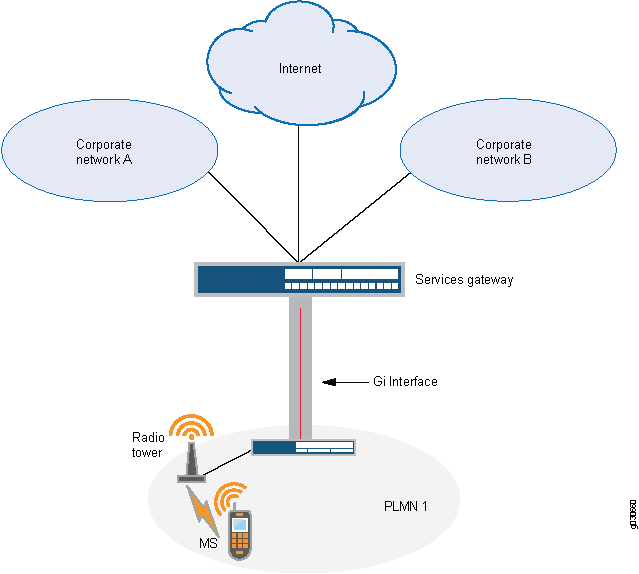
Deploying a security device on the Gi interface enables you to control traffic for multiple networks, protect a PLMN from the Internet and external networks, and safeguard mobile users from external threats. Junos OS supports numerous virtual routers, allowing you to dedicate one virtual router per customer network and keep traffic isolated. The security device can forward packets securely to the Internet or destination networks using Layer 2 Tunneling Protocol (L2TP) for IPsec VPN tunnels.Figure 2 shows how a security device protects a PLMN on the Gi interface.
Operational Modes
Junos OS supports two interface operational modes with GTP: transparent mode and route mode. If you want the security device to participate in the routing infrastructure of your network, you can run it in route mode. This requires a certain amount of network redesign. Alternatively, you can implement the security device into your existing network in transparent mode without having to reconfigure the entire network. In transparent mode, the security device functions as a Layer 2 switch or bridge, and the IP addresses of interfaces are set at 0.0.0.0, making the presence of the security device invisible, or transparent, to users.
Junos OS supports two operational modes for GTP interfaces: transparent mode and route mode.
-
In route mode, the security device participates in the routing infrastructure. This requires some network redesign.
-
In transparent mode, the security device acts as a Layer 2 switch or bridge, with all interface IP addresses set to 0.0.0.0. This allows you to insert it into the network without reconfiguring the existing infrastructure, making the device effectively invisible to users.
Junos OS supports NAT on interfaces and policies that do not have GTP inspection enabled.
Route mode supports active/passive and active/active chassis clusters, while transparent mode supports active/passive only.
GTP In-Service Software Upgrade
GTP supports unified in-service software upgrade (ISSU) between two SRX Series Firewalls running different Junos OS versions. Unified ISSU on a chassis cluster allows operators to upgrade software with no control-plane disruption and minimal impact to traffic.
GTP Support for Central Point Architecture
User equipment (UE), such as mobile phones, connects to a Serving GPRS Support Node (SGSN) or Service Gateway (S-GW) to access GPRS data services. The SGSN (S-GW) connects to a Gateway GPRS Support Node (GGSN) or PDN Gateway (P-GW) to reach the Internet. The UE requests the SGSN to create one or more GPRS Tunneling Protocol (GTP) tunnels to the GGSN (P-GW) for Internet connectivity.
When a UE moves to a new location, it attaches to a new SGSN. The new SGSN sends an update to the GGSN so the GGSN can refresh the SGSN information in the existing tunnel.
The GTP Application Layer Gateway (ALG) maintains tunnel state and allows update requests only for existing tunnels. Because some GTP-C messages are bidirectional and may originate from either the SGSN or GGSN, initial packet direction may be unknown. If the first packet appears from an unexpected direction, the GTP ALG may stop creating the session and drop the packet.
To prevent these drops, the device creates a new flow session and allows GTP-C traffic even when the SGSN–GGSN direction is not yet identified. Once the GGSN IP address is determined, the correct SPU is used to anchor the session; otherwise, the session migrates to the correct SPU.
GTP-C tunnel handling also supports tunnel-based session distribution, which speeds
tunnel setup and balances load across SPUs. When enabled, GTP-C tunnels and their
sessions are distributed based on the SGSN TEID so different tunnels spread across
multiple SPUs. This behavior is controlled by the command set security
forwarding-process application-services enable-gtpu-distribution. This
command is mandatory; without it, GTP ALG does not function and GTP packets are not
inspected.
Enhancements include:
-
Preventing GTP-C packet drops during SGSN handover.
-
Supporting GTP-C rate limiting to protect the GGSN from floods.
-
Distributing both GTP-C and GTP-U traffic across multiple SPUs using tunnel-based session distribution. Use the
enable-gtpu-distributioncommand to enable GTP-C or GTP-U session distribution. -
Improvements to GTP Tunnel Management, GSN handling, and Path Object Management.
GTP Tunnel Management
GTP establishes a tunnel between an SGSN and a GGSN (or S-GW and P-GW). The SGSN receives packets from UEs, encapsulates them with a GTP header, and forwards them through the tunnel. The GGSN decapsulates the packets and forwards them to external hosts.
Tunnel Object
A tunnel object stores endpoint information:
-
Client endpoint → downstream GSN (SGSN)
-
Server endpoint → upstream GSN (GGSN)
Each endpoint stores fields for both IPv4 and IPv6 addresses, learned during tunnel creation or updates.
Redirect Entry
A redirect entry (or redirect tunnel) assists in locating the anchor SPU. It is created when normal GTP tunnels form. Each redirect entry maps to one tunnel endpoint and copies:
-
IP address(es)
-
TEID
-
Anchor SPU ID
IPv6 support extends redirect entries in the same way it extends tunnel objects.
Gateway GPRS Support Node (GSN)
The gateway GPRS support node (GGSN) or P-GW (PDN Gateway) converts the incoming data traffic coming from the mobile users through the Service gateway GPRS support node (SGSN) and forwards it to the relevant network, and vice versa. The GGSN and the SGSN together form the GPRS support nodes (GSN).
GSN Object: The GTP ALG maintains a GSN table. Each GSN node in a GSN table will record one GSN IP address, (IPv4 or IPv6), GSN restart counter, and GSN-based rate-limiting counter, and so on. If a GSN node has both IPv4 and IPv6 address, The GTP ALG will generate two GSN entries, one for IPv4 address and the other for IPv6 address and the two GSN entries in the same GSN node counts the rate-limit signaling messages independently, and ages out separately.
GSN Reboot: When a GSN restarts, the restart counter changes and all associated tunnels are deleted. If a GSN uses both IPv4 and IPv6 addresses, a restart detected on either address triggers removal of tunnels associated with both addresses.
Path Object Management
A path object stores information about communication between two GSN addresses (IPv4 or IPv6).
It records:
-
Message counters
-
Timestamps
-
Rate-limiting parameters
For a GSN with both IPv4 and IPv6 addresses, each address maintains its own path object, performs rate limiting independently, and ages out separately.
Change History Table
Feature support is determined by the platform and release you are using. Use Feature Explorer to determine if a feature is supported on your platform.