
Policy-Based GTPv2 and Path Restart
Learn about policy-based GTPv2, comparison of GTP versions and network functions, enabling GTPv2 inspection in policies and GTPv2 Path Restart.
GTPv2 Overview
The GPRS tunneling protocol (GTP) establishes a GTP tunnel between a Serving GPRS Support Node (SGSN) and a Gateway GPRS Support Node (GGSN) for individual Mobile Stations (MS) and GTP version 2 (GTPv2).
GTPv2 is part of LTE, a fourth generation (4G) wireless broadband technology developed by Third-Generation Partnership Project (3GPP). 3GPP is the standard body for developing GPRS standards. LTE is designed to increase the capacity and speed of mobile telephone networks. GTPv2 is a protocol designed for LTE networks. An LTE network comprises network elements, LTE interfaces, and protocols.
GTPv0 and GTPv1 are implemented using SGSNs and GGSNs. However, in GTPv2, the traditional SGSNs and GGSNs are replaced by three logical nodes—a serving gateway (SGW), a packet data network gateway (PGW), and a mobility management entity (MME).
| Mobile Generation | GTP Version Used | Node Types Involved | Purpose |
|---|---|---|---|
| GTPv1 - 3G (UMTS) | GTPv2 (Used in 4G/LTE Networks – Control Plane Only) | SGSN, GGSN | Signalling + user-plane tunnelling |
| GTPv2 - 4G (LTE) | GTPv2 (control C-plane), GTPv1‑U (user U-plane) | MME, SGW, PGW | Session management (control C-plane) + user traffic (user U-plane) |
Figure 1 shows the following LTE interfaces deployed in the public land mobile network (PLMN).
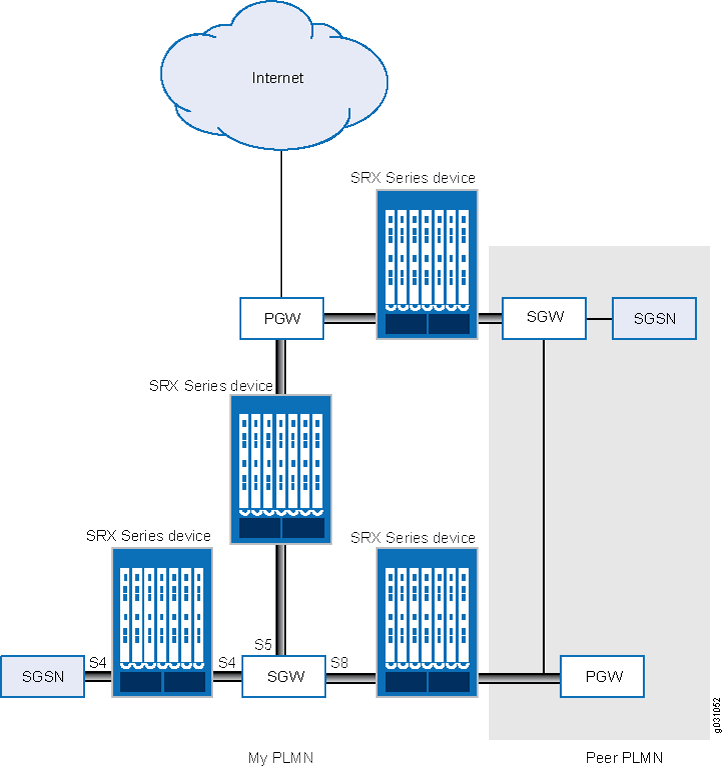
| Interface | Connects | Main Functions | 3G Equivalent | Notes |
|---|---|---|---|---|
| S5 | SGW and PGW |
|
Gn | Used within the same PLMN |
| S8 | SGW (visitedVisited PLMN) and PGW (homeHome PLMN) |
|
Gp | Inter-PLMN version of S5 |
| S4 | S4-SGSN and SGW |
|
None | Enables 3G-4G Interoperability. No direct 3G equivalent |
Policy-Based GTPv2
GPRS tunneling protocol version 2 (GTPv2) implements a policy mechanism that checks every GTPv2 packet against security policies that regulate GTPv2 traffic. Based on the security policy, the packet is then forwarded, dropped, or tunneled.
A GTPv2 security policy allows you to forward, deny, or tunnel GTPv2 traffic. However, the security policy does not enable GTPv2 traffic inspection on the device. To enable traffic inspection, you must apply a GTPv2 inspection object to a security policy. A GTPv2 inspection object is a set of configuration parameters for processing GTPv2 traffic.
You can apply only one GTPv2 inspection object per security policy. However, you can apply an inspection object to multiple security policies.
By default, a GTPv2 inspection object is not applied to a security policy. You need to explicitly apply an inspection object to a security policy.
Using GTPv2 security policies, you can permit or deny GTPv2 tunnel establishment from certain peers, such as a SGW. You can configure GTPv2 security policies that specify multiple source and destination addresses, address groups, or an entire zone.
Example: Enable GTPv2 Inspection in Policies
This example shows how to enable GTPv2 inspection in policies.
Requirements
Before you begin, you must restart the device after GTPv2 is enabled. By default, GTPv2 is disabled on the device.
Overview
In this example, you configure interfaces as ge-0/0/1 and ge-0/0/2, and assign them the interface addresses 4.0.0.254/8 and 5.0.0.254/8, respectively. You then configure the security zones and specify the global addresses as 4.0.0.5/32 and 5.0.0.6/32, respectively. You enable GTPv2 inspection in security policies to allow bidirectional traffic between two networks within the same PLMN.
Configuration
CLI Quick Configuration
To quickly configure this example, copy the following commands, paste them into a text file, remove any line breaks, change any details necessary to match your network configuration, copy and paste the commands into the CLI at the [edit] hierarchy level, and then enter commit from configuration mode.
 set security gtp profile gtp2
set interfaces ge-0/0/1 unit 0 family inet address 4.0.0.254/8
set interfaces ge-0/0/2 unit 0 family inet address 5.0.0.254/8
set security zones security-zone sgw1 interfaces ge-0/0/1.0 host-inbound-traffic system-services all
set security zones security-zone sgw1 host-inbound-traffic protocols all
set security zones security-zone pgw1 interfaces ge-0/0/2.0 host-inbound-traffic system-services all
set security zones security-zone pgw1 host-inbound-traffic protocols all
set security address-book global address local-sgw1 4.0.0.5/32
set security address-book global address remote-pgw1 5.0.0.6/32
set security policies from-zone sgw1 to-zone pgw1 policy sgw1_to_pgw1 match source-address local-sgw1 destination-address remote-pgw1 application junos-gprs-gtp
set security policies from-zone sgw1 to-zone pgw1 policy sgw1_to_pgw1 then permit application-services gprs-gtp-profile gtp2
set security policies from-zone pgw1 to-zone sgw1 policy pgw1_to_sgw1 match source-address remote-pgw1 destination-address local-sgw1 application junos-gprs-gtp
set security policies from-zone pgw1 to-zone sgw1 policy pgw1_to_sgw1 then permit application-services gprs-gtp-profile gtp2
Step-by-Step Procedure
To configure GTPv2 inspection in policies:
Create the GTPv2 inspection object.
[edit]
user@host# set security gtp profile gtp2
Configure the interfaces.
[edit interfaces]
user@host# set ge-0/0/1 unit 0 family inet address 4.0.0.254/8
user@host# set ge-0/0/2 unit 0 family inet address 5.0.0.254/8
Configure the security zones.
[edit security zones]
user@host# set security-zone sgw1 interfaces ge-0/0/1.0
user@host# set security-zone sgw1 host-inbound-traffic system-services all
user@host# set security-zone sgw1 host-inbound-traffic protocols all
user@host# set security-zone pgw1 interfaces ge-0/0/2.0
user@host# set security-zone pgw1 host-inbound-traffic system-services all
user@host# set security-zone pgw1 host-inbound-traffic protocols all
Specify the addresses.
[edit security address-book global]
user@host# set address local-sgw1 4.0.0.5/32
user@host# set address remote-pgw1 5.0.0.6/32
Enable GTPv2 inspection in the security policies.
[edit security policies]
user@host# set from-zone sgw1 to-zone pgw1 policy sgw1_to_pgw1 match source-address local-sgw1 destination-address remote-pgw1 application junos-gprs-gtp
user@host# set from-zone sgw1 to-zone pgw1 policy sgw1_to_pgw1 then permit application-services gprs-gtp-profile gtp2
user@host# set from-zone pgw1 to-zone sgw1 policy pgw1_to_sgw1 match source-address remote-pgw1 destination-address local-sgw1 application junos-gprs-gtp
user@host# set from-zone pgw1 to-zone sgw1 policy pgw1_to_sgw1 then permit application-services gprs-gtp-profile gtp2
Results
From configuration mode, confirm your configuration by entering the show security policies command. If the output does not display the intended configuration, repeat the configuration instructions in this example to correct it.
[edit]
user@host# show security policies
from-zone sgw1 to-zone pgw1 {
    policy sgw1_to_pgw1 {
    match {
    source-address local-sgw1;
        destination-address remote-pgw1;
        application junos-gprs-gtp;
        }
        then {
            permit {
            application-services {
            gprs-gtp-profile gtp2;
        }
        }
    }
    }
}
from-zone pgw1 to-zone sgw1 {
    policy pgw1_to_sgw1 {
    match {
    source-address remote-pgw1;
        destination-address local-sgw1;
        application junos-gprs-gtp;
    }
        then {
            permit {
            application-services {
            gprs-gtp-profile gtp2;
        }
    }
    }
    }
}
default-policy {
    permit-all;
}
If you are done configuring the device, enter commit from configuration mode.
GTP Path Restart
Restarting a GTP path terminates all GTP tunnels between two devices. Each GTP gateway is associated with a restart number. You can obtain a restart number from the Recovery information element (IE) of a GTP message.
You can detect a restart by comparing the locally stored restart number with the newly obtained one. The locally stored restart number is a nonzero value and does not match with the new restart number.
You can use the set security gtp profile name restart-path (echo | create | all) command to restart a GTP path.
After you configure this command, the device detects the changed restart number obtained from the Recovery IE in the messages. You can use the echo option to obtain a new restart number from echo messages, the create option to obtain a restart number from create-session messages, or the all option to obtain a new restart number from all types of GTP messages.
Example: Restart aRestart GTPv2 Path
This example shows how to restart a GTPv2 path.
Requirements
No special configuration beyond device initialization is required before configuring this feature.
Overview
For brevity, this example uses GTPv2.
In this example, you restart the GTPv2 path for the GTPv2 inspection object named gtp2. You obtain a new restart number from the Recovery IE in an echo message.
Configuration
Step-by-Step Procedure
To restart the GTPv2 path:
Specify the GTPv2 profile.
[edit]
user@host# set security gtp profile gtp2
Restart the path.
[edit]
user@host# set security gtp profile gtp2 restart-path echo
If you are done configuring the device, commit the configuration.
[edit]
user@host# commit