
Zero Trust Inline Segmentation
Zero Trust Inline Segmentation (ZTIS) extends GBP support to Mist access points (APs).
Zero Trust Inline Segmentation enables supported switches to learn GBP tags from Mist APs, allowing both wired and wireless clients to participate in GBP microsegmentation.
Table 1 shows the differences from mainline functionality for different platforms.
|
Platform |
Difference |
|---|---|
|
QFX5130, QFX5700 |
Zero Trust Inline Segmentation is not supported. |
ZTIS GBP Messages
When you enable ZTIS on a supported switch, the switch learns GBP tag assignments from attached Mist APs through proprietary ZTIS GBP messages.
Table 2 shows the two types of ZTIS GBP messages:
| ZTIS GBP Message Type | Description |
|---|---|
| ZTIS GBP update |
A ZTIS GBP update message contains the mapping between a MAC address and a GBP tag. This can be a solicited or unsolicited message from the sender to convey a tag assignment to the receiver. This can be a unicast or multicast message. |
| ZTIS GBP lookup |
A ZTIS GBP lookup message is a request by the sender to obtain the GBP tag assignment from the receiver for the MAC address specified within the message. This is a unicast message. |
|
Note: ZTIS GBP update messages contain
MAC-based GBP tag assignments only and ZTIS GBP lookup messages
request MAC-based GBP tag assignments only.
|
|
Figure 1 shows the format of the ZTIS GBP messages. The messages are signed with a key to detect tampering.

The following sections describe how these messages are used.
ZTIS Interface Roles
The ZTIS interface role determines how ZTIS GBP update and lookup messages are handled and propagated. You can configure the interface role explicitly or you can let the switch auto-detect the role on an interface.
If the interface role changes for any reason (for example, new configuration), the switch flushes its MAC address tables on that interface. MAC addresses will have to be relearned and GBP tag assignments rebuilt.
ZTIS Access-Point Role
The ZTIS access-point role describes an interface that connects
a ZTIS-enabled access switch directly to a Mist AP. The Mist AP conveys GBP tag
assignments across this link to the access switch through a ZTIS GBP message
exchange.
Specifically, the Mist AP and the access switch behave as follows:
-
If a wireless client is assigned a GBP tag during authentication, the Mist AP sends a multicast ZTIS GBP update message containing the MAC-based GBP tag assignment to the upstream access switch. The destination multicast MAC address in the message is set to
5d:5b:35:ff:ff:01and the source MAC address is set to the MAC address of the Mist AP.When the access switch receives this ZTIS GBP update message, the switch updates its MAC address tables and internal data structures with the specified MAC-based tag assignment.
-
If the ZTIS GBP update message is dropped or if the access switch reboots, the tag assignment is lost. In this situation, if the access switch receives a client data frame with a source MAC address that has no GBP tag assigned, the access switch sends a ZTIS GBP lookup message to the Mist AP asking for the missing tag assignment. The destination MAC address in the ZTIS GBP lookup message is set to the MAC address of the Mist AP. The source MAC address is set to a derivation of the chassis MAC address of the access switch.
When the Mist AP receives this ZTIS GBP lookup message, the Mist AP looks up the specified MAC address to obtain the GBP tag. If the GBP tag exists, the Mist AP responds to the ZTIS GBP lookup message with a unicast ZTIS GBP update message containing the tag assignment. The destination unicast MAC address in the response is set to the MAC address of the access switch (a derivation of the chassis MAC address). The source MAC address is set to the MAC address of the Mist AP.
Figure 2 shows ZTIS in an EVPN-VXLAN network connecting wired and wireless clients. GBP tags for wired clients are assigned statically using the CLI or dynamically through RADIUS authentication as is usual. GBP tags for wireless clients are assigned through RADIUS authentication and the tag assignments are communicated from the Mist AP to upstream switches in ZTIS GBP update messages. The switch receiving the ZTIS GBP update messages configures its MAC address tables and internal data structures with the GBP tag assignments as if the GBP tags were assigned through the CLI or learned locally. Regular GBP tag processing then occurs. There is no restriction or limitation in functionality due to the tag being assigned through a ZTIS GBP message instead of the CLI.
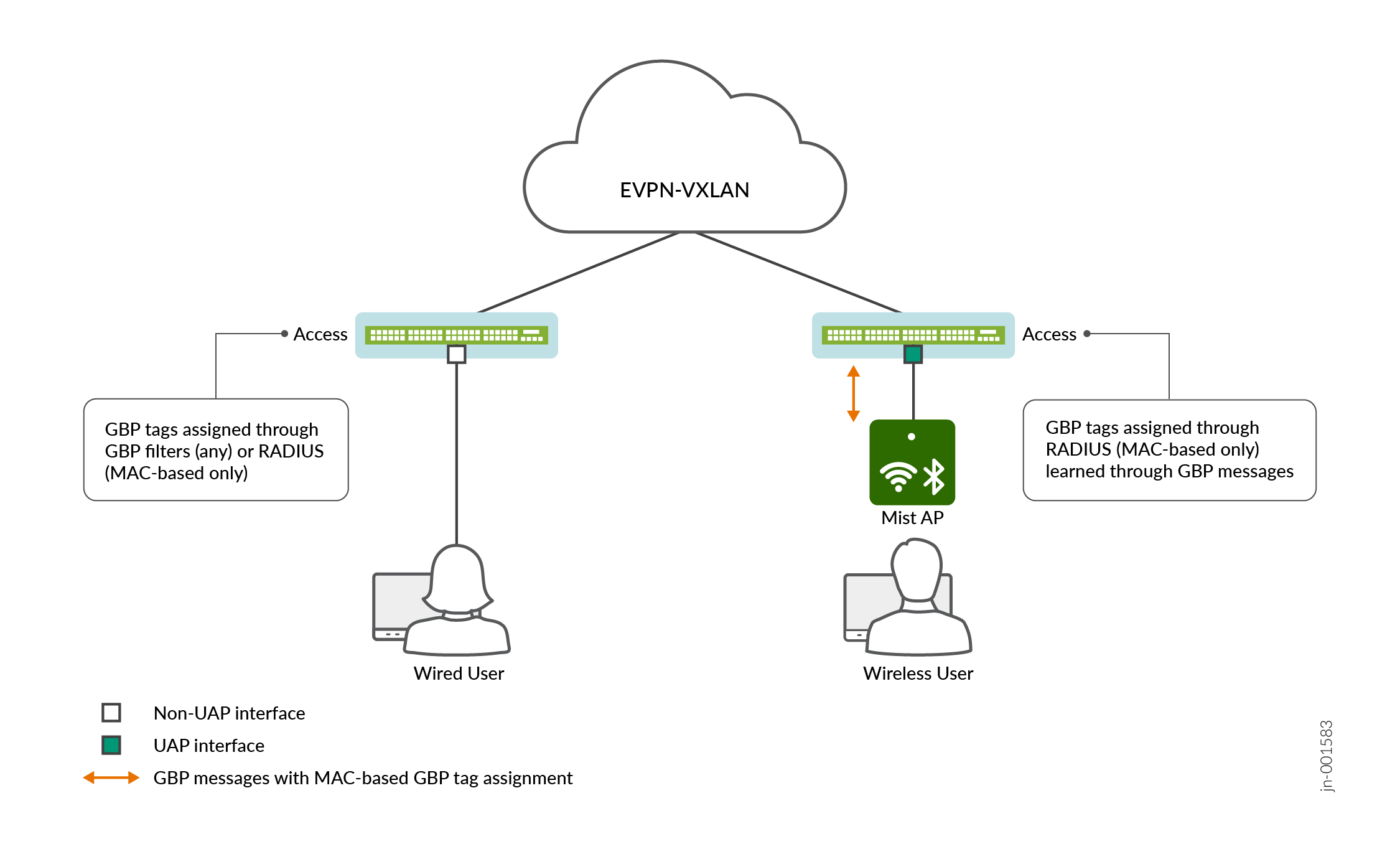
Although the above example shows ZTIS in an EVPN-VXLAN network, you can configure ZTIS in a pure L2 network as well. The ZTIS capability works independently from the underlying infrastructure.
To configure a ZTIS access-point role on an interface:
set protocols unified-access-policy interface <name> access-point
or simply:
set protocols unified-access-policy interface <name>
The access-point role is the default if you don't specify a
role.
ZTIS Inter-Switch-Link Role
While the ZTIS access-point role describes the interface
connecting to a Mist AP, the ZTIS inter-switch-link role
describes the interface connecting to another ZTIS-enabled switch. This role is
key to propagating MAC-based GBP tags across an L2 network of ZTIS-enabled
switches.
Specifically, the ZTIS-enabled switches with the
inter-switch-link role behave as follows:
-
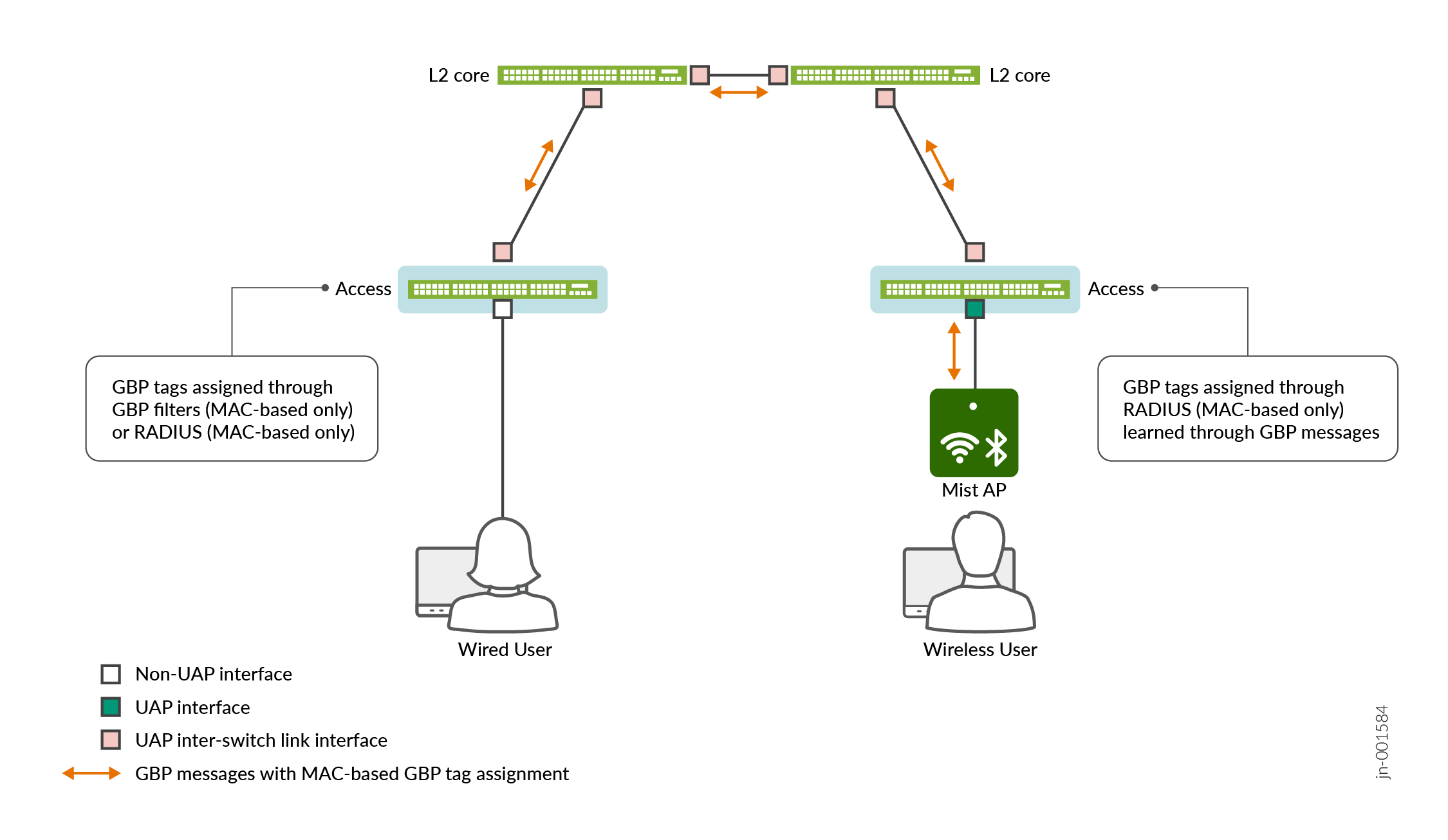
Wireless - If an access switch receives a ZTIS GBP update message from a Mist AP, the access switch processes the message as described in ZTIS Access-Point Role and passes this multicast message out all inter-switch link interfaces. This message then propagates across all ZTIS-enabled switches where this tag assignment is learned.
-
Wired - If an access switch learns of a GBP tag assignment for a wired user (for example, through CLI configuration or RADIUS authentication), it creates a unicast ZTIS GBP update message containing that tag assignment and sends it out all inter-switch links to its ZTIS-enabled neighbors.
Passing ZTIS GBP update messages across the network in this manner allows access switches to enforce policy on both the source and destination GBP tags at the ingress. This feature, however, is limited to ZTIS-enabled switches in a pure L2 network.
Figure 3 shows how ZTIS GBP messages propagate over inter-switch links across a pure layer 2 network. GBP tags from both wired and wireless clients are propagated in this manner.
To configure a ZTIS inter-switch-link role on an interface:
set protocols unified-access-policy interface <name> inter-switch-link
Auto-Detecting the Interface Role
You can configure the switch to auto-detect interface roles on specified ZTIS interfaces or on all ZTIS interfaces. Auto-detection leverages the use of LLDP to detect the device attached to the interface and configures the role based on the identity of that attached device.
If, through LLDP, the switch determines that the attached device is a Mist AP,
then the switch configures the interface with the access-point
role. If the switch determines that the attached device is a ZTIS-enabled
switch, then the switch configures the interface with the
inter-switch-link role.
If you configure auto-detection on an interface, but the switch cannot determine
the identity of the attached device either because the attached device does not
have LLDP enabled or because the attached device did not identify itself as a
Mist AP or a ZTIS-enabled switch, then the interface remains a regular non-ZTIS
interface. A regular non-ZTIS interface is simply a switch interface that is not
configured for ZTIS and is displayed as a server side interface
in the CLI.
The switch will not send unicast ZTIS GBP messages on a server
side interface nor will it process any unicast ZTIS GBP messages
received on that interface. However, it will continue to relay multicast
messages to and from that interface as is appropriate for a switch. This means
that multicast ZTIS GBP messages will still be propagated on that interface (but
not otherwise acted upon or processed).
To configure a specific interface for auto-detection:
set protocols unified-access-policy interface <if-name> auto-detect
To configure all interfaces for auto-detection:
set protocols unified-access-policy interface all auto-detect
interface all configuration for that interface. For
example, in the below configuration, the specified interface statement prevails
and ge-0/0/1 becomes an access-point
interface:set protocols unified-access-policy interface all inter-switch-link set protocols unified-access-policy interface ge-0/0/1 access-point
ZTIS Configuration
unified-access-policy in the CLI.Use the GBP Pure L2 Profile
In some deployments, you may want to perform policy enforcement on access switches that are not L3 gateways. Perhaps you want to keep your access switches at layer 2 for simplicity and move the routing and gateway responsibility to a WAN router. This means that the access switches do not perform IP route lookups and cannot participate in L3 segmentation.
In this situation, if you enable the gbp-pure-l2-profile, we
allow you to add a destination IP address/subnet match to your policy. This
gives you the ability to support both L2 and L3 segmentation even on a pure L2
access switch.
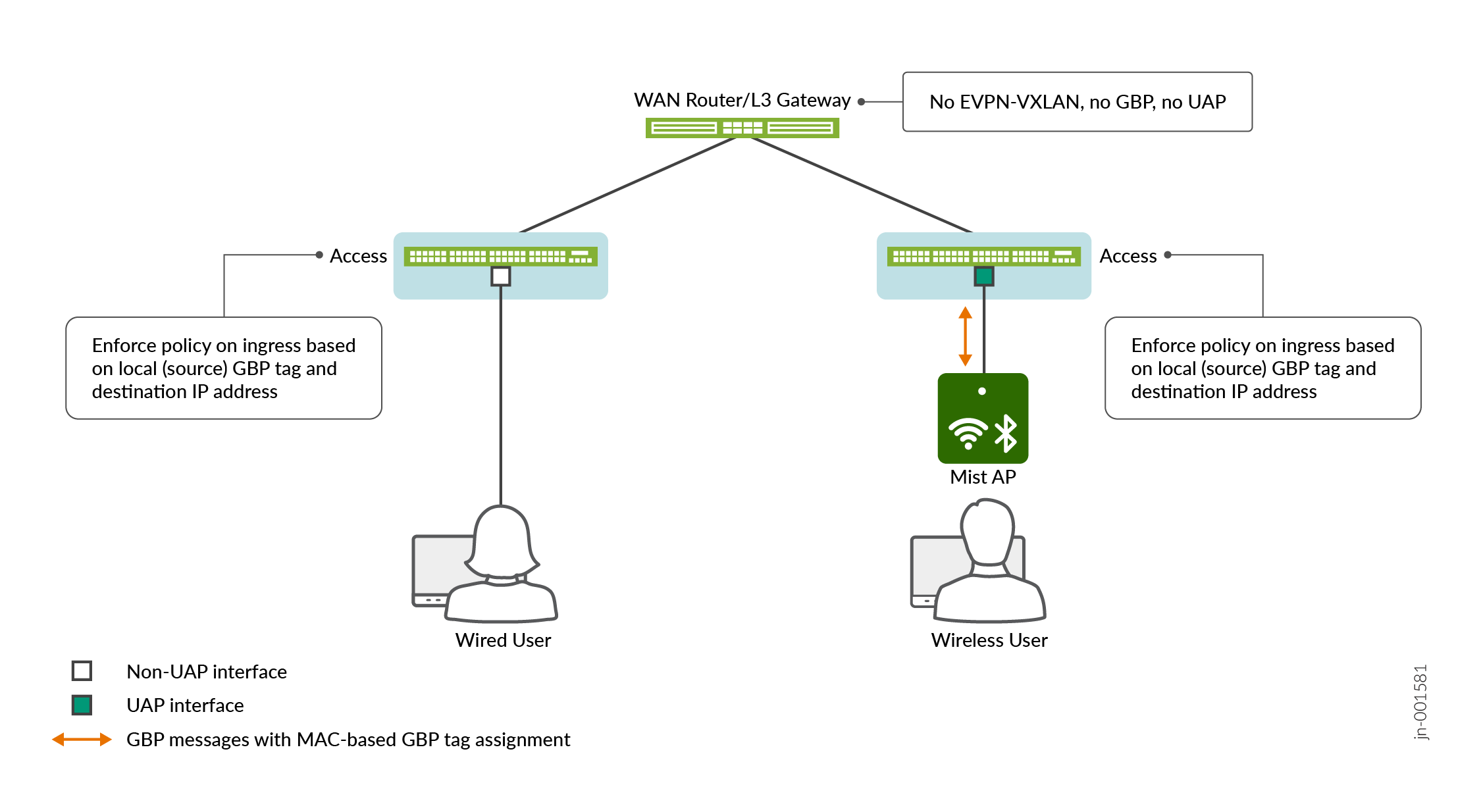
Figure 4 shows GBP-enabled layer 2 access
switches connected to a WAN router. The WAN router does not support EVPN-VXLAN
and does not support GBP. However, even in this scenario, the access switch can
still participate in L2 and L3 segmentation if you enable the
gbp-pure-l2-profile and enforce policy on the combination
of a local (source) GBP tag and a destination IP address/subnet.
This feature allows you to incorporate third-party WAN and core/distribution routers into your network and continue to support GBP microsegmentation. This is ideal for smaller sites where policy enforcement at the access layer simplifies design and reduces dependency on core infrastructure.
Table 3 and Table 4 show the supported GBP tag
assignment and policy enforcement features with the
gbp-pure-l2-profile. A pure layer 2 device only supports a
subset of the tagging and enforcement features.
| Tag Assignment Based On ... | Support |
|---|---|
|
MAC address only |
Yes |
|
Interface only |
Yes |
|
VLAN only |
Yes1 |
|
Interface and VLAN |
Yes1 |
|
IP address |
No |
|
IEEE 802.1X |
Yes |
| 1Not supported on EX4100 switches. | |
| Enforcement | Support |
|---|---|
|
Egress |
Yes, with destination GBP tag |
|
Ingress |
Yes, with source GBP tag and destination IP address |
|
L4 fields |
Yes |
|
Ingress with Tag Propagation |
No |
|
Explicit Default Discard |
No |
|
MAC/IP Inter-tagging |
No |
|
Filter-Based Forwarding |
No |
Below is an example of configuring GBP with the
gbp-pure-l2-profile.
set routing-options router-id 10.1.2.3
set interfaces lo0 unit 0 family inet address 10.1.2.3/32
set protocols evpn encapsulation vxlan
set protocols evpn extended-vni-list all
set switch-options vtep-source-interface lo0.0
set switch-options route-distinguisher 10.1.2.3:100
set switch-options vrf-target target:1:100
set vlans default vxlan vni 100001
set vlans default no-arp-suppression
set vlans vlan1099 vxlan vni 101099
set vlans vlan1099 no-arp-suppression
etc.
Change History Table
Feature support is determined by the platform and release you are using. Use Feature Explorer to determine if a feature is supported on your platform.
set protocols unified-access-policy interface
                            <name> access-point
). See ZTIS Access-Point Role.