
Example: Configuring PBB with Multihomed EVPN
This example shows how to integrate provider backbone bridging (PBB) with Ethernet VPN (EVPN). With this integration, the control plane operations in the core are simplified, providing faster convergence and scalability enhancements than regular EVPN. The PBB-EVPN applications include Data Center Interconnect (DCI) and carrier Ethernet E-LAN services.
Requirements
This example uses the following hardware and software components:
Four provider edge (PE) devices connected to two common multihomed customer sites, and each PE device is connected to a host.
Two multihomed customer edge (CE) devices.
Junos OS Release 17.2R1 or later running on all the PE routers.
Before you begin:
Configure the device interfaces.
Configure an IGP, such as OSPF, on all the PE devices.
Establish an internal BGP session between the PE devices.
Enable RSVP on the PE devices.
Configure MPLS and label-switched paths (LSPs) between the PE devices.
Overview and Topology
With the introduction of the Integrating PBB with EVPN feature, PBB became integrated with Ethernet VPN (EVPN) to enable significant reduction in the control plane learning across the core, allowing a huge number of Layer 2 services, such as data center connectivity, to transit the network in a simplified manner. See the Integrating PBB with EVPN entry in Feature Explorer for platform and software release support for the Integrating PBB with EVPN feature.
In a PBB-EVPN network, the backbone core bridge (BCB) device in the PBB core is replaced with MPLS, while retaining the service scaling properties of the PBB backbone edge bridge (BEB). The B-component (provider routing instance) is signaled using EVPN BGP signaling and encapsulated inside MPLS using provider edge (PE) and provider (P) devices. Thus, PBB-EVPN combines the vast scaling property of PBB with the simplicity of a traditional basic MPLS core network, resulting in significant reduction in the amount of network-wide state information, as opposed to regular PBB.
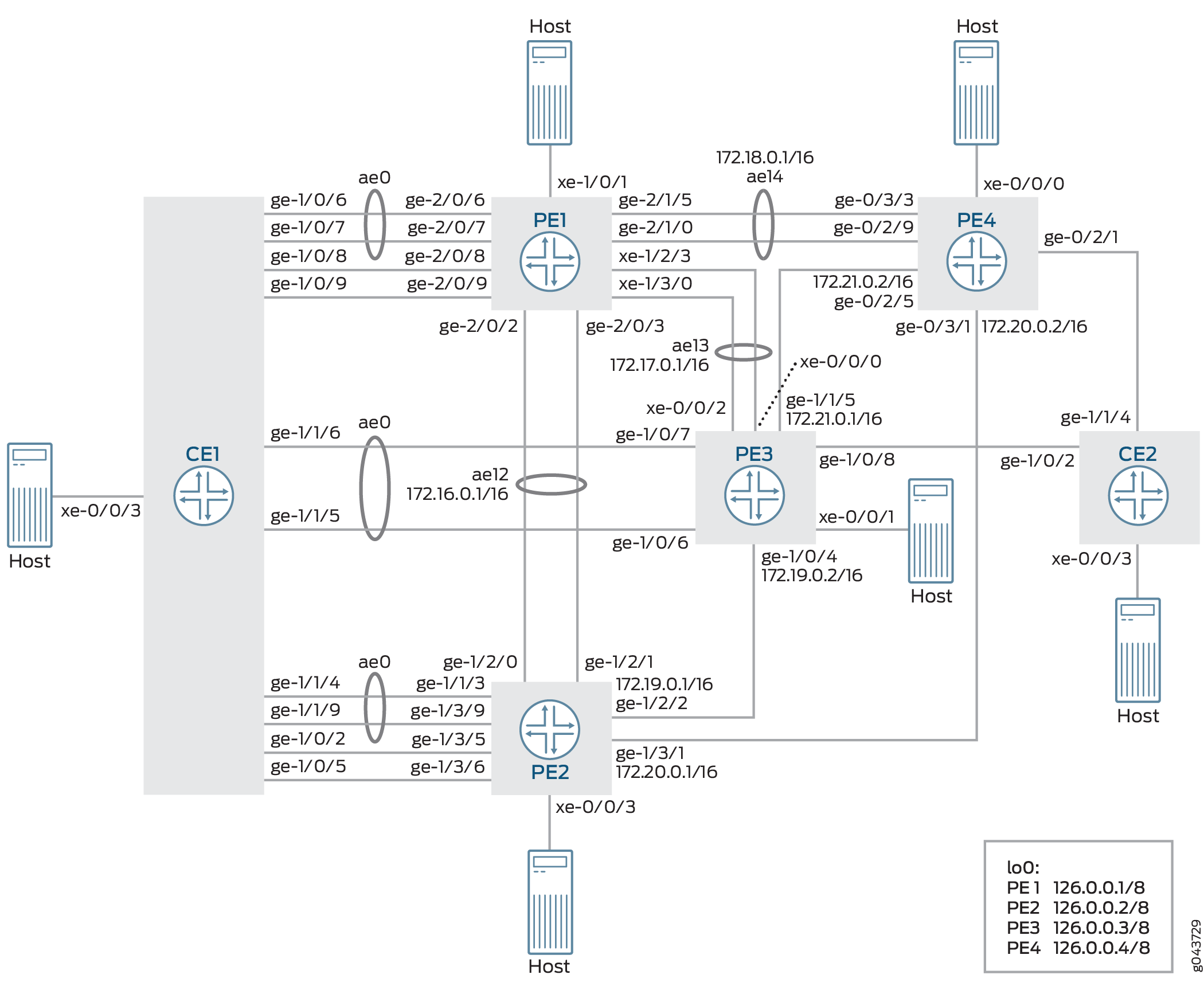
In Figure 1, PBB is integrated with EVPN, where the CE devices are multihomed in the active/standby mode. Device CE1 is multihomed to Devices PE1, PE2, and PE3, and Device CE2 is multihomed to Device PE3 and PE4.
Configuration
CLI Quick Configuration
To quickly configure this example, copy the following commands, paste them into a text file, remove any line breaks, change any details necessary to match your network configuration, copy and paste the commands into the CLI at the [edit] hierarchy level, and then enter commit from configuration mode.
CE1
set chassis aggregated-devices ethernet device-count 50
set chassis network-services enhanced-ip
set interfaces xe-0/0/3 flexible-vlan-tagging
set interfaces xe-0/0/3 encapsulation flexible-ethernet-services
set interfaces xe-0/0/3 unit 0 encapsulation vlan-bridge
set interfaces xe-0/0/3 unit 0 vlan-id 10
set interfaces xe-0/0/3 unit 1 encapsulation vlan-bridge
set interfaces xe-0/0/3 unit 1 vlan-id 20
set interfaces xe-0/0/3 unit 2 encapsulation vlan-bridge
set interfaces xe-0/0/3 unit 2 vlan-id 30
set interfaces ge-1/0/2 flexible-vlan-tagging
set interfaces ge-1/0/2 encapsulation flexible-ethernet-services
set interfaces ge-1/0/2 unit 1 encapsulation vlan-bridge
set interfaces ge-1/0/2 unit 1 vlan-id 20
set interfaces ge-1/0/5 flexible-vlan-tagging
set interfaces ge-1/0/5 encapsulation flexible-ethernet-services
set interfaces ge-1/0/5 unit 2 encapsulation vlan-bridge
set interfaces ge-1/0/5 unit 2 vlan-id 30
set interfaces ge-1/0/6 gigether-options 802.3ad ae0
set interfaces ge-1/0/7 gigether-options 802.3ad ae0
set interfaces ge-1/0/8 flexible-vlan-tagging
set interfaces ge-1/0/8 encapsulation flexible-ethernet-services
set interfaces ge-1/0/8 unit 1 encapsulation vlan-bridge
set interfaces ge-1/0/8 unit 1 vlan-id 20
set interfaces ge-1/0/9 flexible-vlan-tagging
set interfaces ge-1/0/9 encapsulation flexible-ethernet-services
set interfaces ge-1/0/9 unit 2 encapsulation vlan-bridge
set interfaces ge-1/0/9 unit 2 vlan-id 30
set interfaces ge-1/1/4 gigether-options 802.3ad ae0
set interfaces ge-1/1/5 gigether-options 802.3ad ae0
set interfaces ge-1/1/6 gigether-options 802.3ad ae0
set interfaces ge-1/1/9 gigether-options 802.3ad ae0
set interfaces ae0 flexible-vlan-tagging
set interfaces ae0 encapsulation flexible-ethernet-services
set interfaces ae0 aggregated-ether-options minimum-links 1
set interfaces ae0 unit 0 encapsulation vlan-bridge
set interfaces ae0 unit 0 vlan-id 10
set bridge-domains bd10 domain-type bridge
set bridge-domains bd10 vlan-id 10
set bridge-domains bd10 interface ae0.0
set bridge-domains bd10 interface xe-0/0/3.0
set bridge-domains bd20 domain-type bridge
set bridge-domains bd20 vlan-id 20
set bridge-domains bd20 interface xe-0/0/3.1
set bridge-domains bd20 interface ge-1/0/8.1
set bridge-domains bd20 interface ge-1/0/2.1
set bridge-domains bd30 domain-type bridge
set bridge-domains bd30 vlan-id 30
set bridge-domains bd30 interface xe-0/0/3.2
set bridge-domains bd30 interface ge-1/0/9.2
set bridge-domains bd30 interface ge-1/0/5.2
CE2
set chassis aggregated-devices ethernet device-count 50
set chassis network-services enhanced-ip
set interfaces xe-0/0/3 flexible-vlan-tagging
set interfaces xe-0/0/3 encapsulation flexible-ethernet-services
set interfaces xe-0/0/3 unit 0 encapsulation vlan-bridge
set interfaces xe-0/0/3 unit 0 vlan-id 10
set interfaces xe-0/0/3 unit 0 family bridge filter output f_log
set interfaces xe-0/0/3 unit 1 encapsulation vlan-bridge
set interfaces xe-0/0/3 unit 1 vlan-id 20
set interfaces xe-0/0/3 unit 2 encapsulation vlan-bridge
set interfaces xe-0/0/3 unit 2 vlan-id 30
set interfaces ge-1/0/2 flexible-vlan-tagging
set interfaces ge-1/0/2 encapsulation flexible-ethernet-services
set interfaces ge-1/0/2 unit 0 encapsulation vlan-bridge
set interfaces ge-1/0/2 unit 0 vlan-id 10
set interfaces ge-1/0/2 unit 1 encapsulation vlan-bridge
set interfaces ge-1/0/2 unit 1 vlan-id 20
set interfaces ge-1/0/2 unit 2 encapsulation vlan-bridge
set interfaces ge-1/0/2 unit 2 vlan-id 30
set interfaces ge-1/1/4 flexible-vlan-tagging
set interfaces ge-1/1/4 encapsulation flexible-ethernet-services
set interfaces ge-1/1/4 unit 0 encapsulation vlan-bridge
set interfaces ge-1/1/4 unit 0 vlan-id 10
set interfaces ge-1/1/4 unit 1 encapsulation vlan-bridge
set interfaces ge-1/1/4 unit 1 vlan-id 20
set interfaces ge-1/1/4 unit 2 encapsulation vlan-bridge
set interfaces ge-1/1/4 unit 2 vlan-id 30
set bridge-domains bd10 domain-type bridge
set bridge-domains bd10 vlan-id 10
set bridge-domains bd10 interface ge-1/1/4.0
set bridge-domains bd10 interface ge-1/0/2.0
set bridge-domains bd10 interface xe-0/0/3.0
set bridge-domains bd20 domain-type bridge
set bridge-domains bd20 vlan-id 20
set bridge-domains bd20 interface ge-1/1/4.1
set bridge-domains bd20 interface ge-1/0/2.1
set bridge-domains bd20 interface xe-0/0/3.1
set bridge-domains bd30 domain-type bridge
set bridge-domains bd30 vlan-id 30
set bridge-domains bd30 interface xe-0/0/3.2
set bridge-domains bd30 interface ge-1/1/4.2
set bridge-domains bd30 interface ge-1/0/2.2
PE1
set chassis aggregated-devices ethernet device-count 50
set chassis network-services enhanced-ip
set interfaces xe-1/0/1 flexible-vlan-tagging
set interfaces xe-1/0/1 encapsulation flexible-ethernet-services
set interfaces xe-1/0/1 unit 0 encapsulation vlan-bridge
set interfaces xe-1/0/1 unit 0 vlan-id 10
set interfaces xe-1/2/3 gigether-options 802.3ad ae13
set interfaces xe-1/3/0 gigether-options 802.3ad ae13
set interfaces ge-2/0/2 gigether-options 802.3ad ae12
set interfaces ge-2/0/3 gigether-options 802.3ad ae12
set interfaces ge-2/0/6 gigether-options 802.3ad ae0
set interfaces ge-2/0/7 gigether-options 802.3ad ae0
set interfaces ge-2/0/8 flexible-vlan-tagging
set interfaces ge-2/0/8 encapsulation flexible-ethernet-services
set interfaces ge-2/0/8 esi 00:22:22:22:22:22:22:22:22:22
set interfaces ge-2/0/8 esi single-active
set interfaces ge-2/0/8 esi source-bmac 00:22:22:22:22:22
set interfaces ge-2/0/8 unit 0 encapsulation vlan-bridge
set interfaces ge-2/0/8 unit 0 vlan-id 20
set interfaces ge-2/0/9 flexible-vlan-tagging
set interfaces ge-2/0/9 encapsulation flexible-ethernet-services
set interfaces ge-2/0/9 esi 00:33:33:33:33:33:33:33:33:33
set interfaces ge-2/0/9 esi single-active
set interfaces ge-2/0/9 esi source-bmac 00:33:33:33:33:33
set interfaces ge-2/0/9 unit 0 encapsulation vlan-bridge
set interfaces ge-2/0/9 unit 0 vlan-id 30
set interfaces ge-2/1/0 gigether-options 802.3ad ae14
set interfaces ge-2/1/5 gigether-options 802.3ad ae14
set interfaces ae0 flexible-vlan-tagging
set interfaces ae0 encapsulation flexible-ethernet-services
set interfaces ae0 esi 00:11:11:11:11:11:11:11:11:11
set interfaces ae0 esi single-active
set interfaces ae0 esi source-bmac 00:11:11:11:11:11
set interfaces ae0 unit 0 encapsulation vlan-bridge
set interfaces ae0 unit 0 vlan-id 10
set interfaces ae12 flexible-vlan-tagging
set interfaces ae12 encapsulation flexible-ethernet-services
set interfaces ae12 aggregated-ether-options minimum-links 1
set interfaces ae12 unit 0 vlan-id 1200
set interfaces ae12 unit 0 family inet address 172.16.0.1/16
set interfaces ae12 unit 0 family iso
set interfaces ae12 unit 0 family mpls
set interfaces ae13 flexible-vlan-tagging
set interfaces ae13 encapsulation flexible-ethernet-services
set interfaces ae13 aggregated-ether-options minimum-links 1
set interfaces ae13 unit 0 vlan-tags outer 1300
set interfaces ae13 unit 0 vlan-tags inner 13
set interfaces ae13 unit 0 family inet address 172.17.0.1/16
set interfaces ae13 unit 0 family iso
set interfaces ae13 unit 0 family mpls
set interfaces ae14 aggregated-ether-options minimum-links 1
set interfaces ae14 unit 0 family inet address 172.18.0.1/16
set interfaces ae14 unit 0 family iso
set interfaces ae14 unit 0 family mpls
set interfaces cbp0 unit 0 family bridge interface-mode trunk
set interfaces cbp0 unit 0 family bridge bridge-domain-type bvlan
set interfaces cbp0 unit 0 family bridge isid-list all
set interfaces cbp0 unit 1 family bridge interface-mode trunk
set interfaces cbp0 unit 1 family bridge bridge-domain-type bvlan
set interfaces cbp0 unit 1 family bridge isid-list all
set interfaces lo0 unit 0 family inet address 127.0.0.1/8 primary
set interfaces lo0 unit 0 family iso
set interfaces pip0 unit 0 family bridge interface-mode trunk
set interfaces pip0 unit 0 family bridge bridge-domain-type svlan
set interfaces pip0 unit 0 family bridge isid-list all-service-groups
set interfaces pip0 unit 1 family bridge interface-mode trunk
set interfaces pip0 unit 1 family bridge bridge-domain-type svlan
set interfaces pip0 unit 1 family bridge isid-list all-service-groups
set routing-options router-id 127.0.0.1
set routing-options autonomous-system 65221
set protocols rsvp interface all
set protocols rsvp interface fxp0.0 disable
set protocols mpls label-switched-path pe1tope2 from 127.0.0.1
set protocols mpls label-switched-path pe1tope2 to 127.0.0.2
set protocols mpls label-switched-path pe1tope2 primary direct_to_pe2
set protocols mpls label-switched-path pe1tope3 from 127.0.0.1
set protocols mpls label-switched-path pe1tope3 to 127.0.0.3
set protocols mpls label-switched-path pe1tope3 primary direct_to_pe3
set protocols mpls label-switched-path pe1tope4 from 127.0.0.1
set protocols mpls label-switched-path pe1tope4 to 127.0.0.4
set protocols mpls label-switched-path pe1tope4 primary direct_to_pe4
set protocols mpls path direct_to_pe2 100.12.1.2 strict
set protocols mpls path direct_to_pe3 100.13.1.3 strict
set protocols mpls path direct_to_pe4 100.14.1.4 strict
set protocols mpls interface all
set protocols mpls interface fxp0.0 disable
set protocols bgp group ibgp type internal
set protocols bgp group ibgp local-address 127.0.0.1
set protocols bgp group ibgp family evpn signaling
set protocols bgp group ibgp neighbor 127.0.0.2
set protocols bgp group ibgp neighbor 127.0.0.3
set protocols bgp group ibgp neighbor 127.0.0.4
set protocols ospf traffic-engineering
set protocols ospf area 0.0.0.0 interface all
set protocols ospf area 0.0.0.0 interface fxp0.0 disable
set routing-instances pbbn1 instance-type virtual-switch
set routing-instances pbbn1 interface cbp0.0
set routing-instances pbbn1 route-distinguisher 127.0.0.1:1
set routing-instances pbbn1 vrf-target target:100:1
set routing-instances pbbn1 protocols evpn pbb-evpn-core
set routing-instances pbbn1 protocols evpn extended-isid-list 1000
set routing-instances pbbn1 bridge-domains bda vlan-id 100
set routing-instances pbbn1 bridge-domains bda isid-list 1000
set routing-instances pbbn1 bridge-domains bda vlan-id-scope-local
set routing-instances pbn1 instance-type virtual-switch
set routing-instances pbn1 interface pip0.0
set routing-instances pbn1 bridge-domains bda domain-type bridge
set routing-instances pbn1 bridge-domains bda vlan-id 10
set routing-instances pbn1 bridge-domains bda interface ae0.0
set routing-instances pbn1 bridge-domains bda interface xe-1/0/1.0
set routing-instances pbn1 bridge-domains bda interface ge-2/0/9.0
set routing-instances pbn1 bridge-domains bda interface ge-2/0/8.0
set routing-instances pbn1 pbb-options peer-instance pbbn1
set routing-instances pbn1 service-groups sga service-type elan
set routing-instances pbn1 service-groups sga pbb-service-options isid 1000 vlan-id-list 10
PE2
set chassis aggregated-devices ethernet device-count 50
set chassis network-services enhanced-ip
set interfaces xe-0/0/3 flexible-vlan-tagging
set interfaces xe-0/0/3 encapsulation flexible-ethernet-services
set interfaces xe-0/0/3 unit 0 encapsulation vlan-bridge
set interfaces xe-0/0/3 unit 0 vlan-id 10
set interfaces ge-1/2/0 gigether-options 802.3ad ae12
set interfaces ge-1/2/1 gigether-options 802.3ad ae12
set interfaces ge-1/2/2 unit 0 family inet address 172.19.0.1/16
set interfaces ge-1/2/2 unit 0 family iso
set interfaces ge-1/2/2 unit 0 family mpls
set interfaces ge-1/3/1 unit 0 family inet address 172.20.0.1/16
set interfaces ge-1/3/1 unit 0 family iso
set interfaces ge-1/3/1 unit 0 family mpls
set interfaces ge-1/3/3 gigether-options 802.3ad ae0
set interfaces ge-1/3/5 flexible-vlan-tagging
set interfaces ge-1/3/5 encapsulation flexible-ethernet-services
set interfaces ge-1/3/5 esi 00:22:22:22:22:22:22:22:22:22
set interfaces ge-1/3/5 esi single-active
set interfaces ge-1/3/5 esi source-bmac 00:22:22:22:22:23
set interfaces ge-1/3/5 unit 0 encapsulation vlan-bridge
set interfaces ge-1/3/5 unit 0 vlan-id 20
set interfaces ge-1/3/6 flexible-vlan-tagging
set interfaces ge-1/3/6 encapsulation flexible-ethernet-services
set interfaces ge-1/3/6 esi 00:33:33:33:33:33:33:33:33:33
set interfaces ge-1/3/6 esi single-active
set interfaces ge-1/3/6 esi source-bmac 00:33:33:33:33:34
set interfaces ge-1/3/6 unit 0 encapsulation vlan-bridge
set interfaces ge-1/3/6 unit 0 vlan-id 30
set interfaces ge-1/3/9 gigether-options 802.3ad ae0
set interfaces ae0 flexible-vlan-tagging
set interfaces ae0 encapsulation flexible-ethernet-services
set interfaces ae0 esi 00:11:11:11:11:11:11:11:11:11
set interfaces ae0 esi single-active
set interfaces ae0 esi source-bmac 00:11:11:11:11:12
set interfaces ae0 unit 0 encapsulation vlan-bridge
set interfaces ae0 unit 0 vlan-id 10
set interfaces ae0 unit 0 family bridge filter output f_log
set interfaces ae12 flexible-vlan-tagging
set interfaces ae12 encapsulation flexible-ethernet-services
set interfaces ae12 aggregated-ether-options minimum-links 1
set interfaces ae12 unit 0 vlan-id 1200
set interfaces ae12 unit 0 family inet address 100.12.1.2/24
set interfaces ae12 unit 0 family iso
set interfaces ae12 unit 0 family mpls
set interfaces cbp0 unit 0 family bridge interface-mode trunk
set interfaces cbp0 unit 0 family bridge bridge-domain-type bvlan
set interfaces cbp0 unit 0 family bridge isid-list all
set interfaces cbp0 unit 1 family bridge interface-mode trunk
set interfaces cbp0 unit 1 family bridge bridge-domain-type bvlan
set interfaces cbp0 unit 1 family bridge isid-list all
set interfaces lo0 unit 0 family inet address 127.0.0.2/8 primary
set interfaces lo0 unit 0 family iso
set interfaces pip0 unit 0 family bridge interface-mode trunk
set interfaces pip0 unit 0 family bridge bridge-domain-type svlan
set interfaces pip0 unit 0 family bridge isid-list all-service-groups
set interfaces pip0 unit 1 family bridge interface-mode trunk
set interfaces pip0 unit 1 family bridge bridge-domain-type svlan
set interfaces pip0 unit 1 family bridge isid-list all-service-groups
set routing-options router-id 127.0.0.2
set routing-options autonomous-system 65221
set protocols rsvp interface all
set protocols rsvp interface fxp0.0 disable
set protocols mpls label-switched-path pe2tope1 from 127.0.0.2
set protocols mpls label-switched-path pe2tope1 to 127.0.0.1
set protocols mpls label-switched-path pe2tope1 primary direct_to_pe1
set protocols mpls label-switched-path pe2tope3 from 127.0.0.2
set protocols mpls label-switched-path pe2tope3 to 127.0.0.3
set protocols mpls label-switched-path pe2tope3 primary direct_to_pe3
set protocols mpls label-switched-path pe2tope4 from 127.0.0.2
set protocols mpls label-switched-path pe2tope4 to 127.0.0.4
set protocols mpls label-switched-path pe2tope4 primary direct_to_pe4
set protocols mpls path direct_to_pe1 172.16.0.1 strict
set protocols mpls path direct_to_pe3 100.23.1.3 strict
set protocols mpls path direct_to_pe4 172.20.0.2 strict
set protocols mpls interface all
set protocols mpls interface fxp0.0 disable
set protocols bgp group ibgp type internal
set protocols bgp group ibgp local-address 127.0.0.2
set protocols bgp group ibgp family evpn signaling
set protocols bgp group ibgp neighbor 127.0.0.1
set protocols bgp group ibgp neighbor 127.0.0.3
set protocols bgp group ibgp neighbor 127.0.0.4
set protocols ospf traffic-engineering
set protocols ospf area 0.0.0.0 interface fxp0.0 disable
set protocols ospf area 0.0.0.0 interface all
set routing-instances pbbn1 instance-type virtual-switch
set routing-instances pbbn1 interface cbp0.0
set routing-instances pbbn1 route-distinguisher 127.0.0.2:1
set routing-instances pbbn1 vrf-target target:100:1
set routing-instances pbbn1 protocols evpn pbb-evpn-core
set routing-instances pbbn1 protocols evpn extended-isid-list 1000
set routing-instances pbbn1 bridge-domains bda vlan-id 100
set routing-instances pbbn1 bridge-domains bda isid-list 1000
set routing-instances pbbn1 bridge-domains bda vlan-id-scope-local
set routing-instances pbn1 instance-type virtual-switch
set routing-instances pbn1 interface pip0.0
set routing-instances pbn1 bridge-domains bda domain-type bridge
set routing-instances pbn1 bridge-domains bda vlan-id 10
set routing-instances pbn1 bridge-domains bda interface ae0.0
set routing-instances pbn1 bridge-domains bda interface xe-0/0/3.0
set routing-instances pbn1 bridge-domains bda interface ge-1/3/6.0
set routing-instances pbn1 bridge-domains bda interface ge-1/3/5.0
set routing-instances pbn1 bridge-domains bda bridge-options mac-statistics
set routing-instances pbn1 pbb-options peer-instance pbbn1
set routing-instances pbn1 service-groups sga service-type elan
set routing-instances pbn1 service-groups sga pbb-service-options isid 1000 vlan-id-list 10
PE3
set chassis aggregated-devices ethernet device-count 50
set chassis network-services enhanced-ip
set interfaces xe-0/0/0 gigether-options 802.3ad ae13
set interfaces xe-0/0/1 flexible-vlan-tagging
set interfaces xe-0/0/1 encapsulation flexible-ethernet-services
set interfaces xe-0/0/1 unit 0 encapsulation vlan-bridge
set interfaces xe-0/0/1 unit 0 vlan-id 10
set interfaces xe-0/0/2 gigether-options 802.3ad ae13
set interfaces ge-1/0/4 unit 0 family inet address 100.23.1.3/24
set interfaces ge-1/0/4 unit 0 family iso
set interfaces ge-1/0/4 unit 0 family mpls
set interfaces ge-1/0/6 gigether-options 802.3ad ae0
set interfaces ge-1/0/7 gigether-options 802.3ad ae0
set interfaces ge-1/0/8 flexible-vlan-tagging
set interfaces ge-1/0/8 encapsulation flexible-ethernet-services
set interfaces ge-1/0/8 esi 00:44:44:44:44:44:44:44:44:44
set interfaces ge-1/0/8 esi single-active
set interfaces ge-1/0/8 esi source-bmac 00:44:44:44:44:44
set interfaces ge-1/0/8 unit 0 encapsulation vlan-bridge
set interfaces ge-1/0/8 unit 0 vlan-id 10
set interfaces ge-1/1/5 unit 0 family inet address 172.21.0.1/16
set interfaces ge-1/1/5 unit 0 family iso
set interfaces ge-1/1/5 unit 0 family mpls
set interfaces ae0 flexible-vlan-tagging
set interfaces ae0 encapsulation flexible-ethernet-services
set interfaces ae0 esi 00:11:11:11:11:11:11:11:11:11
set interfaces ae0 esi single-active
set interfaces ae0 esi source-bmac 00:11:11:11:11:13
set interfaces ae0 unit 0 encapsulation vlan-bridge
set interfaces ae0 unit 0 vlan-id 10
set interfaces ae13 flexible-vlan-tagging
set interfaces ae13 encapsulation flexible-ethernet-services
set interfaces ae13 aggregated-ether-options minimum-links 1
set interfaces ae13 unit 0 vlan-tags outer 1300
set interfaces ae13 unit 0 vlan-tags inner 13
set interfaces ae13 unit 0 family inet address 100.13.1.3/24
set interfaces ae13 unit 0 family iso
set interfaces ae13 unit 0 family mpls
set interfaces cbp0 unit 0 family bridge interface-mode trunk
set interfaces cbp0 unit 0 family bridge bridge-domain-type bvlan
set interfaces cbp0 unit 0 family bridge isid-list all
set interfaces cbp0 unit 1 family bridge interface-mode trunk
set interfaces cbp0 unit 1 family bridge bridge-domain-type bvlan
set interfaces cbp0 unit 1 family bridge isid-list all
set interfaces lo0 unit 0 family inet address 127.0.0.3/8 primary
set interfaces lo0 unit 0 family iso
set interfaces pip0 unit 0 family bridge interface-mode trunk
set interfaces pip0 unit 0 family bridge bridge-domain-type svlan
set interfaces pip0 unit 0 family bridge isid-list all-service-groups
set interfaces pip0 unit 1 family bridge interface-mode trunk
set interfaces pip0 unit 1 family bridge bridge-domain-type svlan
set interfaces pip0 unit 1 family bridge isid-list all-service-groups
set routing-options router-id 127.0.0.3
set routing-options autonomous-system 65221
set protocols rsvp interface all
set protocols rsvp interface fxp0.0 disable
set protocols mpls label-switched-path pe3tope1 from 127.0.0.3
set protocols mpls label-switched-path pe3tope1 to 127.0.0.1
set protocols mpls label-switched-path pe3tope1 primary direct_to_pe1
set protocols mpls label-switched-path pe3tope2 from 127.0.0.3
set protocols mpls label-switched-path pe3tope2 to 127.0.0.2
set protocols mpls label-switched-path pe3tope2 primary direct_to_pe2
set protocols mpls label-switched-path pe3tope4 from 127.0.0.3
set protocols mpls label-switched-path pe3tope4 to 127.0.0.4
set protocols mpls label-switched-path pe3tope4 primary direct_to_pe4
set protocols mpls path direct_to_pe1 172.17.0.1 strict
set protocols mpls path direct_to_pe2 172.19.0.1 strict
set protocols mpls path direct_to_pe4 172.21.0.2 strict
set protocols mpls interface all
set protocols mpls interface fxp0.0 disable
set protocols bgp group ibgp type internal
set protocols bgp group ibgp local-address 127.0.0.3
set protocols bgp group ibgp family evpn signaling
set protocols bgp group ibgp neighbor 127.0.0.1
set protocols bgp group ibgp neighbor 127.0.0.2
set protocols bgp group ibgp neighbor 127.0.0.4
set protocols ospf traffic-engineering
set protocols ospf area 0.0.0.0 interface all
set protocols ospf area 0.0.0.0 interface fxp0.0 disable
set routing-instances pbbn1 instance-type virtual-switch
set routing-instances pbbn1 interface cbp0.0
set routing-instances pbbn1 route-distinguisher 127.0.0.3:1
set routing-instances pbbn1 vrf-target target:100:1
set routing-instances pbbn1 protocols evpn traceoptions file pbbevpn.log
set routing-instances pbbn1 protocols evpn traceoptions file size 500m
set routing-instances pbbn1 protocols evpn traceoptions flag all
set routing-instances pbbn1 protocols evpn control-word
set routing-instances pbbn1 protocols evpn pbb-evpn-core
set routing-instances pbbn1 protocols evpn extended-isid-list 1000
set routing-instances pbbn1 bridge-domains bda vlan-id 100
set routing-instances pbbn1 bridge-domains bda isid-list 1000
set routing-instances pbbn1 bridge-domains bda vlan-id-scope-local
set routing-instances pbn1 instance-type virtual-switch
set routing-instances pbn1 interface pip0.0
set routing-instances pbn1 bridge-domains bda domain-type bridge
set routing-instances pbn1 bridge-domains bda vlan-id 10
set routing-instances pbn1 bridge-domains bda interface ae0.0
set routing-instances pbn1 bridge-domains bda interface xe-0/0/1.0
set routing-instances pbn1 bridge-domains bda interface ge-1/0/8.0
set routing-instances pbn1 bridge-domains bda bridge-options mac-statistics
set routing-instances pbn1 pbb-options peer-instance pbbn1
set routing-instances pbn1 service-groups sga service-type elan
set routing-instances pbn1 service-groups sga pbb-service-options isid 1000 vlan-id-list 10
PE4
set chassis aggregated-devices ethernet device-count 50
set chassis network-services enhanced-ip
set interfaces xe-0/0/0 flexible-vlan-tagging
set interfaces xe-0/0/0 encapsulation flexible-ethernet-services
set interfaces xe-0/0/0 unit 0 encapsulation vlan-bridge
set interfaces xe-0/0/0 unit 0 vlan-id 10
set interfaces ge-0/2/1 flexible-vlan-tagging
set interfaces ge-0/2/1 encapsulation flexible-ethernet-services
set interfaces ge-0/2/1 esi 00:44:44:44:44:44:44:44:44:44
set interfaces ge-0/2/1 esi single-active
set interfaces ge-0/2/1 esi source-bmac 00:44:44:44:44:45
set interfaces ge-0/2/1 unit 0 encapsulation vlan-bridge
set interfaces ge-0/2/1 unit 0 vlan-id 10
set interfaces ge-0/2/5 unit 0 family inet address 172.21.0.2/16
set interfaces ge-0/2/5 unit 0 family iso
set interfaces ge-0/2/5 unit 0 family mpls
set interfaces ge-0/2/9 gigether-options 802.3ad ae14
set interfaces ge-0/3/1 unit 0 family inet address 172.20.0.2/16
set interfaces ge-0/3/1 unit 0 family iso
set interfaces ge-0/3/1 unit 0 family mpls
set interfaces ge-0/3/3 gigether-options 802.3ad ae14
set interfaces ae14 aggregated-ether-options minimum-links 1
set interfaces ae14 unit 0 family inet address 100.14.1.4/24
set interfaces ae14 unit 0 family iso
set interfaces ae14 unit 0 family mpls
set interfaces cbp0 unit 0 family bridge interface-mode trunk
set interfaces cbp0 unit 0 family bridge bridge-domain-type bvlan
set interfaces cbp0 unit 0 family bridge isid-list all
set interfaces cbp0 unit 1 family bridge interface-mode trunk
set interfaces cbp0 unit 1 family bridge bridge-domain-type bvlan
set interfaces cbp0 unit 1 family bridge isid-list all
set interfaces lo0 unit 0 family inet address 127.0.0.4/8 primary
set interfaces pip0 unit 0 family bridge interface-mode trunk
set interfaces pip0 unit 0 family bridge bridge-domain-type svlan
set interfaces pip0 unit 0 family bridge isid-list all-service-groups
set interfaces pip0 unit 1 family bridge interface-mode trunk
set interfaces pip0 unit 1 family bridge bridge-domain-type svlan
set interfaces pip0 unit 1 family bridge isid-list all-service-groups
set routing-options router-id 127.0.0.4
set routing-options autonomous-system 65221
set protocols rsvp interface all
set protocols rsvp interface fxp0.0 disable
set protocols mpls label-switched-path pe4tope1 from 127.0.0.4
set protocols mpls label-switched-path pe4tope1 to 127.0.0.1
set protocols mpls label-switched-path pe4tope1 primary direct_to_pe1
set protocols mpls label-switched-path pe4tope2 from 127.0.0.4
set protocols mpls label-switched-path pe4tope2 to 127.0.0.2
set protocols mpls label-switched-path pe4tope2 primary direct_to_pe2
set protocols mpls label-switched-path pe4tope3 from 127.0.0.4
set protocols mpls label-switched-path pe4tope3 to 127.0.0.3
set protocols mpls label-switched-path pe4tope3 primary direct_to_pe3
set protocols mpls path direct_to_pe1 172.18.0.1 strict
set protocols mpls path direct_to_pe2 172.20.0.1 strict
set protocols mpls path direct_to_pe3 172.21.0.1 strict
set protocols mpls interface all
set protocols mpls interface fxp0.0 disable
set protocols bgp group ibgp type internal
set protocols bgp group ibgp local-address 127.0.0.4
set protocols bgp group ibgp family evpn signaling
set protocols bgp group ibgp neighbor 127.0.0.1
set protocols bgp group ibgp neighbor 127.0.0.2
set protocols bgp group ibgp neighbor 127.0.0.3
set protocols ospf traffic-engineering
set protocols ospf area 0.0.0.0 interface all
set protocols ospf area 0.0.0.0 interface fxp0.0 disable
set routing-instances pbbn1 instance-type virtual-switch
set routing-instances pbbn1 interface cbp0.0
set routing-instances pbbn1 route-distinguisher 127.0.0.4:1
set routing-instances pbbn1 vrf-target target:100:1
set routing-instances pbbn1 protocols evpn pbb-evpn-core
set routing-instances pbbn1 protocols evpn extended-isid-list 1000
set routing-instances pbbn1 bridge-domains bda vlan-id 100
set routing-instances pbbn1 bridge-domains bda isid-list 1000
set routing-instances pbbn1 bridge-domains bda vlan-id-scope-local
set routing-instances pbn1 instance-type virtual-switch
set routing-instances pbn1 interface pip0.0
set routing-instances pbn1 bridge-domains bda domain-type bridge
set routing-instances pbn1 bridge-domains bda vlan-id 10
set routing-instances pbn1 bridge-domains bda interface xe-0/0/0.0
set routing-instances pbn1 bridge-domains bda interface ge-0/2/1.0
set routing-instances pbn1 pbb-options peer-instance pbbn1
set routing-instances pbn1 service-groups sga service-type elan
set routing-instances pbn1 service-groups sga pbb-service-options isid 1000 vlan-id-list 10
Configuring Device CE1
Step-by-Step Procedure
The following example requires that you navigate various levels in the configuration hierarchy. For information about navigating the CLI, see Using the CLI Editor in Configuration Mode in the CLI User Guide.
To configure Device CE1:
Set the number of aggregated Ethernet interfaces on Device CE1.
[edit chassis]
user@CE1# set aggregated-devices ethernet device-count 50
Set Device CE1’s network services to enhanced Internet Protocol and use enhanced mode capabilities.
[edit chassis]
user@CE1# set chassis network-services enhanced-ip
Configure Device CE1’s interfaces.
[edit interfaces]
user@CE1# set interfaces xe-0/0/3 flexible-vlan-tagging
user@CE1# set interfaces xe-0/0/3 encapsulation flexible-ethernet-services
user@CE1# set interfaces xe-0/0/3 unit 0 encapsulation vlan-bridge
user@CE1# set interfaces xe-0/0/3 unit 0 vlan-id 10
user@CE1# set interfaces xe-0/0/3 unit 1 encapsulation vlan-bridge
user@CE1# set interfaces xe-0/0/3 unit 1 vlan-id 20
user@CE1# set interfaces xe-0/0/3 unit 2 encapsulation vlan-bridge
user@CE1# set interfaces xe-0/0/3 unit 2 vlan-id 30
user@CE1# set interfaces ge-1/0/2 flexible-vlan-tagging
user@CE1# set interfaces ge-1/0/2 encapsulation flexible-ethernet-services
user@CE1# set interfaces ge-1/0/2 unit 1 encapsulation vlan-bridge
user@CE1# set interfaces ge-1/0/2 unit 1 vlan-id 20
user@CE1# set interfaces ge-1/0/5 flexible-vlan-tagging
user@CE1# set interfaces ge-1/0/5 encapsulation flexible-ethernet-services
user@CE1# set interfaces ge-1/0/5 unit 2 encapsulation vlan-bridge
user@CE1# set interfaces ge-1/0/5 unit 2 vlan-id 30
user@CE1# set interfaces ge-1/0/6 gigether-options 802.3ad ae0
user@CE1# set interfaces ge-1/0/7 gigether-options 802.3ad ae0
user@CE1# set interfaces ge-1/0/8 flexible-vlan-tagging
user@CE1# set interfaces ge-1/0/8 encapsulation flexible-ethernet-services
user@CE1# set interfaces ge-1/0/8 unit 1 encapsulation vlan-bridge
user@CE1# set interfaces ge-1/0/8 unit 1 vlan-id 20
user@CE1# set interfaces ge-1/0/9 flexible-vlan-tagging
user@CE1# set interfaces ge-1/0/9 encapsulation flexible-ethernet-services
user@CE1# set interfaces ge-1/0/9 unit 2 encapsulation vlan-bridge
user@CE1# set interfaces ge-1/0/9 unit 2 vlan-id 30
user@CE1# set interfaces ge-1/1/4 gigether-options 802.3ad ae0
user@CE1# set interfaces ge-1/1/5 gigether-options 802.3ad ae0
user@CE1# set interfaces ge-1/1/6 gigether-options 802.3ad ae0
user@CE1# set interfaces ge-1/1/9 gigether-options 802.3ad ae0
Configure the aggregated Ethernet bundle on Device CE1.
[edit interfaces]
user@CE1# set interfaces ae0 flexible-vlan-tagging
user@CE1# set interfaces ae0 encapsulation flexible-ethernet-services
user@CE1# set interfaces ae0 aggregated-ether-options minimum-links 1
user@CE1# set interfaces ae0 unit 0 encapsulation vlan-bridge
user@CE1# set interfaces ae0 unit 0 vlan-id 10
Configure the bridge domains on Device CE1.
[edit bridge-domains]
user@CE1# set bd10 domain-type bridge
user@CE1# set bd10 vlan-id 10
user@CE1# set bd10 interface ae0.0
user@CE1# set bd10 interface xe-0/0/3.0
user@CE1# set bd20 domain-type bridge
user@CE1# set bd20 vlan-id 20
user@CE1# set bd20 interface xe-0/0/3.1
user@CE1# set bd20 interface ge-1/0/8.1
user@CE1# set bd20 interface ge-1/0/2.1
user@CE1# set bd30 domain-type bridge
user@CE1# set bd30 vlan-id 30
user@CE1# set bd30 interface xe-0/0/3.2
user@CE1# set bd30 interface ge-1/0/9.2
user@CE1# set bd30 interface ge-1/0/5.2
Results
From configuration mode, confirm your configuration by entering the show chassis, show interfaces, and show bridge-domains commands. If the output does not display the intended configuration, repeat the instructions in this example to correct the configuration.
user@CE1# show chassis
aggregated-devices {
    ethernet {
        device-count 50;
    }
}
network-services enhanced-ip;
user@CE1# show interfaces
xe-0/0/3 {
    flexible-vlan-tagging;
    encapsulation flexible-ethernet-services;
    unit 0 {
        encapsulation vlan-bridge;
        vlan-id 10;
    }
    unit 1 {
        encapsulation vlan-bridge;
        vlan-id 20;
    }
    unit 2 {
        encapsulation vlan-bridge;
        vlan-id 30;
    }
}
ge-1/0/2 {
    flexible-vlan-tagging;
    encapsulation flexible-ethernet-services;
    unit 1 {
        encapsulation vlan-bridge;
        vlan-id 20;
    }
}
ge-1/0/5 {
    flexible-vlan-tagging;
    encapsulation flexible-ethernet-services;
    unit 2 {
        encapsulation vlan-bridge;
        vlan-id 30;
    }
}
ge-1/0/6 {
    gigether-options {
        802.3ad ae0;
    }
}
ge-1/0/7 {
    gigether-options {
        802.3ad ae0;
    }
}
ge-1/0/8 {
    flexible-vlan-tagging;
    encapsulation flexible-ethernet-services;
    unit 1 {
        encapsulation vlan-bridge;
        vlan-id 20;
    }
}
ge-1/0/9 {
    flexible-vlan-tagging;
    encapsulation flexible-ethernet-services;
    unit 2 {
        encapsulation vlan-bridge;
        vlan-id 30;
    }
}
ge-1/1/4 {
    gigether-options {
        802.3ad ae0;
    }
}
ge-1/1/5 {
    gigether-options {
        802.3ad ae0;
    }
}
ge-1/1/6 {
    gigether-options {
        802.3ad ae0;
    }
}
ge-1/1/9 {
    gigether-options {
        802.3ad ae0;
    }
}
ae0 {
    flexible-vlan-tagging;
    encapsulation flexible-ethernet-services;
    aggregated-ether-options {
        minimum-links 1;
    }
    unit 0 {
        encapsulation vlan-bridge;
        vlan-id 10;
    }
}
user@CE1# show bridge-domains
bd10 {
    domain-type bridge;
    vlan-id 10;
    interface ae0.0;
    interface xe-0/0/3.0;
}
bd20 {
    domain-type bridge;
    vlan-id 20;
    interface xe-0/0/3.1;
    interface ge-1/0/8.1;
    interface ge-1/0/2.1;
}
bd30 {
    domain-type bridge;
    vlan-id 30;
    interface xe-0/0/3.2;
    interface ge-1/0/9.2;
    interface ge-1/0/5.2;
}
If you are done configuring the device, enter commit from configuration mode.
Configuring Device PE1
Step-by-Step Procedure
The following example requires that you navigate various levels in the configuration hierarchy. For information about navigating the CLI, see Using the CLI Editor in Configuration Mode in the CLI User Guide.
To configure Device PE1:
Set the number of aggregated Ethernet interfaces on Device PE1.
[edit chassis]
user@PE1# set aggregated-devices ethernet device-count 50
Set Device PE1’s network services to enhanced Internet Protocol and use enhanced mode capabilities.
[edit chassis]
user@PE1# set network-services enhanced-ip
Configure the CE-facing interfaces of Device PE1.
[edit interfaces]
user@PE1# set ge-2/0/6 gigether-options 802.3ad ae0
user@PE1# set ge-2/0/7 gigether-options 802.3ad ae0
user@PE1# set ge-2/0/8 flexible-vlan-tagging
user@PE1# set ge-2/0/8 encapsulation flexible-ethernet-services
user@PE1# set ge-2/0/8 unit 0 encapsulation vlan-bridge
user@PE1# set ge-2/0/8 unit 0 vlan-id 20
user@PE1# set ge-2/0/9 flexible-vlan-tagging
user@PE1# set ge-2/0/9 encapsulation flexible-ethernet-services
user@PE1# set ge-2/0/9 unit 0 encapsulation vlan-bridge
user@PE1# set ge-2/0/9 unit 0 vlan-id 30
Configure the aggregate Ethernet bundle on Device PE1 that connects to Device CE1.
[edit interfaces]
user@PE1# set ae0 flexible-vlan-tagging
user@PE1# set ae0 encapsulation flexible-ethernet-services
user@PE1# set ae0 unit 0 encapsulation vlan-bridge
user@PE1# set ae0 unit 0 vlan-id 10
Configure the EVPN multihoming parameters for the CE-facing interfaces and aggregate Ethernet bundle that connect to the multihomed customer site.
[edit interfaces]
user@PE1# set ge-2/0/8 esi 00:22:22:22:22:22:22:22:22:22
user@PE1# set ge-2/0/8 esi single-active
user@PE1# set ge-2/0/8 esi source-bmac 00:22:22:22:22:22
user@PE1# set ge-2/0/9 esi 00:33:33:33:33:33:33:33:33:33
user@PE1# set ge-2/0/9 esi single-active
user@PE1# set ge-2/0/9 esi source-bmac 00:33:33:33:33:33
user@PE1# set ae0 esi 00:11:11:11:11:11:11:11:11:11
user@PE1# set ae0 esi single-active
user@PE1# set ae0 esi source-bmac 00:11:11:11:11:11
Note:In this example, the EVPN multihoming is operating in the active/standby mode. To configure active/active EVPN multihoming, include the
active-activestatement at the[edit interfaces interface-name esi]hierarchy level instead of thesingle-activestatement.Configure the interface of Device PE1 that connects to Devices PE2, PE3, and PE4.
[edit interfaces]
user@PE1# set ge-2/0/2 gigether-options 802.3ad ae12
user@PE1# set ge-2/0/3 gigether-options 802.3ad ae12
user@PE1# set xe-1/2/3 gigether-options 802.3ad ae13
user@PE1# set xe-1/3/0 gigether-options 802.3ad ae13
user@PE1# set ge-2/1/0 gigether-options 802.3ad ae14
user@PE1# set ge-2/1/5 gigether-options 802.3ad ae14
Configure the aggregate Ethernet bundle on Device PE1 that connect to Devices PE2, PE3, and PE4.
[edit interfaces]
user@PE1# set ae12 flexible-vlan-tagging
user@PE1# set ae12 encapsulation flexible-ethernet-services
user@PE1# set ae12 aggregated-ether-options minimum-links 1
user@PE1# set ae12 unit 0 vlan-id 1200
user@PE1# set ae12 unit 0 family inet address 172.16.0.1/16
user@PE1# set ae12 unit 0 family iso
user@PE1# set ae12 unit 0 family mpls
user@PE1# set ae13 flexible-vlan-tagging
user@PE1# set ae13 encapsulation flexible-ethernet-services
user@PE1# set ae13 aggregated-ether-options minimum-links 1
user@PE1# set ae13 unit 0 vlan-tags outer 1300
user@PE1# set ae13 unit 0 vlan-tags inner 13
user@PE1# set ae13 unit 0 family inet address 172.17.0.1/16
user@PE1# set ae13 unit 0 family iso
user@PE1# set ae13 unit 0 family mpls
user@PE1# set ae14 aggregated-ether-options minimum-links 1
user@PE1# set ae14 unit 0 family inet address 172.18.0.1/16
user@PE1# set ae14 unit 0 family iso
user@PE1# set ae14 unit 0 family mpls
Configure the interface of Device PE1 that connects to the host.
[edit interfaces]
user@PE1# set xe-1/0/1 flexible-vlan-tagging
user@PE1# set xe-1/0/1 encapsulation flexible-ethernet-services
user@PE1# set xe-1/0/1 unit 0 encapsulation vlan-bridge
user@PE1# set xe-1/0/1 unit 0 vlan-id 10
Configure the loopback interface of Device PE1.
[edit interfaces]
user@PE1# set lo0 unit 0 family inet address 127.0.0.1/8 primary
user@PE1# set lo0 unit 0 family iso
Configure the customer backbone port (CBP) interfaces on Device PE1.
[edit interfaces]
user@PE1# set cbp0 unit 0 family bridge interface-mode trunk
user@PE1# set cbp0 unit 0 family bridge bridge-domain-type bvlan
user@PE1# set cbp0 unit 0 family bridge isid-list all
user@PE1# set cbp0 unit 1 family bridge interface-mode trunk
user@PE1# set cbp0 unit 1 family bridge bridge-domain-type bvlan
user@PE1# set cbp0 unit 1 family bridge isid-list all
Configure the Provider Instance Port (PIP) on Device PE1.
[edit interfaces]
user@PE1# set pip0 unit 0 family bridge interface-mode trunk
user@PE1# set pip0 unit 0 family bridge bridge-domain-type svlan
user@PE1# set pip0 unit 0 family bridge isid-list all-service-groups
user@PE1# set pip0 unit 1 family bridge interface-mode trunk
user@PE1# set pip0 unit 1 family bridge bridge-domain-type svlan
user@PE1# set pip0 unit 1 family bridge isid-list all-service-groups
Configure the router ID and autonomous system number for Device PE1.
[edit routing-options]
user@PE1# set router-id 127.0.0.1
user@PE1# set autonomous-system 65221
Configure RSVP on all the interfaces of Device PE1, excluding the management interface.
[edit protocols]
user@PE1# set rsvp interface all
user@PE1# set rsvp interface fxp0.0 disable
Configure MPLS on all the interfaces of Device PE1, excluding the management interface.
[edit protocols]
user@PE1# set mpls interface all
user@PE1# set mpls interface fxp0.0 disable
Configure LSPs from Device PE1 to all other PE devices.
[edit protocols]
user@PE1# set mpls label-switched-path pe1tope2 from 127.0.0.1
user@PE1# set mpls label-switched-path pe1tope2 to 127.0.0.2
user@PE1# set mpls label-switched-path pe1tope2 primary direct_to_pe2
user@PE1# set mpls label-switched-path pe1tope3 from 127.0.0.1
user@PE1# set mpls label-switched-path pe1tope3 to 127.0.0.3
user@PE1# set mpls label-switched-path pe1tope3 primary direct_to_pe3
user@PE1# set mpls label-switched-path pe1tope4 from 127.0.0.1
user@PE1# set mpls label-switched-path pe1tope4 to 127.0.0.4
user@PE1# set mpls label-switched-path pe1tope4 primary direct_to_pe4
Configure MPLS paths from Device PE1 to all other PE devices.
[edit protocols]
user@PE1# set mpls path direct_to_pe2 100.12.1.2 strict
user@PE1# set mpls path direct_to_pe3 100.13.1.3 strict
user@PE1# set mpls path direct_to_pe4 100.14.1.4 strict
Configure an internal BGP session under family EVPN from Device PE1 to all other PE devices.
[edit protocols]
user@PE1# set bgp group ibgp type internal
user@PE1# set bgp group ibgp local-address 127.0.0.1
user@PE1# set bgp group ibgp family evpn signaling
user@PE1# set bgp group ibgp neighbor 127.0.0.2
user@PE1# set bgp group ibgp neighbor 127.0.0.3
user@PE1# set bgp group ibgp neighbor 127.0.0.4
Configure OSPF on all the interfaces of Device of PE1, excluding the management interface.
[edit protocols]
user@PE1# set ospf traffic-engineering
user@PE1# set ospf area 0.0.0.0 interface all
user@PE1# set ospf area 0.0.0.0 interface fxp0.0 disable
Configure a customer routing instance (I-component) on Device PE1 with type virtual switch. Assign the CBP interface, route-distinguisher, and virtual routing and forwarding (VRF) target values to the PBBN routing instance.
[edit routing-instances]
user@PE1# set pbbn1 instance-type virtual-switch
user@PE1# set pbbn1 interface cbp0.0
user@PE1# set pbbn1 route-distinguisher 127.0.0.1:1
user@PE1# set pbbn1 vrf-target target:100:1
Configure PBB-EVPN integration from the customer routing instance. Assign the extended I-SID list and bridge domains to the routing instance.
[edit routing-instances]
user@PE1# set pbbn1 protocols evpn pbb-evpn-core
user@PE1# set pbbn1 protocols evpn extended-isid-list 1000
user@PE1# set pbbn1 bridge-domains bda vlan-id 100
user@PE1# set pbbn1 bridge-domains bda isid-list 1000
user@PE1# set pbbn1 bridge-domains bda vlan-id-scope-local
Configure a provider routing instance on Device PE1 with type virtual switch. Assign the PBP interface and bridge domains to the routing instance.
[edit routing-instances]
user@PE1# set pbn1 instance-type virtual-switch
user@PE1# set pbn1 interface pip0.0
user@PE1# set pbn1 bridge-domains bda domain-type bridge
user@PE1# set pbn1 bridge-domains bda vlan-id 10
user@PE1# set pbn1 bridge-domains bda interface ae0.0
user@PE1# set pbn1 bridge-domains bda interface xe-1/0/1.0
user@PE1# set pbn1 bridge-domains bda interface ge-2/0/9.0
user@PE1# set pbn1 bridge-domains bda interface ge-2/0/8.0
Configure the peer PBBN routing instance in the customer routing instance.
[edit routing-instances]
user@PE1# set pbn1 pbb-options peer-instance pbbn1
Configure the service groups to be supported in the customer routing instance.
[edit routing-instances]
user@PE1# set pbn1 service-groups sga service-type elan
user@PE1# set pbn1 service-groups sga pbb-service-options isid 1000 vlan-id-list 10
Results
From configuration mode, confirm your configuration by entering the show chassis, show interfaces, routing-options, show protocols and show routing-instances commands. If the output does not display the intended configuration, repeat the instructions in this example to correct the configuration.
user@PE1# show chassis
aggregated-devices {
    ethernet {
        device-count 50;
    }
}
 network-services enhanced-ip;
user@PE1# show interfaces
xe-1/0/1 {
    flexible-vlan-tagging;
    encapsulation flexible-ethernet-services;
    unit 0 {
        encapsulation vlan-bridge;
        vlan-id 10;
    }
}
xe-1/2/3 {
    gigether-options {
        802.3ad ae13;
    }
}
xe-1/3/0 {
    gigether-options {
        802.3ad ae13;
    }
}
ge-2/0/2 {
    gigether-options {
        802.3ad ae12;
    }
}
ge-2/0/3 {
    gigether-options {
        802.3ad ae12;
    }
}
ge-2/0/6 {
    gigether-options {
        802.3ad ae0;
    }
}
ge-2/0/7 {
    gigether-options {
        802.3ad ae0;
    }
}
ge-2/0/8 {
    flexible-vlan-tagging;
    encapsulation flexible-ethernet-services;
    esi {
        00:22:22:22:22:22:22:22:22:22;
        single-active;
        source-bmac 00:22:22:22:22:22;
    }
    unit 0 {
        encapsulation vlan-bridge;
        vlan-id 20;
    }
}
ge-2/0/9 {
    flexible-vlan-tagging;
    encapsulation flexible-ethernet-services;
    esi {
        00:33:33:33:33:33:33:33:33:33;
        single-active;
        source-bmac 00:33:33:33:33:33;
    }
    unit 0 {
        encapsulation vlan-bridge;
        vlan-id 30;
    }
}
ge-2/1/0 {
    gigether-options {
        802.3ad ae14;
    }
}
ge-2/1/5 {
    gigether-options {
        802.3ad ae14;
    }
}
ae0 {
    flexible-vlan-tagging;
    encapsulation flexible-ethernet-services;
    esi {
        00:11:11:11:11:11:11:11:11:11;
        single-active;
        source-bmac 00:11:11:11:11:11;
    }
    unit 0 {
        encapsulation vlan-bridge;
        vlan-id 10;
    }
}
ae12 {
    flexible-vlan-tagging;
    encapsulation flexible-ethernet-services;
    aggregated-ether-options {
        minimum-links 1;
    }
    unit 0 {
        vlan-id 1200;
        family inet {
            address 172.16.0.1/16;
        }
        family iso;
        family mpls;
    }
}
ae13 {
    flexible-vlan-tagging;
    encapsulation flexible-ethernet-services;
    aggregated-ether-options {
        minimum-links 1;
    }
    unit 0 {
        vlan-tags outer 1300 inner 13;
        family inet {
            address 172.17.0.1/16;
        }
        family iso;
        family mpls;
    }
}
ae14 {
    aggregated-ether-options {
        minimum-links 1;
    }
    unit 0 {
        family inet {
            address 172.18.0.1/16;
        }
        family iso;
        family mpls;
    }
}
cbp0 {
    unit 0 {
        family bridge {
            interface-mode trunk;
            bridge-domain-type bvlan;
            isid-list all;
        }
    }
    unit 1 {
        family bridge {
            interface-mode trunk;
            bridge-domain-type bvlan;
            isid-list all;
        }
    }
}
lo0 {
    unit 0 {
        family inet {
            address 127.0.0.1/8 {
                primary;
            }
        }
        family iso;
    }
}
pip0 {
    unit 0 {
        family bridge {
            interface-mode trunk;
            bridge-domain-type svlan;
            isid-list all-service-groups;
        }
    }
    unit 1 {
        family bridge {
            interface-mode trunk;
            bridge-domain-type svlan;
            isid-list all-service-groups;
        }
    }
}
user@PE1# show routing-options
router-id 127.0.0.1;
autonomous-system 65221;
user@PE1# show protocols
rsvp {
    interface all;
    interface fxp0.0 {
        disable;
    }
}
mpls {
    label-switched-path pe1tope2 {
        from 127.0.0.1;
        to 127.0.0.2;
        primary direct_to_pe2;
    }
    label-switched-path pe1tope3 {
        from 127.0.0.1;
        to 127.0.0.3;
        primary direct_to_pe3;
    }
    label-switched-path pe1tope4 {
        from 127.0.0.1;
        to 127.0.0.4;
        primary direct_to_pe4;
    }
    path direct_to_pe2 {
        100.12.1.2 strict;
    }
    path direct_to_pe3 {
        100.13.1.3 strict;
    }
    path direct_to_pe4 {
        100.14.1.4 strict;
    }
    interface all;
    interface fxp0.0 {
        disable;
    }
}
bgp {
    group ibgp {
        type internal;
        local-address 127.0.0.1;
        family evpn {
            signaling;
        }
        neighbor 127.0.0.2;
        neighbor 127.0.0.3;
        neighbor 127.0.0.4;
    }
}
ospf {
    traffic-engineering;
    area 0.0.0.0 {
        interface all;
        interface fxp0.0 {
            disable;
        }
    }
}
user@PE1# show routing-instances
pbbn1 {
    instance-type virtual-switch;
    interface cbp0.0;
    route-distinguisher 127.0.0.1:1;
    vrf-target target:100:1;
    protocols {
        evpn {
            pbb-evpn-core;
            extended-isid-list 1000;
        }
    }
    bridge-domains {
        bda {
            vlan-id 100;
            isid-list 1000;
            vlan-id-scope-local;
        }
    }
}
pbn1 {
    instance-type virtual-switch;
    interface pip0.0;
    bridge-domains {
        bda {
            domain-type bridge;
            vlan-id 10;
            interface ae0.0;
            interface xe-1/0/1.0;
            interface ge-2/0/9.0;
            interface ge-2/0/8.0;
        }
    }
    pbb-options {
        peer-instance pbbn1;
    }
    service-groups {
        sga {
            service-type elan;
            pbb-service-options {
                isid 1000 vlan-id-list 10;
            }
        }
    }
}
If you are done configuring the device, enter commit from configuration mode.
Verification
Confirm that the configuration is working properly.
- Verifying BGP Peering Status
- Verify MAC Table Entries
- Verifying the EVPN Database
- Verifing EVPN Routing Instances
Verifying BGP Peering Status
Purpose
Verify that the BGP session is established between the PE devices.
Action
From operational mode, run the show bgp summary command.
user@PE1> show bgp summary
Groups: 1 Peers: 3 Down peers: 0
Table          Tot Paths  Act Paths Suppressed    History Damp State    Pending
bgp.evpn.0
                      13         13          0          0          0          0
Peer                     AS      InPkt     OutPkt    OutQ   Flaps Last Up/Dwn State|#Active/Received/Accepted/Damped...
127.0.0.2         65221         10          8       0       0          42 Establ
  bgp.evpn.0: 6/6/6/0
  pbbn1.evpn.0: 3/3/3/0
  __default_evpn__.evpn.0: 3/3/3/0
127.0.0.3         65221          8          8       0       0          40 Establ
  bgp.evpn.0: 4/4/4/0
  pbbn1.evpn.0: 3/3/3/0
  __default_evpn__.evpn.0: 1/1/1/0
127.0.0.4         65221          9         11       0       0        1:04 Establ
  bgp.evpn.0: 3/3/3/0
  pbbn1.evpn.0: 3/3/3/0
  __default_evpn__.evpn.0: 0/0/0/0
Meaning
A BGP session is established between the PE devices.
Verify MAC Table Entries
Purpose
Verify the number of rbeb interfaces learned in the MAC table on all PEs.
Action
From operational mode, run the show bgp summary command.
user@PE1> show bridge mac-table count instance pbn1 bridge-domain bda
10 MAC address learned in routing instance pbn1 bridge domain bda

  MAC address count per interface within routing instance:
    Logical interface        MAC count
    ae0.0:10                         0
    ge-2/0/8.0:10                   10
    ge-2/0/9.0:10                    0
    rbeb.32772                       0
    rbeb.32771                       0
    xe-1/0/0.0:10                    0

  MAC address count per learn VLAN within routing instance:
    Learn VLAN ID            MAC count
               10                   10
Meaning
For VLAN ID 10, 10 MAC addresses have been learned in the MAC table of Device PE1.
Verifying the EVPN Database
Purpose
Verify the EVPN database information on Device PE4.
Action
From operational mode, run the show evpn database command.
user@PE1> show evpn database
Instance: pbbn1
VLAN  DomainId  MAC address        Active source                  Timestamp        IP address
      1000      00:11:11:11:11:11  127.0.0.1                  Jan 26 12:09:29
      1000      00:11:11:11:11:12  127.0.0.2                  Jan 26 12:09:38
      1000      00:1d:b5:a2:47:b0  127.0.0.1                  Jan 26 12:09:10
      1000      00:22:22:22:22:22  127.0.0.1                  Jan 26 12:09:29
      1000      00:23:9c:5e:a7:b0  Local                          Jan 26 12:08:02
      1000      00:23:9c:f0:f9:b0  127.0.0.3                  Jan 26 12:09:30
      1000      00:33:33:33:33:33  127.0.0.1                  Jan 26 12:09:29
      1000      00:44:44:44:44:44  127.0.0.3                  Jan 26 12:09:34
      1000      00:44:44:44:44:45  Local                          Jan 26 12:09:28
      1000      80:71:1f:c1:ed:b0  127.0.0.2                  Jan 26 12:09:31
Verifing EVPN Routing Instances
Purpose
Verify the EVPN routing instance information on all the PE devices.
Action
From operational mode, run the show evpn routing-instance command.
user@PE1> show evpn routing-instance
Instance: pbbn1
  Route Distinguisher: 127.0.0.1:1
  Per-instance MAC route label: 300080
  Per-instance multicast route label: 300096
  PBB EVPN Core enabled
  Control word enabled
  MAC database status                     Local  Remote
    MAC advertisements:                       4       6
    MAC+IP advertisements:                    0       0
    Default gateway MAC advertisements:       0       0
  Number of local interfaces: 4 (4 up)
    Interface name  ESI                            Mode             Status     AC-Role
    ae0.0           00:11:11:11:11:11:11:11:11:11  single-active    Up         Root
    cbp0.0          00:00:00:00:00:00:00:00:00:00  single-homed     Up         Root
    ge-2/0/8.0      00:22:22:22:22:22:22:22:22:22  single-active    Up         Root
    ge-2/0/9.0      00:33:33:33:33:33:33:33:33:33  single-active    Up         Root
  Number of IRB interfaces: 0 (0 up)
  Number of bridge domains: 1
    VLAN  Domain ID   Intfs / up    IRB intf   Mode             MAC sync  IM route label  SG sync  IM core nexthop
          1000           0    0                Extended         Enabled   300096          Disabled
  Number of Bundle bridge domains: 0
  Number of neighbors: 3
    Address               MAC    MAC+IP        AD        IM        ES Leaf-label
    127.0.0.2           2         0         0         1         0
    127.0.0.3           2         0         0         1         0
    127.0.0.4           2         0         0         1         0
  Number of ethernet segments: 3
    ESI: 00:11:11:11:11:11:11:11:11:11
      Status: Resolved by IFL ae0.0
      Local interface: ae0.0, Status: Up/Blocking
      Designated forwarder: 127.0.0.2
      Backup forwarder: 127.0.0.1
      Backup forwarder: 127.0.0.3
      Last designated forwarder update: Jan 26 12:43:42
      Minimum ISID: 1000
    ESI: 00:22:22:22:22:22:22:22:22:22
      Status: Resolved by IFL ge-2/0/8.0
      Local interface: ge-2/0/8.0, Status: Up/Forwarding
      Designated forwarder: 127.0.0.1
      Backup forwarder: 127.0.0.2
      Last designated forwarder update: Jan 26 12:43:42
      Minimum ISID: 1000
    ESI: 00:33:33:33:33:33:33:33:33:33
      Status: Resolved by IFL ge-2/0/9.0
      Local interface: ge-2/0/9.0, Status: Up/Forwarding
      Designated forwarder: 127.0.0.1
      Backup forwarder: 127.0.0.2
      Last designated forwarder update: Jan 26 12:43:42
      Minimum ISID: 1000
user@PE2> show evpn routing-instance
Instance: pbbn1
  Route Distinguisher: 127.0.0.2:1
  Per-instance MAC route label: 338721
  Per-instance multicast route label: 338737
  PBB EVPN Core enabled
  Control word enabled
  MAC database status                     Local  Remote
    MAC advertisements:                       2       8
    MAC+IP advertisements:                    0       0
    Default gateway MAC advertisements:       0       0
  Number of local interfaces: 4 (4 up)
    Interface name  ESI                            Mode             Status     AC-Role
    ae0.0           00:11:11:11:11:11:11:11:11:11  single-active    Up         Root
    cbp0.0          00:00:00:00:00:00:00:00:00:00  single-homed     Up         Root
    ge-1/3/5.0      00:22:22:22:22:22:22:22:22:22  single-active    Up         Root
    ge-1/3/6.0      00:33:33:33:33:33:33:33:33:33  single-active    Up         Root
  Number of IRB interfaces: 0 (0 up)
  Number of bridge domains: 1
    VLAN  Domain ID   Intfs / up    IRB intf   Mode             MAC sync  IM route label  SG sync  IM core nexthop
          1000           0    0                Extended         Enabled   338737          Disabled
  Number of Bundle bridge domains: 0
  Number of neighbors: 3
    Address               MAC    MAC+IP        AD        IM        ES Leaf-label
    127.0.0.1           4         0         0         1         0
    127.0.0.3           2         0         0         1         0
    127.0.0.4           2         0         0         1         0
  Number of ethernet segments: 3
    ESI: 00:11:11:11:11:11:11:11:11:11
      Status: Resolved by IFL ae0.0
      Local interface: ae0.0, Status: Up/Forwarding
      Designated forwarder: 127.0.0.2
      Backup forwarder: 127.0.0.1
      Backup forwarder: 127.0.0.3
      Last designated forwarder update: Jan 26 12:09:37
      Minimum ISID: 1000
    ESI: 00:22:22:22:22:22:22:22:22:22
      Status: Resolved by IFL ge-1/3/5.0
      Local interface: ge-1/3/5.0, Status: Up/Blocking
      Designated forwarder: 127.0.0.1
      Backup forwarder: 127.0.0.2
      Last designated forwarder update: Jan 26 12:09:33
      Minimum ISID: 1000
    ESI: 00:33:33:33:33:33:33:33:33:33
      Status: Resolved by IFL ge-1/3/6.0
      Local interface: ge-1/3/6.0, Status: Up/Blocking
      Designated forwarder: 127.0.0.1
      Backup forwarder: 127.0.0.2
      Last designated forwarder update: Jan 26 12:09:33
      Minimum ISID: 1000
user@PE3> show evpn routing-instance
Instance: pbbn1
  Route Distinguisher: 127.0.0.3:1
  Per-instance MAC route label: 338833
  Per-instance multicast route label: 338849
  PBB EVPN Core enabled
  Control word enabled
  MAC database status                     Local  Remote
    MAC advertisements:                       2       8
    MAC+IP advertisements:                    0       0
    Default gateway MAC advertisements:       0       0
  Number of local interfaces: 3 (3 up)
    Interface name  ESI                            Mode             Status     AC-Role
    ae0.0           00:11:11:11:11:11:11:11:11:11  single-active    Up         Root
    cbp0.0          00:00:00:00:00:00:00:00:00:00  single-homed     Up         Root
    ge-1/0/8.0      00:44:44:44:44:44:44:44:44:44  single-active    Up         Root
  Number of IRB interfaces: 0 (0 up)
  Number of bridge domains: 1
    VLAN  Domain ID   Intfs / up    IRB intf   Mode             MAC sync  IM route label  SG sync  IM core nexthop
          1000           0    0                Extended         Enabled   338849          Disabled
  Number of Bundle bridge domains: 0
  Number of neighbors: 3
    Address               MAC    MAC+IP        AD        IM        ES Leaf-label
    127.0.0.1           4         0         0         1         0
    127.0.0.2           2         0         0         1         0
    127.0.0.4           2         0         0         1         0
  Number of ethernet segments: 2
    ESI: 00:11:11:11:11:11:11:11:11:11
      Status: Resolved by IFL ae0.0
      Local interface: ae0.0, Status: Up/Blocking
      Designated forwarder: 127.0.0.2
      Backup forwarder: 127.0.0.1
      Backup forwarder: 127.0.0.3
      Last designated forwarder update: Jan 26 12:09:46
      Minimum ISID: 1000
    ESI: 00:44:44:44:44:44:44:44:44:44
      Status: Resolved by IFL ge-1/0/8.0
      Local interface: ge-1/0/8.0, Status: Up/Forwarding
      Designated forwarder: 127.0.0.3
      Backup forwarder: 127.0.0.4
      Last designated forwarder update: Jan 26 12:09:31
      Minimum ISID: 1000
user@PE4> show evpn routing-instance
Instance: pbbn1
  Route Distinguisher: 127.0.0.4:1
  Per-instance MAC route label: 301520
  Per-instance multicast route label: 301536
  PBB EVPN Core enabled
  Control word enabled
  MAC database status                     Local  Remote
    MAC advertisements:                       2       8
    MAC+IP advertisements:                    0       0
    Default gateway MAC advertisements:       0       0
  Number of local interfaces: 2 (2 up)
    Interface name  ESI                            Mode             Status     AC-Role
    cbp0.0          00:00:00:00:00:00:00:00:00:00  single-homed     Up         Root
    ge-0/2/1.0      00:44:44:44:44:44:44:44:44:44  single-active    Up         Root
  Number of IRB interfaces: 0 (0 up)
  Number of bridge domains: 1
    VLAN  Domain ID   Intfs / up    IRB intf   Mode             MAC sync  IM route label  SG sync  IM core nexthop
          1000           0    0                Extended         Enabled   301536          Disabled
  Number of Bundle bridge domains: 0
  Number of neighbors: 3
    Address               MAC    MAC+IP        AD        IM        ES Leaf-label
    127.0.0.1           4         0         0         1         0
    127.0.0.2           2         0         0         1         0
    127.0.0.3           2         0         0         1         0
  Number of ethernet segments: 1
    ESI: 00:44:44:44:44:44:44:44:44:44
      Status: Resolved by IFL ge-0/2/1.0
      Local interface: ge-0/2/1.0, Status: Up/Blocking
      Designated forwarder: 127.0.0.3
      Backup forwarder: 127.0.0.4
      Last designated forwarder update: Jan 26 12:43:52
      Minimum ISID: 1000
Meaning
The command output displays PBB-EVPN integration, where EVPN is in the active/standby multihoming mode. If EVPN multihoming was configured in the active/active mode, the status of all the ESIs would be Up/Forwarding. In the active/standby multihoming mode, one ESI is in the Up/Forwarding state and all other ESIs remain in the Up/Blocking state.