Help us improve your experience.

Let us know what you think.

Do you have time for a two-minute survey?


Example: Using GBP to Segment Traffic

This basic example shows how you can use GBP filters and policies to segment traffic.

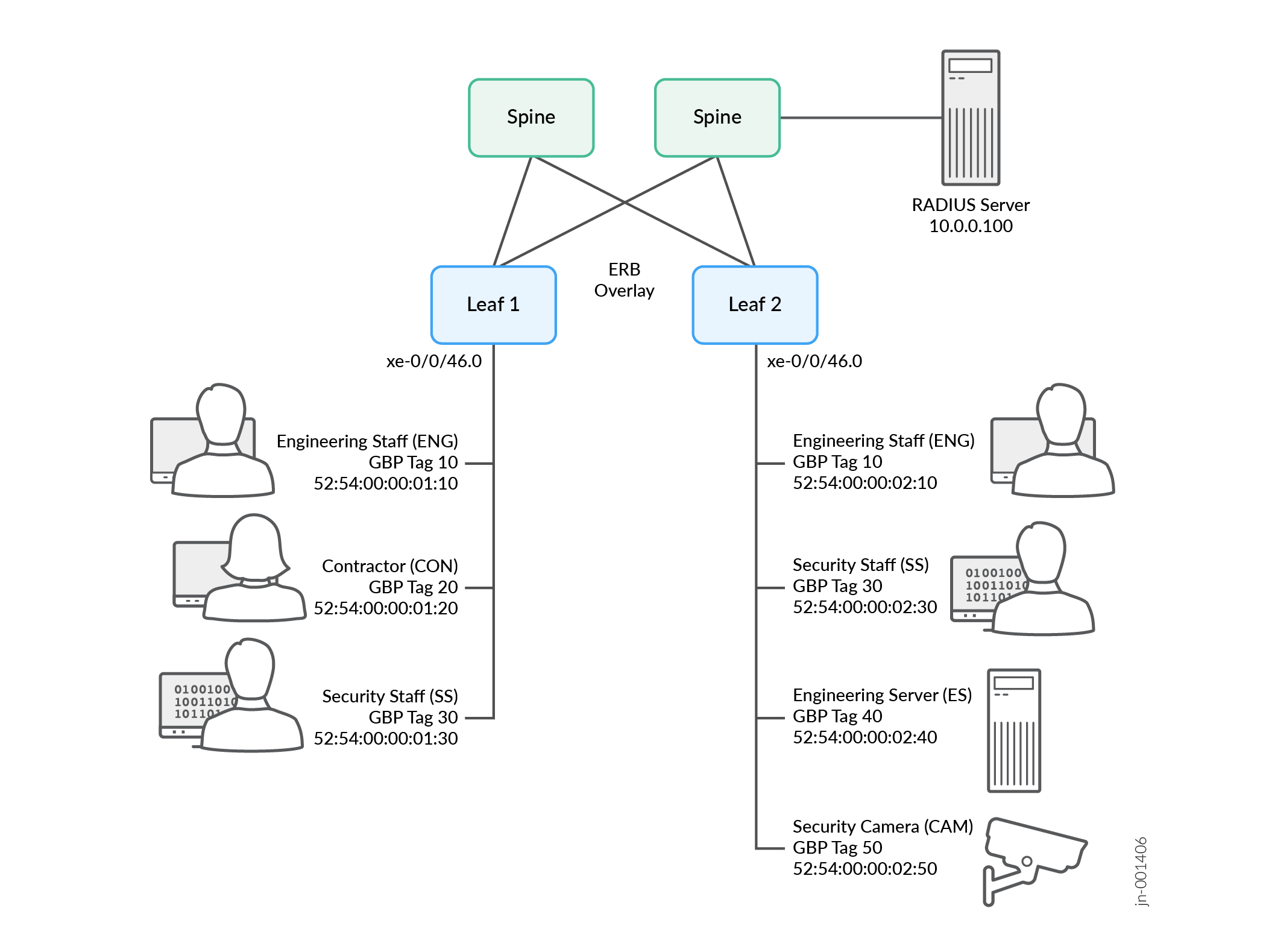
This example shows how to configure a pair of switches for GBP-based microsegmentation. The switches (Leaf 1 and Leaf 2) control access for the following users and equipment, as shown in Figure 1:

  • 2 Engineering Staff (ENG)

  • 1 Contractor (CON)

  • 2 Security Staff (SS)

  • 1 Engineering Server (ES)

  • 1 Security Camera (CAM)

Figure 1: GBP Example GBP Example

Table 1 shows the GBP tag values that we'll assign. We'll show how to assign these tags using both the CLI and RADIUS.

Table 1: GBP Tag Assignments

Endpoint

GBP Tag

Engineering Staff (ENG)

10

Contractor (CON)

20

Security Staff (SS)

30

Engineering Server (ES)

40

Security Cam (CAM)

50

Table 2 shows the microsegmentation policies that we'll apply. We use Y to indicate where access is permitted, N to indicate where access is blocked, and - to indicate not applicable (since there is only one contractor, one engineering server, and one security camera).

Table 2: Microsegmentation Policy
  ENG (Tag 10) CON (Tag 20) SS (Tag 30) ES (Tag 40) CAM (Tag 50)
ENG (Tag 10) Y Y N Y N
CON (Tag 20) Y - N N N
SS (Tag 30) N N Y N Y
ES (Tag 40) Y N N - N
CAM (Tag 50) N N Y N -
  1. Follow this step if you're assigning GBP tags using the CLI.
    Add the following assignments to both Leaf 1 and Leaf 2. Instead of tailoring the assignments to each switch individually, we'll use the same assignments on both switches for convenience and consistency.
  2. Follow this step if you're assigning GBP tags using a RADIUS server.
    1. Configure both Leaf 1 and Leaf 2 to use the RADIUS server:
      where 10.0.0.100 is the IP address of the RADIUS server.
    2. Configure the relevant interfaces on both Leaf 1 and Leaf 2 for RADIUS authentication:
      where xe-0/0/46.0 is the interface connecting to the endpoint users and devices on both switches.
    3. Configure the GBP tag assignments on the RADIUS server using the Juniper-Switching-Filter VSA or the Juniper-Group-Based-Policy-Id VSA.
      Juniper-Switching-Filter VSA:Juniper-Group-Based-Policy-Id VSA:
  3. Set the desired GBP profile on both Leaf 1 and Leaf 2.
  4. Enable ingress policy enforcement on both Leaf 1 and Leaf 2.

    Set ingress enforcement on Leaf 1 to allow Leaf 1 to enforce policy for traffic in the Leaf 1 to Leaf 2 direction.

    Set ingress enforcement on Leaf 2 to allow Leaf 2 to enforce policy for traffic in the Leaf 2 to Leaf 1 direction.

    In our example, we're setting ingress enforcement on both switches.

  5. Create firewall filter rules to enforce the microsegmentation policies shown in Table 2.

    Set the following rules on both Leaf 1 and Leaf 2.

    We'll add a default discard rule at the end so that we don't have to configure any of the discard relationships explicitly. The default discard capability was introduced in Junos OS Release 24.2R1. See Explicit Default Discard.

    If you're running a release earlier than Junos OS Release 24.2R1, then you must configure each discard rule explicitly.

    You've now configured the GBP tag assignments and the GBP policies to microsegment traffic in our example.