
Understanding VXLAN VNI Rate Limiting
VXLAN per-VNI rate limiting applies policers to tunnel-initiated L2 unicast and BUM traffic, using EVACL filters to control bandwidth, prevent congestion, and reduce DoS exposure.
VXLAN VNI rate limiting enhances network traffic management and security by applying rate limits to VXLAN tunnel-initiated traffic on a per-VNI (virtual network identifier) basis. This feature mitigates network congestion and prevents denial of service (DoS) attacks by controlling bandwidth usage for both unicast and BUM (broadcast, unknown unicast, and multicast) traffic. Additionally, the implementation supports two-color and three-color policers, enabling differentiated traffic handling and further refining traffic control through egress filtering using egress VLAN access control list (EVACL) filters. You can configure these features using specific CLI commands, which enable precise management of traffic rate limiting and filtering. This functionality ensures fair bandwidth distribution and enhances network performance and security, making it a critical component for maintaining efficient and stable VXLAN environments.
Benefits of VXLAN VNI Rate Limiting
-
Mitigates network congestion by applying rate limits to specific VNIs, ensuring no single application or user consumes excessive bandwidth.
-
Prevents potential DoS attacks by controlling the rate of VXLAN traffic, enhancing network security and stability.
-
Manages bandwidth-intensive applications effectively, allowing critical traffic to be prioritized and ensuring essential services remain unaffected.
-
Enhances traffic control granularity with two-color and three-color policers, providing specific actions for out-of-spec traffic and maintaining optimal network performance.
-
A new EVACL profile accommodates additional qualifiers without affecting existing EVACL scales, ensuring that current network setups remain intact while implementing new rate-limiting features.
VXLAN VNI Rate Limiting Overview
The VXLAN VNI rate limiting feature provides the ability to control the rate of VXLAN traffic per-VNI, thereby preventing network congestion and mitigating potential DoS attacks. This feature applies rate limits specifically to L2 unicast and BUM traffic within each VNI, ensuring that no single user or application consumes excessive bandwidth. By leveraging EVACL filters with specific qualifiers and policer actions, the feature effectively manages bandwidth-intensive applications and prioritizes critical traffic, maintaining a balanced distribution of resources across multiple tenants.
To implement VXLAN VNI rate limiting, you utilize a policing mechanism that includes both two-color and three-color policers. These policers allow you to define rate limits and burst sizes for known unicast and BUM traffic, providing you with flexibility in traffic management. Specifically, the two-color policer differentiates between traffic that is within or exceeding the defined rate limit, while the three-color policer introduces an additional state to further refine traffic management. By configuring these policers, you ensure that traffic exceeding the set limits is appropriately handled, preventing any single flow from overwhelming the network.
Configuring this feature involves several CLI commands. For instance, to set up a basic
policer, you can use commands like set firewall policer name
if-exceeding bandwidth-limit bandwidth. To handle more complex
scenarios with three-color policers, you can use set firewall three-color-policer
name single-rate committed-information-rate
rate. For egress filtering, you can apply filters using
commands such as set firewall family ethernet-switching filter
name term term-name from vxlan
tunnel-initiated. These commands allow you to precisely define and manage traffic
rates, ensuring that your network remains stable and secure even under high load.
Rate Limiting Tunnel-Initiated Traffic
We added the following qualifiers to the EVACL group to support rate-limiting tunnel-initiated traffic:
-
Packet forward type—to qualify on unicast and BUM.
-
EFP control ID from egress DVP table—to qualify for tunnel-initiated traffic.
-
Policer—to rate-limit the traffic.
-
Three-color-policer—to rate-limit the traffic.
-
Policer stats groups—to account policer color traffic.
We also added a new profile for EVACL to accommodate these new qualifiers. The per-VNI rate-limit feature is only available in this new profile. The default profile does not include these qualifiers, ensuring that the existing EVACL scale remains unaffected. Policer action will be part of the default EVACL profile.
Use set system packet-forwarding-options firewall profiles ethernet-switching
egress profile1 to configure this profile.
In EVPN-VXLAN, you can configure various services to use different VNIs, enabling traffic segmentation based on the service type. The VXLAN VNI rate limiting per-VNI feature enables rate limiting VXLAN traffic for each VNI.
In Figure 1, the traffic from the servers connected to Leaf 1 is sent to the servers connected to Leaf 2 using VXLAN encapsulation over the Spine. The VXLAN tunnel is initiated on Leaf 1 and terminated on Leaf 2, and the traffic is segmented using two different VNIs. Additionally Leaf 1 has some locally switched traffic going between servers S1 and S2.
In typical EVPN-VXLAN configurations, a VLAN maps one-to-one with a VNI. So policing traffic per-VNI is treated as per VLAN and the rate-limiting filter is applied on the egress of the VLAN for traffic entering the VXLAN tunnel.
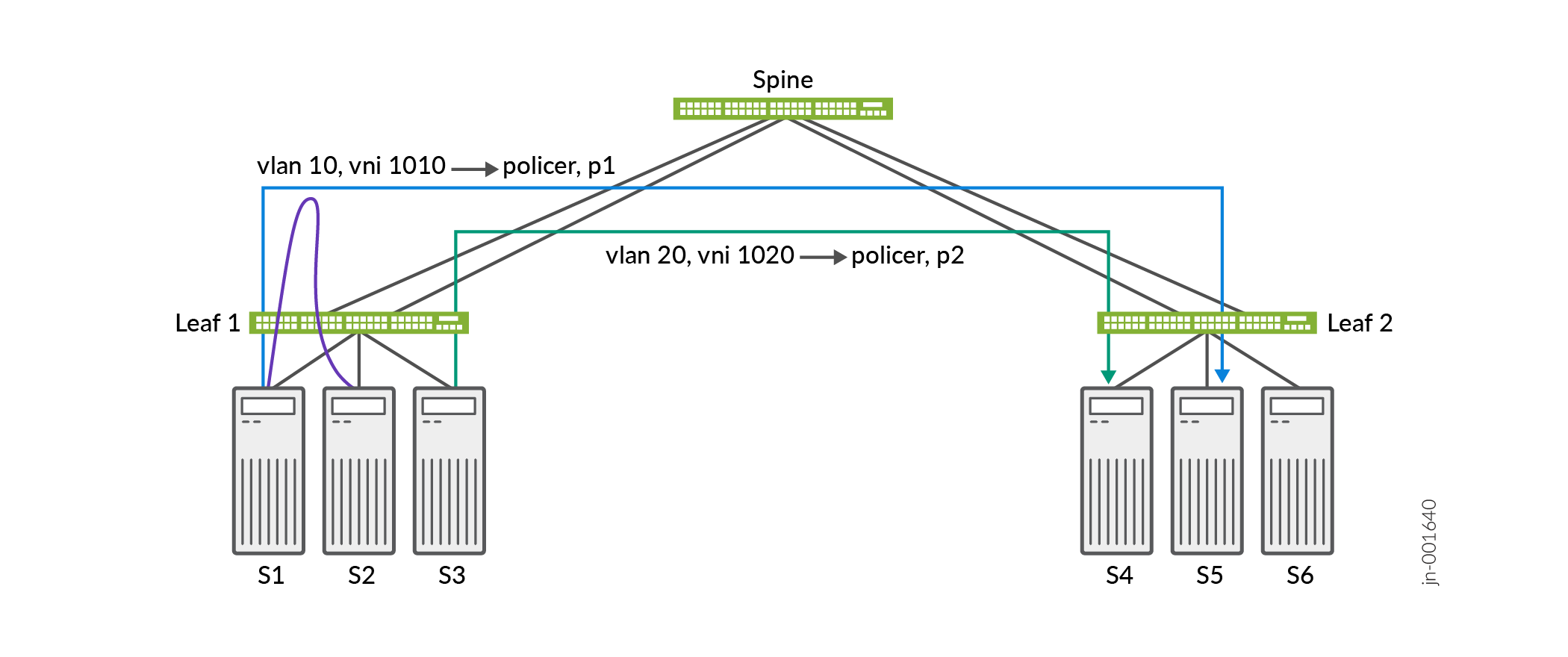
In this example, the requirement is to rate limit the VXLAN tunnel-initiated traffic per-VNI without affecting the locally switched traffic.
The traffic on each VLAN has different requirements so we create different filters and
policers based on the specific requirements. We then apply each rate-limiting filter on the
egress of the VLAN using the configuration statement set routing-instances
instance-name vlans vlan-name forwarding-options
filter output filter-name. These filters match on the
tunnel-initiated L2 unicast and L2 BUM traffic to rate-limit the traffic
as it enters the VXLAN tunnel.
Caveats and Limitations
When implementing VXLAN VNI rate limiting keep these caveats and limitations in mind:
-
The egress rate-limit per-VNI feature requires the EVACL profile
profile1. -
The only supported policer action is discard.
-
The VXLAN VNI rate-limiting feature only supports rate limiting L2 unicast and L2 BUM traffic. It does not support rate limiting L3 unicast, L3 multicast, or Type 5 tunnel-initiated traffic.
-
We configure a match on BUM traffic using the match condition
traffic-type-except known-unicast. We cannot match for broadcast, unknown unicast, or multicast traffic separately.
VXLAN VNI Rate Limiting Configuration Examples
Here are some example configurations for implementing VXLAN VNI Rate Limiting.
- Configure the EVACL Filter Profile
- Filter Configuration for IPv4 VXLAN Tunnel-Initiated Traffic
- Filter Configuration for IPv6 VXLAN Tunnel-Initiated Traffic
- Filter Configuration for All VXLAN Tunnel-Initiated Traffic
- Single-Rate Policer Configuration Example
- Three-Color-Policer Configuration Example
- Apply the Filter to a Routing Instance
Configure the EVACL Filter Profile
Configure the EVACL profile profile1 to implement the qualifiers
necessary to support VXLAN VNI rate limiting.
set system packet-forwarding-options firewall profiles ethernet-switching
          egress profile1
Filter Configuration for IPv4 VXLAN Tunnel-Initiated Traffic
This example configures a filter for IPv4 VXLAN tunnel-initiated traffic using the
traffic-type known-unicast and traffic-type-except
known-unicast statements to select L2 unicast and L2 BUM traffic respectively.
This filter uses two terms to send the different traffic types to different policers.
set firewall family ethernet-switching filter f1 term t1 from ip-version ipv4 vxlan tunnel-initiated
set firewall family ethernet-switching filter f1 term t1 from traffic-type known-unicast
set firewall family ethernet-switching filter f1 term t1 then policer p1

set firewall family ethernet-switching filter f1 term t2 from ip-version ipv4 vxlan tunnel-initiated
set firewall family ethernet-switching filter f1 term t2 from traffic-type-except known-unicast
set firewall family ethernet-switching filter f1 term t2 then policer p2
Filter Configuration for IPv6 VXLAN Tunnel-Initiated Traffic
This example configures a filter for IPv6 VXLAN tunnel-initiated traffic using the
traffic-type known-unicast and traffic-type-except
known-unicast statements to select L2 unicast and L2 BUM traffic respectively.
This filter uses two terms to send the different traffic types to different policers.
set firewall family ethernet-switching filter f1 term t1 from ip-version ipv6 vxlan tunnel-initiated
set firewall family ethernet-switching filter f1 term t1 from traffic-type known-unicast
set firewall family ethernet-switching filter f1 term t1 then policer p1

set firewall family ethernet-switching filter f1 term t2 from ip-version ipv6 vxlan tunnel-initiated
set firewall family ethernet-switching filter f1 term t2 from traffic-type-except known-unicast
set firewall family ethernet-switching filter f1 term t2 then policer p2
Filter Configuration for All VXLAN Tunnel-Initiated Traffic
This example configures a filter for all (including non-IP) VXLAN tunnel-initiated traffic using the
traffic-type known-unicast and traffic-type-except
known-unicast statements to select L2 unicast and L2 BUM traffic respectively.
This filter uses two terms to send the different traffic types to different policers.
set firewall family ethernet-switching filter f1 term t1 from vxlan tunnel-initiated
set firewall family ethernet-switching filter f1 term t1 from traffic-type known-unicast
set firewall family ethernet-switching filter f1 term t1 then policer p1

set firewall family ethernet-switching filter f1 term t2 from vxlan tunnel-initiated
set firewall family ethernet-switching filter f1 term t2 from traffic-type-except known-unicast
set firewall family ethernet-switching filter f1 term t2 then policer p2
Single-Rate Policer Configuration Example
You can use a single-rate two-color policer to configure bandwidth and burst-size limits.
discard. set firewall policer p1 if-exceeding bandwidth-limit 1m set firewall policer p1 if-exceeding burst-size-limit 24k set firewall policer p1 then discard set firewall policer p2 if-exceeding bandwidth-limit 24k set firewall policer p2 if-exceeding burst-size-limit 8k set firewall policer p2 then discard
Three-Color-Policer Configuration Example
You can configure a three-color policer to meter a traffic flow using the
committed-information-rate and committed-burst-size
statements for guaranteed traffic, plus a second set of bandwidth and burst-size limits
for peak traffic.
discard. set firewall three-color-policer p1 action loss-priority high then discard set firewall three-color-policer p1 single-rate committed-information-rate 100m set firewall three-color-policer p1 single-rate committed-burst-size 100k set firewall three-color-policer p1 single-rate excess-burst-size 200k set firewall three-color-policer p2 action loss-priority high then discard set firewall three-color-policer p2 two-rate committed-information-rate 100m set firewall three-color-policer p2 two-rate committed-burst-size 100k set firewall three-color-policer p2 two-rate peak-information-rate 200m set firewall three-color-policer p2 two-rate peak-burst-size 200k
Apply the Filter to a Routing Instance
You apply the filter configuration to a routing instance under the
forwarding-options filter output hierarchy.
set routing-instances macVrf vlans vlan100 forwarding-options filter output f1