
CoS Support for Pseudowire Subscriber Logical Tunnel Interfaces
Junos provides CoS support for pseudowire subscriber logical tunnel (PSLT) interfaces, which is essential for optimizing traffic management within MPLS-based environments. Implementing CoS on pseudowire interfaces allows for efficient traffic prioritization and bandwidth allocation, especially in Layer 2 VPN or Layer 2 circuit services. This feature offers detailed traffic management through classification and rewriting functionalities, supporting traffic control profiles (TCPs) and hierarchical CoS configurations on logical tunnel interfaces.
In modern telecommunication networks, particularly those leveraging MPLS technology, PSLT interfaces play a crucial role in streamlining network operations and enhancing service delivery. Pseudowire subscriber (PS) interfaces are used to provide pseudowire connectivity for the subscribers/clients on access network to various services on the provider network. We can consider PS interfaces as a tunnel that is either an MPLS-based Layer 2 VPN or Layer 2 circuit. The PS interface is anchored over a logical tunnel (LT) interface. The LT interface is a recycle channel interface used to connect logical systems or VPN instances within the same router. A PS tunnel transports Ethernet encapsulated traffic from an access node to the router that hosts the subscriber management services. The termination of the PS tunnel on the router is like a physical Ethernet termination and is the point at which subscriber management functions are performed.
Figure 1 illustrates how PSLT interfaces enable service providers to extend a pseudowire service from the access-aggregation network to the service edge. The stitching PE (S-PE) router terminates the pseudowire services from access-aggregation network and initiates new services such as pseudowire, L3-VPN etc. MPLS traffic from PE1 terminates at the PS interface PSn.0 logical interface of the S-PE router. After forwarding decision is made, packets are forwarded to designated static service logical interface (PSn.1, PSn.2, etc).
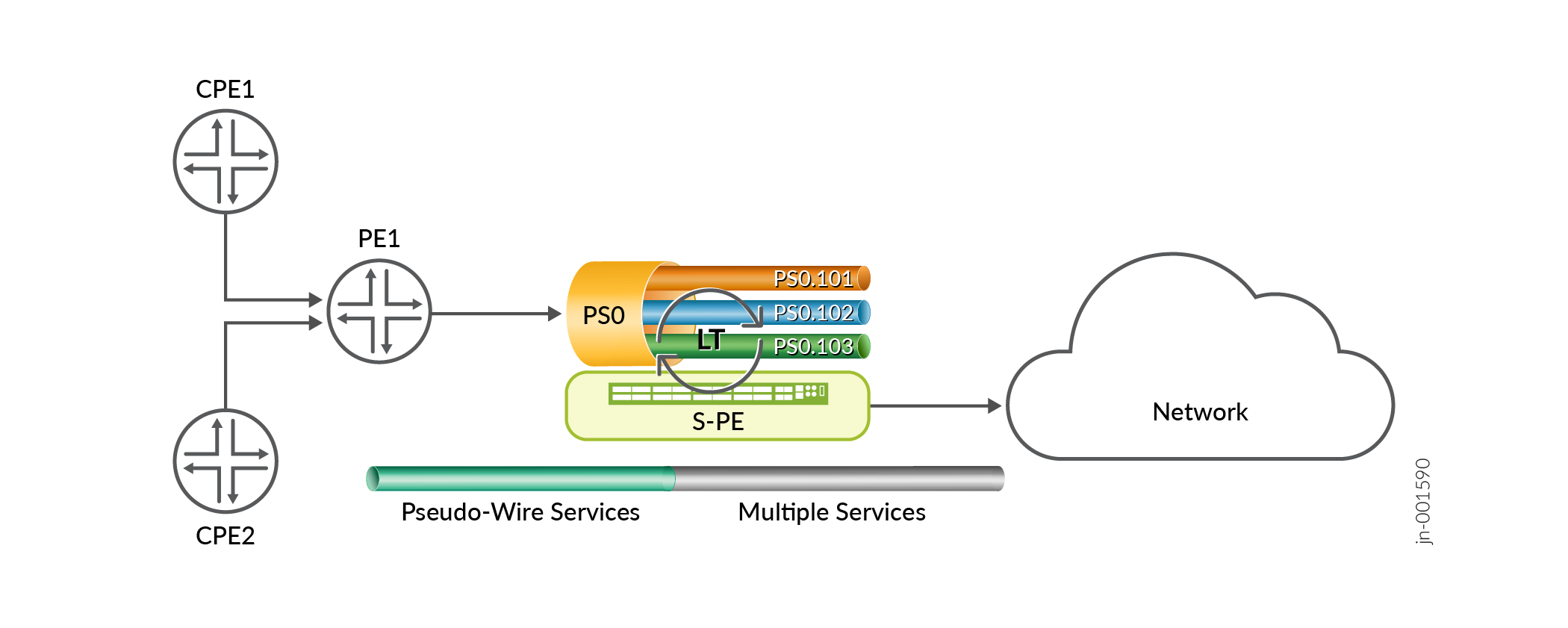
In Figure 1 above, upstream traffic, that is traffic from PE1 towards the core network, after recycling at LT interface, ingresses on service interfaces PS0.101, PS0.102, and PS0.103. You apply CoS classification to these service interfaces. Similarly in the downstream direction, that is traffic from the network to PE1, traffic egresses out over these same service interfaces, and here you can apply CoS rewrite. You can also apply traffic control profiles to these service interfaces.
Benefits of CoS Support for Pseudowire Subscriber Interfaces
-
Enhances traffic management by enabling precise CoS classification and rewriting, optimizing traffic prioritization and efficient bandwidth allocation.
-
Supports hierarchical CoS configurations, providing granular control over traffic flows and resource distribution across different service levels.
-
Integrates traffic control profiles (TCP), facilitating advanced traffic shaping and control to meet specific service quality requirements.
-
Increases network flexibility by allowing detailed management of data flow through logical tunnel interfaces, improving service delivery in complex network environments.
Understand CoS for PSLT Interfaces
The following are characteristics of CoS on PS interfaces:
-
PS interfaces such as PS0, PS1, etc. are logical interface but have no representation in the CoS scheduling hierarchy. No separate bandwidth is allocated for a PS interface.
-
Transport logical interfaces and client logical interfaces are part of the same LT interface, so both upstream and downstream traffic consume LT interface bandwidth.
-
You can combine all the client logical interfaces of a PS interface in a logical interface set to have a common CoS scheduling configuration.
-
Typical deployment has all client logical interfaces of a PS interface as part of a logical interface set with a TCP. Transport logical interfaces can have separate TCPs.
-
If you apply no custom classifier or rewrite rule to a PS interface, then the default classifier and rewrite rule apply.
-
An anchor point interface (physical interface) is specified for a PS interface. This identifies the logical tunnel interface that terminates the pseudowire tunnel at the access node.
Configuration of CoS on PS interfaces is similar to CoS on physical interfaces. However, behavioral differences do exist, because a PS interface is constituted on top of an LT recycle interface.
| CoS Feature | Target Interface | Direction |
|---|---|---|
| Classifier | PS0.0 transport logical interface | Downstream (network to PE router). From a classifier point of view, the transport logical interface is just any other logical interface. |
| PS0.x – static client VLAN logical interface | Upstream (PE router to network). Client VLAN logical interfaces are just any other logical interface, so similar classifier functionality applies. | |
| LT.x | Point to point. | |
| Rewrite rule | PS0.0 transport logical interface | Upstream. From a rewrite rule point of view, the transport logical interface is just any other logical interface. |
| PS0.x – static client VLAN logical interface | Downstream. | |
| LT.x | Point to point. | |
| Scheduler | PS0.0 transport logical interface | Upstream. You can attach a scheduler to shape the upstream traffic. |
| PS0.x – static client VLAN logical interface | Downstream. | |
| PS0.x-y – static client VLAN logical interface set | Downstream. You can attach a scheduler to shape downstream traffic for logical interfaces, PS0.x to PS0.y. | |
| LT interface | You can apply a scheduler to the LT interface. Be aware that LT port bandwidth depends on the recycle bandwidth allocation. |
Configure CoS for PSLT Interfaces
You can enforce CoS on pseudowire subscriber interfaces to shape, prioritize, and mark traffic for L2/L3 VPN services by leveraging logical tunnel-anchored pseudowire client logical interfaces. Apply classifiers and rewrite rules per logical interface, and use hierarchical schedulers and traffic-control profiles on pseudowire logical interfaces or logical interface sets. You can use six priorities and weighted random early detection (WRED). Available bandwidth for PS interfaces is constrained by the bandwidth configured on the underlying LT recycle interface; use the logical tunnel port shaper to control upstream traffic.
The following shows sample CoS configuration over a PS interface:
Create an LT interface with a port speed of 100G:
[edit]
user@host# set chassis fpc 0 pfe 0 core 0 channel 0 tunnel-services bandwidth 100g
Put the LT interface into hierarchical scheduler mode:
[edit]
user@host# set groups ps_lt interfaces lt-0/0/0:0 hierarchical-scheduler
Create PS interfaces and logical interfaces:
[edit]
user@host# set interfaces ps0 anchor-point lt-0/0/0:0
user@host# set interfaces ps0 flexible-vlan-tagging
user@host# set interfaces ps0 unit 0 encapsulation ethernet-ccc
user@host# set interfaces ps0 unit 1 vlan-id 100
user@host# set interfaces ps0 unit 1 family inet address 70.70.1.1/24

user@host# set interfaces ps1 anchor-point lt-0/0/0:0
user@host# set interfaces ps1 flexible-vlan-tagging
user@host# set interfaces ps1 unit 0 encapsulation ethernet-ccc
user@host# set interfaces ps1 unit 1 vlan-id 100
user@host# set interfaces ps1 unit 1 family mpls
user@host# set interfaces ps1 unit 2 vlan-id 101
user@host# set interfaces ps1 unit 2 family inet address 24.1.1.1/24
Create a PS logical interface set of client logical interfaces:
[edit]
user@host# set interfaces interface-set psiflset1 interface ps1 unit 1
user@host# set interfaces interface-set psiflset1 interface ps1 unit 2
Apply a classifier to a client PS logical interface:
[edit]
user@host# set class-of-service interfaces ps0 unit 1 classifiers dscp dscp_cl
Apply a rewrite rule to a client PS logical interface:
[edit]
user@host# set class-of-service interfaces ps0 unit 1 rewrite-rules dscp rw_dscp
Apply a TCP to a client PS logical interface:
[edit]
user@host# set class-of-service interfaces ps1 unit 1 output-traffic-control-profile tcp_1
Apply a TCP to a PS logical interface set:
[edit]
user@host# set class-of-service interfaces interface-set psiflset1 output-traffic-control-profile tcp_1
Use the
show interfaces voqcommand to display statistics for PS logical interfaces:user@host> show interfaces voq ps1.1