
CoS Features and Limitations on PTX Series Routers
Table 1 summarizes CoS features and limitations on PTX Series Packet Transport Routers.
The following table lists the CoS features supported on the PTX Series router, as well as the limitations relevant to the PTX Series router. Note that this list is a subset of the overall CoS feature set.
|
CoS Feature |
Capacity |
Comments |
|---|---|---|
| Classifiers | ||
|
Maximum number per PFE |
64 |
L2 classifiers (sum of IEEE-802.1p and IEEE-802.1ad cannot exceed 32) DSCP and IP precedence classifiers (sum of DSCP and IP precedence classifiers cannot exceed 32) DSCP IPv6 classifiers MPLS EXP classifiers |
|
|
Yes |
DSCP and IP precedence classifiers cannot be configured on the same logical interface. |
|
|
Yes |
Separate classifiers can be applied for IPv4 and IPv6 packets per logical interface. |
|
|
Yes |
You can associate IEEE-802.1p and IEEE-802.1ad classifiers with any other type of classifier on the same logical interface. For L3 packets, an L3 classifier takes precedence over an IEEE classifier. |
|
|
Yes |
|
|
|
Yes |
Note:
MPLS EXP classifiers are not supported on PTX10001-20C routers. |
|
Loss priorities based on the Frame Relay discard eligible (DE) bit |
No |
|
| Drop Profiles | ||
|
Maximum number |
32 |
You can configure up to 32 drop-profiles in the PTX chassis. |
|
Per queue |
Yes |
|
|
Per loss priority |
Yes |
|
|
Per Transmission Control Protocol (TCP) bit |
No |
|
protocol option |
protocol any only |
PTX Series PFEs not support drop-profile assignments for a queue based on
the protocol. As a consequence, the |
|
Note:
PTX10K-LC1201 and PTX10K-LC1202 line cards on PTX10001-36MR, PTX10004, PTX10008, and PTX10016 routers support one or two drop profile points (fill level/drop probability pairs) per drop profile:
Figure 1 shows how two point RED curves generate a single line. Figure 1: Two Drop Profile Points
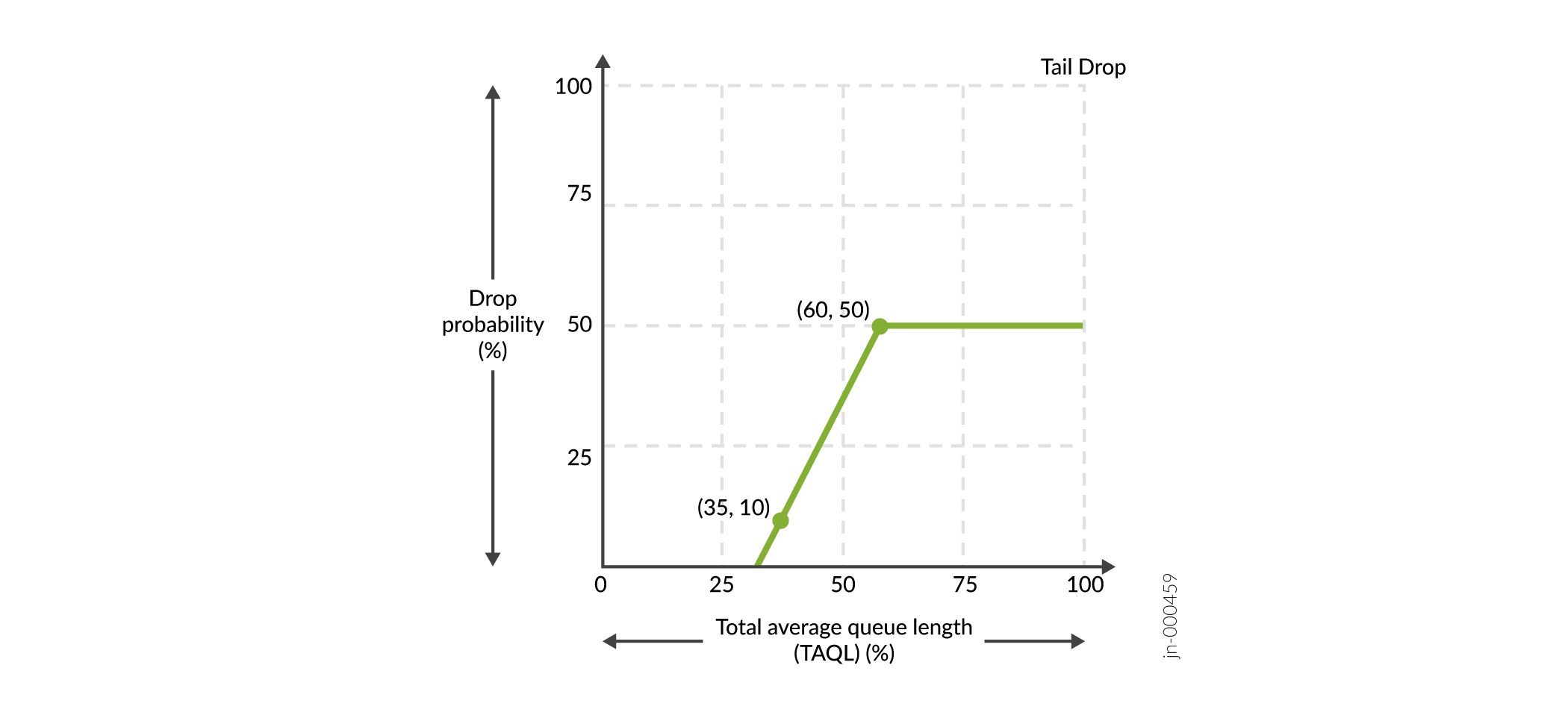
Although the first point is (35,10), we see the drop profile points starting earlier where the line intersects the X axis. At the second point (60,50), the drop probability is maximum and remains at point 50 from TAQL 60% through 100%, after which the tail drop happens. |
||
| Policing | ||
|
Traffic policing |
Yes |
|
|
Two-rate tricolor marking (TCM) |
Yes |
|
| Queuing | ||
|
Priority |
Yes (4) |
On PTX Series routers, strict-high-priority queues and high-priority queues are assigned different hardware priorities. Strict-high-priority can starve other queues if a rate limiter is not applied on PTX Series routers. |
|
Per-queue output statistics |
Yes |
Red-dropped counters are not maintained per drop precedence. Also tail drop counters always show zero because packets are always dropped by the RED algorithm. On PTX Series routers, transmitted byte counters are computed using the full Layer 2 overhead (including all L2 encapsulation and CRC) plus 12 for the inter-packet gap plus 8 for the preamble. On Junos OS Evolved PTX Series routers , the tail-dropped counters and the
RED-dropped counters are displayed separately in the output of the
|
|
|
Yes |
Percentage transmit rate for a scheduler has the range 1 through 100 percent. Unconfigured interfaces are equivalent to |
|
Excess bandwidth sharing |
Yes |
On PTX Series routers, excess bandwidth is shared based on the ratio of the configured transfer rate. Therefore, all priority queues get a share of excess bandwidth. |
|
Virtual Output Queueing |
Yes |
PTX Series routers support a virtual output queuing (VOQ) architecture and the fabric schedulers utilize the CoS scheduling parameters to configure the fabric schedulers. There is not a separate configuration for the fabric schedulers on PTX Series routers. With the VOQ architecture, packets are queued and dropped on ingress during congestion. |
|
Buffer latency |
Yes |
On PTX Series routers, |
| Rewrite Markers | ||
|
Maximum number per PFE |
64 |
The sum of L2 and L3 rewrite rules cannot exceed 64. |
|
|
Yes |
|
|
|
Yes |
|
|
|
Yes |
PTX Series routers support Layer 2 rewrite of 802.1p and 802.1ad, to either the outer VLAN tag, or both outer and inner VLAN tags. L2 and L3 rewrites can be applied to the same packet simultaneously. |
|
|
No |
|
|
|
Yes |
PTX Series routers support rewrite of both DSCP and DSCP IPv6 for protocol MPLS. |
For PTX Series routers running Junos OS Evolved:
-
PTX Series routers running Junos OS Evolved support Layer 3 VPNs.
-
Junos OS Evolved does not support applying classifier and rewrite rules to IRB interfaces on PTX Series routers.