
HTTP/2 Protocol
Learn about the HTTP/2 protocol and its benefits, features, and configuration.
HTTP/2 protocol is a modern version of the HTTP protocol designed to improve application performance and efficiency by enabling multiple transactions over a single connection. You can safely enable applications running over HTTP/2, without any additional configuration on your device.
HTTP/2 adoption is now widespread across modern applications such as gRPC, 5G Core (5GC), enterprise SaaS, and high‑traffic Web platforms.
HTTP/2 Protocol Overview
HTTP/2 protocol introduces features such as multiplexing, which allows multiple requests and responses to be sent simultaneously over a single connection, thereby reducing latency caused by head‑of‑line blocking. HTTP/2 also uses header compression to minimize overhead, supports server push to proactively send resources to clients, and maintains backward compatibility with existing HTTP semantics. Together, these enhancements enable faster page loads, better utilization of network resources, and improved performance for modern, content‑rich Web applications.
The most significant architectural change in HTTP/2 is the introduction of a binary framing layer. Instead of transmitting messages as human‑readable text as in HTTP/1.1, HTTP/2 encapsulates all data into binary frames.
HTTP/2 protocol infrastructure enables your device to inspect HTTP/2 traffic for security services while preserving the existing HTTP/1.1 policy and feature model. Secure communication is maintained with HTTP/2 protocol over TLS 1.2 and TLS 1.3, along with robust application identification (AppID) and policy enforcement.
Each HTTP/2 connection is logically divided into multiple streams. This model enables your device to inspect, permit, or deny individual HTTP/2 transactions independently while maintaining a single connection. Security services primarily operate on stream sessions, while session setup, authentication, and SSL decisions are often handled at the session connection level.
HTTP/2 and HTTP/1.1 traffic can co-exist, which maintains continuity in existing network setups without necessitating changes to current security policies. Table 1 summarizes the functional differences between HTTP/1.1 and HTTP/2.
| Aspect | HTTP/1.1 | HTTP/2 |
|---|---|---|
|
Primary design goal |
Designed for simplicity and basic request–response over TCP |
Designed to improve performance, reduce latency, and use network resources efficiently |
|
Message framing |
Text-based, line-oriented protocol (headers and bodies sent as plaintext) |
Binary framing layer that encapsulates messages into frames |
|
Multiplexing |
Limited; request pipelining exists but suffers from head‑of‑line blocking |
Full multiplexing of multiple streams over a single TCP connection |
|
Connection usage |
Multiple TCP connections per origin commonly used for concurrency |
Single TCP connection per origin is sufficient |
|
Request/response ordering |
Responses must be sent in order on a connection |
Responses can be interleaved and delivered out of order |
|
Header handling |
Headers are sent in full with every request and response |
Headers are compressed using HPACK |
|
Flow control |
Relies on TCP flow control only |
Adds application‑level flow control per stream and per connection |
|
Extensibility |
Hard to extend due to text parsing and ambiguity |
Designed to be extensible through new frame types |
You can downgrade HTTP/2 to HTTP/1.1 to keep traffic flowing when your device cannot safely support a full HTTP/2 session for a given traffic. Your device downgrades the HTTP/2 traffic to HTTP/1.1 when a feature requires packet holding or deep buffering (for example, Content Security antivirus and ICAP hold mode).
The system initiates the downgrades early (typically during Application-Layer Protocol Negotiation (ALPN) negotiation) to avoid mid‑stream protocol transitions. This adaptive mechanism ensures that your network remains resilient and capable of handling varying traffic conditions.
Benefits of HTTP/2 Protocol
-
You can process multiple management requests at the same time over a single connection, reducing latency and improving overall responsiveness.
-
You experience lower latency and better performance, especially when you use automation or orchestration platforms that generate high volumes of API traffic.
What HTTP/2 Protocol Support Provides
HTTP/2 protocol support on your device enables more efficient, secure, and scalable delivery of web-based applications and services by leveraging modern transport optimizations. HTTP/2 protocol support:
-
Improve Web application performance by enabling multiplexing of multiple HTTP streams over a single TCP connection
-
Reduce page load times through header compression and more efficient use of network resources
-
Enhance user experience for latency-sensitive applications such as Web portals, APIs, and SaaS services
-
Optimize bandwidth utilization on WAN and Internet links by minimizing protocol overhead
-
Support modern browser and application requirements that require HTTP/2 for secure connections
-
Align with industry best practices for delivering secure, high-performance HTTPS services through your device
-
Enable better scalability of Web services behind your device by reducing connection overhead on servers
-
Facilitate consistent policy enforcement and security inspection for HTTP/2 traffic with existing security services
-
Prepare the network for future application features and frameworks that are designed to operate over HTTP/2 by default
From the firewall perspective, HTTP/2 support provides the following benefits:
-
Performs HTTP/2 inspection of various supported features, see HTTP/2 Protocol Supported Features.
- Consistent policy enforcement on HTTP/2 connections and streams.
- Better visibility into modern Web and API traffic.
- Continued use of SSL inspection for encrypted sessions.
- Controlled downgrade behavior when a service cannot safely process HTTP/2.
- Better troubleshooting through session and counter visibility.
Your device supports applications running over HTTP/2 by default. You can manage the HTTP/2 functionalities manually, see Manage HTTP/2 Inspection.
HTTP/2 Protocol Supported Features
Figure 1 shows the high-level HTTP/2 traffic flow on your device. When you enable HTTP/2 on your device, the device performs the session setup, authentication, and SSL decisions at the HTTP/2 connection level. The security services such as AppID, policy enforcement, and content inspection primarily operate at the HTTP/2 stream level.
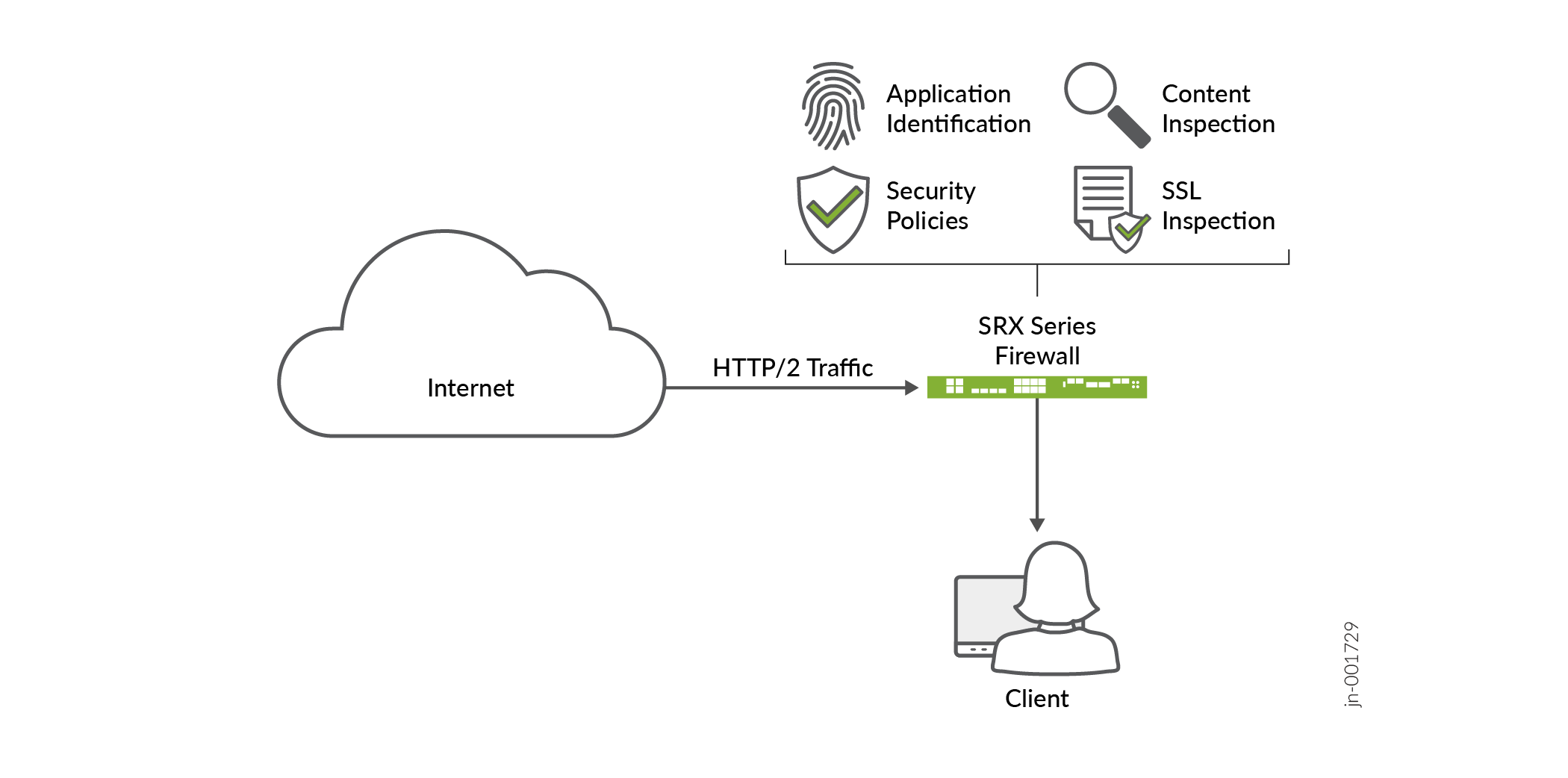
The followings are the key features support HTTP/2 traffic inspection on your device:
-
Active Directory as Identity Source: Users can use Active Directory or Identity-Management Service for user-identity in HTTP/2 sessions. The device determines the source identity of an HTTP/2 connection session and applies the same identity for all the stream sessions.
-
Application Identification (AppID): Your device identifies applications using AppID for both HTTP/2 sessions and individual streams.
-
AppQoS: You can enforce granular AppQoS for HTTP/2 traffic using DiffServ code point (DSCP), based on first stream classifications. The application classification of the first stream is used for AppQoS rule lookup. This classification is then applied to the entire HTTP/2 connection session and all individual streams. As a result, all packets within the HTTP/2 session inherit the same AppQoS behavior derived from the first completed stream's classification. See Understanding HTTP/2 Application Quality of Service (AppQoS) DSCP Support.
-
Content Security: HTTP/2 protocol supports Content Security features such as Web filtering and content filtering. These features bypass the HTTP/2 connection session and process stream sessions directly. The system applies actions based on the existing configuration for specific sessions, ensuring accurate filtering and enhanced security.
-
Cleartext (plaintext): The system identifies HTTP/2 connections early, manages as single TCP connections, and tracks each HTTP/2 stream independently. The system performs Layer 7 inspection and enforces policies on each stream, providing granular visibility and control over individual transactions within the same connection. See Cleartext HTTP/2 Inspection.
-
Security Policy: HTTP/2 traffic supports your existing HTTP/1.1 security policy configurations. The device treats HTTP/2 traffic as a multi-stream connection where policies are applied for HTTP/2 connection and individual streams. If the HTTP/2 connection matches a permit policy (
http-default-muxor explicitly configured HTTP/2 policy), then the device allows the connection session and perform policy lookup for individual streams separately. In a single HTTP/2 connection, one stream session can have permit action while another stream session can have deny action. If HTTP/2 connection session matches a deny policy, then the device drops the complete session including individual streams. -
SSL and TLS: HTTP/2 supported over TLS 1.2 and TLS 1.3, ensuring robust encryption standards are in place to protect data. This capability not only enhances secure communication but also maintains continuity across existing network setups by supporting HTTP/2 traffic without requiring changes to current security policies. See SSL Proxy Support for HTTP/2 Through ALPN (TLS 1.2 and TLS 1.3).
Manage HTTP/2 Inspection
To effectively manage and monitor HTTP/2 inspection, it is crucial to understand the implications of flow control settings and session management. Managing HTTP/2 inspection involves determining the appropriate settings for stream prioritization and evaluating fallback mechanisms to HTTP/1.1 when necessary.
- Disable HTTP/2 Inspection Globally
- Disable HTTP/2 Inspection for a Specific Policy
- Configure HTTP/2 Session Parameters
- Enable HTTP/2 Inspection Globally
Disable HTTP/2 Inspection Globally
Disable HTTP/2 globally when you want your device to process SSL proxy traffic to HTTP/1.1 for compatibility, or troubleshooting. Disable HTTP/2 globally for the following reasons:
- You need a quick rollback: A global disable gives you one device-wide switch when HTTP/2 causes broad application issues and you need all SSL proxy sessions to use HTTP/1.1 right away.
- You use features that force fallback often: Some features can trigger HTTP/2 to HTTP/1.1 fallback. If many flows hit those cases, a global disable can simplify behavior.
- You troubleshoot session failures: If users report broken sites, resets, or unexpected protocol behavior, a global disable helps you test whether HTTP/2 handling causes the problem.
- You want predictable HTTP/1.1 only inspection: Some deployments prefer a single protocol path for easier operations, captures, and troubleshooting. With HTTP/2 disabled globally, the device uses the same HTTP/1.1 inspection path for all SSL proxy sessions.
- You need to handle environment-wide compatibility issues: If many applications, services, or middlebox features do not work well with HTTP/2 in your current deployment, a global disable avoids repeated per-session fallback decisions.
Use the following configuration to disable HTTP/2 inspection for SSL proxy services at global level:
set services ssl proxy global-config http2 off
Disabling HTTP/2 redirect all eligible traffic to operate in HTTP/1.1 mode.
Disable HTTP/2 Inspection for a Specific Policy
Disable HTTP/2 for a specific policy when only some traffic has problems with HTTP/2 and the rest of the traffic works well. A policy-level disabling allows your force only the matching sessions to use HTTP/1.1 instead of changing behavior for the whole device. This approach gives you better control and reduces the effect on other applications.
Use a policy-level disable in the following cases:
- A specific site or application fails on HTTP/2: If one destination has session failures, reset issues, or inspection problems, disable HTTP/2 only for that policy. This keeps other traffic on HTTP/2.
- A specific policy uses features that trigger fallback: Some features can require HTTP/1.1 for correct inspection or service handling, such as packet-hold services, ICAP, or other unsupported feature combinations in the affected flow. A policy-level disable avoids repeated fallback decisions for that traffic.
- You want to limit operational impact: A policy-level disable affects only the matching destination, application, or traffic class. It avoids a device-wide rollback.
- You want easier troubleshooting: If only one business application has trouble, disable HTTP/2 for that policy and test again. This helps you confirm whether HTTP/2 handling causes the issue.
- You need predictable inspection for selected traffic: Some applications work better when the device always processes them through the HTTP/1.1 path. A policy-level disable gives you that behavior without changing every SSL proxy session.
Use the following configuration to disable HTTP/2 inspection for a specific policy:
set security policies from-zone trust to-zone untrust policy p1 application-services ssl-proxy disable-http2
Configure HTTP/2 Session Parameters
Configure HTTP/2 session parameters when you want to balance performance,
resource use, and inspection stability on your device. The HTTP/2 feature scope
for the device includes tunable settings such as
max-concurrent-streams and
max-header-table-size.
Why configure max-concurrent-streams
max-concurrent-streams controls how many HTTP/2 streams a
peer can keep active on one connection. HTTP/2 uses streams to carry many
requests and responses on one TCP connection, so this setting directly
affects concurrency.
Configure max-concurrent-streams for the following
reasons:
- Control resource use on the device: More concurrent streams can increase CPU, memory, and inspection load because SRX must track more active streams inside each HTTP/2 connection.
- Protect the device from stream-heavy traffic: A lower limit can reduce the risk of a client opening too many streams on one connection and pushing the device into a high-load state.
- Match the setting to the traffic pattern: A higher value can help web-style traffic that needs many small parallel requests, while a lower value can work better for environments that favor tighter control over connection resources.
- Improve inspection stability: If the device or a related service struggles with large numbers of parallel streams, tuning this value can reduce pressure on HTTP/2 sessions.
Use the following configuration to manage
max-concurrent-streams:
set security application-services http2 max-concurrent-streams 100
Why configure max-header-table-size
max-header-table-size controls the size of the HPACK dynamic
header table that HTTP/2 traffic uses for header compression. HPACK improves
efficiency by storing repeated headers in a dynamic table and reusing
headers across the connection.
Configure max-header-table-size for the following
reasons:
- Control memory use: A larger header table can improve compression, but it also requires more memory per connection. A smaller table reduces memory pressure on the device.
- Balance compression and scale: A larger table can reduce repeated header overhead on long-lived connections, but a smaller table can help when you need to support many concurrent connections with predictable memory use.
- Reduce the effect of large or unique headers: If clients send many different headers, a large dynamic table can grow quickly. Tuning this setting helps limit the amount of state the device keeps for header compression.
- Support stable inspection behavior: Since HTTP/2 inspection depends on correct header decoding, a reasonable table size can help avoid stress from oversized or highly variable header sets.
Use the following configuration to manage
max-header-table-size:
set security application-services http2 max-header-table-size 4096
Enable HTTP/2 Inspection Globally
If you disabled the HTTP/2 inspection for any reason, you can enable it manually. Use the following configuration to enable HTTP/2 inspection for SSL proxy services at global level:
set services ssl proxy global-config http2 on
Troubleshoot HTTP/2 Traffic
You can monitor and troubleshoot HTTP/2 traffic using the following operational commands and security logs.
Operational Commands
-
show security application-services monitoring: Provides real‑time and averaged statistics for HTTP/2 application‑service sessions. The output includes the current number of HTTP/2 connection, stream sessions, and their creation rates separately for encrypted and plaintext traffic. An example shown below:
user@host> show security application-services monitoring FPC 0 PIC 0 Current session HTTP2 parent: 0 Current session HTTP2 child: 0 Current plain text session HTTP2 parent: 0 Current plain text session HTTP2 child: 0 Total HTTP2 Session Creation Per Second (for last 96 seconds on average): 0 HTTP2 Parent Session Creation Per Second (for last 96 seconds on average): 0 HTTP2 Child Session Creation Per Second (for last 96 seconds on average): 0 Total HTTP2 plain text Session Creation Per Second (for last 96 seconds on average): 0 HTTP2 plain text Parent Session Creation Per Second (for last 96 seconds on average): 0 HTTP2 plain text Child Session Creation Per Second (for last 96 seconds on average): 0 -
show security application-services status: Provides the status, enabled features, and key protocol limits of HTTP proxy services running on the device. An example shown below:
user@host> show security application-services status
HTTP Proxy status:
  Encrypted HTTP2: Enabled/Disabled
  Plain-text HTTP2:  Enabled/Disabled
  Bypass services: No
  Push streams: Disabled
  RFC 7540 priorities: Disabled
  Compression: Enabled
  Max concurrent streams: 10
  Max header table size: 4096
  Initial window size: 65535
  Maximum header size: 8192
  Trace options: Enabled
-
show security application-services counters: Provides counters maintained by security application services on the device. You can monitor service activity and confirm that application‑level inspection features are processing traffic as expected. An example shown below:
user@host> show security application-services counters
HTTP Proxy Ignored counters:
HTTP2 counters:
TLS not interested: 5
Global/Policy based H2 disabled: 0
HTTP2 disabled: 0
L7 services disabled: 0
Low memory: 0
Miscellaneous: 6
Security Logs
HTTP/2 Connection and Stream Session Logging: Provides detailed information regarding the HTTP/2 connection and stream level logs. Examples are shown below:
Log for HTTP/2 connection:
Stream create:
2023-05-19T18:20:37.630+08:00 flow-srx4600-01 RT_FLOW - RT_FLOW_SESSION_CREATE [junos@2636.1.1.1.2.35 source-address="192.168.1.101" source-port="33883" destination-address="192.168.2.101" destination-port="443" service-name="junos-https" nat-source-address="192.168.1.101" nat-source-port="33883" nat-destination-address="192.168.2.101" nat-destination-port="80" src-nat-rule-name="None" dst-nat-rule-name="None" protocol-id="6" policy-name="sec_policy" source-zone-name="trust" destination-zone-name="untrust" session-id-32="80000058" username="N/A" roles="N/A" packet-incoming-interface="ge-0/0/1.0" application="HTTP2" nested-application="N/A" encrypted="yes" conn-tag="0"]
Log for HTTP/2 stream:
Stream create:
2023-05-19T18:20:37.630+08:00 flow-srx4600-01 RT_FLOW - RT_FLOW_STREAM_CREATE [junos@2636.1.1.1.2.35 source-address=”192.168.1.101” source-port=”33883” destination-address=”192.168.2.101” destination-port=”443” service-name=”junos-https” nat-source-address=”192.168.1.101” nat-source-port=”33883” nat-destination-address=”192.168.2.101” nat-destination-port=”80” src-nat-rule-name=”None” dst-nat-rule-name=”None” protocol-id=”6” policy-name=”sec_policy” source-zone-name=”trust” destination-zone-name=”untrust” session-id-32=”80000059” username=”N/A” roles=”N/A” packet-incoming-interface=”ge-0/0/1.0” application=”HTTP” nested-application=”facebook” encrypted=”no” conn-tag=”0” parent-session-id=”80000058” client-side-stream-id=”102” server-side-stream-id=”102”]