
System Requirements for AWS
Before you install the Routing Director software, ensure that your system meets the requirements that we describe in these sections.
Software Requirements
You can deploy Routing Director on Amazon Web Services (AWS).
You must have login credentials to AWS with permissions to create, modify, and delete VMs, security groups, load balancers, IAM roles and policies, along with access to the S3 bucket.
Hardware Requirements
This section describes the minimum hardware resources that are required on each node virtual machine (VM) in the Routing Director deployment cluster, for evaluation purposes or for small deployments.
The compute, memory, and disk requirements of the cluster nodes can vary based on the intended capacity of the system. The intended capacity depends on the number of devices to be onboarded and monitored, types of sensors, and frequency of telemetry messages. If you increase the number of devices, you'll need higher CPU and memory capacities. Ensure that CPU and memory resources are not oversubscribed.
To get a scale and size estimate of a production deployment and to discuss detailed dimensioning requirements, contact your Juniper Partner or Juniper Sales Representative.
The bare minimum resources required for each of the nodes in a Routing Director deployment cluster (without the AI-ML and routing observability use cases) are:
| Four-node Cluster | Three-node Cluster | Single-node Cluster |
|---|---|---|
|
16-vCPU |
24-vCPU |
32-vCPU |
|
32-GB RAM |
48-GB RAM |
64-GB RAM |
|
512-GB SSD. SSDs are mandatory. |
512-GB SSD. SSDs are mandatory. |
512-GB SSD. SSDs are mandatory. |
To configure the AI-ML (artificial intelligence [AI] and machine learning [ML]) use case, each node in the cluster requires additional resources (30% beyond the specifications listed in the table above). AI-ML features include detecting blackholes, and physical-layer faults, as well as anomalies in device hardware health, interface health, protocol functioning, and fabric health.
To configure the AI-ML use case, the bare minimum resources required for each of the nodes in the cluster are:
| Four-node Cluster | Three-node Cluster | Single-node Cluster |
|---|---|---|
|
24-vCPU |
32-vCPU |
48-vCPU |
|
48-GB RAM |
64-GB RAM |
96-GB RAM |
|
768-GB SSD |
768-GB SSD |
768-GB SSD |
| Four-node Cluster | Three-node Cluster | Single-node Cluster |
|---|---|---|
|
48-vCPU |
64-vCPU |
64-vCPU |
|
96-GB RAM |
128-GB RAM |
128-GB RAM |
|
2000-GB SSD |
2000-GB SSD |
2000-GB SSD |
The host servers must have enough CPU, memory, and disk space to accommodate the hardware resources listed in this section.
To ensure high availability, we recommend that you distribute the nodes across separate fault domains. For AWS deployments, place each node in separate availability zones to ensure node and infrastructure high availability.
Network Requirements
The nodes must be able to communicate with each other through SSH. The nodes must be able to sync to an NTP server. SSH is enabled automatically during the VM creation, and you will be asked to enter the NTP server address during the cluster creation. Ensure that there is no firewall blocking NTP or blocking SSH traffic between the nodes in case they are on different servers.
- Cluster in Single or Multiple Subnets
- Cluster with Multiple NICs
- Configure IPv4 Addresses and Hostnames
Cluster in Single or Multiple Subnets
In AWS deployments, clusters can be deployed across a single or multiple subnets. Multi-subnet deployments are typically used to support high availability by distributing resources across multiple Availability Zones.
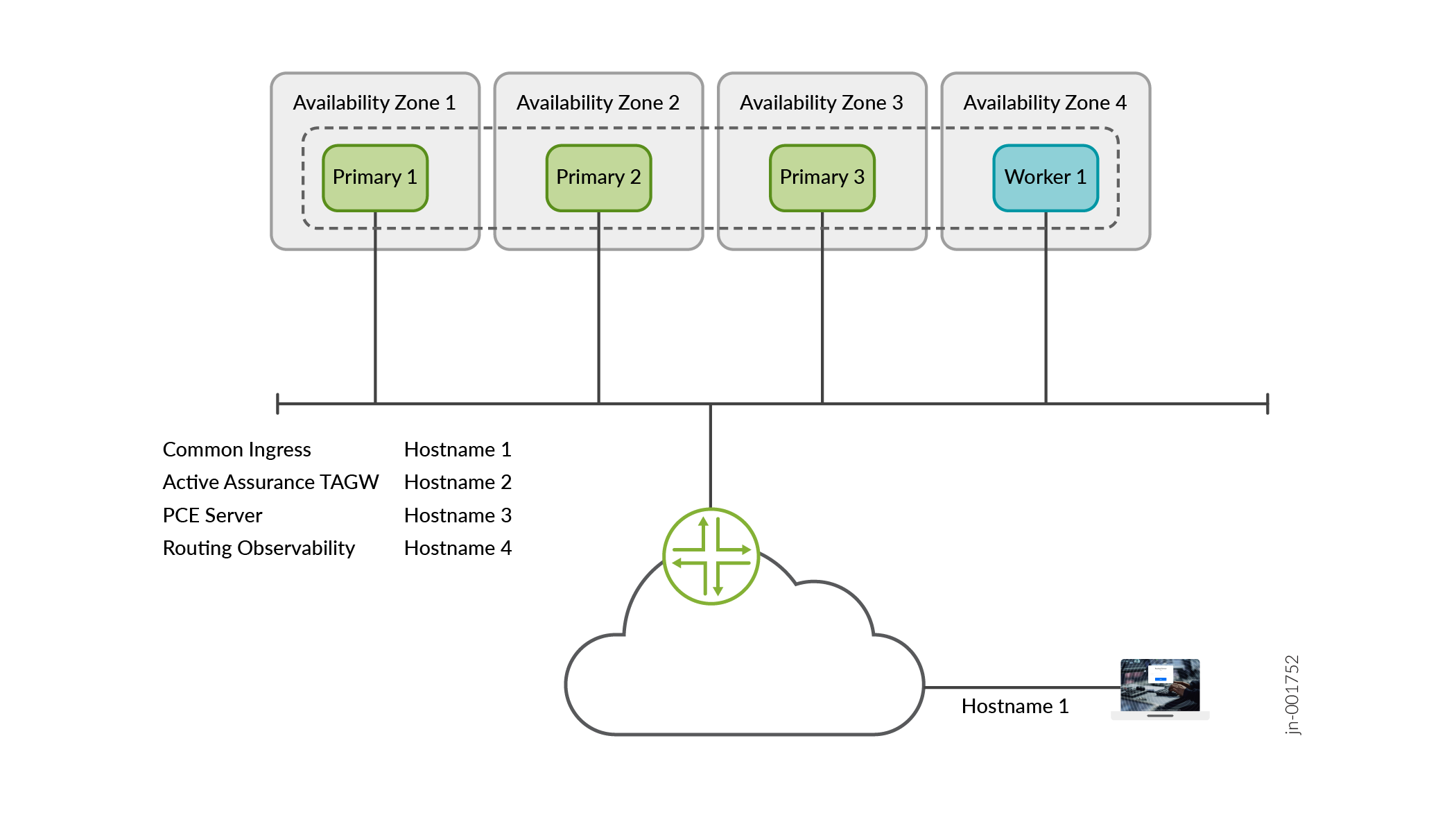
From a configuration perspective, no additional cluster-level setup is required to support multi-subnet deployments, as AWS Load Balancers handle traffic routing and failover. AWS does not require explicit network configuration such as BGP peering or TOR integration.
Cluster with Multiple NICs
While AWS instances support multiple network interfaces, the use of dual NIC configurations is not required for typical cluster deployments and has not been qualified.
In most scenarios, network separation (for example, between device management and external GUI access) can be achieved using AWS Load Balancers rather than multiple NICs.
Configure IPv4 Addresses and Hostnames
You need to have the following IP addresses and hostnames available for the installation.
-
Interface IP addresses, one for each of the nodes.
-
Internet gateway IP address.
-
Primary and secondary DNS server IPv4 addresses.
-
NTP server information.
-
AWS generated hostnames are available as DNS names when you create the network loadbalancers. You need the following hostnames:
-
Generic ingress hostname shared between gNMI, NETCONF (SSH connections from devices), and the Web GUI—This is a general-purpose hostname that is shared between multiple services and used to access Routing Director from outside the cluster.
-
Active Assurance Test Agent gateway (TAGW)—This hostname serves HTTP-based traffic to the Active Assurance Test Agent endpoint.
-
PCE server—This hostname address is used to establish Path Computational Element Protocol (PCEP) sessions between Routing Director and the devices. You must resolve this hostname (using the
nslookup
                                        DNS-name
command) to determine the corresponding IP address before you deploy the cluster.The PCE server hostname configuration is necessary to view dynamic topology updates in your network in real-time. For information on establishing BGP-LS peering and PCEP sessions, see Dynamic Topology Workflow.
-
Routing observability cRPD—This hostname is used by external network devices as BGP Monitoring Protocol (BMP) station IP address to establish the BMP session. You must resolve this hostname (using the
nslookup DNS-namecommand) to determine the corresponding IP address before you deploy the cluster. -
Routing observability IPFIX—This hostname is used to collect IPFIX data to view predictor events. Predictor events indicate routing, forwarding, and OS exceptions that are identified by Routing Director as a potential indicator of traffic loss. You must resolve this hostname (using the
nslookup DNS-namecommand) to determine the corresponding IP address before you deploy the cluster.
-
IPv6 addresses are not supported for AWS deployments.
Firewall Requirements
The following section lists the ports that firewalls must allow for communication within and from outside of the cluster.
The following table details the security group that is attached to the EC2 instance and allows traffic flow to and from the VMs.
| Direction | Protocol/Port | Source/Destination | Description |
|---|---|---|---|
|
Inbound |
TCP/22 |
0.0.0.0/0 |
For all SSH management |
|
Inbound |
TCP/30011-30023 |
0.0.0.0/0 |
NodePort; to allow connection from the routers and the source-IP addresses to connect to the GUI. |
|
Inbound |
any |
VPC subnet IP range |
Allow all intra-VPC communication between the VMs. |
|
Outbound |
any |
any |
Allow all outbound traffic from the VMs |
The following table details the security group that is applied to the AWS load balancer to allow intracluster communication between the nodes.
| Direction | Protocol/Port | Source/Destination | Description |
|---|---|---|---|
|
Inbound |
TCP/443 |
0.0.0.0/0 |
For access to the GUI. Allow from everywhere |
|
Inbound |
TCP/2200 |
0.0.0.0/0 |
For NETCONF access. Allow traffic from the load balancer to the VM. |
|
Inbound |
TCP/4189 |
0.0.0.0/0 |
For PCEP |
|
Inbound |
UDP/4739 |
0.0.0.0/0 |
For routing observability CRPD |
|
Inbound |
TCP/5432 |
0.0.0.0/0 |
For routing observability IPFIX health-check |
|
Inbound |
TCP/6800 |
0.0.0.0/0 |
For active assurance TAGW |
|
Inbound |
TCP/17002 |
0.0.0.0/0 |
For routing observability IPFIX |
|
Inbound |
TCP/32767 |
0.0.0.0/0 |
For gNMI term access |
|
Outbound |
any |
any |
Allow all outbound traffic from the VMs |
The following ports must be open for communication from outside the cluster.
| Port |
Protocol |
Usage |
From |
To |
|---|---|---|---|---|
|
179 |
TCP |
Topology visualization and traffic engineering using the topology information |
Routing Director deployment cluster node IP address |
Router IP address to which you want to set up BGP peering from Routing Director. You can use the router management IP address or the router interface IP address. |
|
443 |
TCP |
Web GUI + API |
External user computer/desktop |
Web GUI Ingress VIP address(es) |
|
443 |
TCP |
Active Assurance Test Agent |
External network devices |
Active Assurance Test Agent VIP address |
|
2200 |
TCP |
NETCONF |
External network devices |
Web GUI Ingress VIP address(es) |
|
4189 |
TCP |
PCE Server |
External network devices |
PCE Server VIP address |
|
4739 |
UDP |
Routing Observability |
External network devices |
IPFIX VIP address |
|
6800 |
TCP |
Active Assurance Test Agent |
External network devices |
Active Assurance Test Agent VIP address |
|
32767 |
TCP |
gNMI |
Routing Director deployment cluster node IP address |
External network devices |
|
17002 |
TCP |
Routing Observability |
External network devices |
Routing observability cRPD load balancer IP address |
Web Browser Requirements
The latest versions of Google Chrome, Mozilla Firefox, and Safari.
We recommend that you use Google Chrome.