
Network Implementation Plan Overview
Routing Director uses a network implementation plan to commit configurations on the device during device onboarding, and update configurations after the device is onboarded. For example, if a plan has an RSVP LSP configured from a device to all the provider edge (PE) devices, an LSP is configured from the device to all the PE devices that are currently present in the network and also, to any PE device that might be added to the network after the device is onboarded.
Before you (a network planner) onboard a device, you must create a network implementation plan to define the device configurations to be committed, and health, connectivity, and compliance [with Center for Internet Security (CIS)] checks to be performed on the device.
The configurations in the network implementation plan are grouped by use cases so that you can configure only those necessary functions on devices. For example, by selecting the Observability use case, you can configure the plan to apply parameters specifically for monitoring device and network performance.
The following use cases can be configured on a device by using a network implementation plan:
-
Active Assurance—Configures generation of synthetic test traffic on devices to test and monitor service availability and performance of the devices included in the plan.
-
Infrastructure Configuration—Configures the network underlay including interfaces, links, routing protocols, software upgrades, and applies custom configuration templates on devices included in the plan.
-
Observability—Defines how to monitor the health and performance of device and network by collecting relevant KPIs.
-
Optimization—Optimizes network performance through closed-loop automation by using the collected performance and health KPIs.
-
Service Orchestration—Manages resources, including bandwidth allocation and access parameters for interfaces and VLANs, for overlay service orchestration of L2 VPNs, L3 VPNs, and related services.
A network implementation plan also defines which device profiles, interface profiles, and port profiles should be applied to a device or a group of devices during onboarding. The profiles define which interfaces to configure, with protocols to enable, IP addresses to assign, and so on.
Routing Director maps the serial number of a device during onboarding with the serial number that is included in a particular network implementation plan and the device and interface profiles are then applied to the corresponding device.
A single network implementation plan can include one or more devices. If you want to onboard multiple devices, you can add all of them to a single implementation plan, and within the plan, reference a different device profile for each device or specify a default device profile that will be applied to all the devices.
You can onboard a maximum of three devices in parallel, at a time.
Additionally, the implementation plan allows the user to provide any required information to build the configuration. For example, for a given interface, you can be referencing an interface profile that does not have automatic address assignment enabled. In the network implementation plan, you will provide the IP address that you want to configure on that interface while creating the plan.
Routing Director provides Add Network Implementation page in a wizard format that guides you to create the plan. Figure shows a screenshot of the Add Network Implementation Plan page designed like a wizard with sections for configuring general information and adding devices and links.
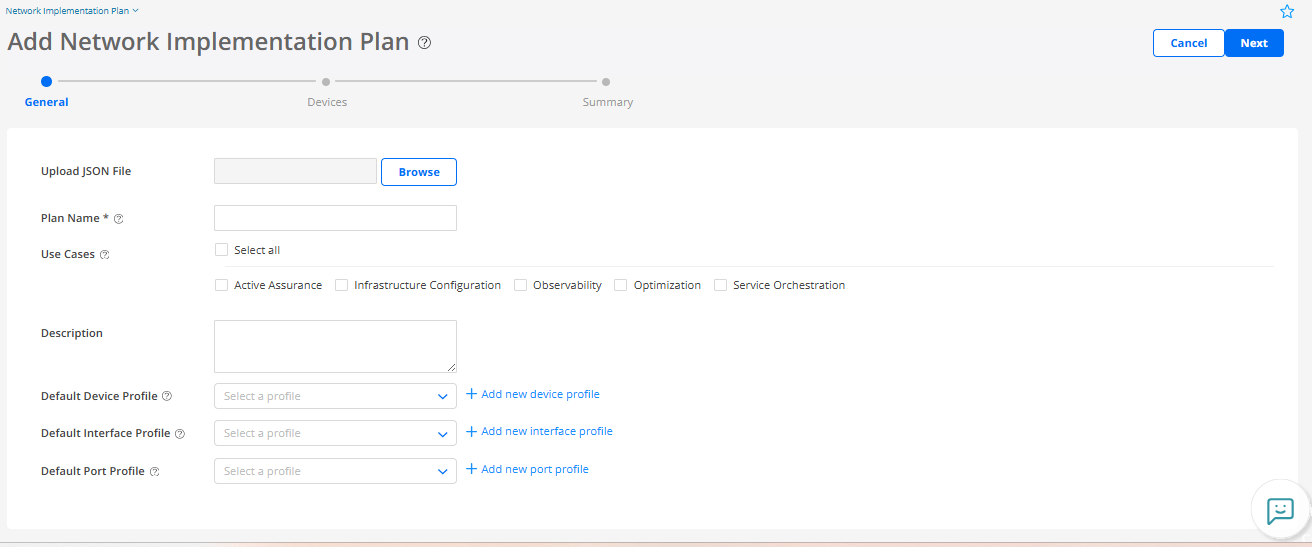
To create a network implementation plan, navigate to Inventory > Device Onboarding > Network Implementation Plan.
In the plan, you:
-
Add one or more devices that you want to associate with the plan.
-
Assign one or more device profiles, interface profiles, and port profiles to the devices. You can also define default device, interface, or port profiles that would be assigned to all the devices and their interfaces in the network implementation plan. See Device and Interface Profiles Overview for adding a device, interface, or port profile.
Assigning profiles to devices is optional. You assign profiles only if you want to commit IP addresses, protocol configurations, and placement resources on the device during device onboarding. If you do not assign profiles, you can directly assign the IP addresses and placement resources to the device in the network implementation plan and commit other configurations through configuration templates after the device is onboarded.
-
Configure links from the device to neighboring devices. You can configure links only between devices in the same network implementation plan.
Figure shows an example of a network implementation plan ISP1 created for onboarding an ACX7024 device with serial number 12345.
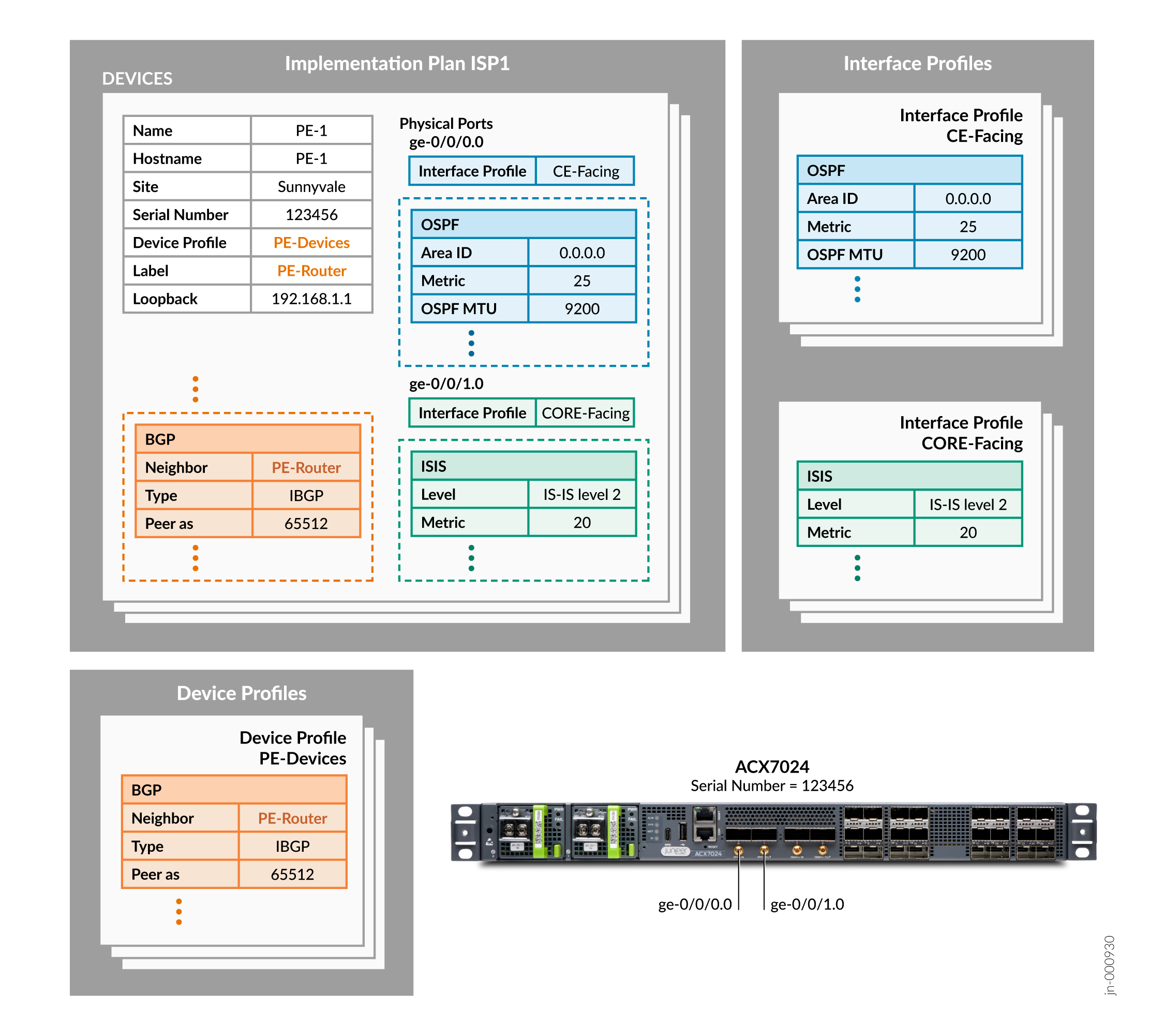
To onboard the ACX7024 device, Routing Director:
- Matches the serial number mentioned in the network implementation plan with the serial number of the ACX7024 device.
-
Tags the ACX 7024 device with the label PE-Router and configures:
-
PE-1 as the hostname
-
192.168.1.1 as the loopback interface IPv4 address
-
-
Configures iBGP on the ACX 7024 device based on the PE-Devices device profile and peers the device with other devices with the PE-Router label.
-
Configures Interface ge-0/0/0.0 to run OSPF with metric 25 and MTU 9200 based on the CE-FACING interface profile referenced for this interface.
-
Configures Interface ge-0/0/1.0 to run IS-IS level 2 with metric 20 and MTU 9200 based on the CORE-FACING interface profile referenced for this interface.
Benefits
-
By using a network implementation plan, you can define the configuration for multiple devices once and commit them when the devices are onboarded. To modify the committed configurations on the devices later, you can change the configuration in the plan and push the changes to the devices.
-
When you use a plan for onboarding a device, Routing Director executes the health and connectivity checks during device onboarding. The health and connectivity checks during onboarding help you to ensure that the device will function without issues after the device is onboarded and is ready for production soon after onboarding.
-
When you use a plan to onboard a device, based on the configurations in the plan, playbooks for collecting metrics are enabled automatically. You do not have to separately configure monitoring. For example, if you enable BGP, Routing Director collects metrics for BGP and displays the data on the Routing Director UI.
-
By defining the links between devices in the plan, the links are configured on the devices while the devices are onboarded, enabling quick deployment of your network.