
ON THIS PAGE
Access Control Profile Overview
Attribute-based access control (ABAC) allows superusers to assign network administrators (users) access privileges granularly to Juniper Routing Director resources (for example, devices, network service, and tagging), and customize the access privilege assignment.
With ABAC, superusers can grant permissions to network administrators (users in the rest of this topic) to perform a specific operation on a specific object. For example, superusers can assign a Network Admin an access control profile that allows the Network Admin (user) read and write access to core devices in a network, while restricting access to read-only for provider edge devices and vice-versa. Another example could be a user can access a Juniper device, but cannot access a Cisco device as shown in the figure.
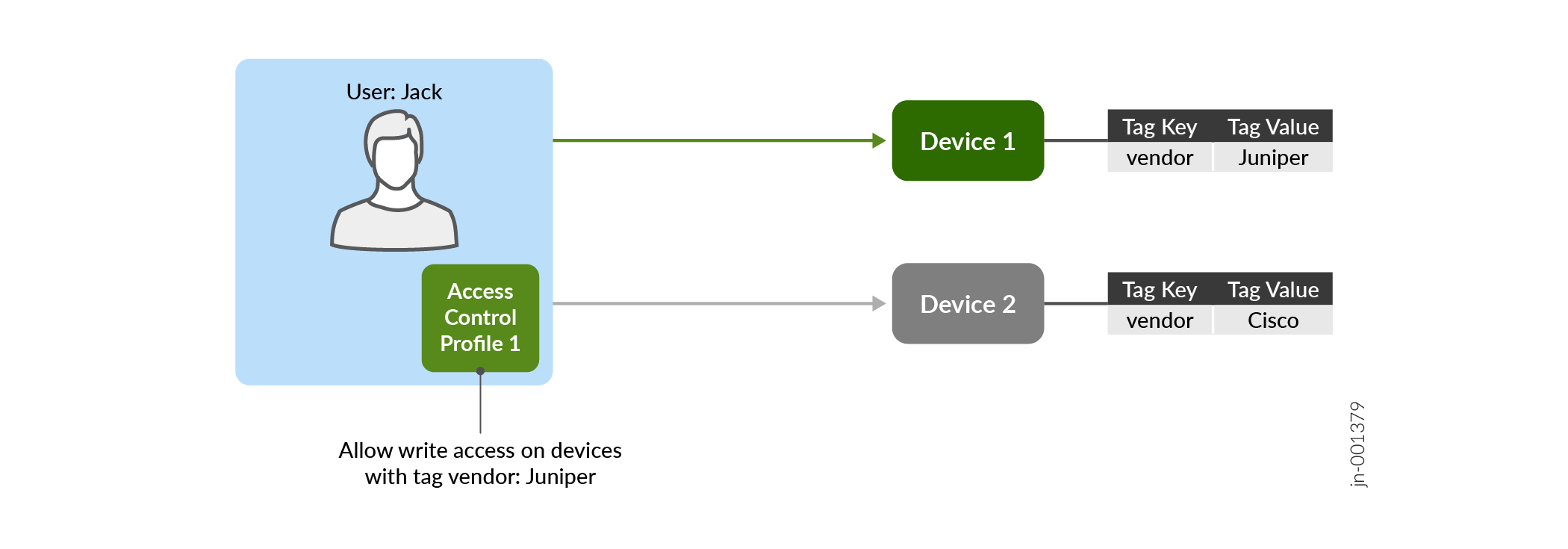
In this release of Routing Director, a superuser can control access to the following resources—network services, devices, and tagging operations. If no profile is applied to a user or if a tag is not applied to a resource, then a user cannot access the resource.
Table 1 lists the resources and the operations that can be access controlled.
| Resource Name | Description | Operations | ||||
|---|---|---|---|---|---|---|
| Create | Read | Update | Delete | Assign/Unassign | ||
|
Device |
Operations such as image upgrade, update and delete configurations, reboot device, and so on |
Onboarding a device is not access controlled |
No |
Yes |
Yes |
NA |
|
Network Service |
Updating, deploying and deleting Service instances |
No |
No |
Yes |
Yes |
NA |
|
Tagging |
Tag management and assignment |
Yes |
No |
Yes |
Yes |
Yes |
ABAC is implemented by using access control profiles. An access control profile comprises the following:
-
Policies—Policies define the resources and conditions in a profile that determine whether a user is allowed or denied access to the resources. These conditions are based on tags assigned to the resources. Policies are defined in JSON format. Below is a sample of a policy Residential Policy that defines access condition for a network service that has a tag key
revenuegroupand a tag value Residential. -
Action—The action (effect) whether to allow or deny access to resources when conditions in the policies are met.
When a user is assigned the following sample profile, Sampleprofile, the
user is allowed write access (indicated by effect) to network services that
have the tag revenuegroup:Residential assigned to them.
{
    "name": "Sampleprofile",
    "description": "Profile to allow access to l2vpn service design",
    "version": "1.0.0",
    "reference": "Non-mandatory way to input user's references like ticket number which necessiated the change",
    "comment": "Non-mandatory way for user to input a comment like change reason",
    "effect": "Allow",
    "policies": [
        {
            "name": "Residential Policy",
            "apis": [
                "*"
            ],
            "resources": [
                "NetworkService"
            ],
            "conditions": {
                "StringResembles": {
                    "revenuegroup": "Residential"
                }
            }
        }
    ]
}
By default, a superuser has the privilege to define tags, assign tags to resources, and also create, edit, and delete access control profiles. A superuser can provide the privilege to create, edit, and delete tags and assign tags to resources by assigning an appropriate profile to other users.
Routing Director logs the changes made to an access control profile and you can view the logs on the Audit Logs page (Settings Menu > Audit Logs).
ABAC Workflow
The workflow to allow a user access to resources using ABAC is as follows:
- Create an access control profile. See Add Access Control Profiles.
- Assign the profile to a user. See Invite Users.
- Enforce the profile while handling requests from the user. Routing Director allows or denies access to resources based on the action (effect) defined in the profile.
A user can be assigned more than one access profile containing multiple policies. Figure shows the behavior when multiple access control profiles and policies are assigned to a user.
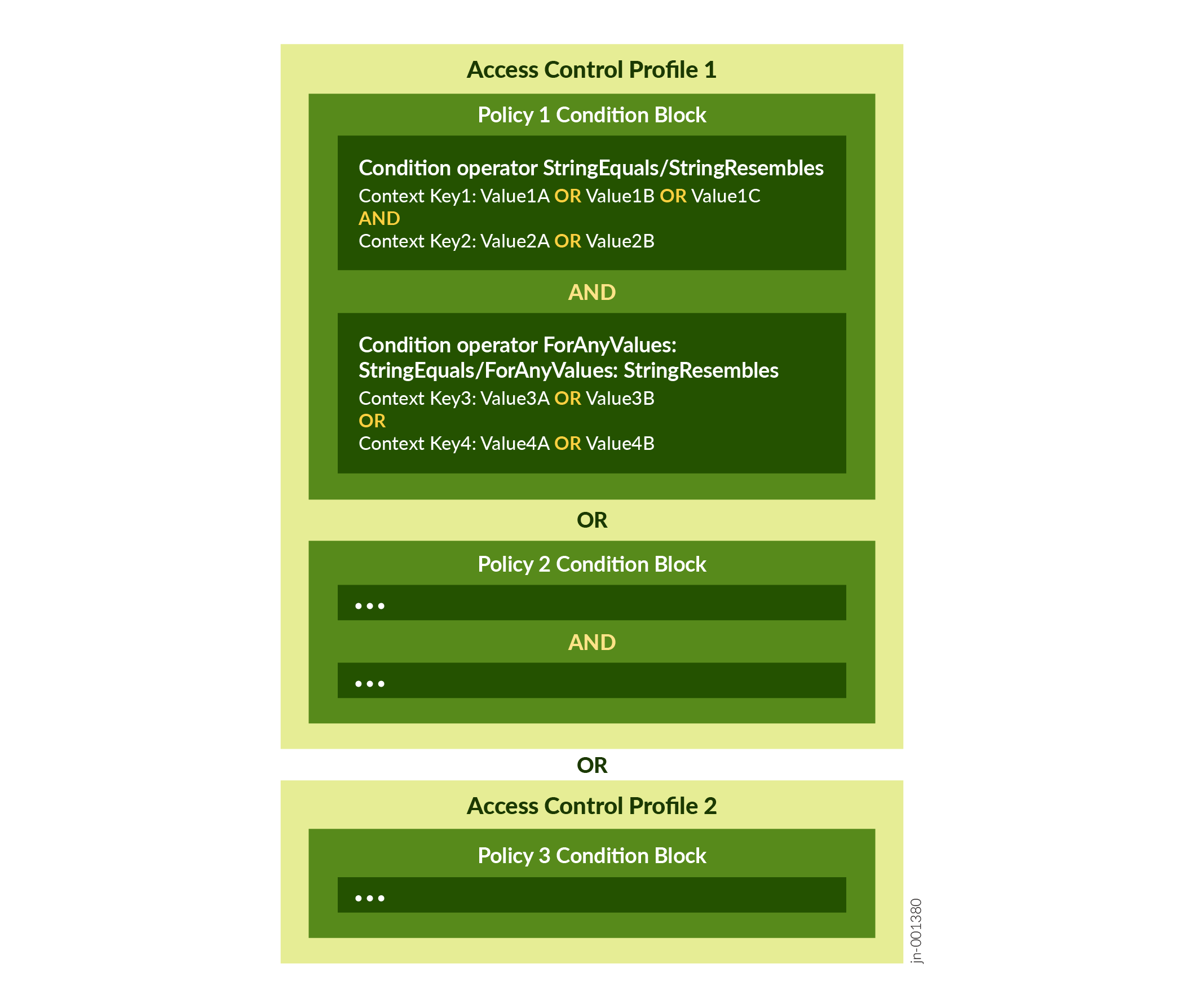
When multiple profiles are assigned, the user is allowed or denied access to a resource as listed in table:
| Access Control Profile Effect | Routing Director Action |
|---|---|
|
All profiles have |
If a resource meets the conditions in any one of the profiles, then a user is allowed access to resources defined in the profile. |
|
Some profiles have |
Routing director first evaluates the profiles with “Deny” effect and if any of them evaluates to True, access is denied to the user. If conditions in none of the profiles with "Deny” effect is satisfied, then the profiles with “Allow” effect are evaluated. If any one of those profile evaluates to True, then the user is granted access to the resource. |
You cannot have all profiles with Deny effect.
Privilege Escalation
A profile that allows tagging a resource with one or more keys, when combined with other profiles that allow access to a resource tagged with those same keys grants users greater privileges. This is because the user can tag any resource with those keys and gain access to it.
For example, a profile P1, with condition region:US, would not allow a
user to access devices tagged region:canada. But a profile P2, that allows
tagging devices with the region key, in combination with profile P1, would
allow the user to tag devices with the region:US tag or change the tag
value from canada to US and then gain access to them.
To warn that a profile includes a tagging policy, Routing Director:
-
Displays privilege level as High on the Access Control Profiles page (Settings Menu > Control Profiles).
-
Displays a Warning sign next to the profile in the Access Control Profile drop-down list (for example, while assigning a profile to a user on the Add Users page).
-
Displays a Warning message Profile with high privilege level when the profile is selected.
To further limit the capability of users assigned a tagging profile, a reserved key
internal.tag.constraints is supported. The reserved key restricts access
to resources, ensuring that a user can only tag resources tagged with those specified by
internal.tag.constraints and not be able to tag any arbitrary resource.
For example, the following condition in a policy would allow a user to access any resource
tagged with department:IT, CTO, or CFO AND vendor:Juniper,
and tag such a resource only with keys region and
type.
"conditions": {
                "StringEquals": {
                    "internal.tag.constraints": {
                        "department": ["IT", "CTO", "CFO"],
                        "vendor": ["Juniper"]
                    },
                    "internal.tag.keys": ["region", "type"]
                }
            }
Benefits
- Enhanced Granular Control: ABAC (Attribute-Based Access Control) allows a superuser to implement more detailed and specific controls over resources, ensuring that access permissions are tailored to individual attributes and contexts.
-
Streamlined Administrative Experience: By using ABAC, the process of managing access for new users and resources is simplified and made efficient.
-
Improved Tag Security and Reliability: Controlling the permission to tag resources ensures that tags remain secure and reliable. This is crucial for maintaining the integrity of Routing Director use-cases and access control mechanisms within the system.