Help us improve your experience.

Let us know what you think.

Do you have time for a two-minute survey?


View Webhooks Delivery Events

Use the Webhook Deliveries page to monitor and review the status of the attempted webhook deliveries.

To view webhook delivery events:

  1. Navigate to Organization > Settings and locate the Webhooks tile.
  2. Click View next to the desired webhook.
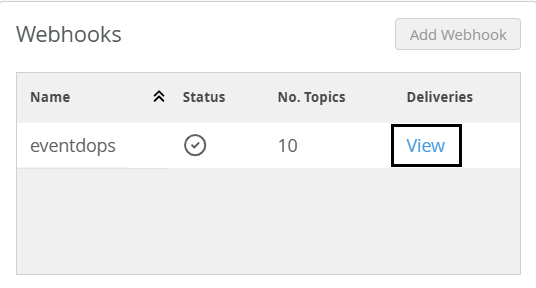
    The Webhook Deliveries page appears.
  3. View the webhook event notifications in the Webhook Deliveries overlay page.
    For field description, see Table 1.
    Note:

    Webhook delivery events are retained for up to 61 days.

    You can click an event to view detailed information about the event.
    For more information on the fields, see Table 2.
  4. Click X to exit the overlay.
    Table 1: Webhook Event Field Description
    Field Description
    Date

    Date and time when the webhook delivery for the event was attempted.

    Topic

    Type of event that triggered the webhook.

    The webhook topics that support webhook delivery are alerts, audits, pings, device status.

    Note: When you create webhooks, you must select the topics that you want to be notified about.
    Status

    HTTP status code that indicates the result of the webhook delivery.

    For example: 200 (Success), 400 (Bad Request), 429 (Too Many Requests).

    Error message

    Provides reason for the failed webhook delivery, if applicable.

    Table 2: Webhook Details Pane
    Field Description
    Timestamp

    Date and time when the webhook delivery for the event was attempted.

    Topic

    Type of event that triggered the webhook.

    The webhook topics that support webhook delivery are alerts, audits, pings, device status.

    Note: When you create webhooks, you must select the topics that you want to be notified about.
    Status Code

    HTTP status code that indicates the result of the webhook delivery.

    For example: 200 (Success), 400 (Bad Request), 429 (Too Many Requests).

    Error Message

    Provides reason for the failed webhook delivery, if applicable.

    Request URL

    Address of the configured endpoint where the webhook was sent.

    Request Headers

    Metadata included with the webhook request.

    Request Payload

    Displays the requested information in JSON format. The request body includes detailed description of the event.

    Response Headers

    Metadata included with the response.