Help us improve your experience.

Let us know what you think.

Do you have time for a two-minute survey?


Access Apstra Data Center Director from Juniper Data Center Assurance

Make sure that you have completed the following:

  • Installed and set up Apstra Edge.

  • Registered Apstra Edge in Juniper Data Center Assurance.

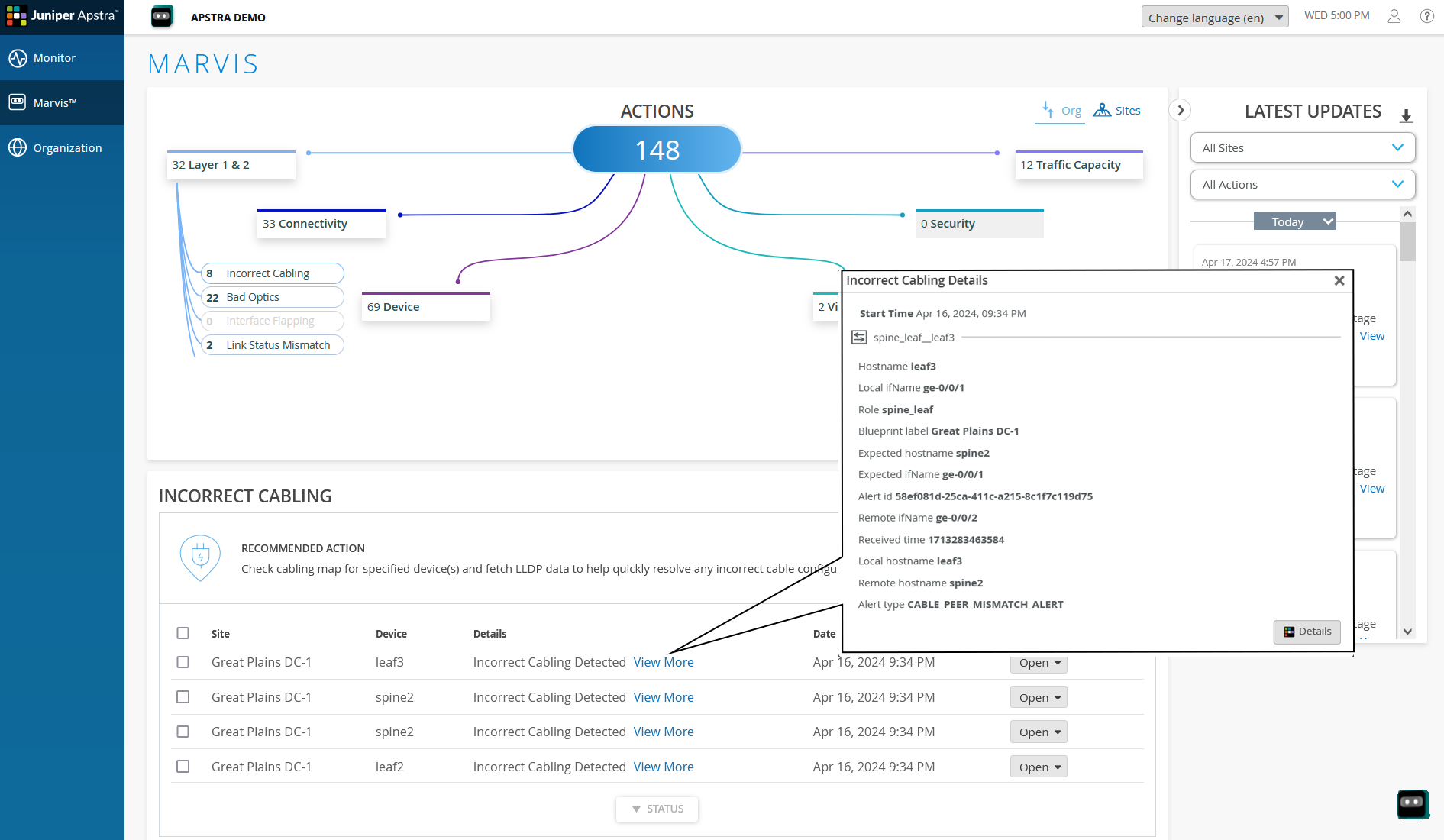
Juniper Data Center Assurance provides detailed insights into the operations of the data center. The events that Juniper Data Center Assurance receives from Apstra Edge are organized in to six event types and displayed in the Marvis Actions dashboard. Each leg in Marvis Actions dashboard corresponds to an event type. You can click the Marvis Actions leg for an event type to view all the events for the selected event type. Click an event to know the reason for the event and recommended resolution. You can then launch Apstra Data Center Director from Juniper Data Center Assurance to troubleshoot and resolve the event. As the information in the Marvis Actions dashboard is real time, network administrators can resolve events even before they impact network traffic.

  1. Log into Juniper Data Center Assurance.
    Marvis Actions dashboard is displayed. The Marvis Actions dashboard for data center displays the events categorized by events type. Each Marvis Actions leg displays the total number of events reported for an event type.
  2. Click the Marvis Actions leg to view the events for the selected event type.
    The various events reported for the event type are displayed.
  3. Click an event.
    More details about the event such as the site where the event is reported, the device affected, and the date and the time of the event are displayed.
  4. Click View More to view more information about the event.
    A pop-up appears displaying more information about the event.
    Juniper Data Center Assurance network management interface showing Marvis section with 148 actions on connectivity, traffic capacity, and security. Detailed pop-up on incorrect cabling issue includes start time, hostname leaf3, interface ge-0/0/1, role spine_leaf, alert ID CABLE_PEER_MISMATCH_ALERT. Recommended action suggests checking cabling map and LLDP data. Recent updates panel on the right.
  5. Click Details to access Apstra Data Center Director application.
    Apstra Data Center Director opens in a new browser window or tab.