Help us improve your experience.

Let us know what you think.

Do you have time for a two-minute survey?


Configure Sustainability Settings for a Site

Administrators can configure carbon intensity and average power cost for a site to ensure that the Site-Level Energy Dashboard displays accurate GHG emissions and power cost.

The average power cost per kWh from the power supplier is used to calculate the aggregate power cost for the site.

The carbon intensity provided by the power supplier determines the GHG emissions for the site. It represents the grams of CO₂e (carbon dioxide equivalent) emitted per kWh of energy produced.

You can configure these values both at organization and site levels. Site-level settings take precedence over organization-level settings. If values are not configured, the dashboard may show default values or leave fields blank.

Configure them to ensure that emission and cost calculations accurately align with the local power supplier's figures, reflect your site's energy profile and support sustainability reporting, cost estimation, and long-term planning.

Note: Before you begin, ensure the following:
  • You have the latest carbon intensity and power cost data from your power supplier or sustainability team.

  • You have the required permissions to edit the Site Configuration page.

To configure sustainability settings for a site:

  1. Navigate to Organization > Site Configuration.
  2. Click the site for which you want to configure these parameters.
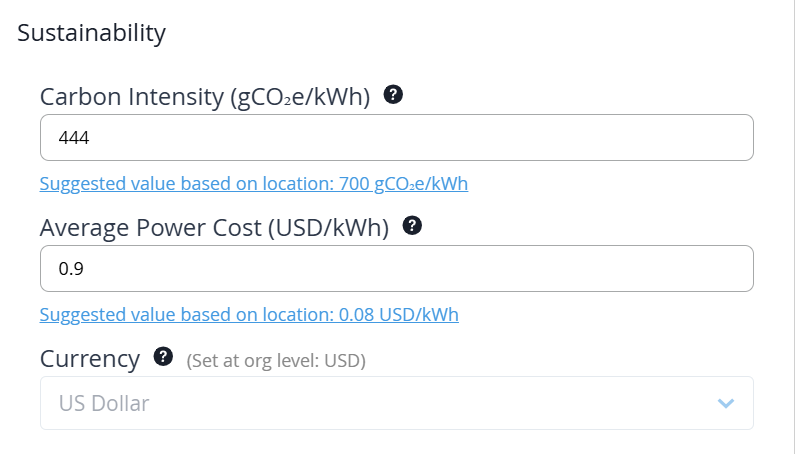
  3. Locate the Sustainability tile.
    Note:

    For all the fields, enter numeric values only. Units are fixed and do not need to be included in the input fields.

  4. To configure the Average Power Cost, enter the average power cost in US dollars (USD) per kilowatt-hour (kWh) for the site.

    You must enter the cost you pay for one kilowatt-hour of electricity as a numeric value between 0.00 and 1.00; for example, 0.12.

    Note:

    The average power cost is currently supported only in USD. Support for additional currencies will be added in future releases.

    Use the electricity rate negotiated with your power supplier.

    For sites with variable or time-of-day pricing, use a blended average that is consistent with your organization’s internal billing or reporting practices.

  5. To configure Carbon Intensity, enter the number of grams of CO₂e emitted per kilowatt-hour (gCO₂e/kWh) for the site.

    You must enter a non-negative numeric value, for example, 450. The value can range from 0 to 1000.

    Carbon intensity varies by region, power supplier, and the mix of renewable and non-renewable energy sources used to generate electricity for the site.

    Obtain this value from your power supplier, regional energy authority, or your organization’s sustainability team.

    Note:

    If site or supplier-specific values are not available, publicly available datasets, such as the EPA eGRID Data Explorer for US-based sites, can be used for estimation purposes.

  6. Click Save to apply the changes.
    Note:

    Updates to sustainability settings are applied during the next data aggregation cycle and changes may take up to one hour to appear on the dashboards.

    Once configured, the values are used to calculate the site's GHG emissions and power cost, which is displayed in the Site-Level Energy Dashboard. These values are also used to generate the site-level energy report for SBTi planning and tracking.

    Remember:
    • Update average power cost whenever your electricity tariff changes.

    • Update carbon intensity if your power supplier changes their energy mix or publishes new emission factors.