ON THIS PAGE
Stacked QRadar Network Insights 1920 Appliances
SUMMARY You can stack the QRadar Network Insights appliances (type 6200).
Each QRadar Network Insights 1920 appliance is configured with 2 Napatech cards. The port configuration on the first Napatech card changes, depending on whether the appliance is part of a standalone configuration or a stacked configuration.
| Standalone configuration | In a standalone configuration, the four ports on the first Napatech card are configured to
accept inbound traffic from the network tap. The second Napatech card is a load balancer that is configured internally. Do not use the ports on this card; if you use them, you do not get any data. |
|
| Stacked configuration | In a stacked configuration, the four ports on the first Napatech card are reconfigured, two ports for inbound traffic and two ports for outbound traffic. The ports are configured as linked pairs, so the data that comes in on port 0 goes out on port 2, and the data that comes in on port 1 goes out on port 3. | Similar to a standalone configuration, the second Napatech card cannot be used in a stacked configuration. |
Single Incoming TAP Line
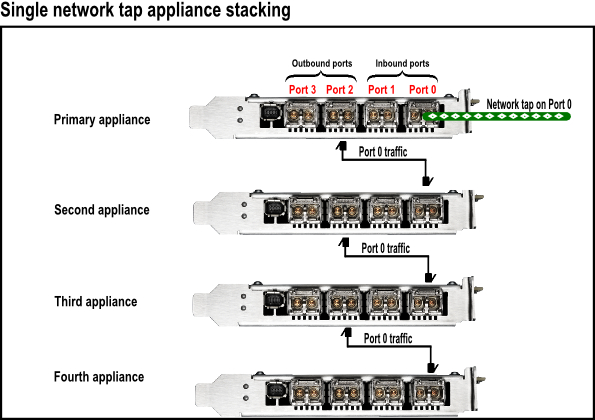
When your deployment has incoming data on one network tap only, the stacked appliances must be cabled like this:
Figure 1: Cabling for Stacked 1920 Appliances with Single Network TAP
Dual Incoming TAP Lines
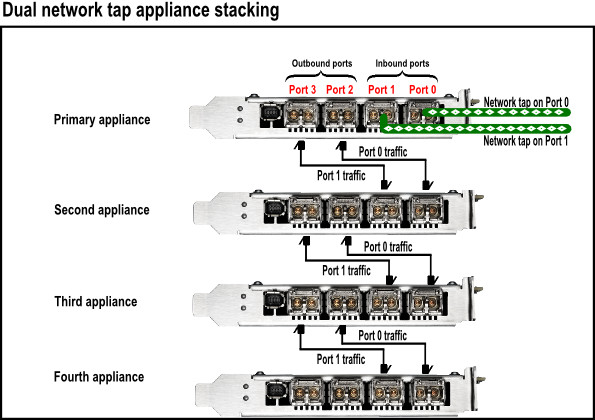
When your deployment has incoming data on two network taps, the stacked appliances must be cabled like this:
Figure 2: Cabling for Stacked 1920 Appliances with Dual Network TAP